Practical design guides
Fabric Swatch Card Template: Keep the Sample and Its Identity Together

Two similar cream fabrics can look identical in a photograph and behave differently when sewn. A useful swatch card connects the physical sample to information you can recover later.
This guide uses a published sewing swatch-card example and an original fictional textile-library workflow. It focuses on identification and visual organization in Ciyo, without treating a generated texture or screen color as a verified fabric specification.
Quick answer
Give every physical sample a stable identifier, reserve a clear mounting area and record only verified facts. Keep unknown material details blank. Build the layout around the sample, then attach a real swatch to an actual-size print before duplicating the card.
1. Decide what question the card must answer
For a home sewing library, the question may be which fabric remains in the cupboard. A small studio may need to trace a sample back to its supplier and batch. Choose the information around that use instead of filling the card with every possible textile field.
Our fictional Fern Studio card uses FS-014 as its sample ID, with source, date, width, amount remaining and a notes area. Fiber content is recorded only when a supplier label or other reliable record supports it. A plausible AI description is not a substitute for that record.
2. Make the identity survive a loose sample
Put the same identifier on the card and in the studio’s inventory record. If samples are likely to be removed, use an attachment or small secondary label that keeps the identity with the fabric. Avoid a system where a photograph is the only way to reconnect the pair.
Distinguish observations from specifications. Feels crisp is an observation; 100% linen is a material claim requiring a source. Keep a place for the source reference so the next person can check the information without guessing from the texture.
3. Plan the layout in Ciyo
Start a dedicated project and import a photograph of the physical swatch beside a ruler. Ask the Design agent to reserve a mounting area and place the identifier where the fabric will not cover it. Use editable text for fields that change from sample to sample.
For Fern Studio, a 90 × 140 mm example card reserves a 55 × 55 mm mounting area above the notes. These are illustrative layout choices. Test your preferred sample size, attachment and card stock before adopting them. Do not ask an image model to redraw a swatch as a color reference.
Live Ciyo check: review the missing evidence
We uploaded our own fictional Fern Studio planning sheet and requested a text-only review. Ciyo distinguished FS-014, the mounting area, the missing supplier source and the UNKNOWN fiber field, then identified physical-sample and print checks still needed. This was a review of our worksheet, not a generated fabric sample, finished card or verified composition.
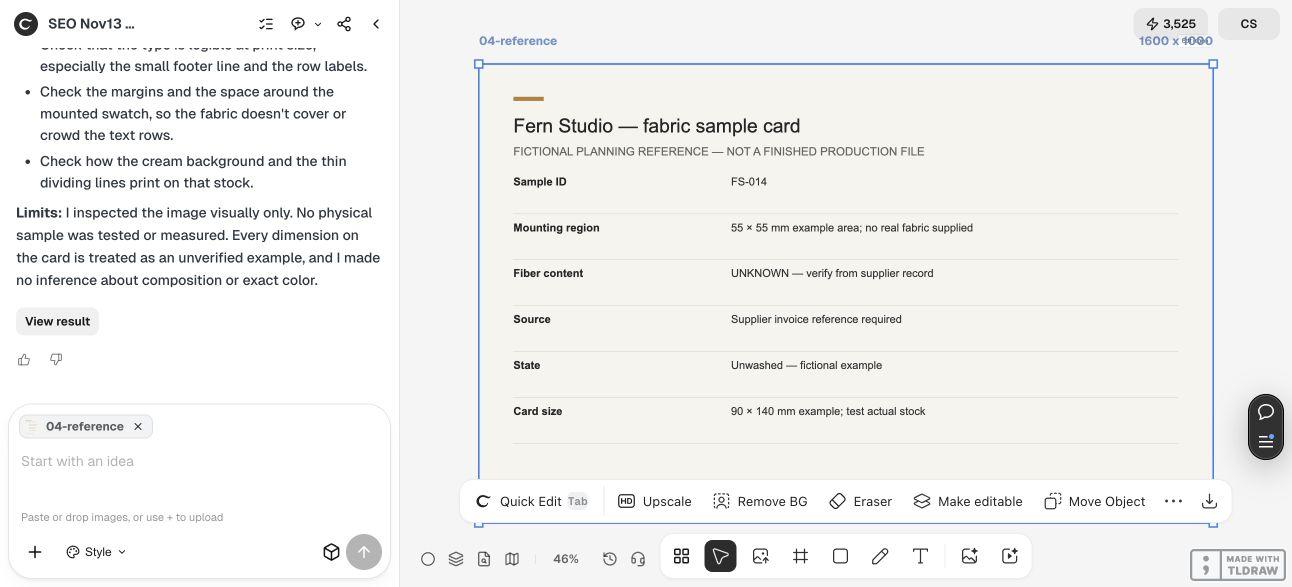
A compact identification template
The existing Liesl + Co. swatch sheet includes fields for fiber content, quantity, width and washing state. The following is an original adaptation for a traceable studio record.
| Field | Example entry | Evidence or action |
|---|---|---|
| Sample ID | FS-014 | Repeat in the inventory record |
| Material | Unknown | Check supplier documentation |
| Source | Supplier invoice reference | Retain the original record |
| Sample state | Unwashed | Record any later treatment |
| Mounting area | Physical fabric | Keep identifier visible |
| Notes | Observed handle and planned use | Separate opinion from specification |
4. Test the assembled card, then make variants
Print one card at actual size and check a known dimension with a ruler. Attach the real sample and verify that it does not cover the identifier or make the card impractical to file. Turn the card over and check any attachment on the back.
Use the card in the place it will live: a binder, box or wall board. Look at it with nearby samples and check whether identifiers remain easy to scan. If the sample changes through washing or another treatment, record that change rather than silently replacing the original photograph.
Copyable swatch-card request
Replace the example dimensions and fields with the needs of your own library.
Plan a reusable fabric swatch card for [STUDIO / PERSONAL LIBRARY]. Card size is [MM], physical swatch area is [MM], and required fields are [APPROVED FIELDS]. Keep [SAMPLE ID] visible when the fabric is mounted. Use the supplied photo only as a placement reference; do not infer fiber content, color codes, care rules or performance. Leave unknown facts blank and distinguish observations from verified specifications. Include a print-and-assembly checklist.Choose a record system you can maintain
A solo maker may prefer a numbered card and one simple inventory list. A team should also decide who can change supplier information and how old versions are retained. More fields are useful only when someone will keep them accurate.
For a client approval board, bring the physical samples to the review. Screen images can communicate arrangement but cannot establish texture, hand or exact color under the client’s lighting.
Source
Primary swatch-card example checked November 13, 2026. Fern Studio, its identifiers and dimensions are illustrative.
Frequently asked questions
Can I use a generated fabric picture as the sample?
Use it as concept art only. A physical swatch and a verified source record are needed when material identity, handle or production color matters.
Which fields are essential?
A stable sample ID, a place for the physical sample and enough source information to recover its identity. Add quantities and treatment notes when they serve your workflow.
What if I do not know the fiber content?
Record it as unknown until you have a reliable source. Do not infer it from a photo or an AI description.
Organize a swatch card around reliable inputs
Bring your approved copy and reference files, make one draft, and compare the result with your checklist before creating more versions.