Printable community activities
How to Make Printable Bingo Cards and Check Every Board

Four attractive bingo sheets can still hide repeated words, a misplaced FREE cell or two identical boards. Those errors belong to the board data, so inspecting a contact sheet alone is not enough.
For a fictional free community gathering, we used a live Ciyo project to create four word-bingo boards and a complete Python generator. We ran the returned source in an isolated folder, compared the actual SVG text with the cell manifest and caller CSV, and reproduced the files twice. The checks establish this small package’s internal consistency; they do not establish fairness or different winners.
Quick answer: validate the cells as well as the layout
Start with one fixed caller pool. For each board, check the number of cells, repeated words, allowed vocabulary and center position. Then compare complete board arrangements and verify that the rendered file agrees with the data.
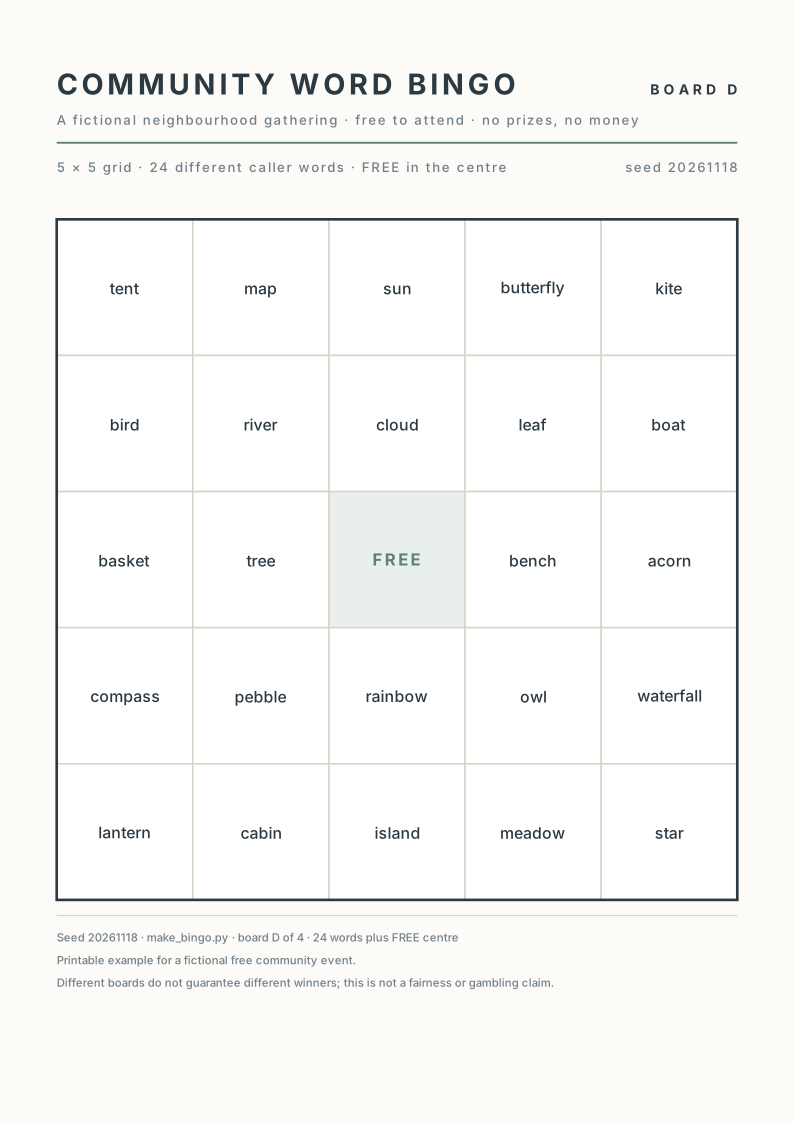
Our five-step workflow uses four 5 × 5 boards, each with 24 different words and one FREE center. The download includes all four editable SVGs, a caller CSV, a cell manifest and the generator that produced them.
| Step | Action | Evidence to keep |
|---|---|---|
| 1 | Fix the vocabulary and board rules | One caller pool and exact cell rules |
| 2 | Generate the boards and source data | Editable SVGs, CSV and manifest |
| 3 | Check cells and board arrangements | Counts, membership and distinct layouts |
| 4 | Compare the rendered boards with the source | Readable proof with the same cells |
| 5 | Keep a reproducible print package | Measured paper proof and named versions |
1. Define one caller pool and explicit board rules
Decide the vocabulary before generating a page. A caller needs one authoritative list; a word that appears on a board but not on that list cannot be called from the supplied package.
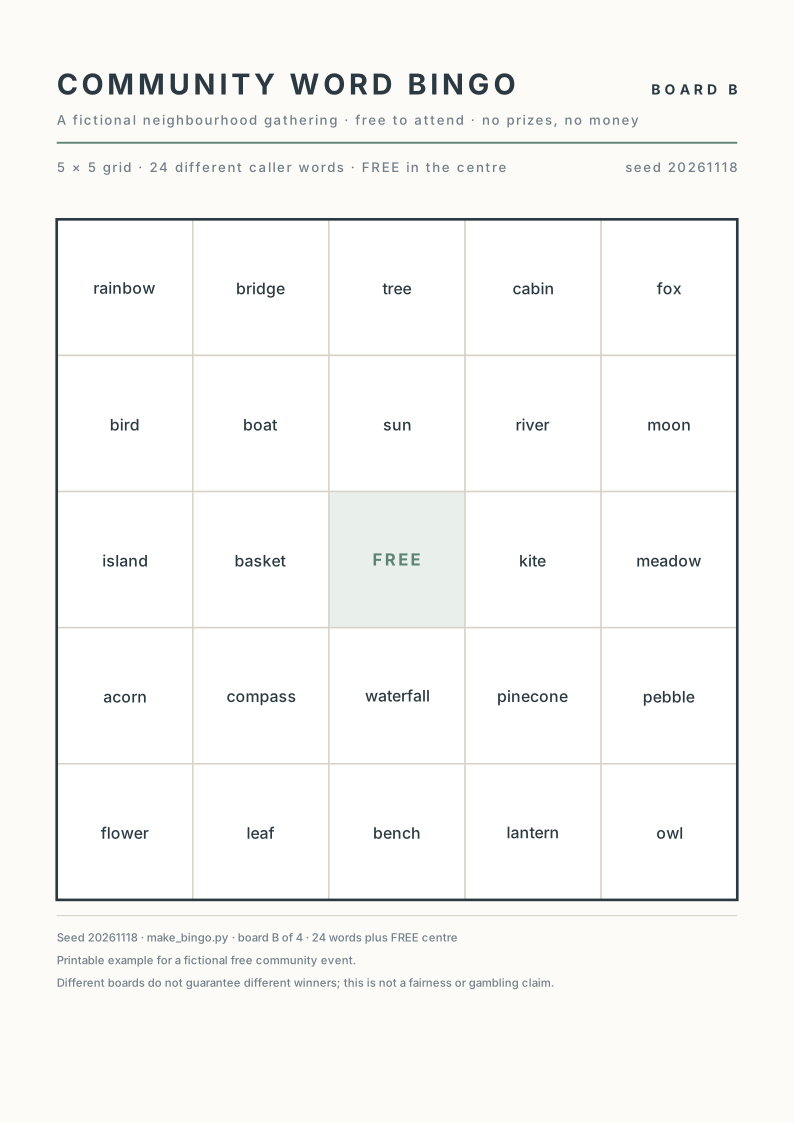
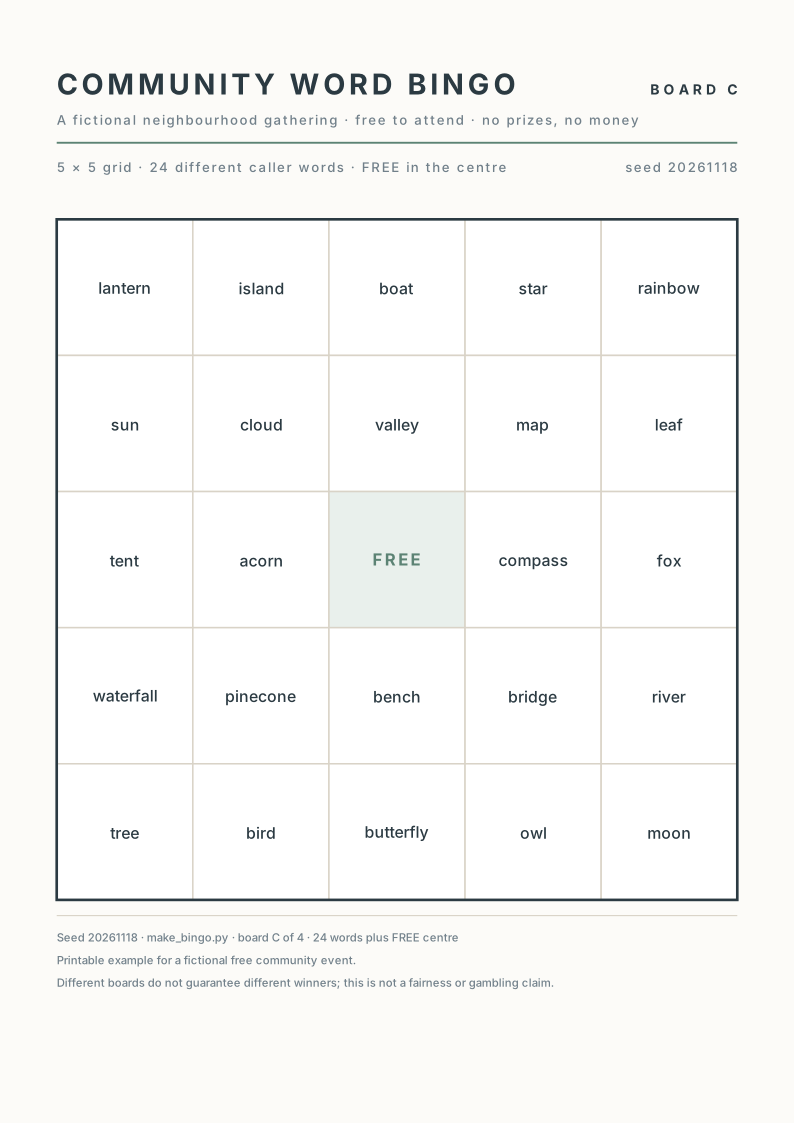
Our fictional example uses 30 nature and travel words: map, river, lantern, boat, bridge, cloud, leaf, tent, compass, basket, pebble, flower, tree, kite, bench, moon, star, sun, rainbow, acorn, pinecone, cabin, waterfall, island, meadow, valley, bird, butterfly, fox and owl.
Each board draws 24 different words from that pool and reserves row 3, column 3 for FREE. We require four distinct complete arrangements. Boards may share words: drawing 24 words from a 30-word pool makes substantial overlap expected. Shared vocabulary is different from an accidental duplicate within a board.
The supplied caller CSV lists the fixed pool in its source order. It is an inventory for this example, not evidence that a randomized calling process was tested. Decide your actual activity rules separately and explain them to participants.
2. Ask Ciyo for board data and editable outputs together
Create a new project with the pool, board count and cell rules in the brief. Request a manifest of the exact cells and a caller CSV along with the visual boards. Those files make the result inspectable beyond a thumbnail.
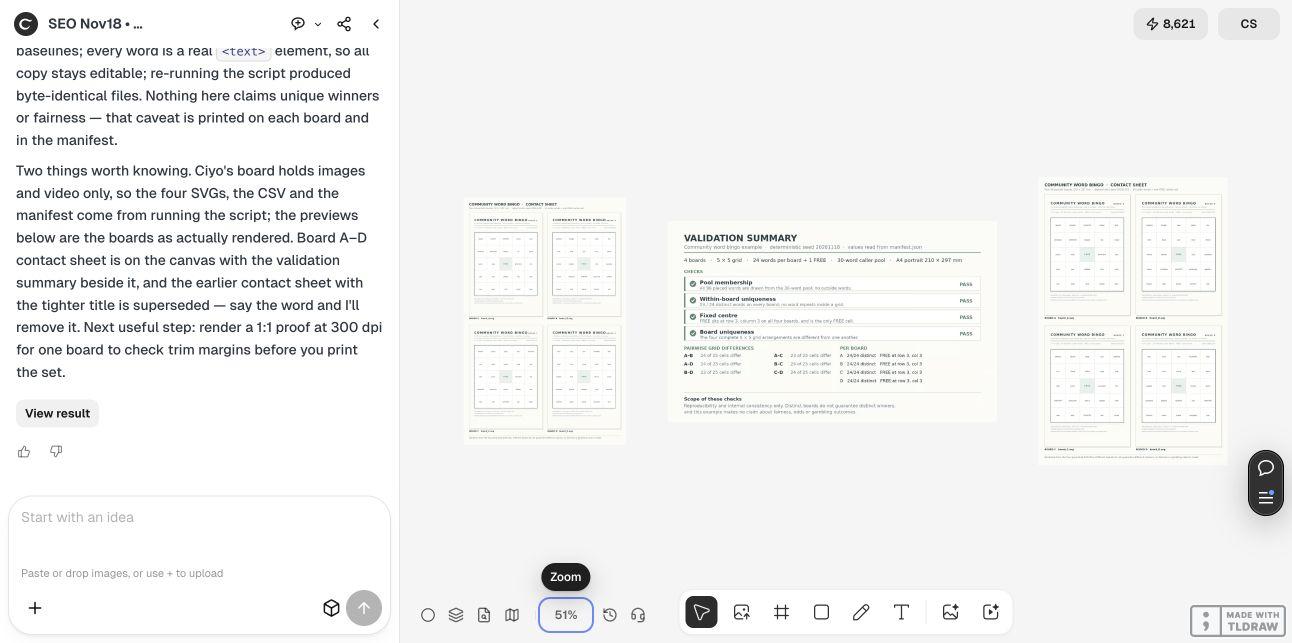
The live Design agent built and rendered the set, revised text spacing, and returned a complete Python 3 standard-library script. The canvas received the contact sheet and validation image. The SVG, CSV and JSON files were recovered by running the returned script locally after source review; they were not downloaded as native canvas attachments.
This approach is useful when repeatability matters. It also introduces a source-review step: inspect generated code before running it, use a separate output directory and check the files it writes. The agent’s own validation report is useful evidence, but an independent check should still compare the actual outputs.
Create [board count] printable word-bingo boards for [fictional activity]. Use this exact caller pool: [complete list]. Each board must be a 5 × 5 grid with one FREE cell at row 3, column 3 and 24 different caller words, with no repeated word within a board. All complete board arrangements must differ. Use a documented deterministic seed for this reproducible sample. Return editable SVGs with physical page units, a caller CSV, a JSON manifest of the exact cells, and a complete runnable Python 3 standard-library generator that writes to a supplied output directory. Put an actual rendered contact sheet and separate validation summary on the Ciyo canvas. Check internal consistency without claiming unique winners or fairness. Do not publish, print, order or send anything.3. Validate every cell and compare the complete arrangements
Count the rows and columns first. For each board, flatten the 25 cells, remove FREE and check that the remaining 24 words are distinct and belong to the caller pool. Check that FREE occurs exactly once and occupies the intended center.
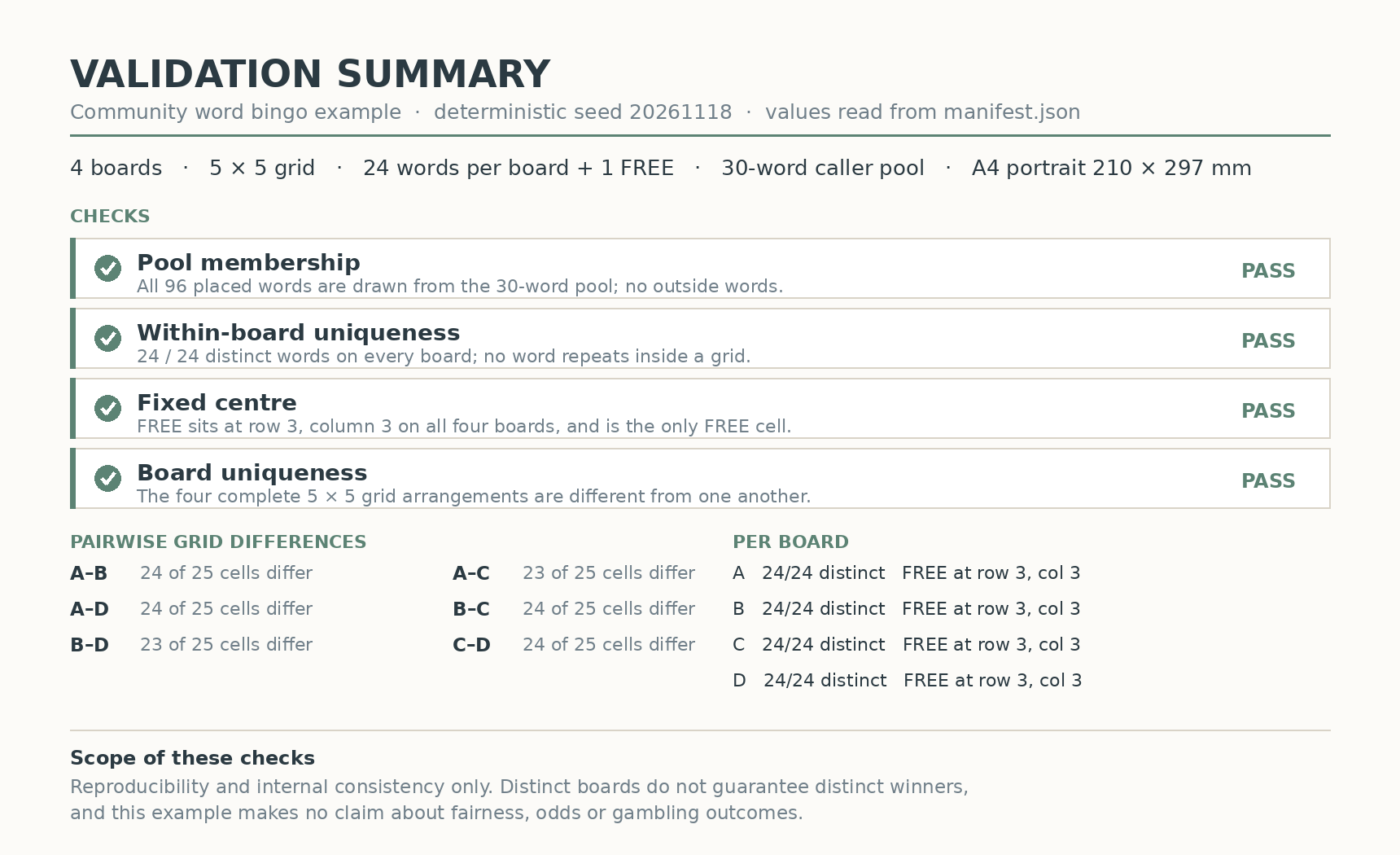
We performed those checks against the returned manifest and then parsed each generated SVG. Its 25 cell text elements matched the manifest in row order. The caller CSV contained exactly the same 30-word pool. This catches a mismatch between a correct data file and an incorrect rendered board.
All four complete grid arrangements were different. Across the six board pairs, 23 or 24 of the 25 cell positions differed; the fixed FREE center is one shared position. That is a description of this sample, not a measure of game fairness.
Changing the pool, board count or generator requires a fresh check. A script that passes for four boards does not establish that it will handle an arbitrary large request or every modified vocabulary list. Keep the scope of your validation aligned with the files you will use.
| Check | Observed result | What it establishes |
|---|---|---|
| Board dimensions | Four grids, each 5 × 5 | Expected cell count |
| Within-board words | 24 different allowed words per board | No repeated caller word within a board |
| FREE cell | Exactly once at row 3, column 3 | The chosen center rule |
| SVG versus manifest | All 100 cell texts match | The generated visual sources use the recorded cells |
| Caller CSV | 30 words, matching the pool | One consistent caller inventory |
| Board pairs | All six pairs differ | Four distinct complete arrangements |
4. Inspect the final rendered version and its text fit
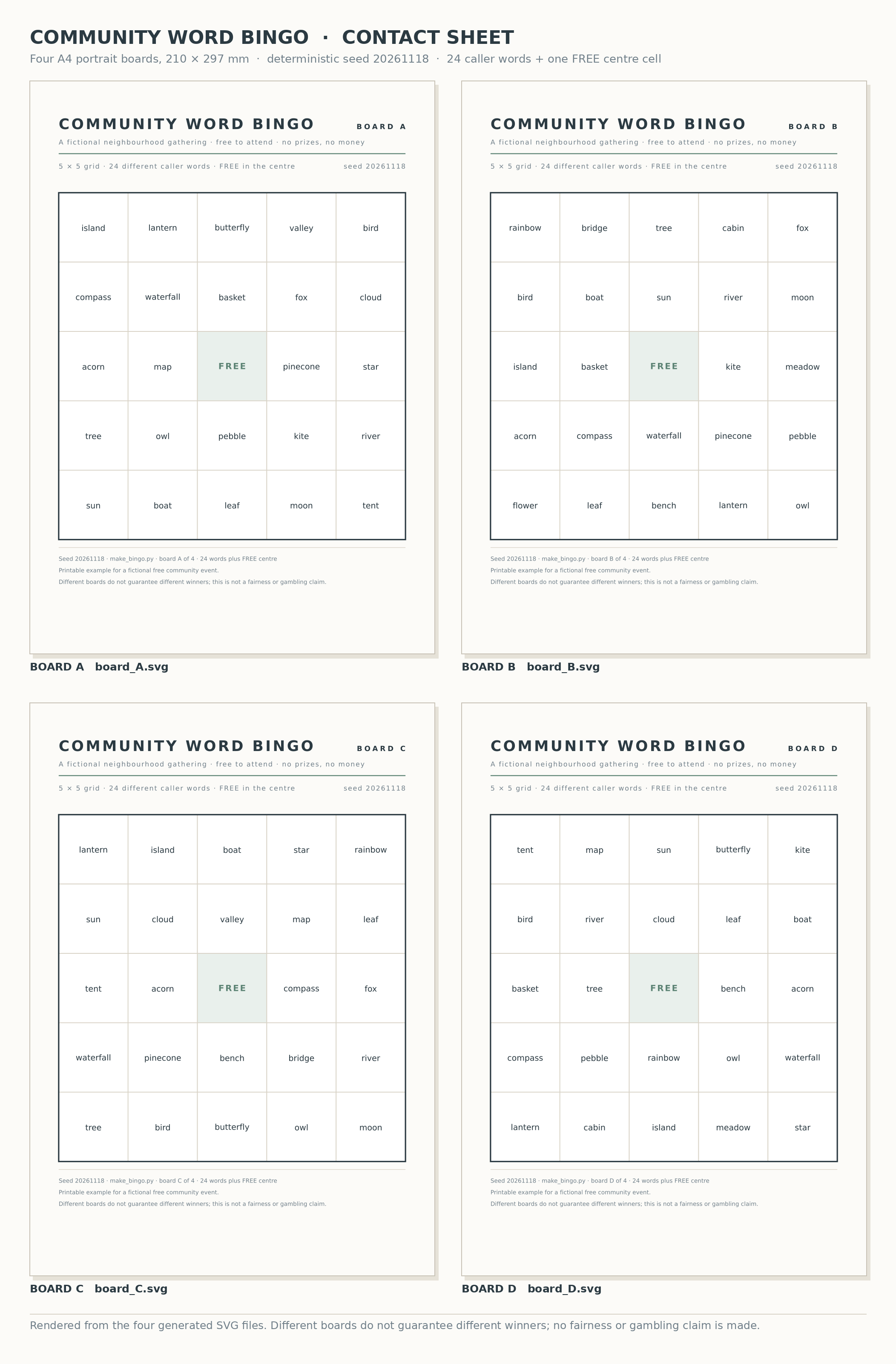
Open the contact sheet and compare all four boards. Check the title, board identifier, cell text, center and footer. Data consistency cannot tell you whether two lines overlap or a long word becomes hard to read.
The live run revised an overflowing footer and a tight title-to-board-label gap. It kept an earlier contact sheet on the canvas and delivered a separately named final version. We selected that final asset for this article; the existence of an older preview is not a reason to use it.
The SVGs declare A4 portrait pages at 210 × 297 mm, with a 180 mm grid and 36 mm cells. Text remains editable and uses an installed-font stack. Recheck rendering if you substitute a font or translate the words, particularly the longest entries.
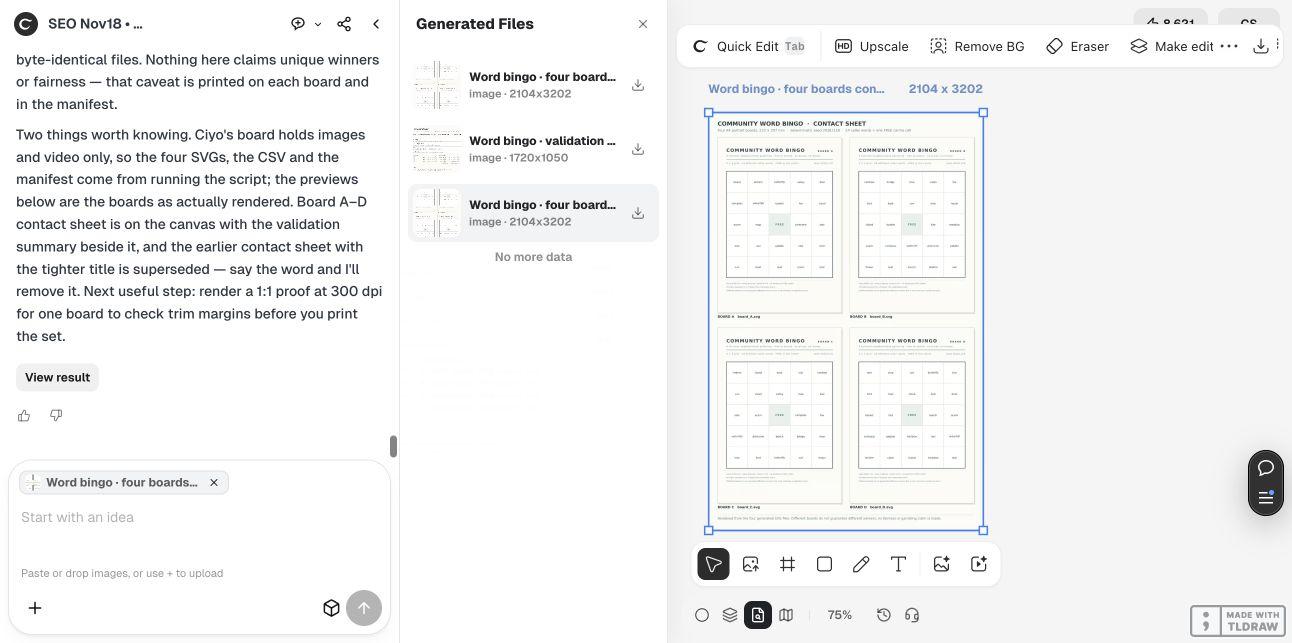
The contact sheet is a review image containing four reduced pages. It is not the same file as an individual A4 board. Use the separate SVGs when preparing a full-size proof, and keep the contact sheet for comparing the set.
5. Save the reproducible package and make a paper proof
The supplied generator uses seed 20261118. After reviewing its source, we ran it twice into separate output folders and compared the bytes of all six generated files: four SVGs, the CSV and the manifest. They were identical in those two runs. Preserve the generator with the files if you need to reproduce this exact sample.
We also exported a separate four-page A4 PDF locally from the supplied SVGs. It uses 2480 × 3508 pixel page renders at approximately 300 pixels per inch, with system font fallback, and all four final PDF pages were visually reviewed. The PDF is a print convenience; the SVGs remain the editable sources. It is not a native PDF attachment from the Ciyo canvas.
To use it, save make_bingo.py and run the command below with an output folder of your choice. It uses Python 3’s standard library. Review any changes before running a modified version; after changing the pool or layout, validate and inspect the new files again.
For a small gathering, you can simply use the supplied boards after checking their suitability. Someone maintaining many variants may prefer the generator and manifest, but still needs to inspect the actual final set. Do not equate a new seed with a verified activity design.
Before printing a full set, produce one A4 proof at the intended scale, measure the 180 mm grid and check the words and margins on paper. We did not print this example or run a live game. Distinct boards can still produce simultaneous winners; the files make no unique-winner or fairness guarantee.
python3 make_bingo.py ./community-bingo-output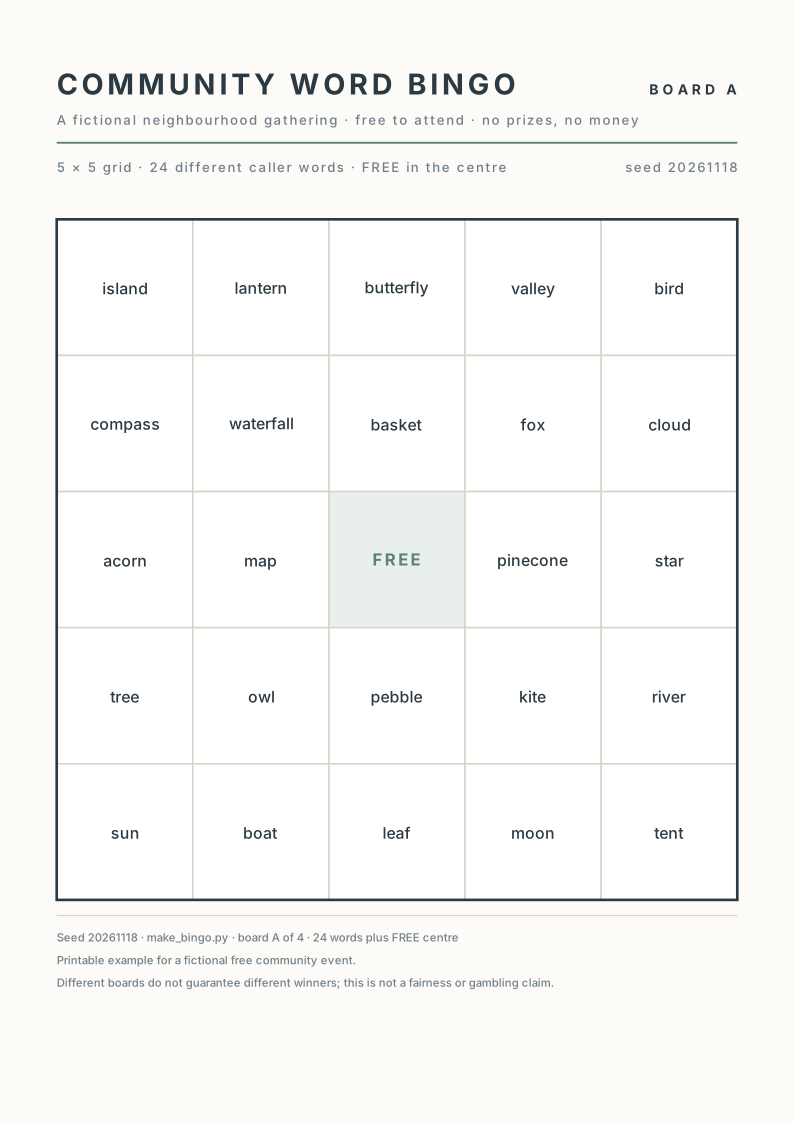
Printable-bingo questions
Can different boards share words?
Yes. Each sample board contains 24 words from the same 30-word pool, so overlap between boards is expected. The checks distinguish shared vocabulary from repeated words within one board and identical complete arrangements.
Does a unique board guarantee a different winner?
No. Different arrangements can still lead to simultaneous wins. This package checks internal consistency and repeatability, not game fairness or winner distribution.
Which file should I use for a full-size print proof?
Use an individual A4 SVG and check the actual print scale. The contact sheet contains four reduced pages for review and is not a full-size board file.
Does the caller CSV contain a tested random calling order?
No. It lists the fixed 30-word pool in source order. Decide and explain the calling process for your own activity separately.
Can I change the words or generate more boards?
You can edit the source, but this article verifies only the supplied four-board sample. Recheck pool size, counts, membership, center cells, distinct arrangements and rendered text after changes.
Make the board rules inspectable
Give Ciyo one caller pool and exact cell rules. Keep the editable boards and source data together, validate the actual files, and make a paper proof before preparing the set.