Paper-pattern label placement
Seed Packet Template: Keep the Label Clear of Folds and Glue

A seed-packet label can look spacious on a flat picture and become awkward when a fold runs through a field or a glue tab covers part of the writing. Review the label inside the actual front panel, with the cut and fold geometry visible, before treating the design as a usable paper pattern.
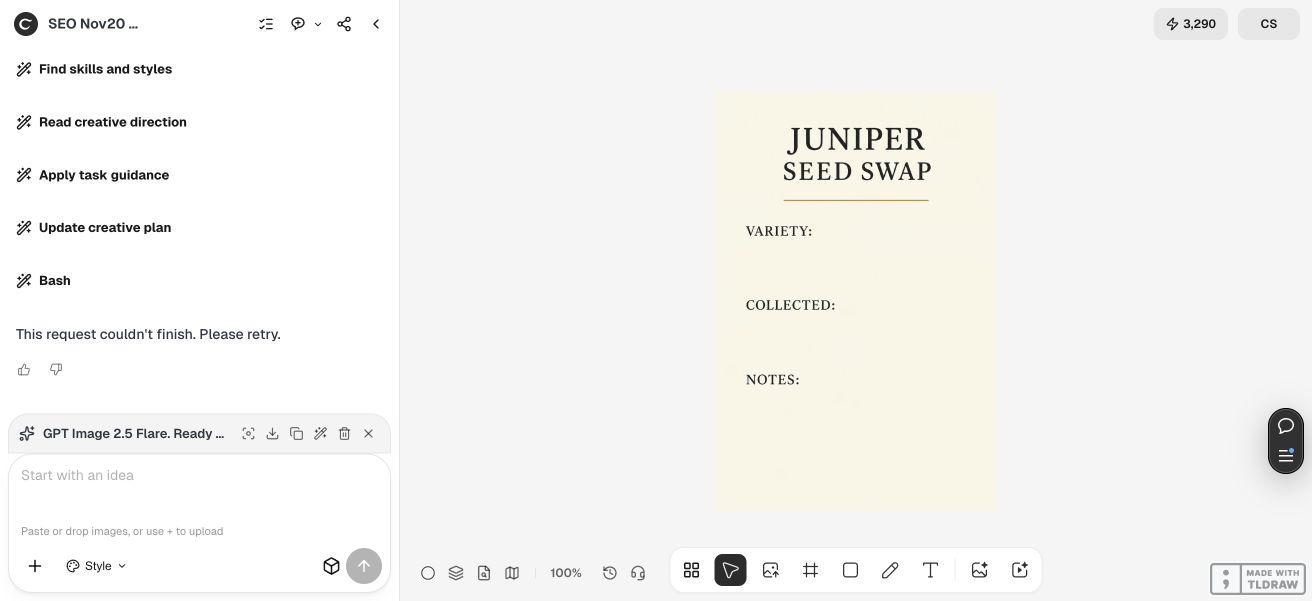
For fictional Juniper Seed Swap, we created a front-label concept in Ciyo's built-in Image Generator after an earlier pattern request failed without saving an image. We separately built and checked an original editable SVG and A4 PDF prototype with a 75 × 110 mm front and back. We reviewed its geometry and rendered proof; we have not physically folded it or tested seed storage, germination or commercial packaging.
Quick answer: define the front panel before positioning the label
Keep cut lines, fold lines and glue areas distinct. In this original prototype, the front and back each measure 75 × 110 mm, with a 10 mm side glue tab, 25 mm top flap and 15 mm bottom flap. The label box remains inside the front panel, at least 8 mm from its nearest side boundary. These are this example's chosen dimensions, not a universal seed-packet standard.
Follow the five steps below. Use the Ciyo image to discuss label hierarchy, use the editable pattern for actual geometry, and dry-fold a physical sample before relying on the finished construction. A label concept does not establish a cut pattern's dimensions.
| Step | Action | Check |
|---|---|---|
| 1 | Define the front, back and closure geometry | An explicit paper-pattern plan |
| 2 | Create a separate label concept in Ciyo | Readable fields without invented seed claims |
| 3 | Position editable text inside the front panel | Clearance from folds and glue |
| 4 | Inspect the SVG and A4 PDF proof | Dimensions, cut outline, fold legend and calibration bar |
| 5 | Print and dry-fold a physical prototype | Actual alignment, writing space and seam behavior |
1. Specify the paper geometry and the label's job
Juniper Seed Swap's fictional label needs a title and blank Variety, Collected and Notes fields. The example contains no species-specific instructions or invented dates. It is a paper-layout exercise, rather than guidance about whether a particular seed should be stored in this material.
The original pattern uses adjacent 75 × 110 mm front and back panels. A 10 mm tab sits on the back panel's outside edge, while the front has a 25 mm top flap and a 15 mm bottom flap. The complete cut net spans 160 × 150 mm. That geometry fits on the supplied A4 page with room for a legend and a 50 mm calibration bar.
Define the front panel explicitly before adding typography. Otherwise a label can be centered on the entire unfolded net, which includes the back and flaps, instead of being centered on the face someone will read. Keep the writing fields out of every closure area.
| Part | Dimensions | Purpose |
|---|---|---|
| Front and back | 75 × 110 mm each | The two main body panels |
| Side tab | 10 mm wide | A separate shaded glue area |
| Top flap | 25 mm deep | The top closure |
| Bottom flap | 15 mm deep | The bottom closure |
| Complete cut net | 160 × 150 mm bounds | The unfolded pattern, excluding the page legend |
| PDF page | 210 × 297 mm | An A4 proof with a calibration bar |
2. Use Ciyo for a label concept, keeping construction separate
Our original live agent request asked for a full pattern review and failed without saving a result. We preserved that outcome and moved the visual example to Ciyo's built-in Image Generator. The revised task requested only a flat label concept, with generous blank fields and no cut or fold lines.
The successful generator settings were GPT Image 2.5 Flare, a 2:3 ratio, 1K and one image. Its actual saved PNG is 832 × 1248. We inspected the labels JUNIPER, SEED SWAP, VARIETY:, COLLECTED: and NOTES:. They are legible and separated by substantial blank areas. There is no plant photograph, perspective packet mockup or storage claim.
That raster concept supplies a visual hierarchy, not a measured 75 × 110 mm panel. We rebuilt the editable typography and writing lines in the separate paper-pattern companion. Do not stretch the concept over a cut net and assume its pixels have become construction measurements.
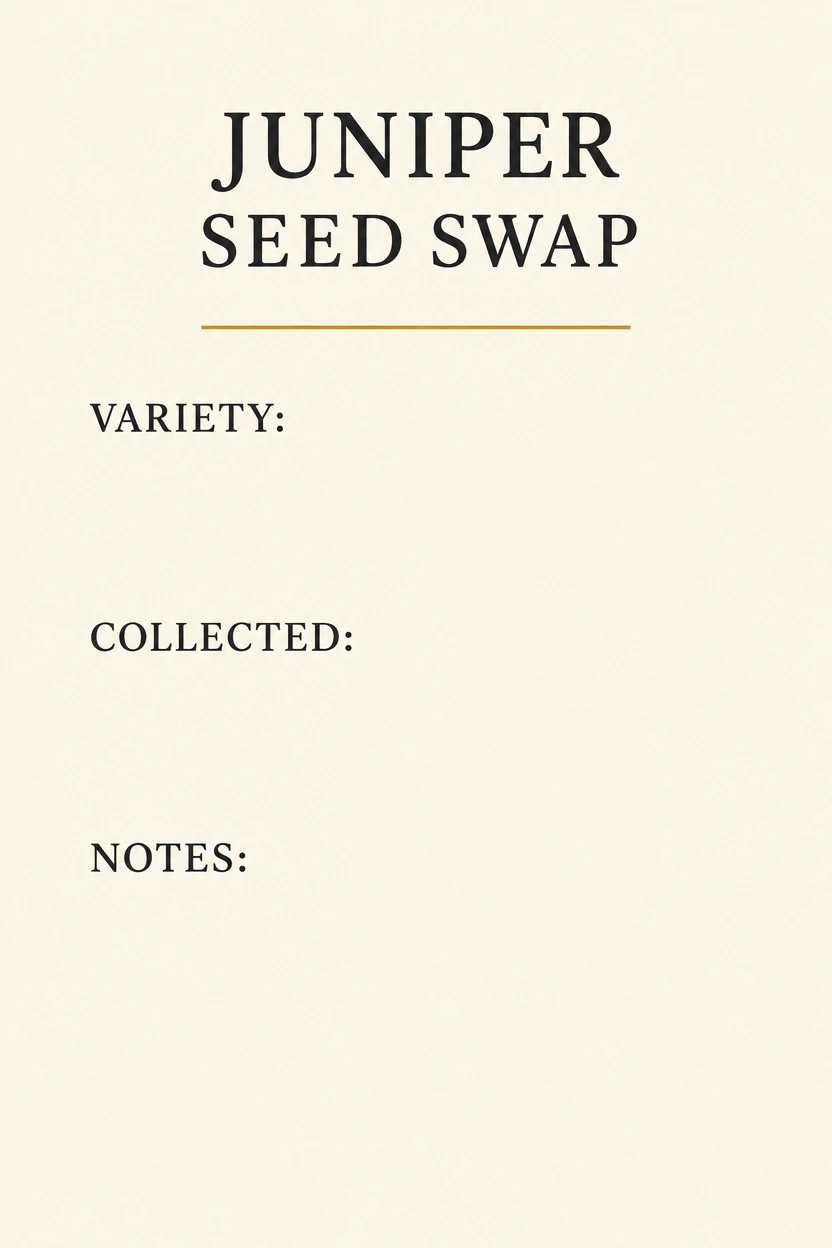
Create a flat portrait front-label concept for [fictional or approved seed-swap project]. Use [palette] and these exact labels: [title], VARIETY:, COLLECTED:, NOTES:. Leave large genuinely blank writing areas and generous margins. No plant photograph, perspective packet mockup, person, seed claim, storage instruction, cut line, fold line or glue mark. This is a visual label concept. The exact editable paper pattern and print proof will be prepared and verified separately.3. Put editable fields inside the actual front panel
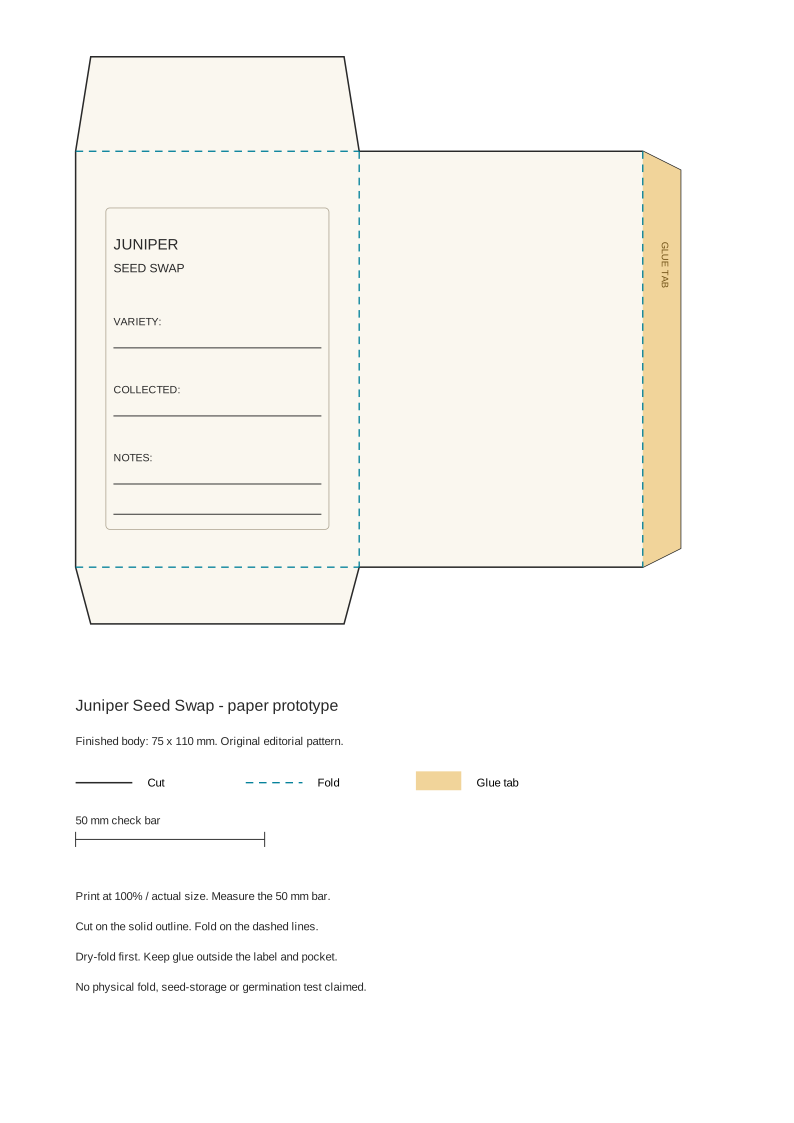
In the supplied SVG's page coordinates, the front occupies x = 20–95 mm and y = 40–150 mm. The back sits beside it at x = 95–170 mm. The label box occupies x = 28–87 mm and y = 55–140 mm, placing its nearest side 8 mm inside the front boundary. This clearance is a design choice for the prototype, not a tested tolerance for every printer or paper stock.
The editable companion uses plain text and writing lines rather than embedding the Ciyo label PNG. Its writing lines run from x = 30 to 85 mm, giving 55 mm of space. Keep those fields inside the front when changing the title, font or panel size. A longer title should trigger a layout review rather than being allowed to cross a fold.
The solid outer outline is the cut path, cyan dashed lines mark folds, and the amber-shaded side tab identifies the glue area. The legend repeats these meanings. Those distinctions belong in a construction proof; they are separate from the text-only concept and from decorative packaging artwork.
4. Inspect the PDF page and its calibration bar
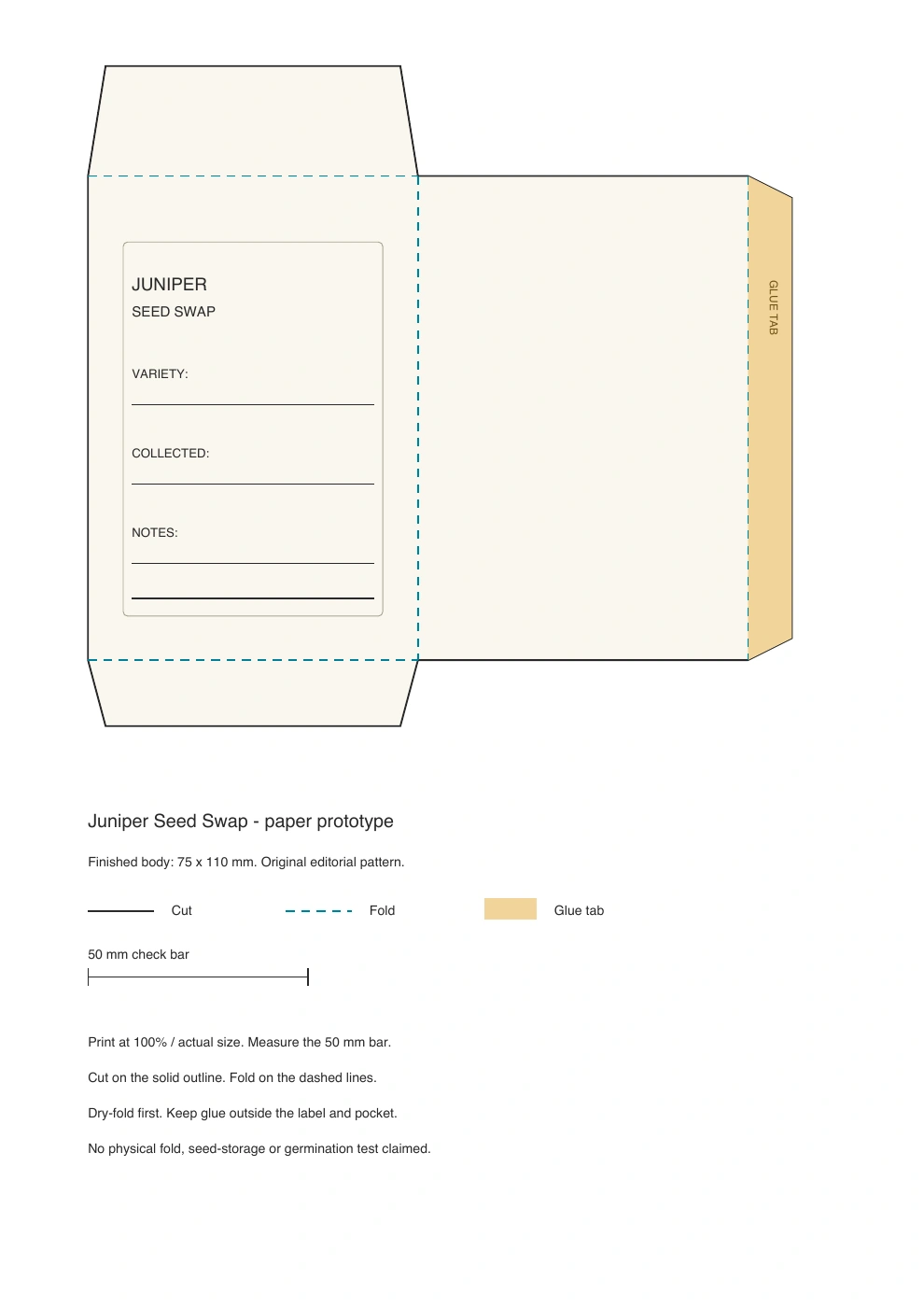
The separate editorial PDF is one A4 page. We checked its page dimensions, the 75 × 110 mm body geometry, flap and tab dimensions, text fields and 50 mm calibration bar. We rendered the page and inspected the proof below for readable labels, distinct line styles and enough room around the pattern.
The SVG and PDF were built as original editorial companions using the same geometry. They were not attached or exported by the failed Ciyo agent request. Their plain typography and writing lines differ from the generated label concept because the source needs to remain directly editable and measurable.
When printing, select actual size or 100% and measure the 50 mm bar on the paper. If it is not 50 mm, resolve scaling before cutting. Do not assume that a page called A4 guarantees the printer left it at the intended scale. The digital check establishes the file's geometry; the printed bar is your check on the physical output.
5. Dry-fold a sample before using the pattern
After confirming the printed scale, cut and dry-fold a sample without adhesive. Check the side seam and closure flaps against the front panel, and confirm that the label remains visible. Inspect the actual paper thickness and alignment before deciding where glue belongs.
Write a realistic example in the blank fields. A long variety name may need more space than the short word used during design. If the handwriting area or fold clearance is inadequate, edit the source and repeat the proof rather than moving text into a flap or glue zone.
For a workshop, a checked paper prototype and a clear legend can support a practical layout exercise. A commercial seed product needs additional decisions about materials, contents and applicable requirements that this example does not establish. We have not physically folded the pattern or evaluated whether it is suitable for any particular seed or storage period.
Packet-template layout questions
Did Ciyo create the measured SVG and PDF?
The original full-pattern agent request failed. Ciyo's built-in generator successfully produced the separate label concept. The measured SVG and A4 PDF are original editorial companions created and checked outside Ciyo.
Are the 75 × 110 mm dimensions a universal packet standard?
They are this prototype's chosen front and back dimensions. The source also specifies a 10 mm glue tab, 25 mm top flap and 15 mm bottom flap. Choose and verify dimensions for your actual use.
Is the 8 mm label clearance a proven print tolerance?
It is the nearest side clearance of the label box in this source. It has not been established as a printer or material tolerance. Check the actual printed and folded sample.
Does the template establish safe seed storage or germination?
The example checks paper geometry and label placement only. It contains no physical fold, seed-storage or germination test and makes no suitability claim for a particular seed.
What skills and time should I allow?
You need an SVG-capable editor for source changes, a way to check print scaling and time for a physical dry-fold and writing check. This example establishes no fixed completion time or production-readiness guarantee.
Give the label a measured place on the front
Use Ciyo to explore a readable label concept, then check the editable paper geometry and an actual print. Keep cut, fold and glue decisions separate from the visual preview.