Practical design workflow
Warehouse Pick List Template for Bin Locations and Shortages

A picker finds three pieces in A-07 when the list asks for five. If they replace five with three, whoever reads the sheet later has no evidence of the shortage. Keep the original target alongside the actual count.
The fictional Juniper Supply Room has three bins on one route. The editable CSV and Ciyo layout proof show where to put a shortage and how to keep pieces and rolls clear.
Quick answer
Write the bin, item ID, unit and target for each pick in walk order. Leave space for the actual quantity. Put a short count on the same row as the bin and target so it can be checked without scanning a second sheet.
| Sequence | Bin | Item ID | Unit | Target qty | Picked qty | Exception |
|---|---|---|---|---|---|---|
| 1 | A-02 | S-014 | piece | 3 | 3 | — |
| 2 | A-07 | S-021 | piece | 5 | 3 | Short 2 |
| 3 | B-01 | S-104 | roll | 1 | 1 | — |
Set the pick sequence from the real locations
Put A-02 first, A-07 second and B-01 third in the sample. In a real room use the known walking order. Alphabetical bins help only when the labels match how the picker will walk.
Keep S-021 next to A-07 and write piece explicitly. For S-104 the unit is roll. A one-roll target must remain distinct from one physical piece.
At A-07, count the three pieces you actually handled. Record picked three beside target five and add Short 2. If your room allows substitutions, use an approved exception field and keep the intended item and substitute separate.
Explore the layout in Ciyo
Create an isolated project, open Image Generator and use this fictional warehouse pick list brief. Keep the CSV alongside the visual proof so you can check the exact fields after generation.
On November 28, 2026, we generated one image using GPT Image 2.5 Flare in Ciyo’s production canvas. The run used 9:21 at 1K and returned a 624 by 1456 image. Check your own quote before you submit.
Use the complete prompt below alongside the screenshot of the canvas composer.
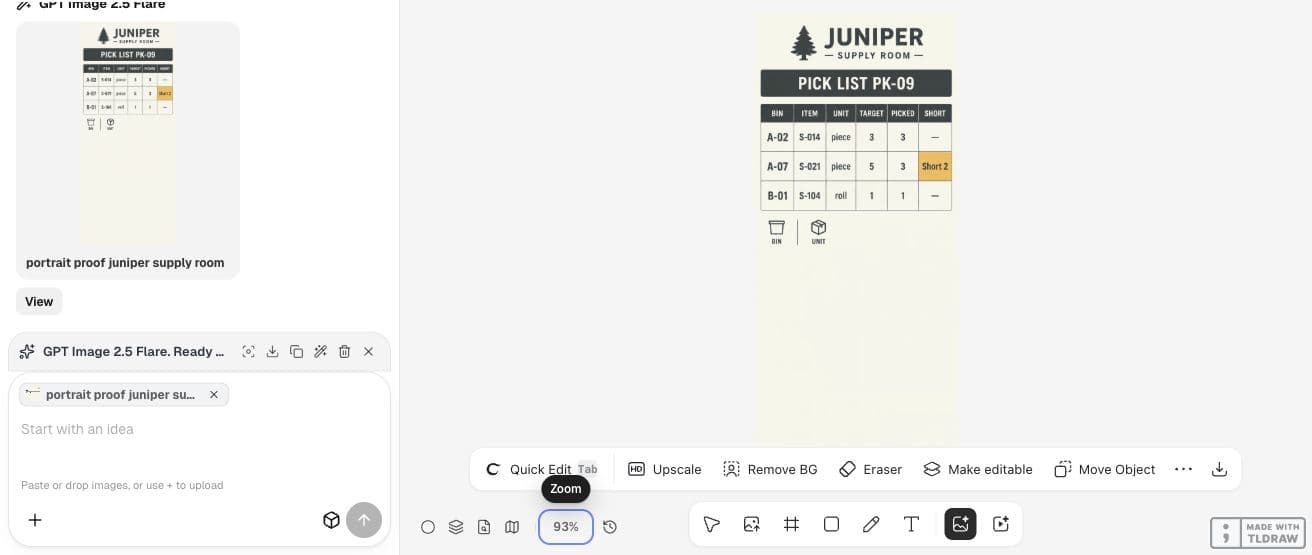
Portrait proof. Juniper Supply Room, Pick list PK-09. Rows in order: A-02 | S-014 | piece | target 3 | picked 3; A-07 | S-021 | piece | target 5 | picked 3 | Short 2; B-01 | S-104 | roll | target 1 | picked 1. Label bins and units. Ivory sheet, charcoal type, amber for shortage. No shipping status.Read the proof alongside the source
The three bins appeared in the supplied order. The amber Short 2 cell sits next to A-07, its target of five, and its picked quantity of three. The third row uses roll instead of piece.
The image helps you check readability and layout. Keep the CSV as your editable source for the fields and values.
Reconcile short picks before the shipping handoff
Read each row aloud as bin, item, unit, target and picked. In the CSV, subtract the picked quantity from the target for A-07 and check the result against Short 2. Record the next action through the team’s normal replenishment or exception process.
A printed pick list helps a small team work through one room. A warehouse system can manage assignments, bin updates and stock transactions when operations get larger. Keep picking observations separate from the shipment document and mark a delivery only from its actual confirmation.
Source and workflow context
Microsoft Business Central documents recording physically picked quantities and handling lines that differ from the target. The three-bin example is a stand-alone worksheet for learning the same distinction.
Warehouse pick list questions
What is the difference between a pick list and a packing slip?
The pick list tells the operator what to find and records the actual pick. A packing slip accompanies the items that actually go out.
What if the pick was interrupted before counting?
Leave the actual quantity empty and mark it as pending. A counted zero means the picker checked and found none.
Should I re-sort after assigning the pick?
If the walking plan changes before work starts, publish one revised order. Keep item IDs stable so the old and new assignments can be reconciled.
Make a proof from checked fields
Build a short proof with two units and a partial pick, then test whether a colleague can locate the exception from one row.