Buyer workflow
AI Pet Portrait Generator: Check Likeness Before You Order
A gift portrait should look like the recipient’s pet, not just the same breed. Before buying a print or a package of styles, choose the markings and expression that must survive, then approve the actual digital file.
Our October 12 Ciyo pilot uses an invented terrier and one watercolor-style image. It demonstrates reference comparison, not a likeness guarantee for a real customer’s pet.
1. Define the file and how it is made
Adobe’s pet-portrait workflow separates a reference photo from a chosen visual style. Start there when comparing tools or commissioning a portrait.
Specify whether you are ordering a digital AI image, a print of that file or another kind of artwork. Include the desired size, revision allowance and approval step in the quote so that the final gift matches the expectation.
2. Approve the reference before choosing a style
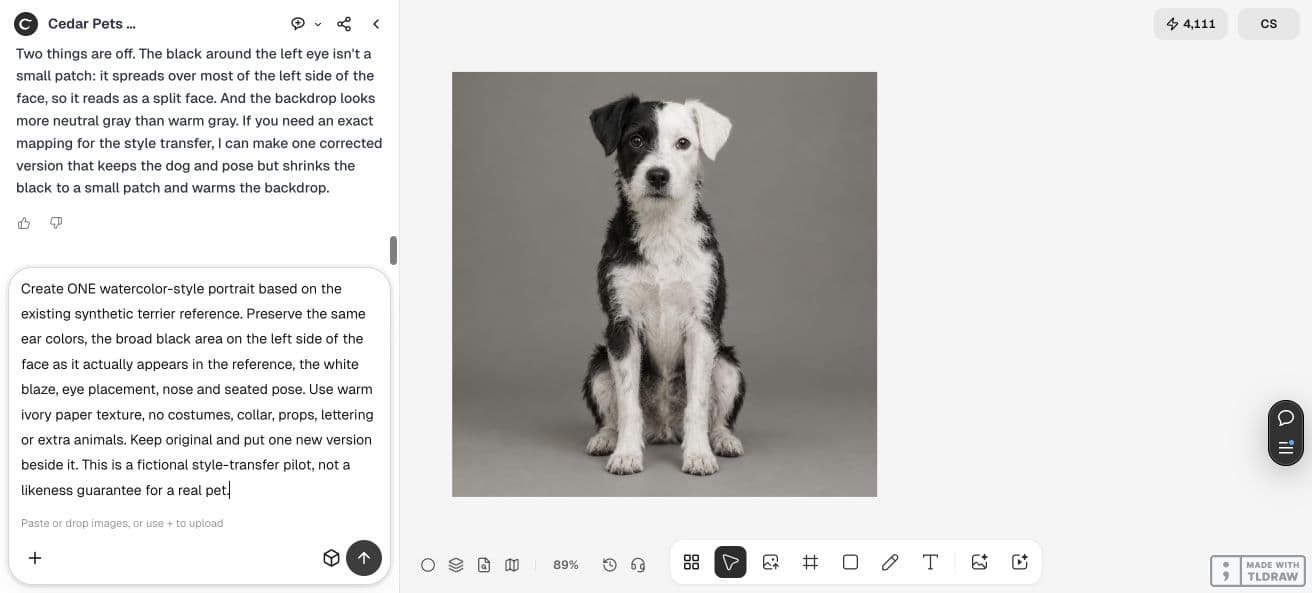
Our synthetic terrier has a black ear on the left of the picture, a white ear on the right, a white blaze and a broad black area on the left face. The broad area was larger than the small patch requested in the initial prompt.
For the style test, we described the reference as it actually appeared. With your own pet, use a clear permitted photo and identify its real markings, eye placement and pose before asking for a variation.
3. Change the style while retaining identity cues
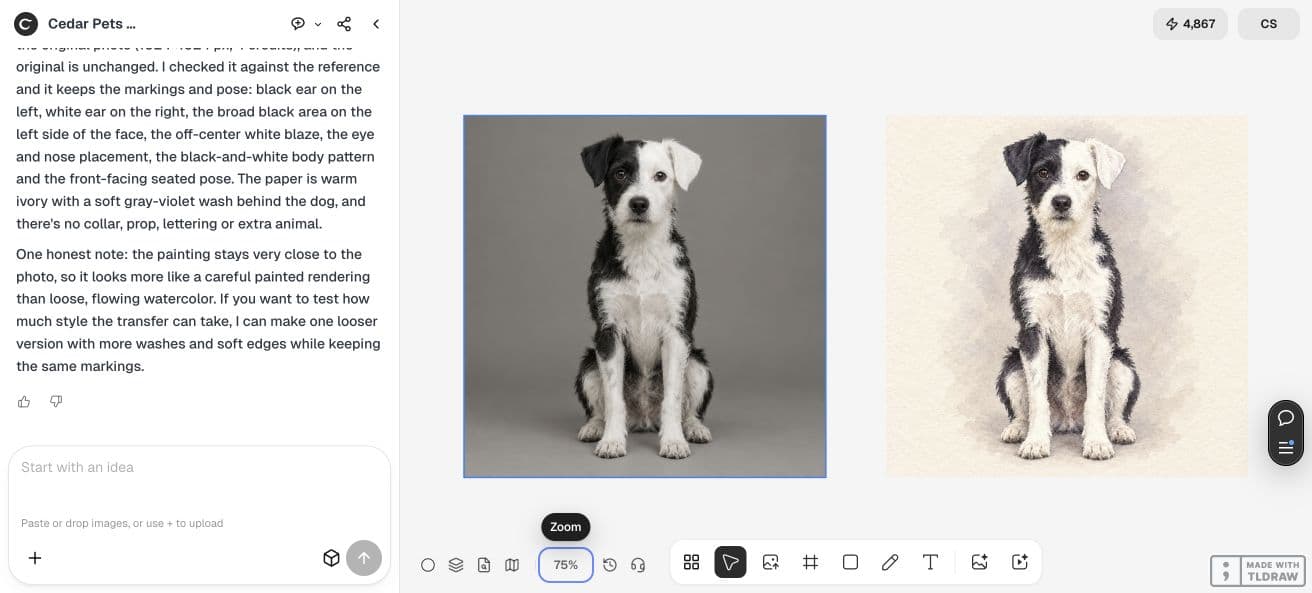
We requested warm ivory paper and a watercolor treatment while retaining the reference markings and seated pose. We excluded costumes and extra objects to keep the comparison focused.
Name left and right as they appear in the reference image. If a marking is important, describe its position and shape rather than relying on a breed name.
Create one watercolor-style portrait from this reference. Preserve the same ear colors, broad black area on the left face in the picture, white blaze, eye placement, nose and seated pose. Warm ivory paper; no costume, collar, props, lettering or extra animals. Keep the original and place one variation beside it.4. Review likeness and style separately
The result retains the recognizable black-and-white face arrangement and seated pose in our comparison. The treatment stays close to a careful painted photograph rather than a loose watercolor wash.
A good marking match does not automatically satisfy the desired style. Ask the recipient or client to approve both. With a real pet, compare the file against the actual reference instead of judging only whether the picture is attractive.
| Check | Evidence to approve |
|---|---|
| Identity cues | Ear colors, markings, eyes and pose match the reference |
| Art direction | The chosen style looks right at the intended viewing size |
| Delivery | The actual export, print size and correction scope are agreed |
5. Check the file before buying a print
Download and inspect the approved image at its intended size. Ask the printer which pixel dimensions and file format it needs; a canvas preview is not a physical print proof.
Keep the approved crop away from important ear tips or paws. If you order multiple gifts, approve the first file before generating additional versions. This pilot does not include a printed sample.
6. Keep the approval with the order
Save the reference, chosen portrait, marking checklist and output requirements together. State clearly that the example is digitally generated, and separate image approval from the printing stage.
Use the print-size guide for the next pixel check. Expand the order when the client accepts the likeness, style and exported file, with any remaining print checks recorded.
Frequently asked questions
Does this prove likeness preservation for my pet?
The reference is synthetic. Test your own permitted photo, identify its actual markings and ask the owner to approve the resulting file.
Is the example a hand-painted portrait or a finished print?
It is a digitally generated watercolor-style image. We did not commission a hand-painted original or verify a physical print.
Approve one portrait first
Use a clear reference, compare the identifying markings and choose the actual file before placing a larger gift or print order.