Video · Tested
Turn a Storyboard Into Video Clips That Cut Together
A storyboard promises a sequence: this shot, then that one. AI video models make one clip at a time, and each clip can wander. The pour finishes, the camera drifts in, and by the last frame the scene no longer looks like the next storyboard frame. When you join the clips, the audience sees the jump.
On September 29, 2026 we animated a three-frame storyboard for Fernhollow Coffee, a fictional café, in Ciyo. We made the same cut two ways and measured it. One way jumped. The other was nearly seamless.
The storyboard: three frames, one glass
Our storyboard is three 9:16 frames of a maple cardamom latte, made earlier by the Ciyo Agent for 11 credits: the barista pours milk, cinnamon falls on the foam, and a hand slides the glass toward the camera. The frames share the glass, the counter and the window light, which is what makes a sequence possible.
We asked the agent for two 5-second clips, each starting on one frame and ending on the next.
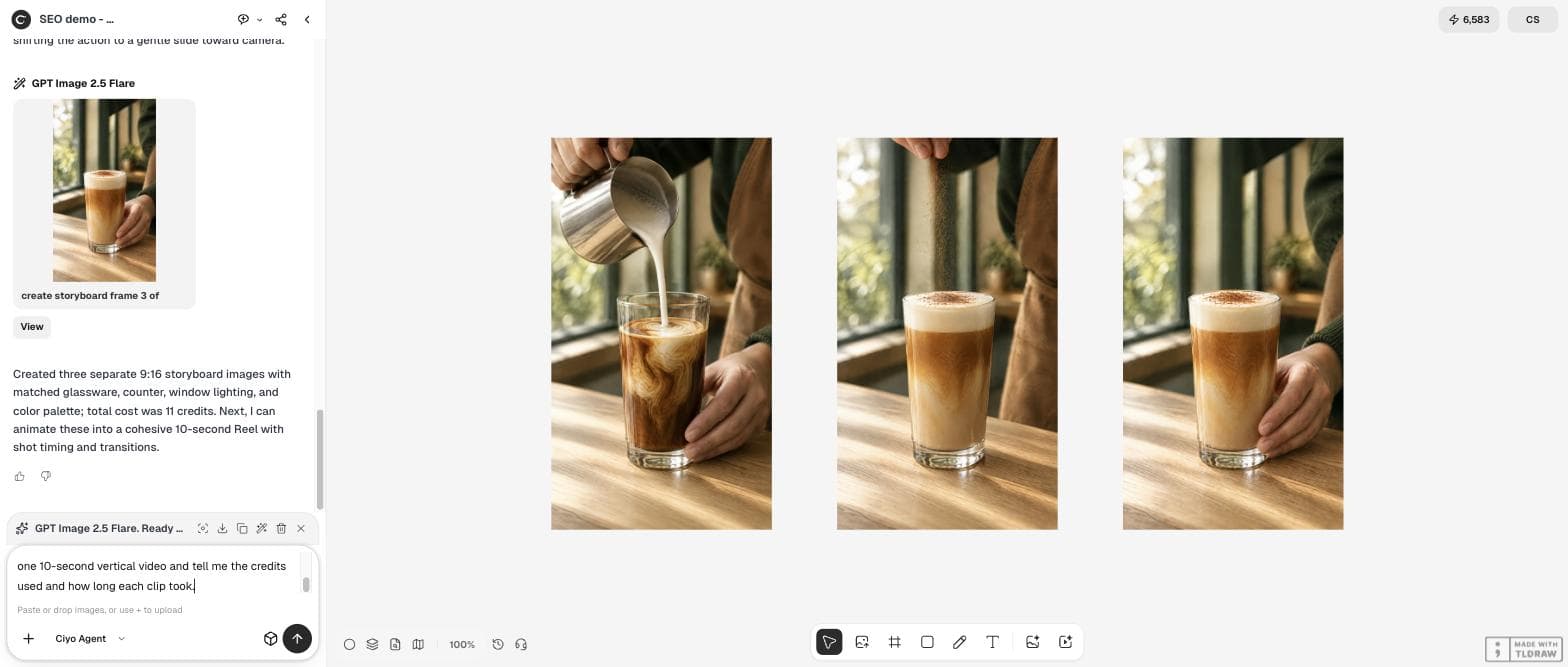
Let's turn this storyboard into the 10-second Reel. Please make two silent 5-second clips with Seedance 2.5, each using a start frame and an end frame from the storyboard: clip A starts on frame 1 and ends on frame 2 (the pour finishes, the jug lifts away, cinnamon falls on the foam); clip B starts on frame 2 and ends on frame 3 (a hand slides the glass gently toward the camera). Calm, slow, one continuous shot each, no text. Then join them into one 10-second vertical video and tell me the credits used and how long each clip took.The agent could lock only the first frame
Before it spent any credits, the agent told us its video tool could lock the first frame of a clip but had no end-frame input. It offered two routes: start each clip on its storyboard frame and describe how the shot should end, or pass both frames as loose references. It recommended the first and warned that it “can leave a small jump at the cut.”
We chose the first route. The agent made clip A from frame 1 and clip B from frame 2 with Seedance 2.5, silent, 720p, for 197 credits each. It timed them: about 6 minutes 7 seconds and 4 minutes 18 seconds. Joined, the video runs 10.08 seconds, because each clip came back one frame longer than 5 seconds.
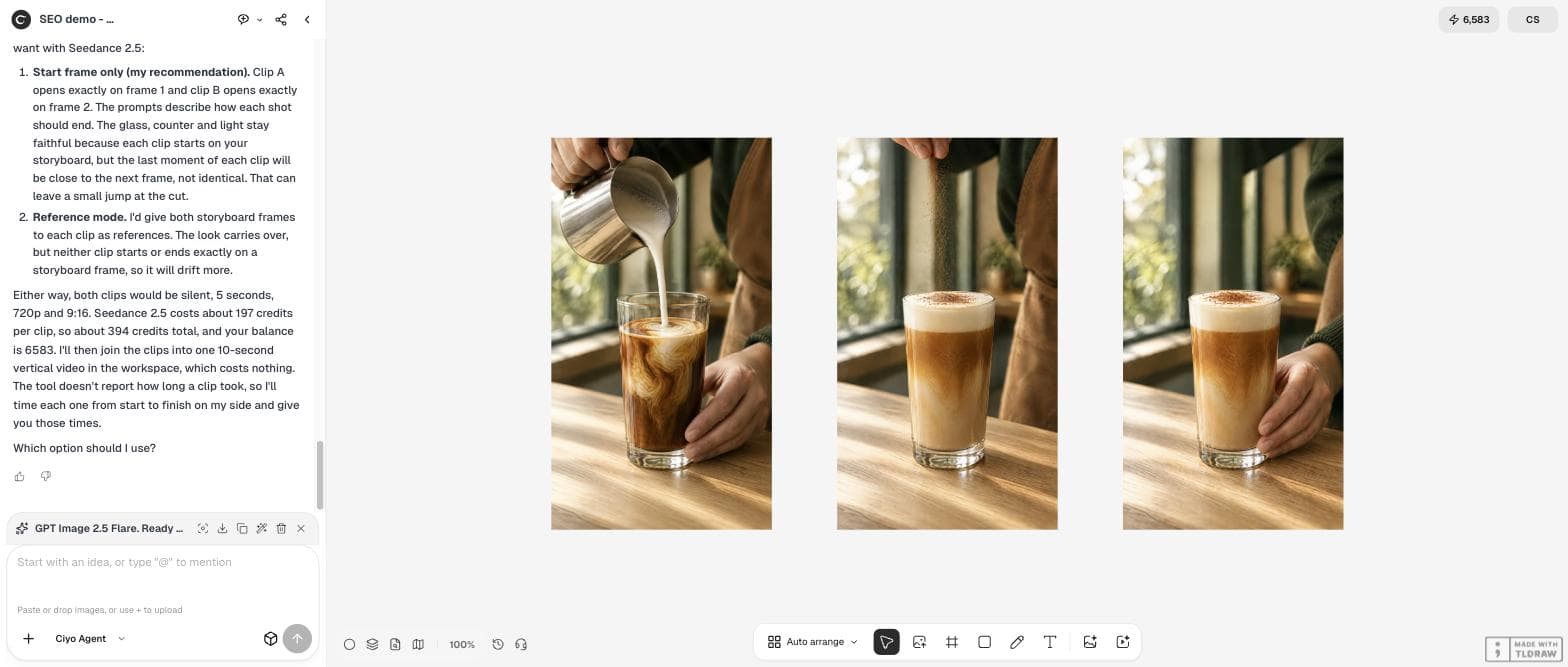
Use option 1, start frame only. For each clip, describe in the prompt how the shot should end so it lands as close as possible to the next storyboard frame. Then join them, and tell me how big the jump at the cut is and how long each clip took.Measure the jump at the cut
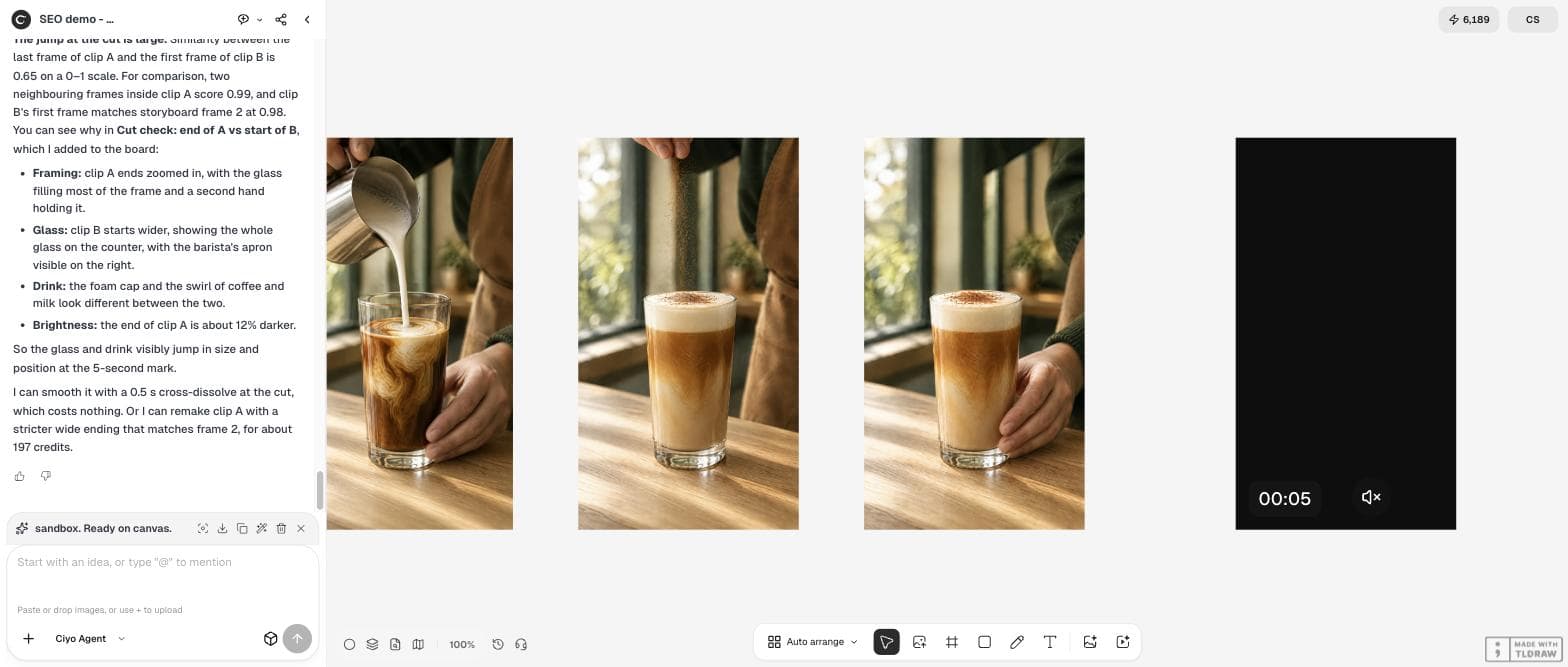
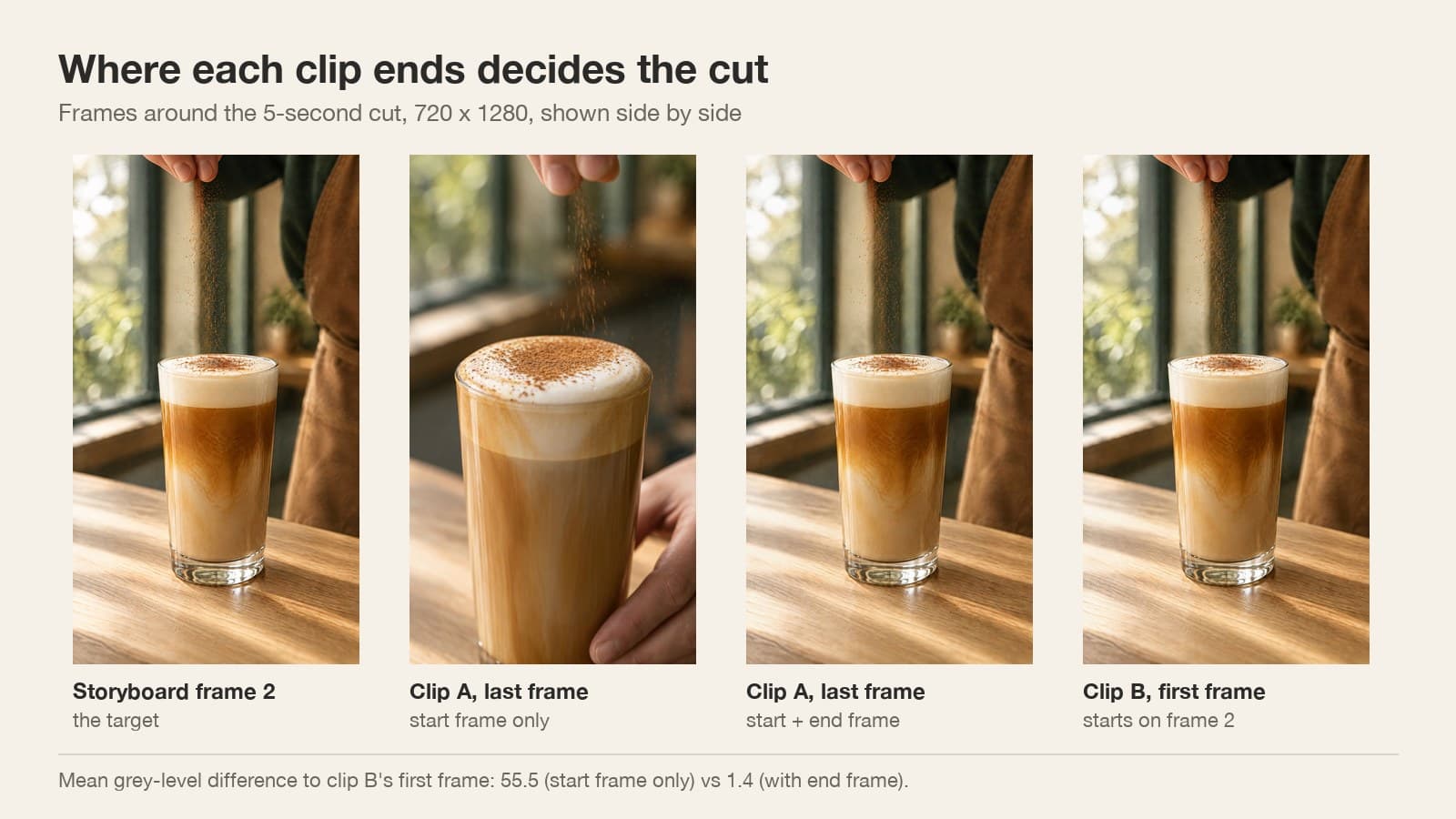
The agent measured the cut itself: the last frame of clip A and the first frame of clip B had a similarity of 0.65 on a 0–1 scale, against 0.99 for neighbouring frames inside a clip. Clip A ended zoomed in on the glass, with a second hand holding it; clip B started wide, as the storyboard does.
We checked with a simpler measure, the average difference in grey level between two frames. Neighbouring frames inside clip A differ by 0.7. Each clip's first frame is within 2.4 of its storyboard frame. But the end of clip A is 55.9 away from storyboard frame 2, and the cut itself jumps by 55.5.
Use an end frame when you can
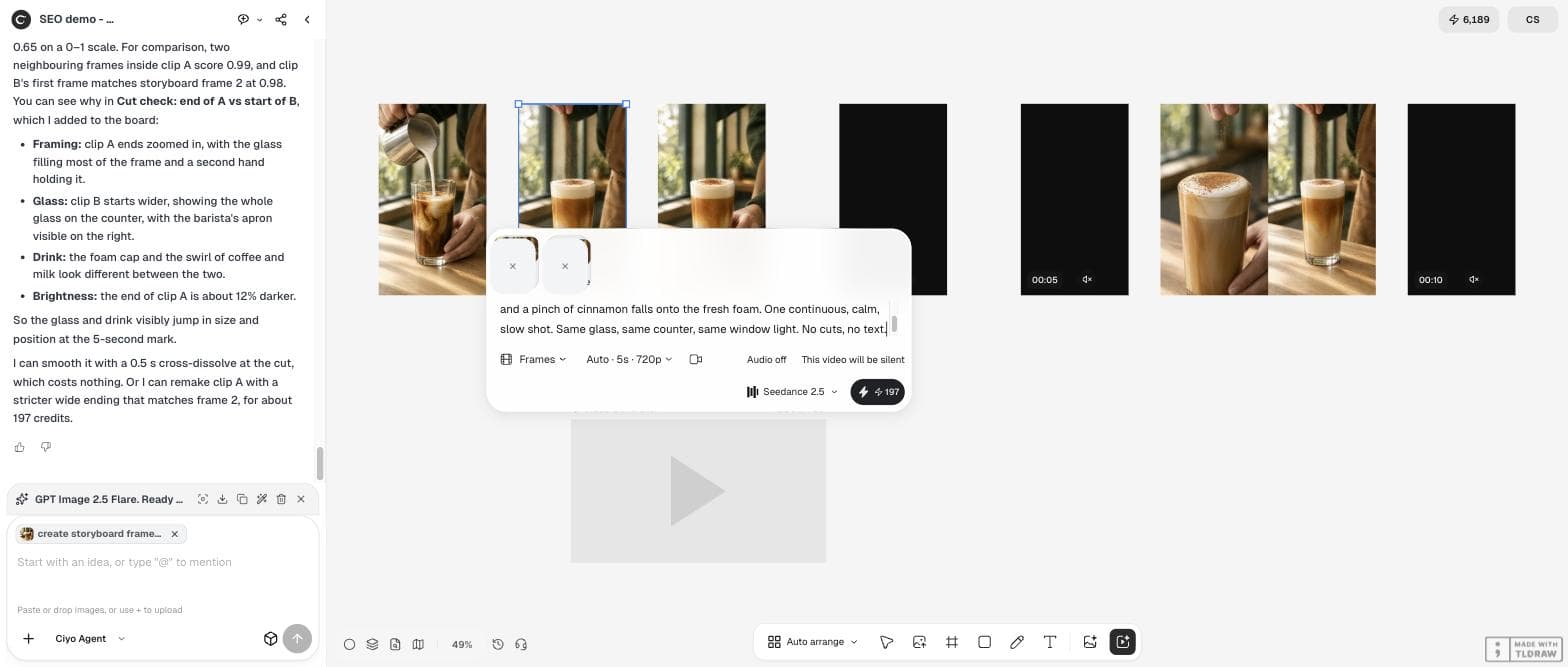
Ciyo's Video Generator on the canvas does have an end-frame slot. In Frames mode you pick a start frame and an end frame from the board, choose Seedance 2.5 and turn the audio off. We remade clip A that way, with storyboard frame 1 at the start and frame 2 at the end, for 197 credits. It took about 4 minutes 22 seconds.
The new clip starts 2.3 and ends 2.5 grey levels from its storyboard frames, so it lands where clip B begins. The difference at the cut fell from 55.5 to 1.4, about twice the 0.7 between neighbouring frames inside a clip. Side by side, the last frame of the new clip A and the first frame of clip B look the same.
The barista finishes pouring the steamed milk, lifts the jug out of frame, and a pinch of cinnamon falls onto the fresh foam. One continuous, calm, slow shot. Same glass, same counter, same window light. No cuts, no text.Plan how the segments connect
The same advice shows up wherever people make multi-shot AI video: agree the storyboard first, then decide how each segment hands over to the next. An end frame is the strongest handover. A shared frame between clips is the next best. A cross-dissolve hides a small jump but not a change of framing.
Posted 2026-09-22. A paid partnership with Pexo, another AI video product. The creator shares a prompt template for a 15-second concept film with timed segments that ends: “Show me the storyboard and production plan first” and “If you need to split the film into segments, plan how they connect.” It is sponsored content for a different tool; the planning advice matches what we measured.
Your options at a cut that jumps
Pick by how big the jump is and what you can spend.
| Fix | Cost in our test | Result |
|---|---|---|
| Start and end frame (Video Generator, Frames mode) | 197 credits per clip | Cut difference 55.5 → 1.4 |
| Start frame only, with the ending described | 197 credits per clip | Clip wandered; cut difference 55.5 |
| Cross-dissolve of about 0.5 s | Free (agent offer) | Softens a small jump; does not hide a framing change |
Storyboard to video with AI
How do I make AI video clips match my storyboard?
Start each clip on its storyboard frame and, where the tool allows it, set the next storyboard frame as the end frame. In our test the end frame cut the jump at the join from 55.5 to 1.4 grey levels.
Can the Ciyo Agent set an end frame?
Not in our test on September 29, 2026: its video tool locked only the first frame. The Video Generator on the canvas has start and end frame slots in Frames mode.
How long does a clip take?
Our 5-second Seedance 2.5 clips at 720p took about 4 to 6 minutes each.
What did it cost?
197 credits per 5-second clip. Joining clips in the agent's workspace cost nothing.
Animate your storyboard in Ciyo
Keep the storyboard on the board, set start and end frames in the Video Generator and join the clips with the Ciyo Agent.