Creative workflow · Before generation
Approve the Image Brief Before You Generate

A ceramics studio needs a simple workshop promotion: one handmade mug, a welcoming mood and room for a headline. Asking for a finished campaign immediately leaves several decisions to chance. Is the mug the subject, or the person making it? Does the image contain the headline? Where will the booking message fit?
Resolve those questions in a short planning pass. This walkthrough uses fictional Still ceramics workshops and a real Ciyo session to turn a rough idea into a brief you can approve before generating the image. The deliverable is a usable composition with separate copy, not a claim about campaign performance.
Choose one deliverable and one reader
Start with the person who will see the image and the action they should take. For Still, the audience is a beginner considering a ceramics class. The visual should make the workshop feel approachable; the eventual caption or booking page supplies the schedule and price.
Choose a square social image for this first pass. A website banner needs a different arrangement, so leave it for a separate brief. Keeping the deliverable narrow makes approval concrete: one mug, a calm surface and enough clear space for a short headline.
| Decision | Chosen constraint | Review question |
|---|---|---|
| Subject | One ivory handmade mug | Is the mug the obvious focal point? |
| Audience | First-time workshop visitors | Does the scene feel welcoming? |
| Format | Square social image | Can the composition survive the intended crop? |
| Copy | Added separately | Is the upper third quiet enough for a headline? |
Ask for a plan with a stopping point
In Ciyo, choose GPT-6 Astra in the agent composer and ask for a brief rather than an image. State what the answer should contain and where the work should stop. In our session, the request entered Plan with me and returned a concise brief plus three review checks.
Read the response before moving on. A plan that adds extra props or invents an offer has changed the assignment. Correct that in text while the choices are still inexpensive to revise.

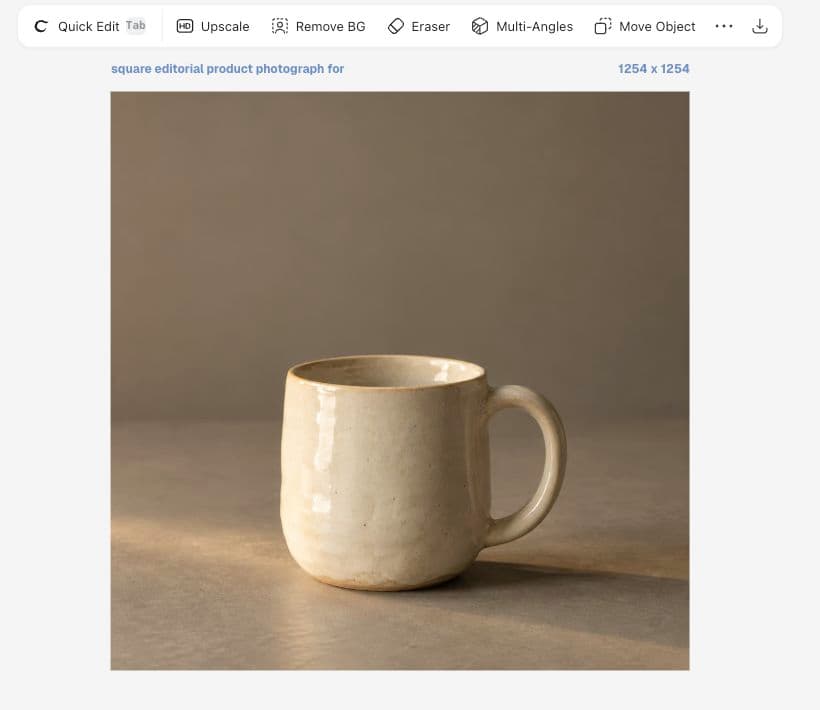
Plan one square social image for fictional Still ceramics workshops: one ivory mug, warm gray tabletop, amber light, empty upper third for editable text. Give a concise image brief and three review checks. Do not generate an image yet.Approve visible criteria rather than adjectives
Our response asked for exactly one mug, a distinction between ivory glaze and the gray surface, and an even upper third. Those are useful checks because a reviewer can point to each one in the result. ‘Premium’ or ‘beautiful’ alone does not say what to fix.
Keep the criteria in the same order during review. First count the objects and inspect placement. Then check material and lighting. Finally imagine the headline at the size someone will see on a phone. If the background is too busy, revise the composition before adding typography.
Move the approved brief into the image generator
Exit Plan with me when you are ready to create. Open Image Generator, choose the image model and check the displayed settings and credit estimate. The agent-model selector and the image-model selector are different controls; choosing Astra for planning does not select an image generator.
For this example we chose GPT Image 2.5 Flare and requested one mug with no letters or extra objects. The completed image left an open area above the mug. It is a fictional generated concept, so it should not be presented as a photograph of a real workshop's actual product.
Revise the failed criterion once
If the mug is too high, ask to move it lower while preserving its appearance and lighting. If the image works but the headline changes, keep the image and edit the separate text. Name the defect rather than asking for a general improvement that may change several useful decisions.
Save the accepted brief together with the selected image. A later teammate should be able to tell why this version was chosen and which details still need approval. A concise note such as ‘composition approved; workshop date pending’ is more useful than an unexplained final filename.
Check the publication details separately
Before publishing, confirm the real offer, booking destination and usage rights for any supplied references. The creative brief does not verify a business's schedule or prove that a campaign will convert.
For the Still example, the image task is complete when the mug is clear and the headline area is usable. Booking copy and publication remain separate decisions. That stopping point makes the next action obvious: add the verified message, review the final composition and export the intended asset.
Brief approval questions
Does planning automatically generate an image?
Our explicit planning request returned a brief and checklist without an image. Review the current mode and your instruction before starting generation.
How long should the brief be?
Long enough to specify the subject, format, audience, fixed details and acceptance checks. A short, testable brief is more useful than a long list of conflicting visual adjectives.
Can this example represent a real product?
The mug shown here is fictional AI-generated artwork. For an actual product, supply an authorized reference and check the output against its real details before use.
Plan one image in Ciyo
Choose a real deliverable, approve a concise brief, then generate and inspect one concept.