Ciyo · GPT-6
Can GPT-6 Generate Images? Astra vs GPT Image 2
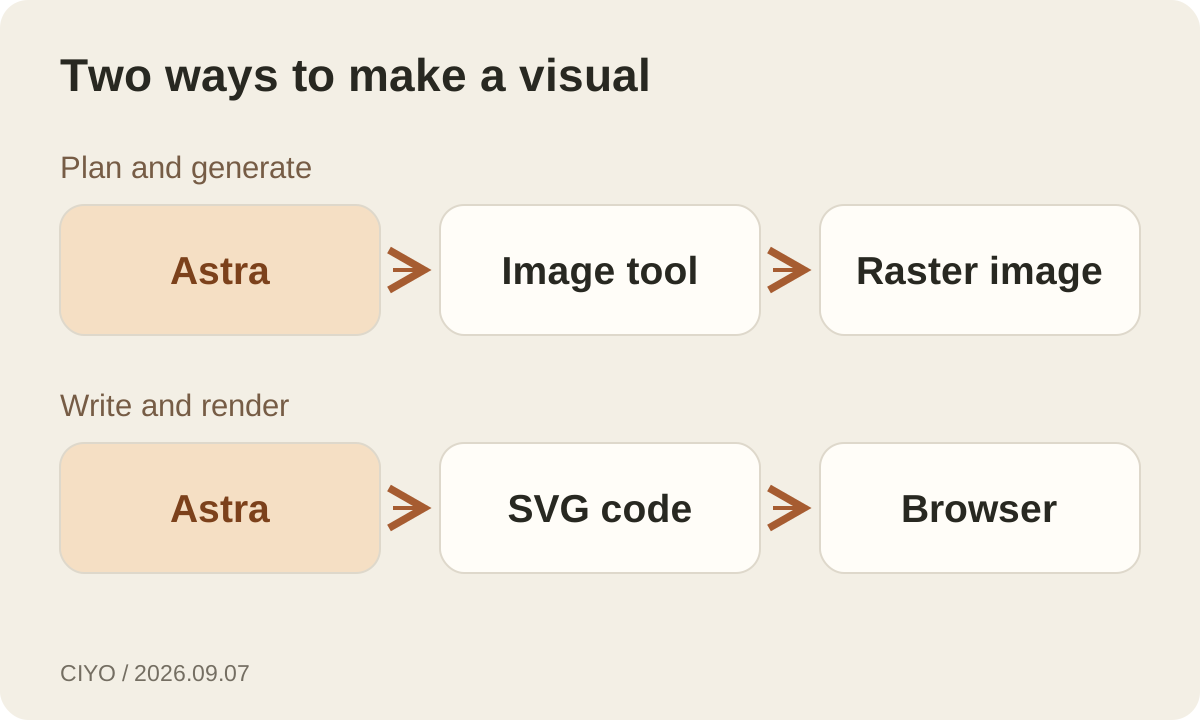
GPT-6 Astra can help create an image when the product or application gives it an image generation tool. The underlying jobs are distinct: Astra interprets the brief, reasons about the composition, and can call a tool; an image model renders the pixels. OpenAI lists text as Astra’s direct output modality and image as GPT Image 2’s output modality.
That distinction matters when a chat returns a detailed description instead of a picture, when an API integration produces no image file, or when you are choosing which service to pay for. This guide uses OpenAI’s documentation checked on September 7, 2026, and a practical campaign example to explain the workflow.
What each model contributes
Astra accepts text and images. It can inspect a reference, identify the hierarchy of a layout, explain why a headline is hard to read, or turn a loose brief into a sequence of production steps. Those abilities are useful before and after rendering. They do not make every Astra response an image, and access to Astra does not automatically configure every supported tool.
GPT Image 2 is the image generation and editing model. Its documented API model ID is gpt-image-2, with a dated snapshot of gpt-image-2-2026-04-21. It accepts text and image inputs and produces images. Think about your deliverable first: a photographic product scene needs a renderer; an analysis of the scene can be a text response.
How a request becomes an image
In the Responses API, an application can select gpt-6-astra and provide the image_generation tool. Astra can then decide when to call that tool. OpenAI’s guide shows that the response contains an image_generation_call whose result holds base64 image data. Your application must extract and save that result; displaying only the assistant’s text can hide a successfully generated image.
The product also controls which tools are available, which image model is used, and how results appear. Check those settings when comparing services. Two interfaces with Astra selected can offer different image controls. A model’s support for a tool describes compatibility, while a particular account and application determine whether you can use it.
A campaign brief with enough detail to survive rendering
Consider an illustrative brief for a ceramic mug launch. The deliverable is a square product image for a shop listing, followed by a wide banner with empty space for a headline. Supply an approved product photograph, the real mug dimensions, the brand palette, and the intended placements. Specify that the handle shape, glaze color, and printed mark must stay faithful to the reference.
Ask Astra to separate fixed requirements from creative choices before generating. The fixed requirements might include the product’s shape and the headline’s safe area; the choices might include background material and lighting. A useful first response identifies missing information and proposes a composition. You can approve that direction before spending on multiple renders.
Keep the initial batch small. Produce two meaningfully different compositions, select one, and refine it. Ten nearly identical variants give you more files to inspect without necessarily teaching you which direction serves the campaign. This is a suggested workflow, not a claim that we benchmarked these models on a mug campaign.
Editing works best when the change is explicit
OpenAI documents multi-turn editing with previous image or response references. That gives a workflow a way to carry an existing image into the next request. Ask for a concrete change such as moving the mug slightly right to preserve headline space, and state which details must remain unchanged. A new description from memory provides less reliable continuity than the actual reference image.
After each edit, inspect the unchanged areas too. A corrected shadow is not a successful revision if the product label changes. For commercial work, compare the handle, logo, proportions, material, and any required wording against the source. Approval should depend on the exported asset at its intended size, not just the conversational explanation of what changed.
Choose the output settings for the placement
The image tool exposes controls for size, quality, format, compression, background, and generation or editing action. These are separate decisions. A wide banner needs a suitable composition as well as a wide file; cropping a square image can remove the product or the area reserved for copy. Request the placement early, then inspect the actual pixel dimensions after export.
GPT Image 2 supports flexible sizes within documented resolution constraints. Its transparent-background feature is documented as a preview; the guide specifies PNG or WebP for transparency, since JPEG does not support it. A tool exposing GPT Image 2 may offer only a subset of these options. Check its export controls rather than assuming every API setting appears in its interface.
SVG, charts, and screenshots need a different check
Astra can write text that describes a vector image, such as SVG code, when the task permits it. A browser can render that code into a diagram. That is a useful route for a simple process figure with precise labels and editable shapes. It also explains why an assistant may create a visual artifact even though the model’s direct output modality is text.
For data charts, calculate values from the underlying data and render them with a charting tool. For a product screenshot, capture the real interface. Generating an attractive picture of a dashboard cannot establish that the dashboard exists or that its numbers are correct. Choose a production method that preserves the evidence your reader needs.
What to check when no picture appears
If the response only describes a picture, first confirm that the current product supports image generation in that mode. In an API application, inspect the available tool configuration and the response output items. If the request requires an image, the documented tool_choice option can require image generation; the application still needs to handle failures and save the returned image.
Next check the requested format, size, account access, and any displayed error. Rephrasing the same prompt repeatedly will not repair a missing tool or an image result that your interface never displays. Keep a minimal request that generates one image, verify that it works, and only then add references, editing history, and batch production.
Where Ciyo fits into the process
Ciyo offers GPT-6 Astra as a selectable design agent alongside its GPT Image generation and editing tools. Choose Astra to plan and refine a design, and choose an image model to render it. Sign in to send your prompt; image and video generation use the displayed credit prices. Ciyo access is separate from a ChatGPT subscription or your own OpenAI API account.
For a finished campaign, keep the brief, approved references, selected result, and final export together. Record what changed between versions. That makes a later crop or language adaptation easier to review and helps distinguish a visual experiment from an asset that is ready to publish.
Continue reading
Questions about GPT-6 images
Is GPT Image 2 another name for GPT-6?
No. gpt-6-astra is the Astra model ID; gpt-image-2 is a separate image model. An application can combine reasoning and image generation in one workflow.
Can GPT-6 analyze an uploaded image?
Astra’s model documentation lists image input support. The interface still needs to support uploading or attaching the image. Image understanding and image generation are separate capabilities.
Does paying for Astra include unlimited image generation?
Do not assume that. Product limits, API usage, and image generation charges depend on the service and billing route. Check the current plan and the tool’s pricing.
Turn a clear brief into an image
Use Ciyo’s image tools to generate a first composition, refine the selected result, and review the cost before each generation.