Design workflow comparisons
Canva vs Ciyo: Choose Around the Design You Need to Revise

Choosing a design tool becomes easier when you name the next revision. Changing an event date in a reusable page layout is a different job from asking an agent to build a new visual direction around a brief. Both can produce a finished-looking graphic; the useful question is what you can reliably edit and hand off afterward.
This comparison combines current Canva documentation with a live Ciyo demonstration on November 15, 2026. We asked Ciyo to make a fictional event card, then change one date. We did not run a timed Canva-versus-Ciyo experiment, and the result below does not establish a universal speed, quality or cost winner.
Quick choice
Start with Canva when your priority is a familiar page-based design, template selection and direct layout editing. Evaluate Ciyo when you want to describe a task to a Design agent and keep its visual results together on a canvas. For either tool, verify the actual source and export you need before committing to a repeatable workflow.
| Your next task | What to assess in Canva | What to assess in Ciyo |
|---|---|---|
| Revise a familiar layout repeatedly | Template, editable page elements and shared design access | Whether the returned asset is a raster preview, editable source or both |
| Explore from a written brief | Current Canva AI capabilities and plan allowance | Agent-directed planning, generated assets and review on the canvas |
| Deliver a multi-page document | Page selection and PDF download settings | Actual export availability; external assembly may be needed |
| Hand off editable artwork | Required format, plan entitlement and recipient’s editor | Source code or editable output actually returned; do not infer it from a PNG |
| Budget for occasional work | Free versus paid tools and any required premium content | Credit use for agent work and media operations separately |
What Canva’s documentation establishes
Canva offers templates, a drag-and-drop editor and AI features. It would be inaccurate to describe it as a tool without AI. Its download help explains file-type selection, page selection and settings that vary by format and plan.
That documented page-and-download workflow is relevant when a team already knows the layout it must maintain. Check your own plan and the design’s assets before choosing an export. Canva’s help identifies several plan-dependent options, including transparent PNG, SVG and CMYK PDF. A file type appearing in a comparison does not mean every account can download it.
This is a documentation-based assessment. We have not measured how quickly a particular Canva user would complete the fictional date revision, or whether their existing template would be a better starting point.
What the Ciyo revision actually did
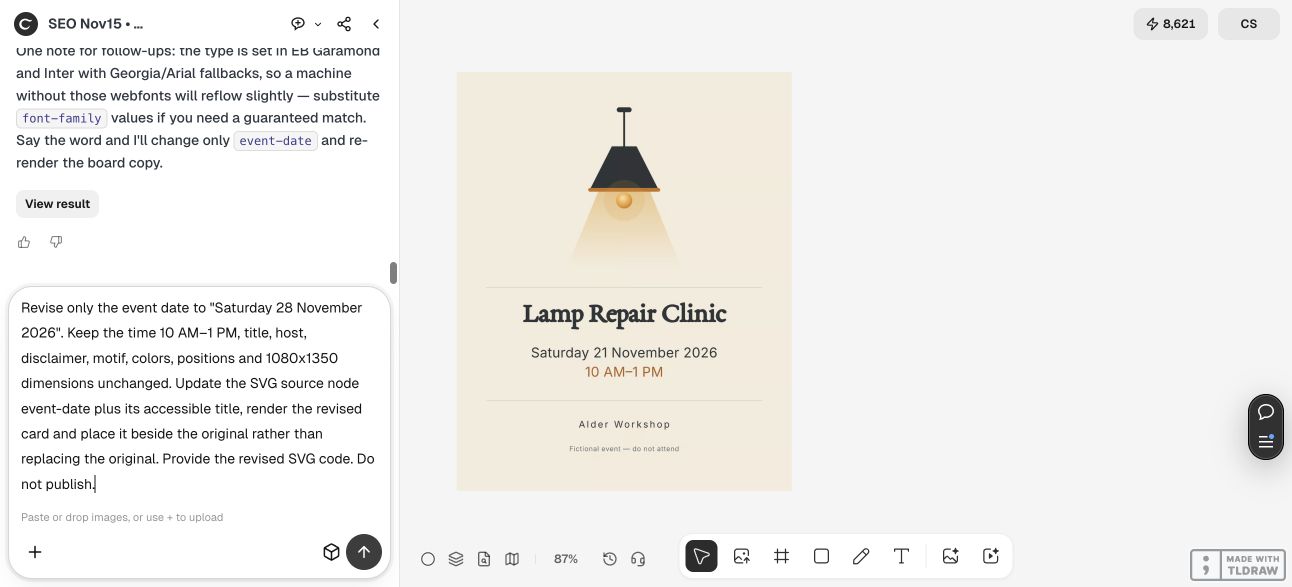
Our fictional Alder Workshop card began at 1080 × 1350 pixels with the title “Lamp Repair Clinic,” the date “Saturday 21 November 2026,” the time “10 AM–1 PM” and a visible fictional-event disclaimer. Ciyo built an SVG layout, rendered a preview and placed that preview on the canvas.
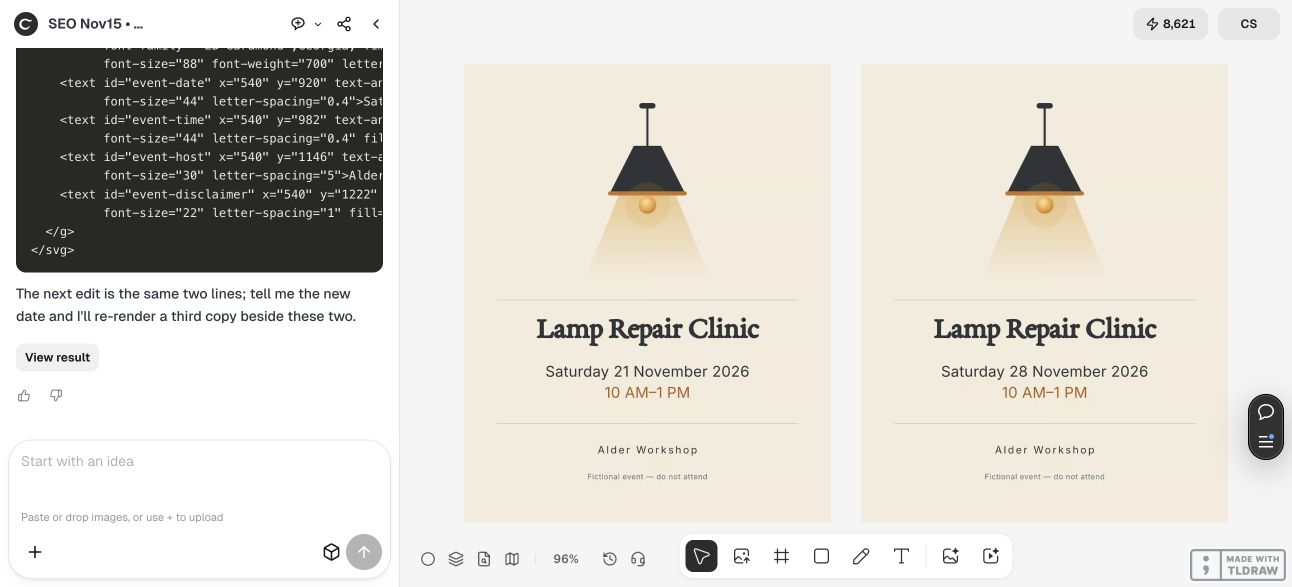
We then requested “Saturday 28 November 2026” while retaining the time, motif, positions and other words. Ciyo returned a second SVG source and placed its rendered image beside the original. Comparing the two actual source strings showed exactly two replacements: the visible date and the accessible title. The rest of the supplied source was identical.
That is useful evidence for this specific constrained revision. It does not prove that every image edit will preserve all other details. A code-based layout with a distinct date node gives a different kind of control from asking an image model to repaint text inside a flattened image.
Revise only [EXACT FIELD] from [OLD VALUE] to [NEW VALUE]. Keep [UNCHANGED COPY, DIMENSIONS, POSITIONS, MOTIF AND COLORS] unchanged. Preserve the original and place the revision beside it. Return the source actually used to make the result, if available, and say which parts cannot be edited separately. Do not publish.

A canvas preview is not the editable source
In this demonstration, the Ciyo board showed raster previews. The SVG source was returned separately as code in the chat. We saved that code as SVG files. We did not demonstrate editing native vector text directly on the Ciyo canvas, and a screenshot should not imply that capability.
Save the source before closing a project handoff. Reopen it in the recipient’s intended editor and inspect font fallback, line breaks and dimensions. An SVG with live text can still change appearance on a machine without the same fonts. If the recipient needs a particular native document format, test that requirement directly.
For a freelancer making occasional assets, this may be a manageable source-plus-preview handoff. For a team changing dates and names every week, a shared, proven layout system may matter more than the first generation. Choose after someone other than the original creator successfully makes the next edit.
Compare the billing models on your actual task
On November 15, Ciyo’s public pricing lists one-time packs of 1,000 credits for US$10, with no subscription. Its page says agent conversation and reasoning can consume credits separately from media generation. Estimate the entire job, including rejected attempts and revisions, rather than treating the lowest listed image price as the total.
Canva’s pricing page lists a Free plan and paid Pro, Business and Enterprise options. A free plan is different from a paid-plan trial. Plan entitlements, AI allowances and premium content can affect the task you are trying to finish; consult the current offer for your region and billing period.
We did not measure a comparable completed-task bill in both products, so this article does not claim that either is cheaper. A practical comparison is the cost of one accepted deliverable with the required editability and export, multiplied by the frequency at which you expect to repeat that job.
Run a small acceptance test before switching
Use one approved brief, one change request and one required output format. In each tool, confirm the words, make the revision, save the source and ask the intended recipient to open the final file. Record any manual reconstruction and any feature that requires a different plan.
Choose Canva if its existing layout and export workflow meets that test with less maintenance for your team. Choose Ciyo if the agent-directed process and canvas review fit your creative work and the returned files satisfy the handoff. Keeping both is reasonable when they serve different stages, but it still requires a clear owner for the final source.
Questions about Canva and Ciyo
Does Canva have AI design tools?
Yes. Canva’s current product and pricing pages list AI capabilities. Check the features and usage allowances of the plan you intend to use.
Did this comparison test both products hands-on?
No. The Ciyo date revision was run live; Canva’s capabilities were assessed through current official documentation. There is no timed head-to-head performance result.
Does Ciyo’s preview prove the design is editable?
No. Our canvas result was a raster image. The editable SVG source was separately returned as code and saved for the handoff.
Which one is cheaper?
That depends on your required features, billing model, job frequency and accepted output. We have not measured an equivalent completed-task bill in both products, so no general price winner is claimed.
Test the next revision
Bring one approved brief and one tightly defined change into Ciyo. Check the result, the source and the handoff before scaling the workflow.