Choosing a creative workflow
AI design agent vs image generator: which should you use?
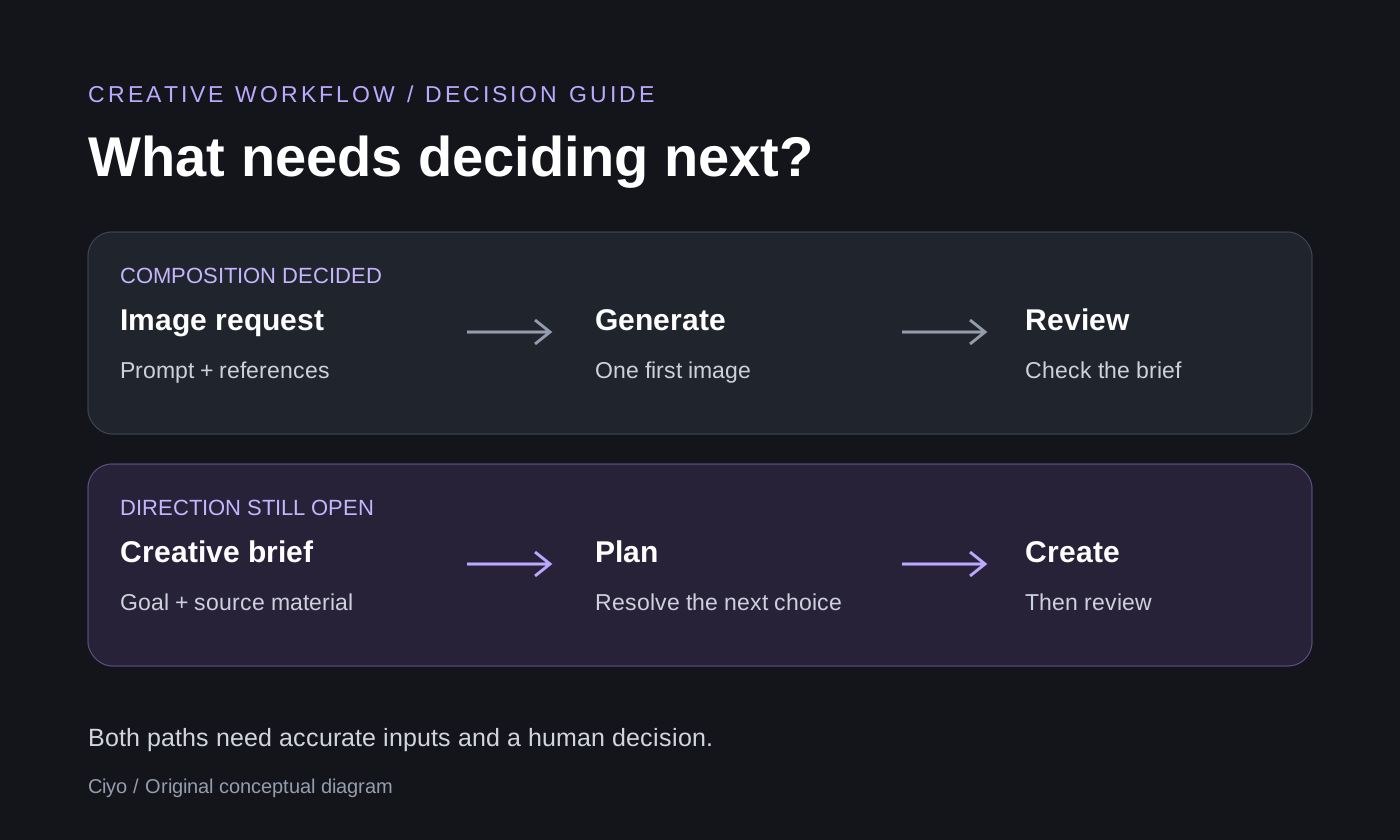
Use an image generator when you already know the image you want to make. Use an AI design agent when you need help connecting a brief, references, creation and revisions. An agent can use an image generator within that process, so these are overlapping ways to work rather than mutually exclusive technologies.
For a small marketing team, the useful question is what needs deciding next. A product background with a settled composition may need one generation. A launch visual with an unclear message, two possible directions and later video work needs a broader conversation. This guide compares those tasks, provides a downloadable decision checklist and points to an actual Ciyo review.
The difference is the scope of the task
An image-generation workflow centers on creating or editing an image from a request and, where supported, reference images. You decide what the image must communicate and judge the result. A design-agent workflow adds a conversation about the job and actions around the assets: clarify a goal, plan the work, invoke available tools and respond to feedback.
The names alone do not tell you which product is better. Image tools can also offer chat, editing and multiple references. An agent may still misunderstand the brief or produce an unsuitable image. Compare the controls, context and output you need, then test one representative task. Neither label guarantees accurate text, consistent products or a finished campaign.
Choose by the decision you need to make
Start with the smallest workflow that can answer your question. If the brief is already settled, adding a planning conversation may add little. If the message is still unclear, generating many pictures can leave the real decision unresolved. The following are starting recommendations, not limits on either type of tool.
| Your situation | Useful starting point | What to check |
|---|---|---|
| One image, with composition and purpose decided | Image generator | Prompt, references, output dimensions and visible accuracy |
| A creative goal with an unclear message or direction | Design agent | Ask for a short plan and resolve assumptions before making assets |
| Two existing concepts need review against the same brief | Design agent with the relevant images selected | A reasoned choice, its weakness and the next revision |
| A precise image change with everything else fixed | Available image-editing controls | Whether the tool supports the change and what else changed |
| A product-photo campaign that may need stills and video | Design agent for the plan; image and video tools for production | Source accuracy, scope, credits and the final files |
| Exact editable typography or a specified production file | Check the editor and export capabilities first | Native text, file type and dimensions; an image is not proof of editable layers |
Try the same fictional brief through both paths
Imagine a notebook launch with one approved product photo. The audience is people who keep a daily desk journal. The task is one square social visual, and the product cover must remain recognizable. These are illustrative instructions, not a new Ciyo generation test.
For a focused image request, specify the scene: use the supplied notebook photo, place it on a quiet desk with soft daylight, preserve the cover, leave clear space for a headline, and avoid adding unapproved wording. You have already chosen the direction. Your next job is to inspect the result against the source.
For an agent request, start one step earlier: ask whether a quiet desk scene or a simple flat lay communicates the journal's everyday use more clearly. Explain the audience, provide the same source photo and ask for a short comparison before generation. Once you select an approach, request one first asset and review it before expanding the set.
Both paths still need the approved photograph, the real message and your judgment. Ask which parts of the product must remain unchanged. If you need exact copy, supply it and check it in the output rather than assuming that a longer conversation guarantees correct letters.
I am making one social visual for a product launch. Help me choose between two visual directions before creating an image. First ask what the product is and who the visual is for. I will supply the product photo and approved words. Keep the first plan short and identify anything we still need to decide.See what a review adds after generation
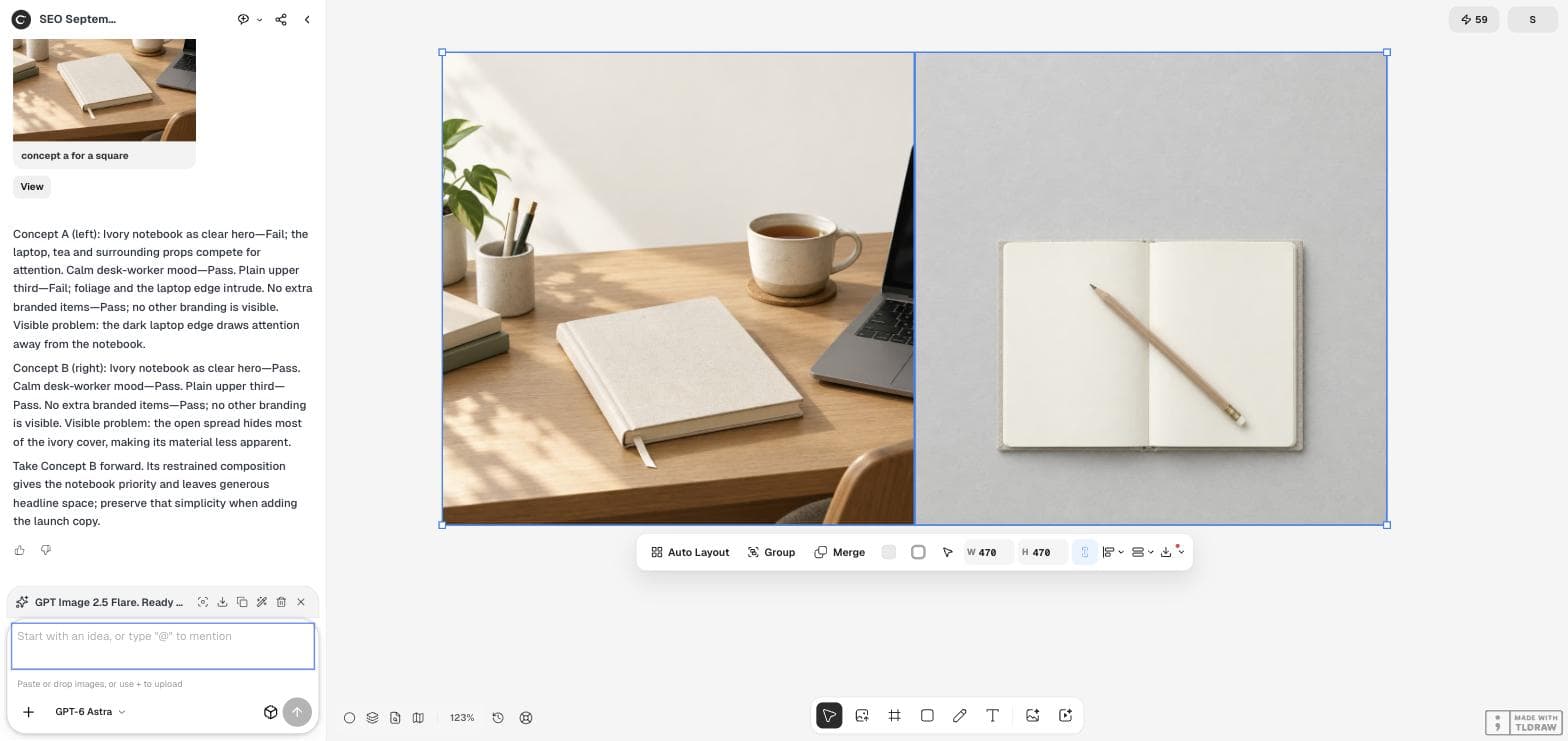
In the existing September 18 Ciyo walkthrough, two notebook concepts were selected on the canvas and reviewed against a brief. The agent recommended a direction and identified a remaining weakness: the notebook cover was not sufficiently visible. That makes the next request more specific than asking for another attractive image.
This is a single recorded creative review, not a speed benchmark or an advertising experiment. Read the full case to see the input, reasoning and limitations. An agent recommendation supports a decision; a person still needs to check the product and accept the final asset.
Evaluate one small pilot before expanding the task
Choose a task with inputs you can inspect: one supplied product photograph, one approved message and one intended output. Review the first result against the same criteria whichever path you choose. A useful pilot reveals whether the product is recognizable, the composition serves the message and the required file is available.
Keep a short record of the initial request, the change you asked for and the issue that remains. If the result fails because the source photo hides an important detail, supply a better source rather than assuming another tool label will solve it. Planning and generation can use credits, so review the scope before requesting more versions.
Use this checklist before you start
Write down the next decision, the files that establish the facts, the smallest useful output and the checks it must pass. If your next decision is simply whether a known composition looks right, start with the image tool. If it is what to make and why, bring that question to the agent.
The downloadable worksheet includes the notebook example and a blank version. Use only the fields that help you decide; it is optional preparation, not a required form in Ciyo. Start with a short request and add references when the task needs them.
Questions about agents and image generators
Is an AI design agent an image model?
In this workflow, the agent manages a conversation and available actions around a creative task. Image generation is one possible action. The agent and the image model perform different jobs, even when you use them in the same workspace.
Will an agent make a better image?
An agent can help clarify the brief and choose the next action, but the result still depends on the image model, inputs and review. This guide does not establish a quality advantage or a measured performance gain.
Does a design agent make all text editable?
No. Text rendered inside an image remains part of that image unless the workflow explicitly produces native text objects. Check the actual editing and export controls before committing to a typography or handoff requirement.
What should I try first in Ciyo?
Choose one real task. Bring a product photo or describe the audience and intended asset, then ask for the smallest useful next step. Review the plan and first output before extending the task. Planning and generation can consume credits.
Bring one real design decision
Open a short draft, edit it and add your own references. Sign in and choose Send when you are ready. Planning and generation can use credits; start with a small task.