Creator collaboration documents
Creator Media Kit Template: Keep Audience Metrics Separate

A potential partner should be able to tell what you make, whom it reaches and how to work with you without decoding a page of impressive-looking numbers. A subscriber count and average opens describe different things. Putting them in one unlabeled audience total makes a media kit less useful.
We created a fictional newsletter media-kit proof in a signed-in Ciyo development workspace on November 21, 2026. The downloaded PNG contains the requested labels and sample figures, but its text is baked into the image. This guide shows how to judge that visual proof and move the approved information into a separately assembled, editable HTML companion. The figures are invented examples, not Ciyo or customer performance.
Quick answer: one label, one metric, one reporting period
Use a short introduction, separately named audience metrics, a reporting date, relevant collaboration options and a contact route. Keep the source and definition of each real metric in your working notes. A visually attractive number should never require the reader to guess whether it means followers, subscribers, views or people reached.
Follow five steps: define the partnership question, prepare the facts, generate a visual proof, inspect the actual output, and rebuild changing information as editable text before sharing. The download below is an English fictional example; replace its information with your own verified facts.
| Step | Action | Keep |
|---|---|---|
| 1 | Choose the reader and collaboration | A specific decision the kit should support |
| 2 | Define each metric and reporting period | Approved facts with their original source |
| 3 | Request a visual hierarchy | The prompt and unmodified image proof |
| 4 | Compare every label and figure | A correction list, not a blanket approval |
| 5 | Keep changing facts editable | A reviewed source file and final sharing copy |
1. Decide what the prospective partner needs to know
Juniper Notes is a fictional art-and-paper newsletter seeking a newsletter feature or tutorial collaboration. Its kit therefore needs a clear subject, a brief description of the audience and two concrete ways to collaborate. It does not need an invented client list, a fundraising history or an impressive-looking testimonial.
Canva's media-kit guide includes bios, services, audience statistics and contact details among common creator-kit elements. Treat that as a menu rather than a requirement to fill every category. A new creator can show an original work sample and explain an offer honestly without pretending to have past brand partnerships.
A product-launch press kit serves a different reader question: it helps someone report on a launch and retrieve approved assets. Keep that document separate when the purpose is press coverage rather than a creator collaboration.
2. Prepare a small, auditable facts sheet
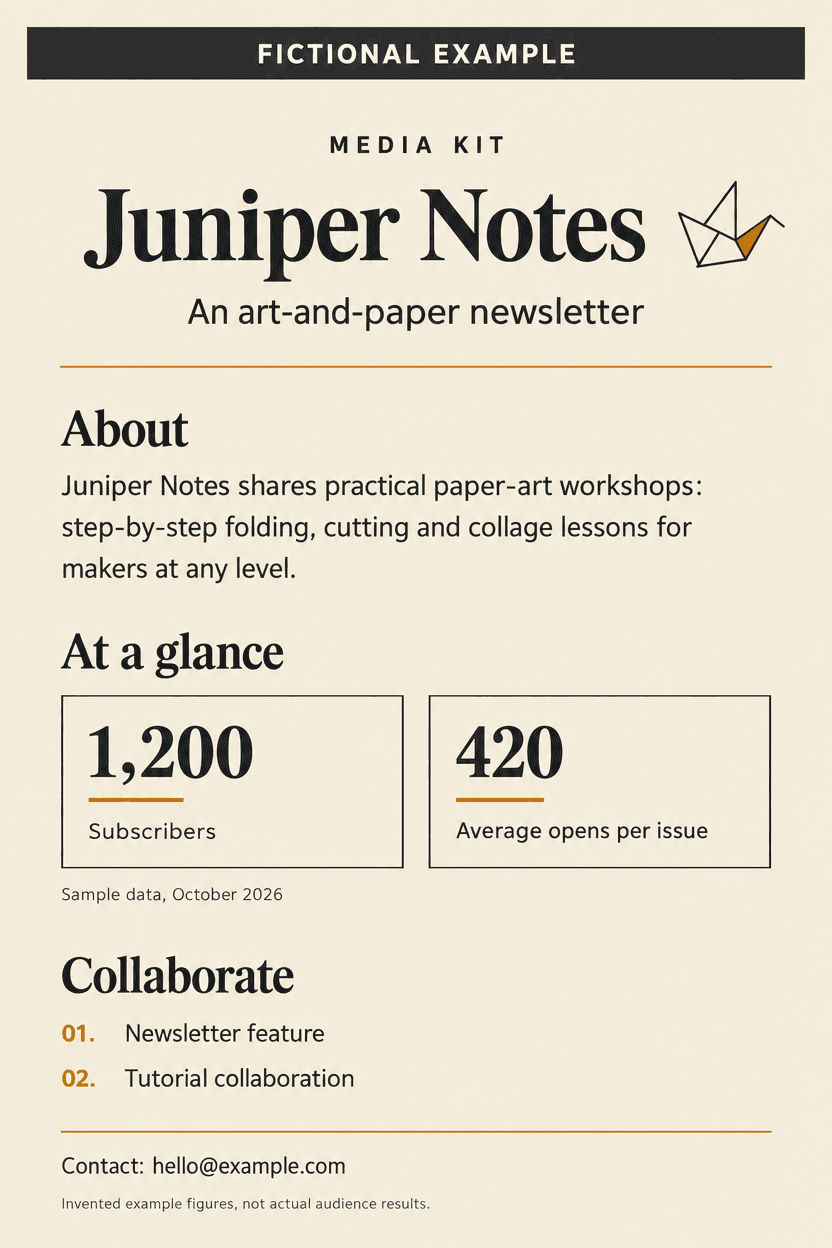
Before designing, write each metric with a name, value, period and source. In our fictional example, Subscribers is 1,200 and Average opens per issue is 420, both under the visible label Sample data, October 2026. They are not added together. The first describes a subscription count; the second describes an illustrative per-issue average.
For your own kit, preserve the definition supplied by the reporting platform. An account count is not automatically a count of unique people, and an open metric is not automatically proof that someone read the whole issue. If you calculate an average, retain the included issues, the calculation and the date range so someone can reproduce it.
Omit an unavailable metric or explain the gap. Do not have a design generator invent demographics, engagement rates or revenue to complete a layout. Review permission before including a customer name, quote or campaign result.
| Visible label | Example value | What to preserve |
|---|---|---|
| Subscribers | 1,200 | Keep separate from opens; replace with an approved count |
| Average opens per issue | 420 | State the included reporting period and definition |
| Sample data | October 2026 | Retain the invented-example disclosure |
3. Brief Ciyo around hierarchy and exact wording
Create an isolated project and ask for a flat page, not a photographed document on a desk. Specify the approved wording, which numbers must remain separate and where the fictional-example disclosure belongs. A request for a polished media kit alone leaves too much room to invent content.
Our run used GPT Image 2.5 Flare to produce one portrait proof. The reusable prompt below narrows the request to the visual deliverable demonstrated here. It does not promise selectable text, a saved HTML file or a PDF from the image-generation step.
Create one flat portrait media-kit proof for [creator or fictional example]. Use this approved bio: [bio]. Keep these metrics separate: [metric name, value and reporting period] and [second metric name, value and reporting period]. Include [collaboration options] and [approved contact]. Use [palette] with a clear reading hierarchy. Do not invent partnerships, testimonials, demographics or results. For fictional material, visibly label the page FICTIONAL EXAMPLE and the figures Sample data, [period]. Generate an image proof and report actual dimensions. Do not claim editable text or a PDF export.4. Inspect the file instead of approving the style alone
The downloaded file is a PNG at 832 × 1248 pixels. We inspected the image itself: it shows the fictional-example banner, Juniper Notes, the bio, the separate 1,200 and 420 metrics, their sample period, both collaboration options and the fictional contact address. The generator also added a small paper-crane motif and a footer explaining that the figures are invented.
Compare the output against your facts sheet line by line. Check digits, punctuation, the association between a figure and its label, and whether a period qualifier has drifted away from the number. Read the page at the size a recipient will actually see. Attractive typography does not establish that an audience claim is accurate.
The Ciyo response explicitly described the text as part of the image. That is the important handoff: use the PNG to review hierarchy, then keep changing facts in an editable document. A pixel size is not a promise of a particular print quality or a selectable-text PDF.
5. Keep the sharing copy editable and dated
The linked HTML companion was assembled separately for this article with real source text. It is not an editable export of the Ciyo PNG. Open it in a browser to review the layout, then edit a saved copy in a text editor or move the approved information into a document tool you already use. Replace the example labels, numbers and address before using it for your own work.
Review the final document again after every update. Changing a subscriber count without changing its date creates ambiguity; changing an offer without checking the contact line can send a partner to the wrong place. Keep a dated working copy and a clearly named sharing copy so old statistics do not circulate as current.
If you print or export through your browser, check pagination and text selection in that new file. This tutorial does not claim a built-in Ciyo PDF export or a tested email campaign. The next action is to review a document, not to send it automatically.
Choose the amount of detail for the reader
A solo creator approaching a first collaboration can lead with the subject, an original sample and a specific offer. An established publisher can add verified reporting definitions and relevant past work. An agency managing several creators should keep each creator's figures and dates separate instead of combining them into an unclear network total.
Add rates only when you have a current, approved offer and can explain its scope. A media kit does not need a made-up rate card to look finished. Keep supporting evidence available without publishing private analytics screenshots or contact details that were never approved for sharing.
Creator media-kit questions
Can I use a media kit before I have brand partnerships?
Yes. Explain what you make, show an original sample and describe a realistic collaboration. Leave out unsupported client logos and testimonials. A smaller honest kit is more useful than invented experience.
Is the Ciyo image an editable template?
The demonstrated PNG has text baked into its pixels. The linked HTML companion is separately assembled editable source; it is not a layered or selectable-text export of that PNG.
Should I add subscribers and average opens together?
No. They describe different measures. Label them separately, retain their reporting definitions and show the applicable period. Our 1,200 and 420 figures are fictional examples.
How long will my own kit take?
That depends on whether your facts, permissions and work samples are ready, plus any revisions and export checks. This single demonstration does not establish a general completion-time guarantee.
Start with an approved facts sheet
Bring a short bio, separately defined metrics and a concrete collaboration offer to Ciyo. Review the visual proof, then keep the information editable before sharing.