Practical design guides
Product Launch Press Kit Template: Check the Facts, Captions and Files
A journalist opening a product launch kit needs accurate information and usable files. A beautiful cover is less useful when the product image has no caption or the download link asks for unexpected access.
This guide uses published press-kit guidance and an original fictional product launch. It shows how to organize visual materials and a handoff checklist in Ciyo. The example does not claim press coverage, sales or permission to distribute somebody else’s assets.
Quick answer
Prepare a short approved fact sheet, clearly labeled original images, usage and contact information, and a file index with working links. Keep concept artwork separate from documentary product photographs. Test the recipient’s access before sharing the kit.
1. Freeze the facts a reporter can quote
Collect the exact product name, launch date, availability wording, price if public and the approved press contact. Record who owns each fact and when it was checked. Omit unsupported awards, customer counts or performance claims rather than making the kit look more complete with invented details.
Our fictional Harbor Tools launch introduces a desk organizer called Field Tray. The fact sheet labels the scenario as fictional throughout this exercise. For a real launch, use the responsible business’s approved facts and keep embargoed information separate from publicly accessible materials.
2. Separate documentation from concept imagery
Build a small image set around the questions a publication might ask: what the product looks like, how it is used and what a detail shows. Retain the originals and caption the view, product version and any relevant illustration status.
A generated lifestyle concept may help plan a scene, but it should not be presented as a photograph of a shipped product. If you include illustrative artwork, label it and keep it in a distinct part of the index. Confirm the rights and approved credits for every distributed image.
3. Organize the review board in Ciyo
Start an isolated project with approved copy and original image references. Use labels to separate fact sheet, product views, concept art and outstanding questions. Ask the Design agent to help review consistency or plan a compact visual introduction, while preserving all approved names and numbers.
For Field Tray, the board keeps a front view, detail view and illustrative use scene in separate regions. The file index identifies which is which. The board helps the team review the kit; it is not itself a guarantee that a recipient can download the required source files.
Live Ciyo check: an index is not a press kit
We uploaded our fictional Field Tray index and requested a text-only review. Ciyo separated facts, documentary photos, concepts and downloads, and flagged missing assets, captions, rights and approved contact information. It also stated that its pixel-level inspection tool could not inspect the SVG. No recipient link, rights clearance or real launch material was verified, published or distributed.
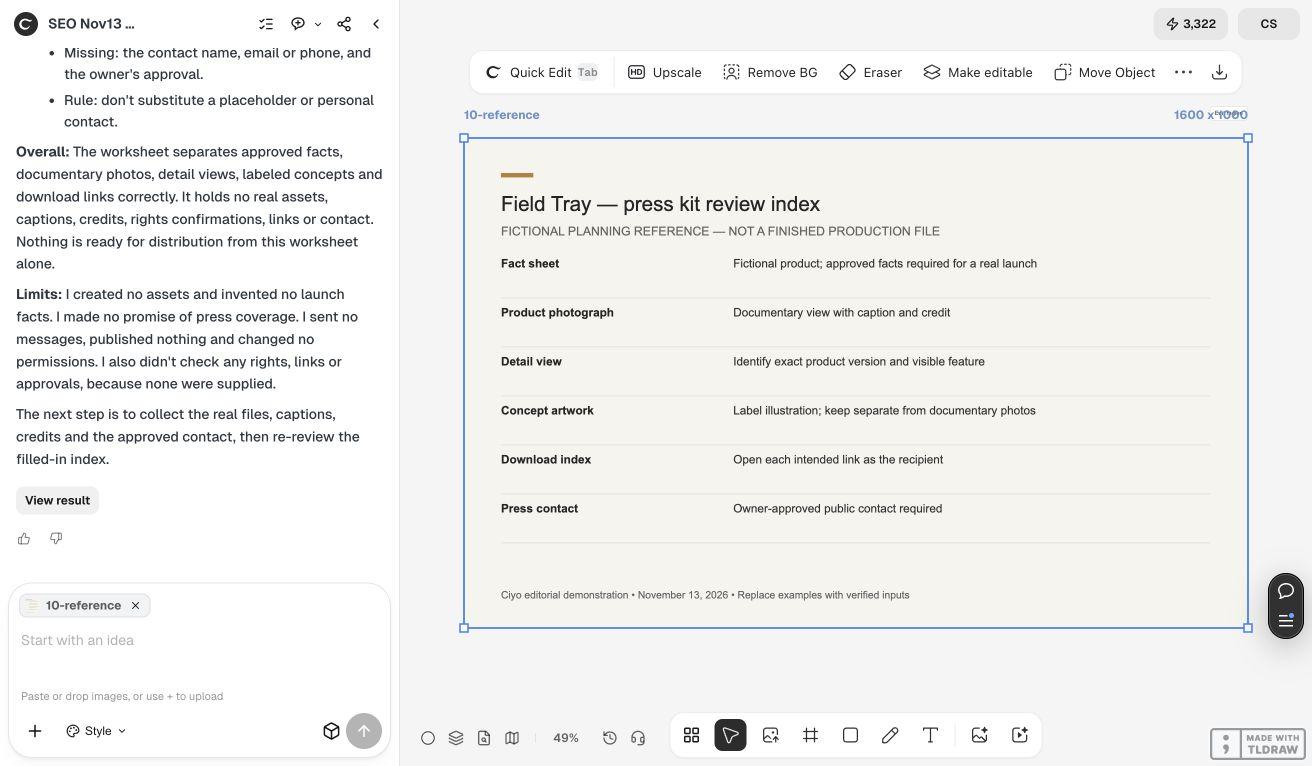
A compact launch-kit index
This is an original checklist for the fictional scenario. Deliver only assets that exist and are approved for the intended audience.
| Item | Must answer | Check |
|---|---|---|
| Fact sheet | What is launching and when? | Approved wording and date |
| Original product image | What does the real product look like? | Caption, version and credit |
| Detail view | What feature is visible? | No unsupported performance claim |
| Concept artwork | Is this illustrative? | Clearly labeled and separated |
| File index | Where can the recipient get each item? | Open links as the recipient |
| Press contact | Who can confirm the facts? | Owner-approved public contact |
4. Test the handoff from outside the working board
Open each intended recipient link in a context with the same access level the recipient will have. Confirm that it reaches the correct file, that the file opens and that its name agrees with the index. Do not make a private folder public merely to avoid resolving a sharing problem.
Check the fact sheet against the launch page one last time. If availability or a price changes, revise both and retain a dated approved version. Sharing a kit is a separate distribution action; this design exercise does not send messages or publish the materials for you.
Copyable press-kit planning brief
Use fictional material while testing the process, then replace it with approved real assets for a real handoff.
Help me organize a press kit for [PRODUCT LAUNCH] using [APPROVED FACT SHEET] and [ORIGINAL ASSET INDEX]. Keep facts, documentary product images and illustrative concepts separate. Preserve exact names, dates and approved prices. Identify missing captions, version labels, rights information and contact fields without inventing them. Produce a review-board plan and a recipient-access checklist. Do not distribute or change file permissions.Choose the lightest kit that answers the story
For a small launch, a concise fact sheet and a few accurate images may be easier to use than a large presentation. A product with several variants needs a clear relationship between each image and its exact version. More files create value only when their identities stay obvious.
Shopify’s press-kit guide treats the kit as a place for reporters to find current business information and usable media. Our checklist adds a practical asset-validation step. Neither a complete kit nor an attractive layout guarantees editorial coverage.
Source
Primary guidance checked November 13, 2026. The product and file examples are fictional; the acceptance checklist is an original adaptation.
Frequently asked questions
Is a press kit the same as an advertising media kit?
The terms overlap, but this guide concerns product information and assets for coverage. It does not describe an advertising rate card or promise audience reach.
Can I include AI-generated product pictures?
Label illustrative concepts clearly and avoid presenting them as documentary photographs of a real product. Confirm the rights and the accuracy of every supplied asset.
Does the press kit guarantee coverage?
No. It can make accurate information easier to use, but a publication decides what to cover.
Organize a launch kit around approved facts and files
Bring your approved copy and reference files, make one draft, and compare the result with your checklist before creating more versions.