Practical design workflow
Family Tree Template: Check Every Relationship Link

Four names can look convincing in a family tree even when one connector points to the wrong person. The relationship list needs to be the source of the drawing.
This original example uses four fictional people and three parent-child links. It is a layout exercise, without real personal details or genealogical claims. The editable table and SVG let you check the structure separately from the visual treatment.
Quick answer: name the people and list the edges
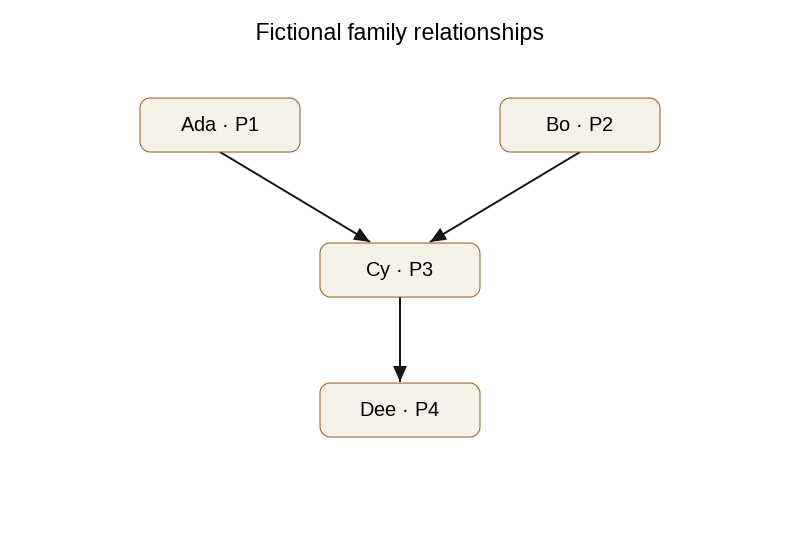
Assign each fictional person an ID, then list a parent ID and child ID for every relationship. In this example, the arrow runs from parent to child. Ada and Bo are parents of Cy; Cy is a parent of Dee. No other relationship is established by the drawing.
Follow four steps: freeze the relationship list, explore a visual layout, construct the explicit graph and review every edge. Do not infer a marriage, dates, gender, biological relationship or missing parent from where a name happens to appear.
| Parent | Child | Direction |
|---|---|---|
| Ada · P1 | Cy · P3 | P1 → P3 |
| Bo · P2 | Cy · P3 | P2 → P3 |
| Cy · P3 | Dee · P4 | P3 → P4 |
1. Keep identities separate from names
Write the four IDs and display names before drawing boxes. IDs help distinguish people who share a name or whose names change in a real source. For this example, the names are Ada, Bo, Cy and Dee; they represent no actual family.
For a real family project, collect and review the relevant source information and sharing permissions outside the image-generation brief. Leave uncertain relationships uncertain. An empty branch is preferable to an invented ancestor added to balance the composition. Avoid uploading sensitive details about living people merely to test a layout.
2. Explore the graph's presentation in Ciyo
Use a fictional project and give the exact relationship list. Review the model settings and quote before generating. Ask for clearly separated generations and readable names rather than decorative branches that make the connectors hard to trace.
Compare the result with the three edges. A visual model can duplicate a name or connect the nearest box instead of the stated child. Treat those as structural errors. An image is a presentation proof, not a source of family history, even when the layout resembles a traditional family tree.
On November 27, 2026, we used Ciyo’s production Image Generator with GPT Image 2.5 Flare, aspect ratio 4:3, 1K and one image. The displayed quote for this run was 2 credits. Check the quote in your own session.
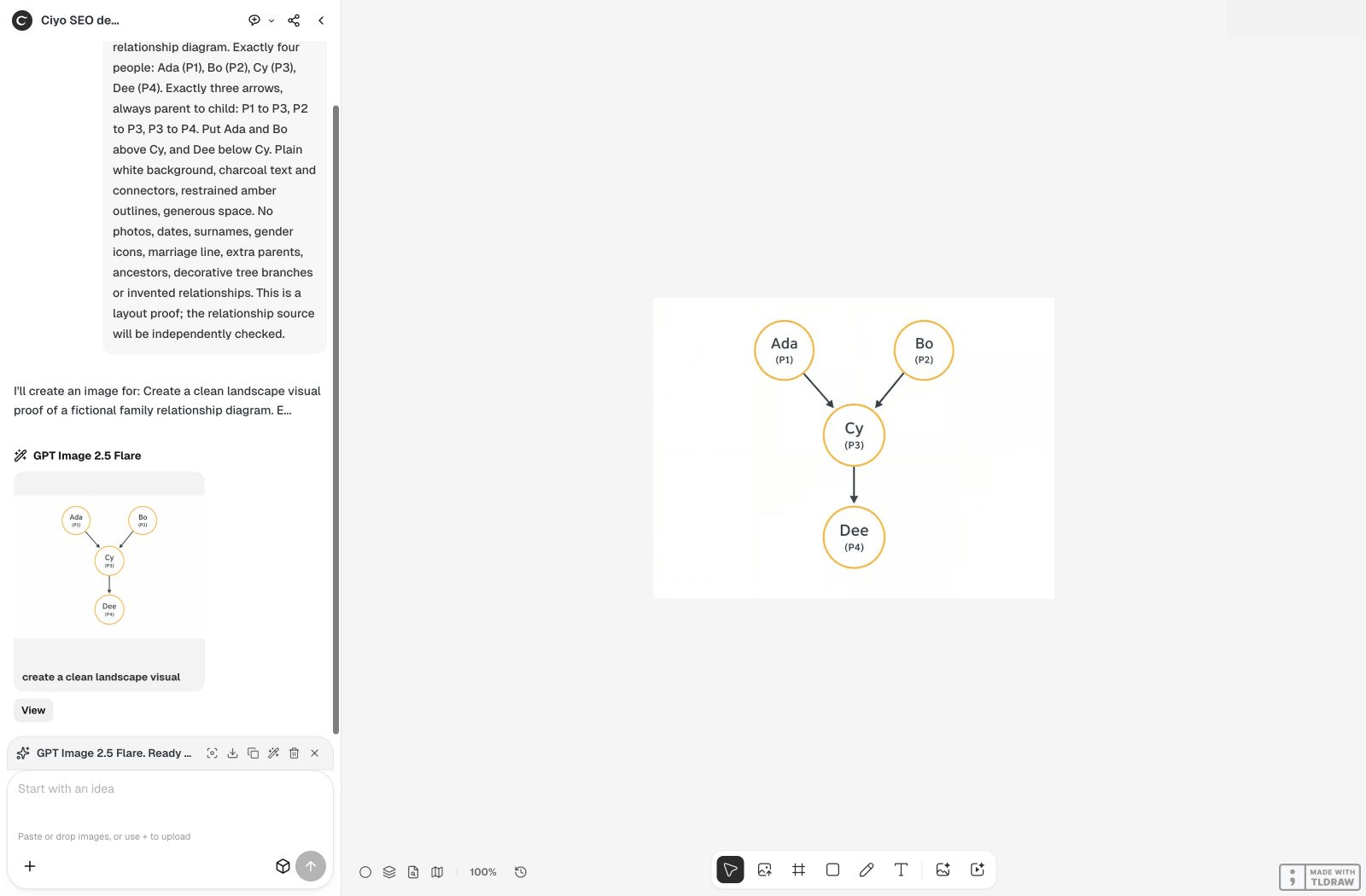
Create a clean landscape visual proof of a fictional family relationship diagram. Exactly four people: Ada (P1), Bo (P2), Cy (P3), Dee (P4). Exactly three arrows, always parent to child: P1 to P3, P2 to P3, P3 to P4. Put Ada and Bo above Cy, and Dee below Cy. Plain white background, charcoal text and connectors, restrained amber outlines, generous space. No photos, dates, surnames, gender icons, marriage line, extra parents, ancestors, decorative tree branches or invented relationships. This is a layout proof; the relationship source will be independently checked.3. Keep the relationship graph explicit
The result has four labeled people and three parent-to-child arrows. Ada and Bo point to Cy, and Cy points to Dee.
The original SVG contains four labelled nodes and three arrowed paths. The HTML example shows the relationship table above the diagram, and the CSV preserves the edge list. These are independently authored source files, not Ciyo exports.
Edit the table and SVG separately when adapting the example. Changing a table cell does not move a connector or rename a node in the SVG. If you need many people, use a tool that maintains a structured relationship graph instead of manually moving dozens of lines without a source list.
4. Trace every arrow from its source
Start at P1 and follow its arrow to P3. Repeat for P2 to P3 and P3 to P4. Count four unique IDs and three unique edges. Confirm that no edge begins and ends at the same person and that the parent-child chain does not loop back to an earlier person.
Then compare the names, ID mapping and sharing scope against the approved source for your real project. A correct diagram proves only that the drawing matches that source; it does not prove that the source is historically accurate. Preserve the distinction when you label, print or share the result.
Choose a layout tool or a genealogy record
Canva's family-tree templates provide editable presentation layouts. They are useful references for arranging a diagram, but a template gallery does not establish a relationship's evidence. Use a genealogy or structured-record workflow when sources, uncertainty and a large graph are central to the task.
A group of character posters can share a visual family without depicting parent-child relationships. Keep that design use of family separate from a literal family tree, where every connecting line makes a specific claim.
Family-tree questions
Does the example describe a real family?
No. Every person, identifier and relationship is fictional. The files demonstrate a checked layout and contain no genealogical evidence.
Does a shared child establish a marriage?
No. This example lists only parent-child edges. Do not add another relationship unless your verified source explicitly establishes it.
Can I edit a name once and update every file?
No. The HTML table, CSV and SVG are separate snapshots. Update each relevant source and check the ID-to-name mapping again.
Make each connector a checked statement
Start with fictional IDs and a relationship list, explore a layout in Ciyo and trace every final arrow against its source before sharing.