Practical design guides
Funeral Program Design: Confirm the Words Before Planning the Pages

A funeral program often needs to be finished quickly while several people are correcting names, readings and photographs. A calm layout helps, but the most important design input is a single, approved version of the words.
This workflow uses a wholly fictional memorial worksheet and supplier binding guidance. It explains how to prepare the page plan and review brief without inventing personal history. No real family’s biography, portrait or service details were used.
Quick answer
Choose one person to collect corrections and approve the final copy. Put verified names, dates, photographs and service order into a reading-order plan. Confirm the physical format with the printer, then read a folded proof page by page before approving production.
1. Collect approved words before choosing decorative elements
Create a master text document with separate fields for the person’s name, dates, service details, participant names, readings, acknowledgments and contact information when needed. Ask the family or organizer which fields belong in the program and who can approve them. Leave unresolved information marked pending in the working brief.
Do not ask an image generator to fill a missing biography, repair an unknown date or invent a quotation. Obtain permission for the selected photograph and any reproduced material. Keep the exact approved text available outside the artwork so each proof can be checked against it.
| Content | Status in the example | Required decision |
|---|---|---|
| Names and dates | Pending confirmation | Designated family/organizer approval |
| Photograph | No real image supplied | Select an authorized image |
| Service participants | Officiant listed as TBD | Organizer confirms name and role |
| Final corrections | One owner required | Approve one dated copy version |
2. Plan the reader’s sequence before the printer’s sheet
List the pages in the order a guest will read them: front cover, inside pages and back. Let the actual service and approved content determine the sequence. There is no universal ceremony order to copy into every program.
Then confirm the format, fold and binding with the supplier. Printivity’s binding guidance explains saddle stitching with folded sheets, which uses page counts in multiples of four for that construction. That constraint is not a reason to impose an eight-page format on every service. A simple folded sheet or a different binding can require a different plan.
3. Give Ciyo a bounded review task
Upload a page-plan reference with approved text and a separate list of unresolved fields. Ask the Design agent to identify inconsistencies, missing signoffs and anything that confuses reading order with printer imposition. Ask for questions rather than replacement personal details.
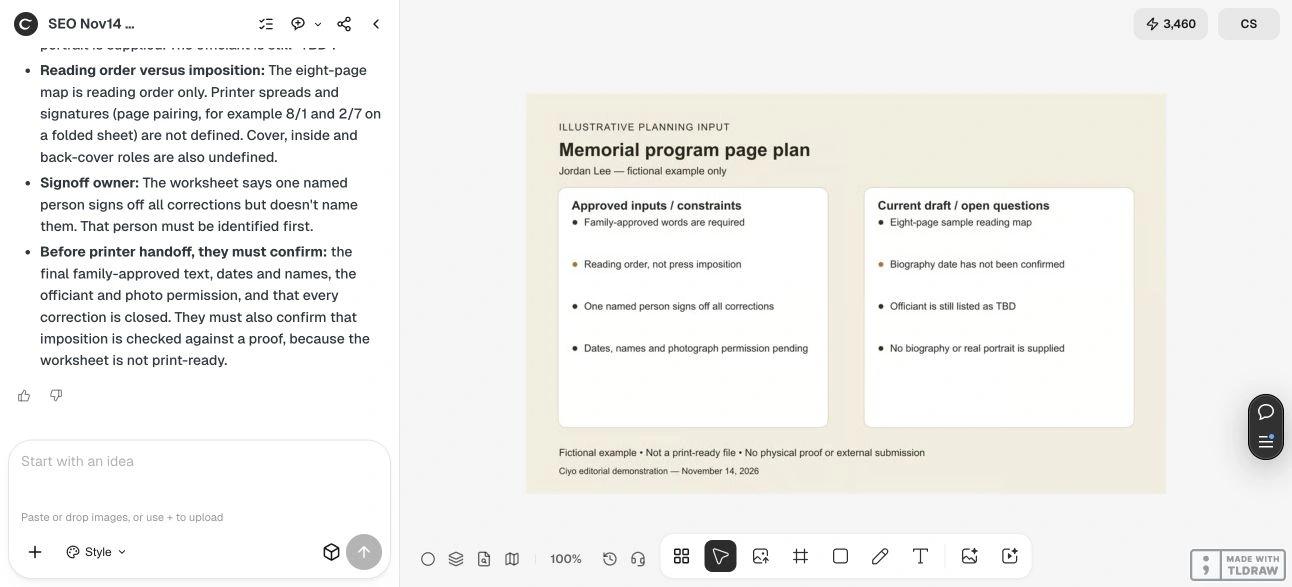
Our fictional worksheet uses the name Jordan Lee, an eight-page sample reading map, an unconfirmed biography date and an officiant placeholder. These are deliberately incomplete planning inputs. They are not a template for a real person’s service or evidence that a biography has been checked.
Live Ciyo review: approvals before imposition
In the November 14 dev.ciyo.ai run, Ciyo identified the unapproved wording, uncertain dates, missing photograph permission and officiant placeholder. It also noticed that the brief required a named signoff owner without actually naming one.
The response distinguished the eight-page reading map from printer imposition and requested a proof. We used the approval questions, not its illustrative page-pairing suggestion as a production instruction. The supplier must specify imposition. No biography, portrait or finished program was generated.
Copyable program-review prompt
Replace the bracketed fields with authorized content. Keep unknown details marked pending and let the organizer resolve them.
Review this funeral program page plan using only [APPROVED COPY VERSION] and [AUTHORIZED PHOTO REFERENCE]. Format: [FOLD/BINDING OR PENDING]. Pages are listed in reading order. Signoff owner: [NAME OR ROLE]. Flag inconsistent names, missing approvals, unresolved placeholders and possible reading-order/imposition confusion. Do not invent biography, dates, quotations or ceremony details. Return corrections and printer questions; do not submit a file.4. Review a folded proof, then freeze the approved version
Print a simple paper proof at the intended size and fold it as the reader will receive it. Turn every page in order, including the back. Check that a heading does not introduce the wrong reading, that names remain paired with roles, and that text stays readable without crowding the fold.
Let the named signoff owner consolidate changes into one version. Ask the printer whether it needs reading-order pages or an imposed layout; do not rearrange the production pages independently. Confirm trim, safe areas, image quality, stock and delivery details with the supplier. A planning review cannot replace the family’s approval or the printer’s proof.
Keep the layout quiet and the corrections traceable
Use a small number of consistent heading styles and enough space between sections. If the copy grows, revisit the page plan with the organizer instead of shrinking everything. Keep a dated final proof and an explicit approval, so a late correction has a clear new version to review.
Source
Printivity binding guidance checked November 14, 2026. The page-planning method and fictional approval register are original examples; the printer determines production requirements.
Frequently asked questions
Does every funeral program need eight pages?
No. Choose the format around the approved content and supplier’s construction. Eight pages is only the deliberately incomplete example used here.
Should I send pages in printer order?
Ask the chosen printer. Maintain a clear reading-order plan, and let the supplier specify whether it wants ordinary pages or an imposed file.
Can Ciyo write missing personal details?
The demonstrated task is a bounded planning review. Names, dates, biography and service details must come from authorized, approved sources rather than invention.
Organize the proof before the deadline
Bring an authorized page plan and approved words into Ciyo. Use the review to prepare a clear correction list for the signoff owner and printer.