GPT-6 Astra · Creator workshop
GPT-6 Astra Sprite Sheets: Alignment, Frames and Transparency
A sprite sheet is a file contract between an artist and a game. It must tell the engine where each frame begins, how large it is and where the character stands. An attractive grid of poses can still fail if the cells vary in size or the feet jump between frames.
This workshop focuses on preparing a usable sheet. It complements our game-development guide with the production details needed to import and inspect an animation asset.
Define the grid before generating artwork
Choose the cell width, cell height, number of frames, row order and background treatment before creating the character. For a simple four-frame idle loop, a single horizontal row is easy to inspect. Keep enough space around the widest pose so a hand or tail does not cross into another cell.
Astra can help write this specification and code a preview. In Ciyo, use image generation for the visual concept. A generated contact sheet still needs inspection and may require assembly in a sprite editor.
Give the engine an unambiguous contract
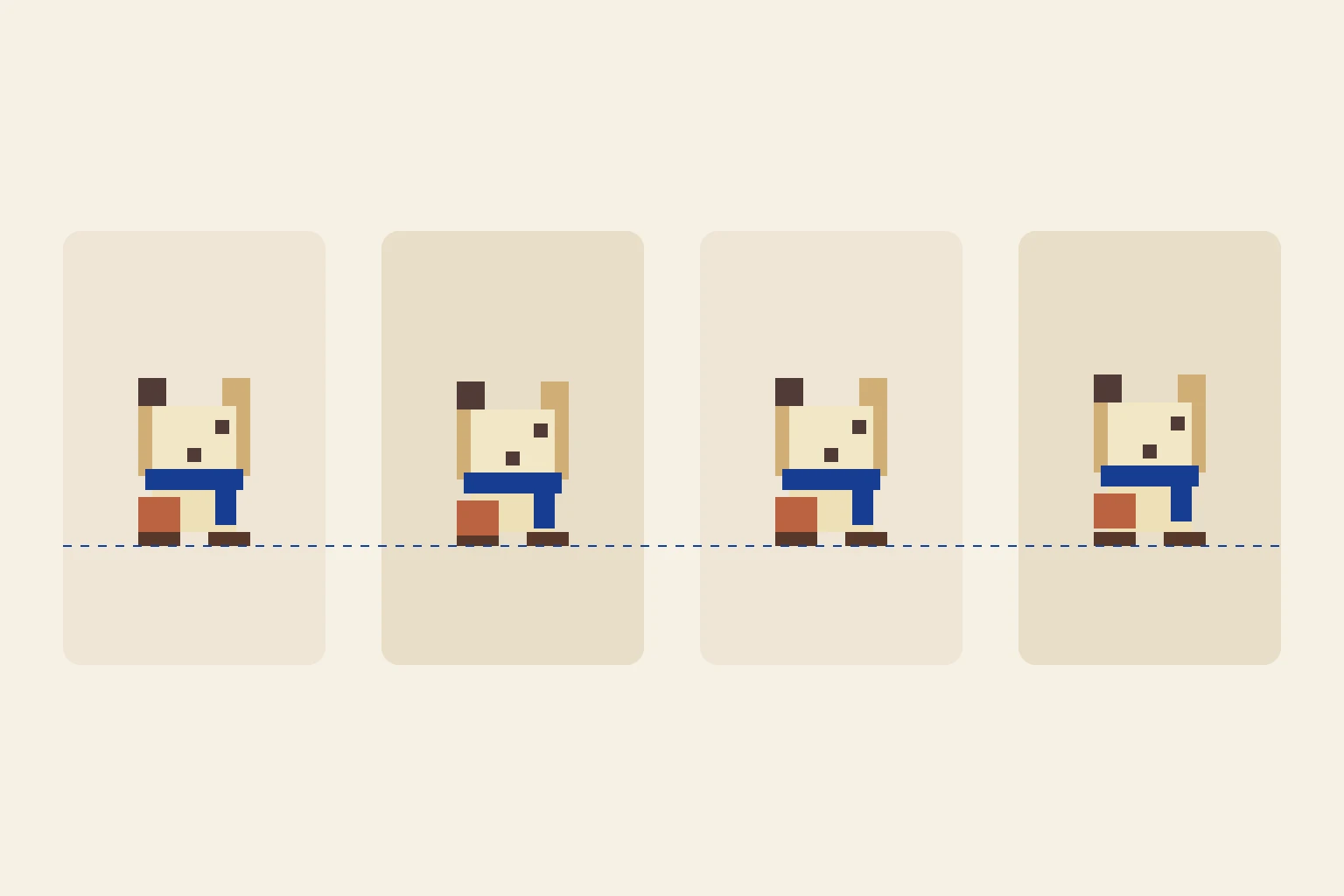
Our downloadable teaching example uses four 64 × 64 cells in a 256 × 64 sheet. The baseline is consistent across frames. These dimensions are choices for this example, not a limit or preset in Ciyo.
| Property | Example | Why it matters |
|---|---|---|
| Cell | 64 × 64 pixels | The importer slices equal regions |
| Sheet | 256 × 64 pixels | Four frames in one row |
| Order | Left to right | Playback follows the intended sequence |
| Anchor | Fixed baseline | The sprite does not bounce accidentally |
| Background | Transparent | No rectangular border in the scene |
Separate character design from animation poses
Approve the silhouette and palette before asking for additional poses. For pixel art, use a small palette and intentional pixel edges. A soft illustration reduced to 64 pixels does not automatically become clean pixel art.
Plan a four-frame idle animation for a small original courier character. Use equal 64 × 64 cells, a consistent baseline and left-to-right frame order. Describe the small change in each pose. Preserve the silhouette, palette and accessories. Distinguish the character concept from the final assembled sprite sheet; flag any required manual cleanup.Create the concept in Ciyo, assemble deliberately
Generate the character or pose references in Ciyo and keep the selected versions on one board. Inspect each pose for missing accessories and unintended perspective changes. Export the useful art for assembly in a sprite editor when exact cell placement is required.
Do not describe Ciyo as an automatic sprite-sheet packer. The important handoff is a consistent set of poses plus the grid specification. Keep the original full-size assets so cleanup does not depend on a tiny exported preview.
Play the sheet before importing it
Open the included preview and switch between individual frames and the looping animation. A static sheet can conceal a one-pixel shift that becomes obvious in motion. Review the feet, head and accessories against a fixed baseline.
The sample is original code-authored artwork with known cell geometry. It demonstrates how to inspect a sheet; it is not an AI-generated benchmark or a claim about Ciyo’s output accuracy.

Check the imported asset in the actual game
Match the importer’s cell size, frame count and playback order to the contract. Use the engine’s appropriate filtering for pixel art and inspect it at the intended scale. A sheet that looks correct in an image viewer may still blur or show neighboring cells when imported incorrectly.
For delivery, include the sheet, its grid specification and the intended animation timing. Record whether cleanup is complete. That gives the developer a usable asset package rather than a picture they must reverse-engineer.
Create game-art concepts in Ciyo
Create a character concept in Ciyo, then export it for precise sprite-sheet assembly and frame inspection.