Practical design guides
Holiday Photo Cards: Prepare Your Own Design for an Unbranded Print Run
Designing your own holiday photo cards gives you control over the greeting and photographs. It does not automatically remove a printer’s branding or make an uploaded file ready for production. Those decisions belong in the order brief before you pay for a run.
This workflow combines current supplier guidance with a fictional Rowan Workshop planning review run in Ciyo. It helps you assemble a front-and-back brief, catch contradictions and request a useful proof. We did not order or inspect printed cards.
Quick answer
Choose the card format and printer first. Ask in writing whether the finished cards, including the back, contain supplier branding. Put the approved photo, greeting, back copy and website into one brief; use the printer’s current template and approve both sides before ordering.
1. Turn “my own design” into an order requirement
A photo-upload option and an unbranded print service are different requirements. Tell the supplier you are supplying completed artwork, specify the quantity and stock you want quoted, and ask where any printer mark would appear. Request a proof showing every printed panel rather than only the front preview.
For Rowan Workshop, the deliverable is a folded greeting card with a workshop photograph on the front and a short thank-you on the back. The brief forbids unapproved supplier branding. That is an instruction to confirm with a printer, not a claim about a particular vendor’s standard service.
| Area | Approved content | Still needs confirmation |
|---|---|---|
| Front | Season’s greetings from Rowan Workshop | Final photo, crop and permission |
| Inside | Approved personal message | Fold and reading orientation |
| Back | Short thank-you and approved website | No unapproved printer mark |
| Production | Chosen supplier template | Trim, bleed, stock and proof |
2. Choose a photograph that survives the final crop
Start with the full-resolution original rather than a screenshot from a messaging app. Identify faces, tools or products that must stay visible. Put the image into the actual supplier layout and inspect the trim and fold boundaries; a pleasing wide photograph may need a different crop on a tall card.
MOO publishes format-specific greeting-card templates and upload guidance. Use the template for the format you actually order, with its own safe and bleed areas. Do not copy a universal pixel size from another card or assume that extending a background also protects text near the cut.
3. Review the front and back together in Ciyo
Upload a planning sheet or your two draft panels in an isolated canvas project. Include the exact approved words beside the images. Ask the Design agent to identify conflicts, missing approvals and questions for the printer. Keep this review separate from the final production file.
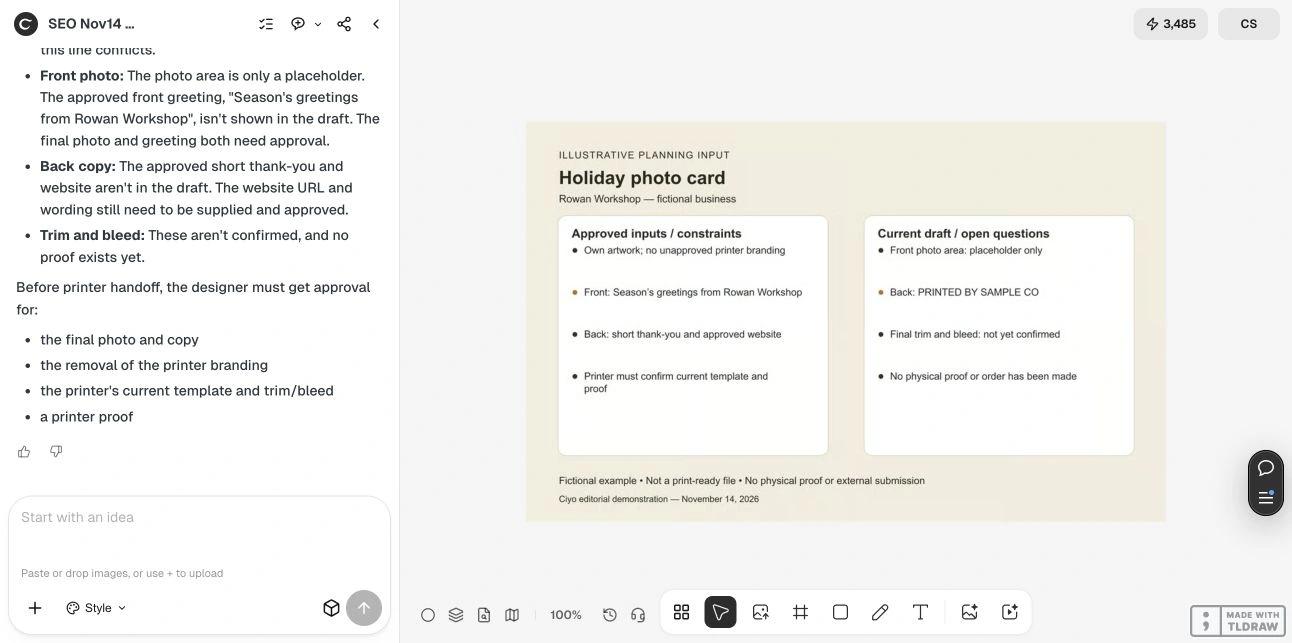
In our November 14 dev.ciyo.ai run, the fictional sheet contained a photo placeholder, unconfirmed trim and bleed, and “PRINTED BY SAMPLE CO” on the back. Ciyo flagged that branding conflict, the missing final photo and greeting, and the absent thank-you and website. It asked for copy, branding removal, template and proof approval. Its reply was longer than the requested four bullets; the useful result was the correction list.
Copyable review prompt
Replace the bracketed fields and attach both sides. Supply only photos and personal messages you are authorized to use.
Review my holiday photo card brief for [BUSINESS OR FAMILY]. Attached are [FRONT AND BACK DRAFTS]. Approved greeting: [EXACT WORDS]. Approved back copy and website: [EXACT WORDS]. Supplier branding policy: [WRITTEN CONFIRMATION OR UNKNOWN]. Identify contradictions and missing photo, fold, trim or bleed approvals. Return a concise correction list and printer questions. Do not place an order or call this a print-ready proof.4. Approve a proof that answers the difficult questions
Ask the supplier to identify the final trim, fold and safe areas on the proof. Check the back for unexpected marks, read the website character by character, and confirm the photo crop on the actual card orientation. A digital proof checks content and placement; a physical sample is needed when stock, color or finish is decisive.
Freeze one approved version and retain the supplier’s confirmation with it. If a photo or website changes later, issue a new proof request instead of assuming the old approval covers the replacement. Ciyo’s review did not test image resolution, color management, paper, shipping or the supplier’s fulfillment.
Why the branding question belongs at the start
In a November 10 Reddit discussion, u/catfanciest asked about printing roughly 200 self-designed holiday cards without the branding encountered on earlier orders. That question informs this approval workflow. The poster did not report using or endorse Ciyo, and print-shop offers in the replies are commercial suggestions rather than verified recommendations.
Original post: November 10, 2026; checked November 14. A request for self-designed, unbranded cards inspired this independent workflow. Supplier offers in the replies were not tested.
Sources and the next design check
Supplier documentation checked November 14, 2026. None of these links establishes an unbranded fulfillment promise for your order.
Frequently asked questions
Can I print my own holiday card design without a printer logo?
Ask the chosen supplier to confirm that requirement in writing and show the back in its proof. Uploading your own design alone does not establish a no-branding policy.
Does Ciyo produce a printer-approved card file?
The demonstrated workflow produces a planning review. Transfer approved artwork into the supplier’s required production template and obtain its prepress approval.
Should the back be blank?
It can be blank or contain approved text, depending on your design and order. Explicitly specify the back so an omitted preview does not become an unexpected printed panel.
Review both sides before ordering
Bring your approved photo and card copy into Ciyo, resolve contradictions, and send a clear correction list to your chosen printer.