Freelance document layout
Invoice Template Design: Keep Line Items and Totals Editable
An invoice image can look finished while leaving its most important information difficult to change. Replacing a quantity in a raster image is different from editing a text field, and a plausible-looking total still needs an arithmetic check. Choose the final document format before approving the visual style.
We tried a fictional invoice brief in a signed-in Ciyo development workspace on November 21, 2026. The run declined to save HTML or PDF, then produced a PNG visual proof and HTML source in chat after we narrowed the request. We saved that source separately and checked its sample arithmetic. The result is a design example, not a payment request, tax-compliance template or accounting integration.
Quick answer: approve the layout, then verify editable values
Use an image proof to judge hierarchy and spacing. Keep descriptions, quantities, unit prices and totals as real text in the final source. Calculate the amounts independently and inspect the exported sharing copy after changes. A static HTML sample does not recalculate itself.
Follow five steps: define the sample fields, request a visual proof, inspect every label and number, save editable source, and check a new export. Our English companion deliberately contains invented details, no tax calculation and no payment instructions.
| Step | Action | Check |
|---|---|---|
| 1 | Prepare approved fields and example values | Keep design samples visibly fictional |
| 2 | Request a flat visual proof | Separate the image from editable source |
| 3 | Read every row and numeric column | Compare against the original brief |
| 4 | Save real text and calculate amounts | Update all dependent totals manually |
| 5 | Inspect the exported copy | Look for wrapping, clipping and stale values |
1. Prepare the information before styling it
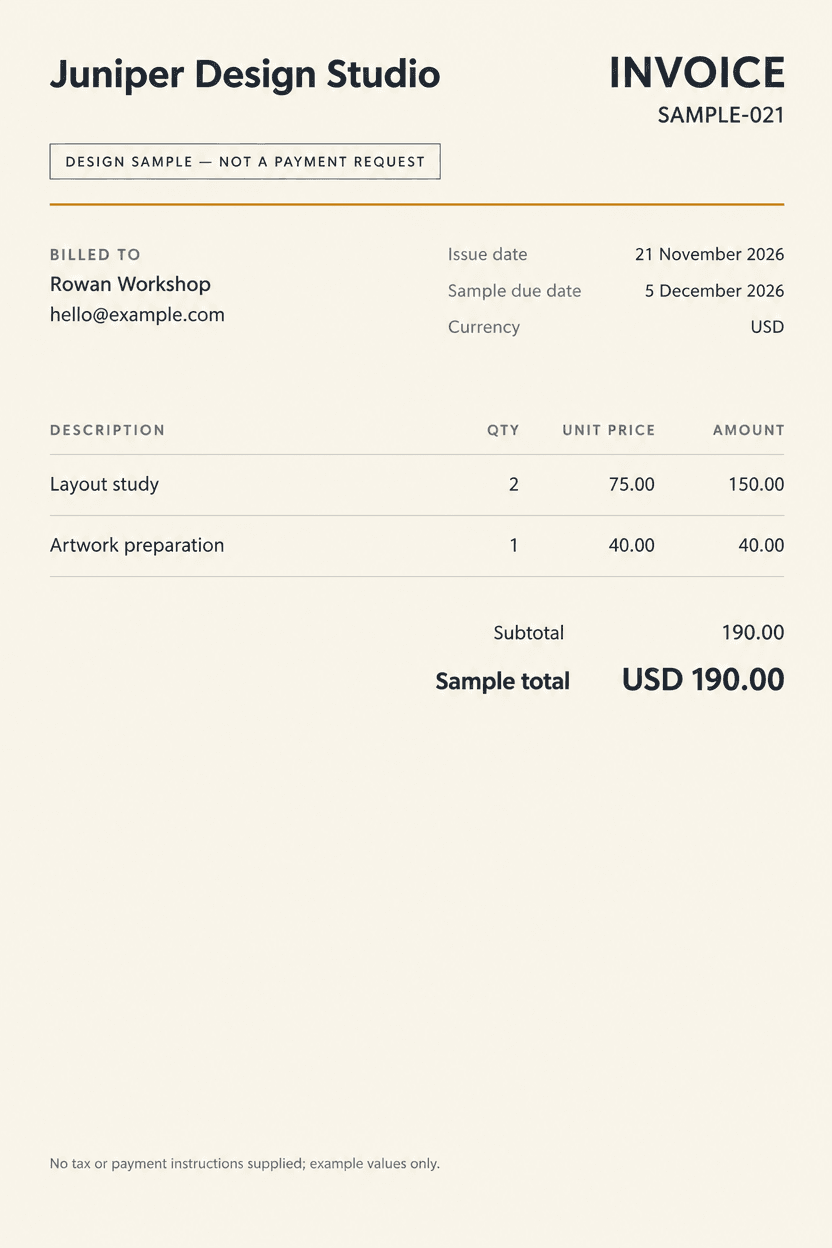
Our fictional Juniper Design Studio sample uses invoice number SAMPLE-021, issue date 21 November 2026, sample due date 5 December 2026 and fictional client Rowan Workshop. The page prominently says DESIGN SAMPLE — NOT A PAYMENT REQUEST. These details make the teaching example recognizable without sending a real bill.
The two sample rows are Layout study, quantity 2 at USD 75.00, and Artwork preparation, quantity 1 at USD 40.00. Their amounts are USD 150.00 and USD 40.00. Keep the currency visible and use the same numeric precision consistently.
Canva's invoice guide treats billing details and a reusable layout as part of the document workflow. Our task here is narrower: readable fields and checked sample numbers. For an actual invoice, use the approved business information and requirements applicable to your own work rather than treating this fictional layout as a complete operational form.
2. Request hierarchy without confusing an image with a document
Ask for a flat page with clear description, quantity, unit-price and amount columns. Give longer descriptions more room, align comparable numbers consistently and separate the final total from the row amounts. Decorative accents should not compete with the information someone must read.
Our first request asked for saved HTML and PDF files. Ciyo declined that deliverable in this run. We then requested a PNG design preview and source code in chat, explicitly keeping them separate. The resulting image used GPT Image 2.5 Flare. The copyable prompt below reflects that adapted scope.

Create a flat invoice-layout PNG proof for [fictional or approved studio]. Include [approved number, dates and recipient] and these exact rows: [description, quantity, unit price, amount]. Use [currency], tabular-style numerals and clear numeric columns. For a fictional sample, visibly state DESIGN SAMPLE — NOT A PAYMENT REQUEST and omit real payment details. Treat the PNG as a visual reference only. If you supply HTML source in chat, keep it separate, use real static text and no scripts, and do not claim a saved project file, automatic calculation or verified PDF.3. Inspect the image at row level
The actual downloaded proof is a PNG at 832 × 1248 pixels. It shows the sample label, both dates, the fictional recipient, the two line items and the USD 190.00 sample total. Its portrait ratio is 2:3, which differs from A4. A visually similar page is not evidence of an exact paper size.
Read across each row rather than scanning only the largest total. Check that 2 belongs to Layout study, 75.00 is its unit price and 150.00 is its amount. Then check the second row, subtotal and currency. The image can help you evaluate spacing, but its text remains pixels.
In this session, the generated file was available through its chat preview and download. The canvas view remained blank during our inspection, so the proof below comes from the downloaded file. We do not treat the agent's statement that it saved an image to the board as proof that the canvas displayed it correctly.
4. Save editable source and verify the arithmetic
The linked HTML was materialized outside Ciyo from the source it supplied in chat. It uses real text and contains no calculation script. We independently parsed the rows and checked decimal arithmetic: 2 × 75.00 = 150.00; 1 × 40.00 = 40.00; 150.00 + 40.00 = 190.00. The sample subtotal and total both match that result.
If you change a quantity or unit price, update its row amount, subtotal and displayed sample total yourself. Editing one occurrence of 190.00 does not update the other. A source document that remains editable is still different from a spreadsheet or accounting tool that calculates dependent values.
Save a local copy before editing. The HTML includes a fixed A4 page layout and a bottom footer; adding many rows or long descriptions can cause content to wrap or run out of room. Treat a changed row count as a layout change that needs another review.
| Description | Quantity | Unit price | Amount |
|---|---|---|---|
| Layout study | 2 | 75.00 | 150.00 |
| Artwork preparation | 1 | 40.00 | 40.00 |
| Sample total | Not applicable | Not applicable | 190.00 |
5. Review a new sharing copy after every change
Open the edited source and inspect the whole page. Check the longest description, the last row, the total and the footer. Look for clipped text, a number that moved into the wrong column and a date left over from the previous version. Different font availability can change line wrapping.
If you export through a browser, choose the intended paper settings and inspect the resulting file's actual page count and text. No PDF accompanies this invoice example, and the demonstrated Ciyo run did not export one. A new PDF is a separate deliverable to verify.
Keep the sample disclosure on this teaching file. Before producing a real invoice, move approved details into the business process you use to review and send invoices. This article does not send a bill or establish that a visual template meets local tax, recordkeeping or payment requirements.
Choose the right handoff for repeated work
For a one-off design discussion, a PNG can communicate hierarchy quickly. For revising a small static sample, editable HTML keeps wording and values accessible in source. For recurring billing with calculations, approvals or records, use a tool and process that actually supports those functions rather than adding them to the image proof's claims.
The useful design decision is which information should remain easy to inspect and change. Preserve the visual direction while choosing a source format that matches the work still to be done.
Invoice template design questions
Can I edit the numbers in the generated PNG as text fields?
No. The demonstrated PNG contains raster text. Use the separately saved HTML source or another document tool to edit values as text.
Does the HTML calculate the total automatically?
No. Its values are static. Changing a quantity or price requires manually updating the row amount, subtotal and total, followed by a fresh arithmetic check.
Is the image proof an exact A4 file?
No. The downloaded image is 832 × 1248 pixels, a 2:3 ratio. The separate HTML has A4 layout styles, and any later export needs its own size and page-count check.
Is this a complete invoice for actual payment?
No. It is a visibly fictional design sample with no tax calculation or payment instructions. It does not establish the requirements for your real invoices.
Review the layout before choosing the final format
Bring approved sample fields to Ciyo for a visual proof. Keep changing values editable, check the arithmetic and inspect the final sharing copy separately.