Small-shop shipment documents
Packing Slip Template: Show What Is Actually in This Shipment

An order contains three units, but today's box contains two. A packing slip that simply repeats the order can make the recipient think an item is missing and give the packer the wrong checklist. The document needs to identify this shipment and distinguish the items inside it from the items still outstanding.
This tutorial uses a fictional Juniper Goods order in a live Ciyo development workspace. Ciyo checked the quantities and, after a failed attempt and a retry, saved a readable PNG before the retry's final response also failed. It supplied no editable attachment or PDF. The article therefore includes separately created editorial HTML, CSV and a checked one-page PDF proof, with that boundary made explicit.
Quick answer: reconcile the box before approving the layout
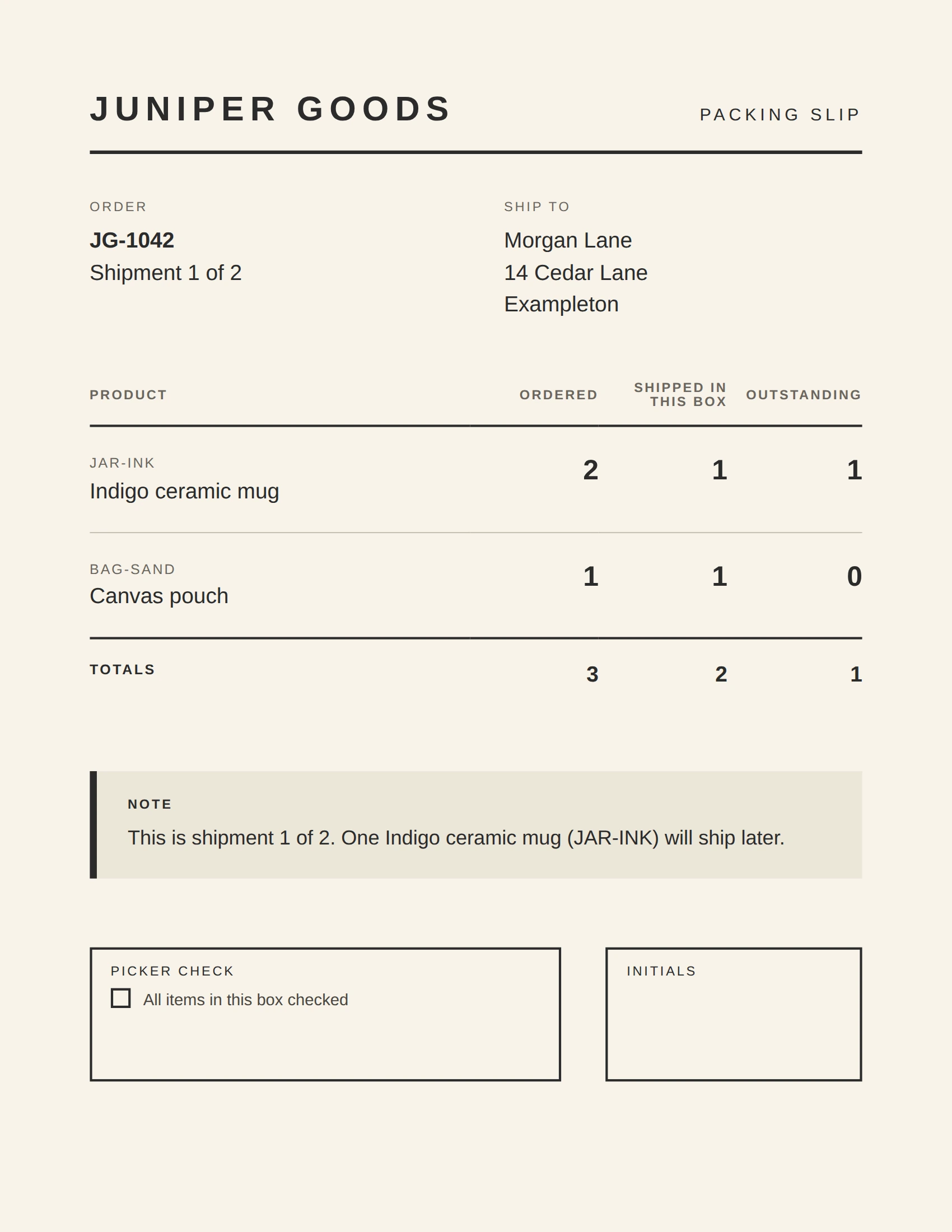
Use a shipment identifier, an item identifier and a clear shipped-in-this-box quantity for each included product. In this example, the mug row reads 2 ordered, 1 shipped and 1 outstanding; the pouch row reads 1, 1 and 0. Totals are 3 ordered, 2 shipped and 1 outstanding. A short note explains that one mug will ship later.
Follow these five steps. Use Ciyo's image to review the hierarchy, then use an editable document and the real fulfillment record to prepare the version that goes into the box. The supplied fictional files are a worked example, not a connection to an order system.
| Step | Action | Acceptance check |
|---|---|---|
| 1 | Separate the order from today's shipment | Item-level ordered, shipped and outstanding quantities |
| 2 | Brief the layout with exact fictional data | A clear shipment number and readable quantity columns |
| 3 | Compare every output row with the fixture | Correct identifiers, quantities and the outstanding-item note |
| 4 | Prepare an editable document and print proof | The source and the actual PDF are both inspected |
| 5 | Reconcile again at packing time | The paper agrees with the box and current order record |
1. Write the shipment fixture before designing the page
Start with the fulfillment facts. Juniper Goods order JG-1042 contains two Indigo ceramic mugs and one Canvas pouch. Shipment 1 of 2 contains one mug and the pouch. The remaining mug will ship later. Morgan Lane and the Exampleton address are fictional demonstration data.
Keep the SKU next to the product description. A packer can compare JAR-INK with the picking record even when two products have similar names. For each row in this simple example, ordered minus shipped equals outstanding. That equation is a check on this fixture; a real store also needs to account for earlier shipments, cancellations and any other state in its fulfillment system.
Shopify's current document guidance describes a packing slip as specific to a shipment and allows separate slips for an order's multiple shipments. It also distinguishes packing slips from other order documents. The design below follows that shipment-specific principle. It contains no prices, payment request or accounting calculation and should not be treated as an invoice.
| SKU and product | Ordered | Shipped in this box | Outstanding |
|---|---|---|---|
| JAR-INK - Indigo ceramic mug | 2 | 1 | 1 |
| BAG-SAND - Canvas pouch | 1 | 1 | 0 |
| Total units | 3 | 2 | 1 |
2. Ask for a readable layout with an explicit file boundary
Give Ciyo the exact shipment data, the required columns and the note that must survive every revision. Ask for generous spacing and a flat document preview. A perspective mockup may look attractive but makes it harder to inspect text and quantities.
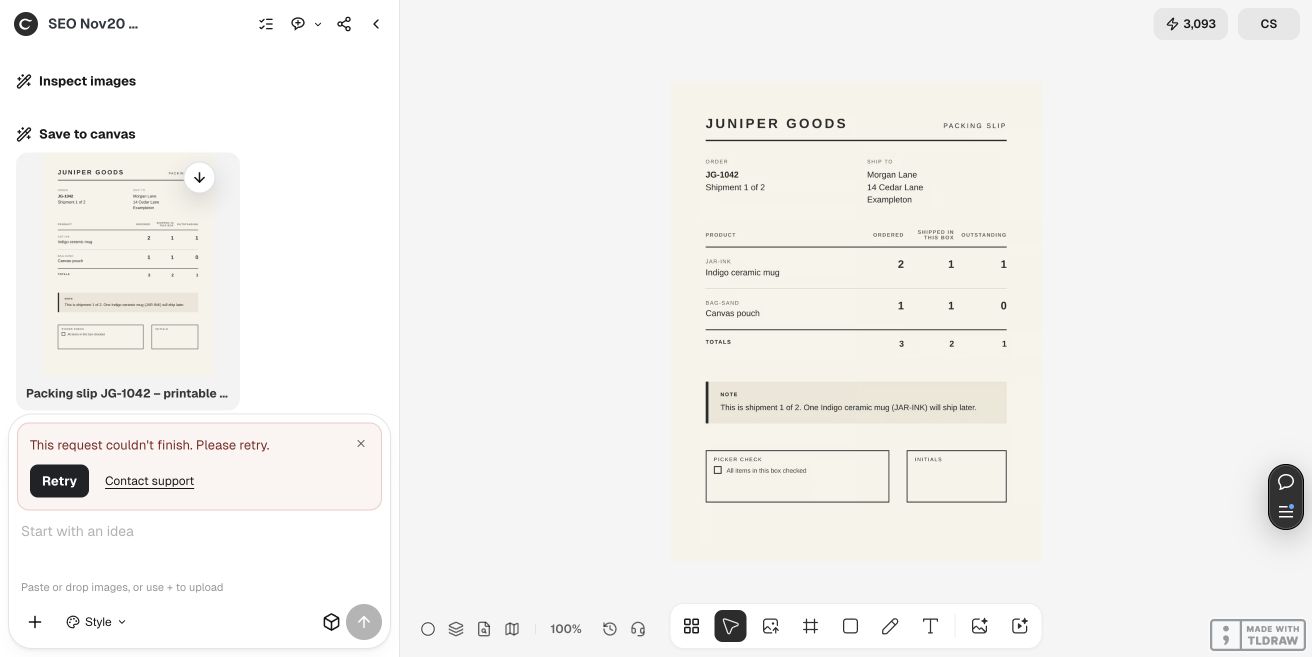
Our first request asked for an editable document and PDF. Ciyo explained that it could provide a flat PNG preview and offered copyable HTML advice in chat instead of an attached document. We accepted both options. The first execution failed; one retry saved the packing-slip PNG but later failed as well. No HTML source arrived. The article's HTML and PDF are separate editorial companions, rather than files exported by Ciyo.
The practical brief below asks only for the visual preview. It makes the document handoff explicit so that a good-looking image does not get mistaken for an editable order template. Check current pricing before running a design request; this example establishes no fixed cost or turnaround time.
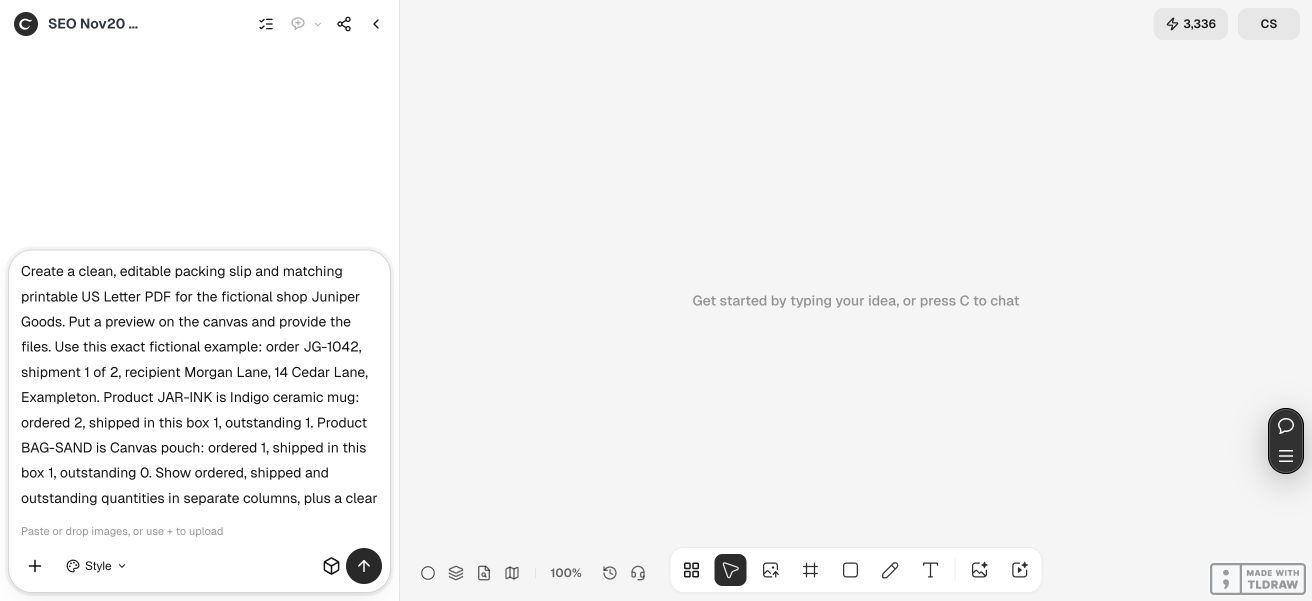
Create a clean flat packing-slip PNG preview for [fictional shop], order [ID], shipment [number] of [total]. Use these exact item rows: [SKU, product name, ordered quantity, shipped in this box, outstanding]. Show the three quantities in separate columns. Include this exact note: [what remains and when it will ship, if confirmed]. Add a picker checkbox and initials area. Use crisp readable text and generous spacing. No prices, payment requests or perspective mockup. Check every quantity against the input and report actual PNG dimensions. The editable source and printable PDF will be prepared and verified separately; do not claim the preview is an editable order document.3. Compare the saved PNG with every source row
The actual saved Ciyo PNG is 1700 × 2200 pixels, matching US Letter proportions. We inspected the original image rather than relying on the canvas thumbnail. It shows the two SKUs, the 2/1/1 and 1/1/0 rows, the 3/2/1 totals and the note that one Indigo ceramic mug will ship later. The picker area and initials box are present, and there are no prices.
Review the identifiers and note separately from the arithmetic. Correct totals could still conceal a row swap: one mug and one pouch are different from two mugs. Read the column headings aloud when checking the quantities so that ordered and shipped values do not silently exchange meaning.
Keep a failed turn's usable output only after inspecting the file itself. Here the PNG exists and passes the stated visual and data checks, while the final response remains a recorded failure. That does not establish reliable document export, a successful Shopify integration or a physically printed result.
4. Use the editable companion and inspect its print proof
Open the supplied HTML companion in a browser. Its document area is editable, and its source can be changed in a text editor. It uses the same fictional data and document hierarchy as the worked example, but it was created separately for this article. It is not recovered Ciyo HTML, and it is not an installed Shopify template.
Page edits are temporary. To retain a reusable version, edit and save the HTML source. The quantities and totals are plain text and do not recalculate automatically; update and reconcile them together whenever the shipment changes. Remove the fictional recipient and replace it with authorized order data only in the workflow where that information belongs.
The separate PDF proof contains one 612 × 792 point US Letter page. We extracted its text, checked the identifiers and outstanding note, and rendered the page for visual inspection. Its data matches the CSV, but its typography is a separate editorial layout. The PDF is a static print proof, while the HTML is the editable companion.
When printing your edited HTML, choose US Letter, 100% scale and no browser headers or footers, then inspect the print preview. Check for clipped headings, wrapped SKUs and an extra blank page. We reviewed the browser layout and rendered PDF; we did not run a physical printer or verify every browser's print behavior.
5. Reconcile the final slip at the packing table
Before sealing the box, compare the current fulfillment record, the physical items and the final document. Check the order and shipment number, each SKU, each shipped quantity and the outstanding-item note. Initial the picker space only after that comparison. A design proof cannot observe what someone actually placed in the box.
A small shop can use this example to establish a clear document layout. A growing fulfillment team should use its order system as the source of truth and have an appropriate owner implement and test a real document template. Shopify has its own order-document template and printing workflow; copying this standalone HTML into an unrelated editor does not connect it to live order data.
If an item or shipment changes after the slip is prepared, regenerate or revise the document and repeat the check. Keep the version that matches the box with the current shipment record. The useful result is a reconciled handoff, rather than a decorative sheet whose numbers were only correct when the first image was generated.
Packing-slip template questions
Should a packing slip list everything ordered?
It must make the contents of this shipment clear. This example also shows ordered and outstanding quantities to explain a split shipment. Your fulfillment system's current shipment record should determine the actual document.
Is the Ciyo PNG an editable template?
No. It is a flat visual proof. The separately supplied HTML is editable, the CSV is the fictional data fixture, and the PDF is a static print proof. None is an installed order-system integration.
Do the HTML totals update when I change a quantity?
No. They are plain text. Reconcile every row and the totals after editing, or use a properly implemented order-system template that derives them from the current shipment.
Can I use the sample as an invoice?
The example contains no prices, taxes, payment terms or accounting calculation. It is a shipment-layout example. Prepare invoices through the appropriate order and accounting workflow.
What skills and time does this require?
You need to read the fulfillment record, check arithmetic and inspect a print preview. Reusing the HTML source requires basic text editing. This run does not establish a fixed completion time, and its failed responses show why a first preview should not be the only handoff check.
Make the shipment quantities easy to check
Give Ciyo an exact fictional fixture and a clear visual hierarchy. Approve the layout, then prepare and reconcile the editable document in the workflow that owns the shipment.