Practical design guides
Jewelry Care Card: Design Around Material-Specific Instructions
A jewelry care card should help the customer look after the item they actually bought. Reusing one paragraph across plated metal and a soft-stone pendant can hide important differences, especially when the material or treatment is not documented.
This workflow combines GIA’s material-aware care guidance with a fictional Rowan Objects card brief. It focuses on copy approval, version matching and graphic layout. It does not supply a universal cleaning recipe or certify a product’s durability.
Quick answer
Identify each item’s material and treatment, obtain its maker-approved care wording, and match that wording to the correct card version. Remove unsupported waterproof or warranty claims, make the essential instructions readable, and approve a physical-size proof before packing orders.
1. Separate product identity from generic brand copy
List the product or collection code, material, finish, stones and any treatment information supplied by the maker. Keep unknowns visible in the working brief. GIA explains that care depends on jewelry and gemstone characteristics; a familiar instruction for one item may be unsuitable for another.
Rowan Objects is our fictional shop. Card A belongs to a plated chain and Card B to a soft-stone pendant. The example intentionally supplies no approved cleaning instructions. The designer’s task is to request and organize that copy, not fill the gap with a confident-sounding recipe.
2. Build a card-to-product copy register
Give each approved care text a version and owner. Pair it with the relevant product codes before placing it in a layout. A short register helps a packing team select the correct insert and makes a later material change visible.
Keep warranty terms separate from care instructions. “Waterproof” and “lifetime guarantee” are product promises that need their own evidence and approval. They should not appear merely because a template included them or an AI draft suggested them.
| Version | Assigned item | Approval still required |
|---|---|---|
| Card A | Plated chain | Maker’s material and care wording |
| Card B | Soft-stone pendant | Stone/treatment details and care wording |
| Both | Shop contact | Approved address or support destination |
| Neither | Waterproof / lifetime guarantee | Remove unless separately substantiated and approved |
3. Review the draft before turning it into a finished insert
Bring the product register, approved copy and draft card into Ciyo. Ask the Design agent to identify mismatched versions, unsupported claims and missing material information. Ask it to preserve approved instructions exactly rather than silently rewriting a meaningful condition.
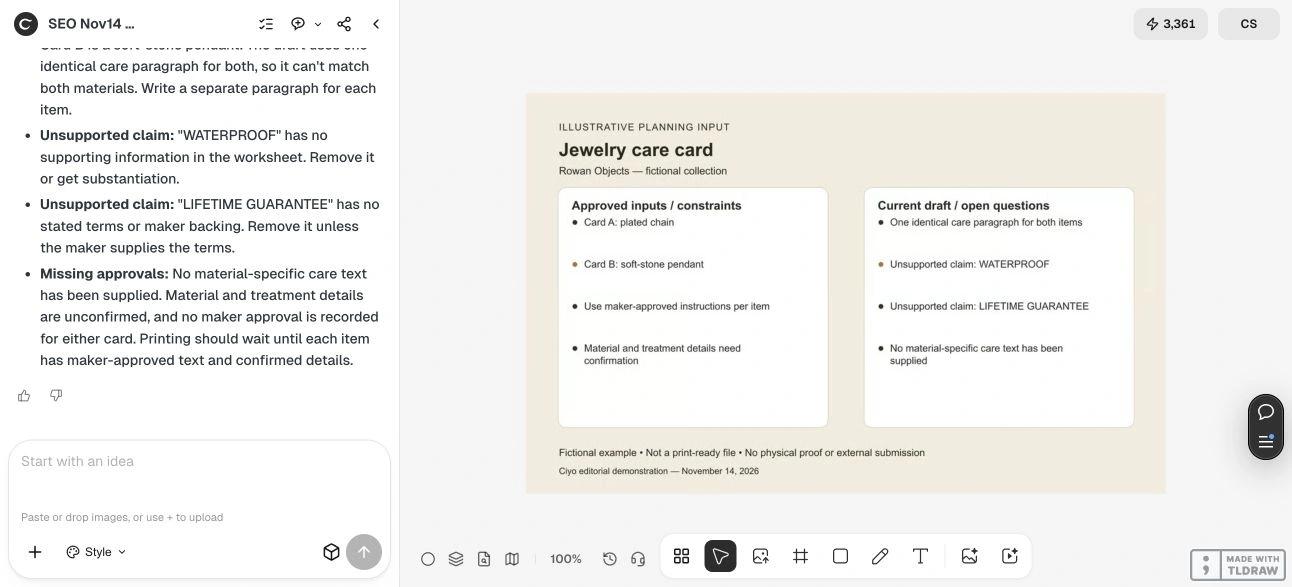
For the fictional worksheet, both cards initially share one generic paragraph and the unsupported promises WATERPROOF and LIFETIME GUARANTEE. Those are deliberate review problems. No jewelry, cleaning method, wear test or customer order was part of this example.
Live Ciyo review: unsupported promises stayed unresolved
On November 14 at dev.ciyo.ai, Ciyo identified the two material assignments, questioned the shared care paragraph, and flagged WATERPROOF and LIFETIME GUARANTEE as unsupported. It requested confirmed material/treatment details and maker-approved wording before printing.
That response helped form a correction list; it did not establish what care each item needs. The maker still decides whether wording can be shared and supplies the appropriate instructions. No jewelry cleaning or durability test was performed.
Copyable care-card review
Use the maker’s wording and replace bracketed details. Do not put unverified material facts into the approved-copy field.
Review the attached jewelry care card plan for [SHOP]. Product-to-card mapping: [ITEM CODES AND MATERIALS]. Maker-approved care text: [EXACT WORDING OR PENDING]. Check version mismatches, missing material/treatment information, unsupported waterproof or warranty claims, and crowded hierarchy. Do not invent a cleaning recipe, guarantee or certification. Return a correction list and required maker approvals.4. Design for a customer reading a small card
Give the main care instruction the strongest text hierarchy, then supporting information and a support contact. Use enough contrast and spacing for the actual printed size. A decorative illustration can help identify the collection, but it should not push necessary wording into tiny text.
If the approved instructions do not fit, ask the maker which information can be shortened or linked to a maintained care page. Test the destination and retain essential wording on the card as appropriate. Do not shorten a condition in a way that changes its meaning.
5. Approve and match the printed versions
Print a full-size proof and compare every line against the approved source. Have the maker confirm the wording and item assignment; have the designer check typography, trim and safe areas with the printer. Keep one clearly labeled approved file per version.
Before packing, place each finished card beside its intended item and check the version code. If the material, supplier or approved care advice changes, review the assignment again. A thank-you insert and a display card can share the visual style while serving different purposes.
Source
GIA jewelry-care guidance checked November 14, 2026. The card register is an original fictional design example, not gemological advice for a specific item.
Frequently asked questions
Can I use the same care card for every item?
Only when the maker confirms that the wording applies to every assigned item. Match instructions to verified materials and treatments rather than assuming one paragraph fits all.
Can Ciyo write the cleaning instructions for an unknown stone?
This workflow asks for a review of supplied, approved wording. Obtain material and care information from the maker or an appropriate specialist before designing the final card.
Should a warranty be printed with the care advice?
Use only separately approved terms and keep them clearly identifiable. A care card template does not establish a waterproof claim or lifetime guarantee.
Match each card to its item
Bring your product register and maker-approved wording into Ciyo. Resolve mismatches before preparing the final print versions.