Practical design workflow
Order Form Template: Keep Items, Units and Requested Quantities Together

A request for three metres of ribbon is different from a request for three rolls. A polished order form can hide that difference if the quantity column has no unit.
This example follows a fictional paper-folding workshop ordering supplies. You get a paper-request layout, an editable HTML worksheet and a CSV source. The worksheet records what is requested; it does not process payment or submit an online order.
Quick answer: give every quantity a unit and an item ID
Use one row per requested item, with an identifier, plain-language name, unit, requested quantity and source reference. Keep these fields together when you change the visual layout. Do not replace a missing quantity with zero: an unanswered request and a request for none mean different things.
The four steps below are to freeze the request data, make a visual proof, prepare the editable worksheet and check the handoff. The example values are fictional and do not describe an actual purchase.
| Item ID | Item | Unit | Requested quantity |
|---|---|---|---|
| P-01 | Ivory paper | sheet | 12 |
| P-02 | Graphite pencil | piece | 6 |
| P-03 | Amber ribbon | metre | 3 |
1. Freeze the request before styling it
Start with the CSV source. Replace the three example items with your actual catalogue identifiers and units. If an item is sold only in packs, write the pack size explicitly and decide whether the quantity means packs or individual pieces. A reviewer should be able to answer that question without interpreting a photograph.
The source/reference column in the download says Supply list v1. Replace it with the approved list, quotation or catalogue version you are using. Keep an internal approval note separately when it contains information that does not belong on a shared order sheet. Prices, taxes and payment terms require their own verified fields if you later add them.
2. Make a visual layout proof in Ciyo
Create a separate fictional project and ask for a quiet, printable form layout. The purpose is to compare hierarchy, spacing and row readability. Keep the supplied item data available beside the image so that a visually plausible substitution cannot become the order source.
Review the model and credit quote displayed in your current session before generating. After a result appears, read each item ID and unit against the source. An image that looks like a form still has no editable form fields or submission backend. Use the prompt as a visual brief, then rebuild exact text in the supplied source.
On November 27, 2026, we used Ciyo’s production Image Generator with GPT Image 2.5 Flare, aspect ratio 3:4, 1K and one image. The displayed quote for this run was 2 credits. Check the quote in your own session.
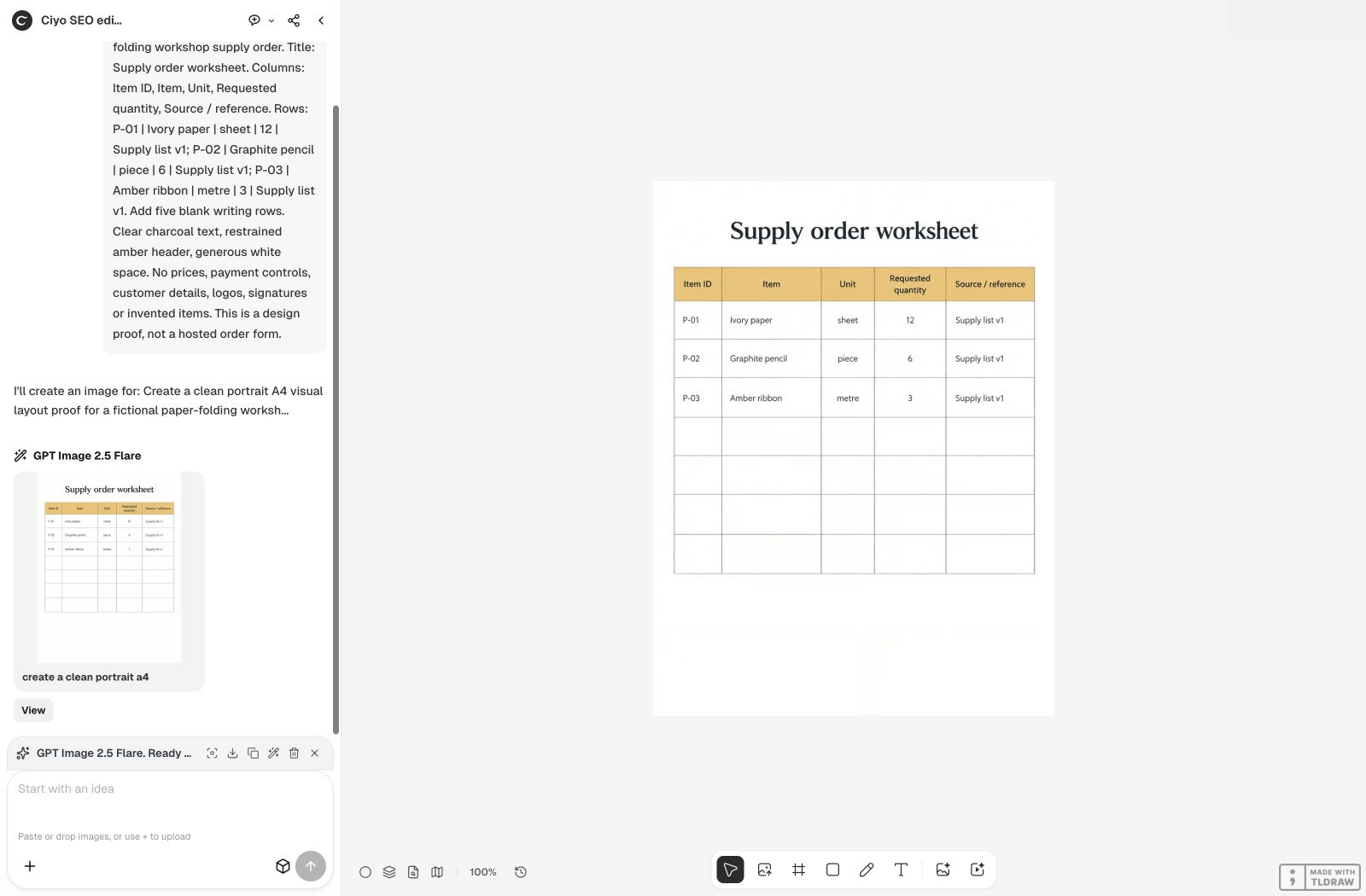
Create a clean portrait A4 visual layout proof for a fictional paper-folding workshop supply order. Title: Supply order worksheet. Columns: Item ID, Item, Unit, Requested quantity, Source / reference. Rows: P-01 | Ivory paper | sheet | 12 | Supply list v1; P-02 | Graphite pencil | piece | 6 | Supply list v1; P-03 | Amber ribbon | metre | 3 | Supply list v1. Add five blank writing rows. Clear charcoal text, restrained amber header, generous white space. No prices, payment controls, customer details, logos, signatures or invented items. This is a design proof, not a hosted order form.3. Edit and save the working worksheet
The generated form retained all three item IDs, units and requested quantities. It added four blank rows instead of five, so check the writing space in the editable worksheet.
Open the HTML example in a browser, edit the title and table cells, and choose Save edited HTML. Keep the CSV as the structured source for a later revision. The two files are separate copies; editing one does not update the other.
Print at 100% on A4 after checking the preview. Disable browser headers and footers, and write a sample long item name into a spare row before printing a batch. The form should leave enough writing space while keeping unit and quantity beside the same item. The download is independently authored editorial source, not a Ciyo export.
4. Check the request at the handoff
Read a completed row aloud as item, quantity and unit. Check the item ID against the source reference, and confirm that blank rows cannot be mistaken for additional requests. If there are several pages, keep the request identifier and page sequence visible on every page you distribute.
Ask the receiving person to distinguish requested quantity from accepted quantity and delivered quantity. Those are different states. This paper sheet provides no confirmation that a supplier accepted or fulfilled the order. Keep any response and later packing record attached to the same request in your own workflow.
Choose a paper worksheet or a hosted order form
A local worksheet suits a small request that someone will review manually. Jotform's digital order-form service is a different option when customers need to enter information online or proceed to payment. Check the live service and its terms for those requirements; adding a QR code to an image does not create them.
If the next task is billing an accepted order, use the invoice workflow linked below and verify its line items separately. Keep the request document useful at its own stage instead of trying to make one image serve as order, invoice and shipment record.
Order form questions
Can this template accept online orders?
No. The supplied HTML is a local editable worksheet. It has no submission endpoint, payment processing or order-confirmation service. Use a hosted form service when you need those functions.
Should I add prices?
Only when you have verified the actual price, currency, unit and any applicable terms. This example intentionally records requested quantities without calculating money.
Can I use the generated image as the source?
Use it to review appearance. Keep exact item identifiers, units and quantities in editable text, and check the printed worksheet against that source before use.
Start with one unambiguous request
Prepare three verified item rows, explore their layout in Ciyo, then carry the approved values into the editable worksheet.