Photo-booth strip layout
Photo Booth Strip Template: Keep Photo Slots and Cut Areas Clear

A narrow photo strip needs more than a decorative border. The photo windows, outer edge and printer's cutting behavior all affect the result. A design called a photo strip may be intended for a social post or bookmark rather than your particular print setup.
On November 21, 2026, our Ciyo background-image attempts returned no asset. We changed the task to a deterministic layout proof, which produced a checked 600 × 1800 PNG and SVG source in chat. We then assembled a separate HTML companion with three replaceable abstract-art stand-ins. No event photographs, physical print or cutting system were tested.
Quick answer: define the geometry before replacing the photos
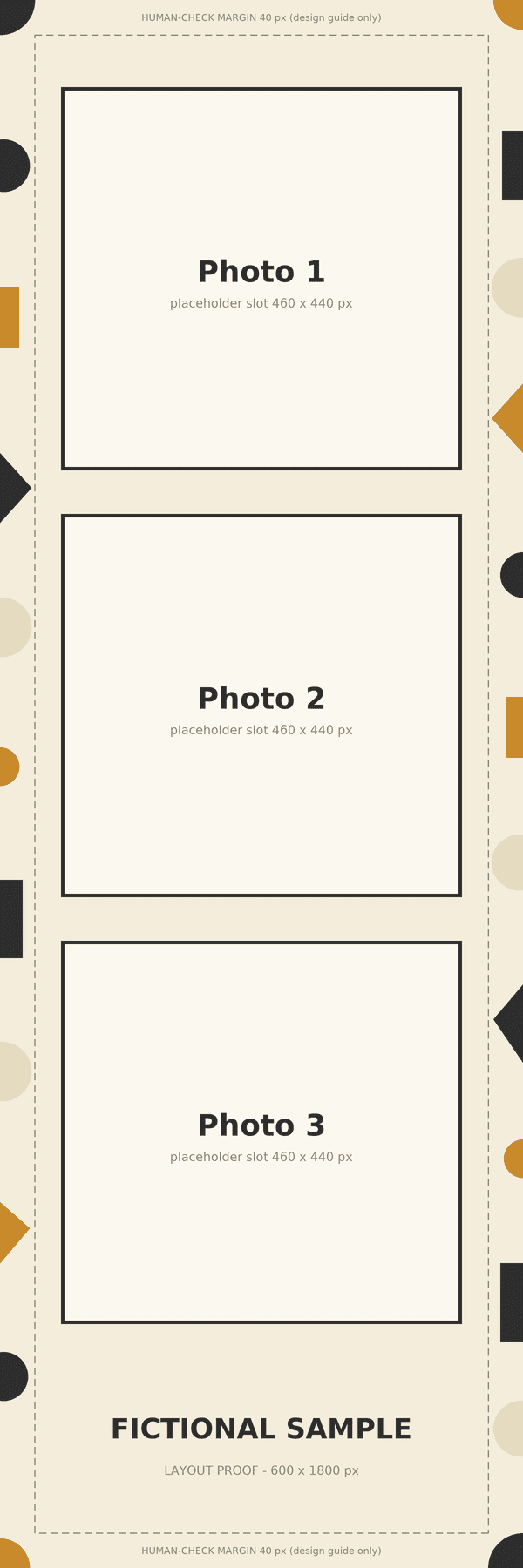
For this sample, 2 × 6 inches at a chosen 300 pixels per inch gives a 600 × 1800 pixel layout. Keep three photo windows inside the frame and inspect each crop. That arithmetic does not establish the correct export, bleed or cutting settings for every printer.
Follow five steps: confirm the production brief, set the photo-window geometry, create an exact-size proof, place approved images, and check the operator's final output. The English downloads retain their fictional-example and proof labels.
| Step | Action | Check |
|---|---|---|
| 1 | Confirm destination and operator requirements | A print or digital brief with actual dimensions |
| 2 | Define photo windows and outer areas | Three distinct slots inside the frame |
| 3 | Create a deterministic proof | 600 × 1800 pixels and the requested labels |
| 4 | Replace images and inspect crops | No stretching or hidden important subjects |
| 5 | Review the production output | Operator-specific scale, orientation and cuts |
1. Confirm what the strip will be used for
Ask whether the deliverable is a digital strip, a single printed strip or a larger print containing multiple strips. Obtain the intended file dimensions, orientation and any current operator template before finalizing the frame. We did not configure a printer for this exercise.
Canva's photo-strip catalog includes several kinds of designs, including social and bookmark-style layouts. That is useful inspiration for the category, but the name alone does not supply a physical print specification.
Our 600 × 1800 example is a deliberately stated design choice. At 300 pixels per inch, 600 divided by 300 is 2 inches and 1800 divided by 300 is 6 inches. An actual production workflow may request a different file, and that request takes precedence over this teaching example.
2. Keep image windows separate from decorative edges
The Ciyo proof has three nominal 460 × 440 pixel windows, with their outer bounds at x 70–530. Their vertical ranges are y 100–540, 590–1030 and 1080–1520. Those bounds include the outline; the interior image areas are slightly smaller.
A dashed guide sits 40 pixels inside the outer edge and is explicitly labeled as a human-check design margin. It is an illustrative choice, not printer bleed, trim allowance or a guaranteed safe area. Do not submit that number as an operator specification.
Keep the photo slots, labels and decorative border independently editable when possible. A flattened image of empty rectangles is useful for review, but it does not create transparent photo holes or a drag-and-drop photo editor.
3. Use an exact-layout method when the image request does not succeed
Our initial background request and its retries failed with an unresolved-reference error and produced no image. We preserved that outcome rather than describing a decorative generation as successful. The subsequent request asked Ciyo to draw the precise layout with a script.
The resulting file is a 600 × 1800 RGB PNG. We inspected the three Photo 1, Photo 2 and Photo 3 placeholders, the fictional-sample footer and the margin-guide wording. The run also supplied SVG source, which we saved separately outside the product.
The useful recovery was a change in deliverable: an exact geometry proof instead of more blind background-generation attempts. This does not diagnose the cause of the earlier failure or establish a general promise about a particular provider.
Draw a flat [width × height] pixel photo-strip layout proof using an exact, deterministic layout. Include [number] placeholder photo windows with [specified bounds], clear labels and a visible fictional-example marker. Keep decoration outside the windows. If you add a review margin, label it illustrative and separate it from any actual printer specification. Save a raster proof and provide editable source if supported. Verify dimensions and slot count. Do not claim transparent holes, a printer integration, a physical print or a cut test.4. Replace images without stretching them
The original blank SVG keeps the Ciyo proof's geometry and labels as editable source. Our separate HTML companion adds three clipped image elements using original abstract editorial artworks as stand-ins. They are not event photographs. We inspected the actual browser render to confirm that each image appears inside its own window.
For a saved source copy, replace the image references with approved image files and inspect the resulting crops. The sample uses centered crops that preserve image proportions while filling each window. A face or important object near an edge would need its own review; our abstract stand-ins do not test portrait framing.
The HTML's original artwork references are public R2 URLs. Save and relink images for offline work. The file is a separate document companion, not a demonstrated Ciyo photo-import or editable-template feature.
5. Review the operator's actual print and cut result
Before a final run, confirm the operator's required file, page orientation, scaling and cutting configuration. Keep the illustrative proof guides separate from the production artwork unless the operator explicitly needs them. This example retains those guides for review.
Use a real test output to inspect outer edges, the final image crops, frame thickness and any division between strips. A preview on a monitor cannot establish where a physical cutter will land or whether a driver will rescale the file.
We did not print or cut this sample. Treat the downloads as inspectable starting points, then verify your own approved photographs and production path before making multiple copies.
Choose the simplest source that supports the handoff
For a visual discussion, the PNG proof clearly shows the intended frame. For changing geometry or wording, the SVG keeps those elements in source. For reviewing three placed images in a browser, the separate HTML companion provides a concrete example.
Keep the source and the final sharing copy clearly named. A later photo replacement or operator-template change deserves another crop and output check, even when the decorative style remains the same.
Photo-strip template questions
Is 600 × 1800 the required size for every 2 × 6 strip?
No. It corresponds to 2 × 6 inches at a chosen 300 pixels per inch. Your operator's current template and workflow determine the actual required file.
Is the 40 px guide a bleed or cutting specification?
No. It is an explicitly illustrative human-check margin in this proof. Obtain actual production requirements from your operator.
Does the Ciyo PNG have transparent photo holes?
No. It has solid placeholder rectangles. The separate HTML companion places replaceable images inside clipped windows, and the SVG provides editable geometry.
Were real event photos or a printer tested?
No. The companion uses original abstract-art stand-ins. We reviewed digital geometry and browser placement; actual photographs, physical printing and cutting remain separate checks.
Create the frame before committing to the print
Ask Ciyo for a precise layout proof, preserve its source and review each placed image. Confirm the actual operator template and a test output before production.