Practical design guides
Photoroom vs Ciyo: Choose the Product Photo Workflow You Need

Photoroom vs Ciyo is a workflow decision before it is an image-quality contest. A shop processing a catalog needs repeatable edits and reliable file handling; a creative team exploring a campaign needs a way to discuss direction and review individual items.
This comparison uses Photoroom’s current web batch-editor documentation and a fictional planning task in Ciyo. We did not run an equivalent Photoroom job, compare paid plans or measure export speed, image quality or throughput. The recommendations below follow that limited evidence.
Quick answer
Start with Photoroom’s documented batch workflow when the immediate task is applying shared edits across a product-photo set. Consider Ciyo for a canvas-based creative brief and review. If both stages matter, test the handoff manually on a small set before assuming there is an integration or a production-ready batch pipeline.
Compare the stages you actually need
Count the stages between receiving source photos and approving their final use. Shared edits, exceptions, creative direction, review, filenames and delivery can matter more than a single impressive preview. Define acceptance criteria before signing up for a plan.
| Criterion | Photoroom | Ciyo |
|---|---|---|
| Shared batch edits | Documented web batch workflow | No equivalent batch throughput test here |
| Individual exceptions | Documented individual-image controls | Item-specific planning/review can be requested |
| Creative direction | Not hands-on tested here | Fictional canvas planning task reviewed |
| AI image quality and speed | Not compared | Not compared |
| Price and free allowance | Not compared; check current plan and editor access | Not compared; check current plans and credits |
| Integrations and transfer | No direct Photoroom–Ciyo handoff verified | Manual pilot required |
| Support | No response-time or service test | No response-time or service test |
Photoroom: start with a defined batch operation
Photoroom’s web help describes shared edits from the batch editor’s side menu and controls for individual images. That supports a concrete starting question: can the same intended change be applied to the set, with exceptions reviewed separately?
Its documentation also notes editor rollout/version differences. Confirm which workflow your account exposes and what your plan allows. A documented feature does not establish your account’s limits, the time your source files will take or whether every label survives a transformation.
The advantage for this task is a documented batch-oriented route. The unresolved part is how it performs on your actual catalog, especially exceptions, export options and cost. We did not test those outcomes or Photoroom’s customer support.
Ciyo: organize a creative brief and correction list
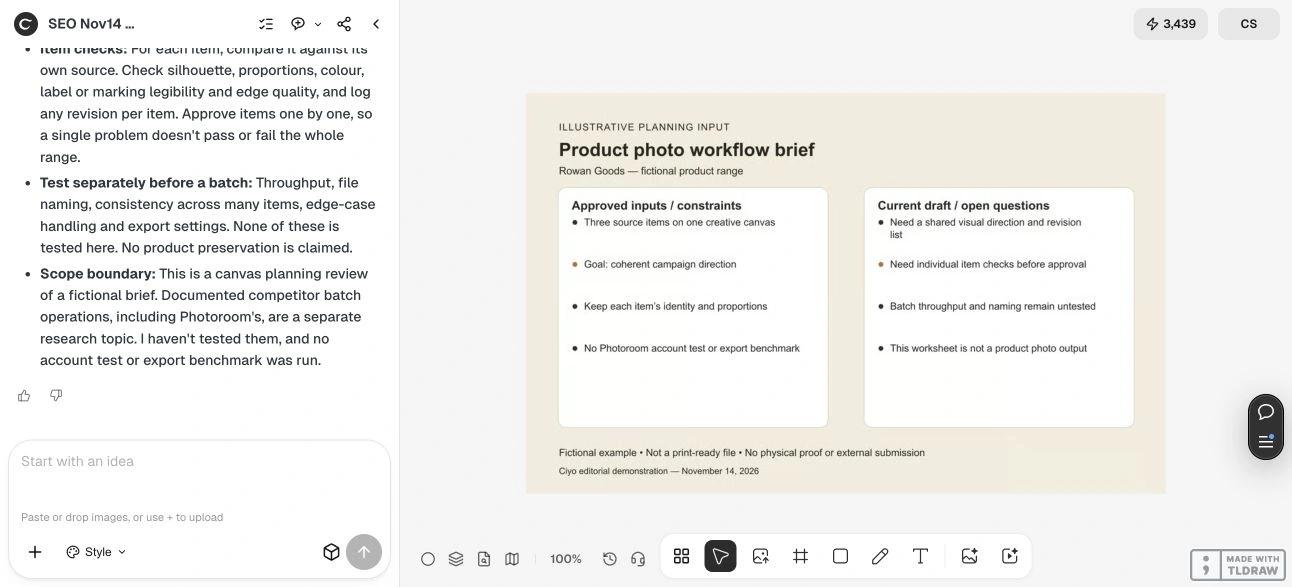
Ciyo’s canvas gives a designer a place to bring references and ask for a bounded review. Our fictional Rowan Goods brief concerns three items and one coherent campaign direction, with item identity and proportions kept as explicit constraints.
That task is useful before a production run when a team still needs to agree on visual direction and review criteria. It does not establish that Ciyo can replace a catalog batch process, preserve every product detail or produce correctly named exports at a measured rate. Those need a separate test with actual authorized product photos.
Choose by role and production stage
For a catalog operator with an approved style and many similar edits, begin with the documented batch route and test representative exceptions. For a solo marketer still defining a campaign, begin with a small creative brief and item-by-item acceptance list. For an agency, separate client direction approval from the repetitive production stage so a change in taste does not trigger an uncontrolled rework of the whole catalog.
No overall price winner follows from this comparison. Work out the expected workload, account access, credits or plan limits and revision needs against current terms. No free-tier or trial allowance is asserted here.
Live Ciyo review: a shared direction and separate item checks
In the November 14 dev.ciyo.ai run, Ciyo proposed a shared light direction, backdrop tone, crop/margin rule, shadow style and color temperature for the fictional three-item range. It recommended comparing each item with its own source for silhouette, proportions, color, markings and edges, then logging revisions separately.
It explicitly left throughput, file naming, consistency across a larger set and export settings for separate tests. The input was a planning worksheet, not three product photos, and no edited image was produced. This supports the planning stage only; it supplies no evidence of image quality or a batch advantage over Photoroom.
A small pilot before changing tools
Use a few authorized source images that include an easy item and a difficult exception. Specify the intended background, crop and allowed changes; require labels, colors, proportions and included accessories to remain accurate. Review each output against the source, then inspect filenames and delivery settings.
Run the same acceptance criteria in both products if image quality or throughput decides the purchase. Record elapsed time, rejected outputs, revision effort and actual plan cost. Our worksheet review supplies no such benchmark, and it is not evidence of a production integration.
Review this creative brief for [SHOP] and [ITEM LIST]. Goal: [CAMPAIGN OR CATALOG TASK]. Approved references and non-negotiable item details: [DETAILS]. Return a shared direction and per-item acceptance checklist. Distinguish planning from batch editing, image generation and export testing. Do not invent throughput, preservation guarantees or an integration with another product.Sources and related workflow
Photoroom’s documentation was checked November 14, 2026. Ciyo observations cover the fictional task only; there was no equivalent Photoroom account run.
Frequently asked questions
Which product is cheaper for my catalog?
This article did not compare current paid plans or usage bills. Check each account’s access and limits, then estimate cost using your actual batch size, rejected results and revisions.
Can I use both products in one workflow?
You can evaluate a manual handoff, but no direct integration or lossless transfer was verified here. Test file formats, naming and item identity on a small set.
Does this comparison establish an image-quality winner?
No. The evidence covers Photoroom documentation and a Ciyo planning task, not an equivalent image-generation or editing benchmark.
Can I switch without checking my old files?
Retain authorized originals and test representative exports. No automatic project migration or support commitment is established by this comparison.
Define the review before the batch
Use Ciyo to organize the creative brief and acceptance list, then test the production workflow your catalog actually requires.