Event response stationery
RSVP Card Template: Check the Response Fields Before Decoration

An RSVP card should make it easy to reply. An attractive border will not help if a guest cannot find the deadline, tell whether declining is an option or understand where to return the response. Decide the response fields before decorating them.
We generated a fictional Juniper Paper Evening RSVP proof in Ciyo on November 22, 2026. The PNG retains the January 10, 2027 response deadline, blank name and guest-count lines and two empty attendance boxes. The English HTML, field checklist and PDF proof are separately assembled editorial companions. No form, invitation or guest response was submitted.
Quick answer: a source you can check, then a visual proof
Put the response deadline near the event name, offer clear attending and declining choices, and ask for a guest count only when applicable. Supply a real return route in your own invitation. Check every field in a flat image proof and a separately prepared printable source.
Follow five steps: define the task, prepare the source, request a visual proof, inspect the actual output and prepare a separately reviewed working file.
1. Separate the invitation from the response
The invitation tells a guest what is happening; the response card helps the host know who plans to attend. Our fictional event is Juniper Paper Evening, with a sample response deadline of January 10, 2027. That is a reply date, not the event date.
Canva's RSVP template collection shows the response-card category. Use examples for visual hierarchy, but decide your actual fields from the event's needs. A save-the-date card has a different purpose and should not be treated as a completed response request.
2. Approve only the fields you need
The sample includes the guest's name, two attendance choices and a guest count if attending. It tells the guest to use the return route supplied in their invitation. No real postal address, email destination or connected web form is included in the download.
Keep the choices unambiguous: a declining guest should not have to invent a zero-person attendance response. A guest-count field should respect the allowance on the actual invitation rather than imply an unlimited plus-one. Avoid collecting extra personal details merely because there is room on the card.
| Field | Example or instruction | Check |
|---|---|---|
| Response deadline | January 10, 2027 | Identified as a reply deadline |
| Attendance | Attending or Declining | Two clear alternatives |
| Guest count | If attending | Matches the invitation allowance |
| Return route | As supplied in your invitation | Replace with a usable route before sending |
3. Request a flat response-card proof
In a separate Ciyo project, ask for a flat card with the event name and approved response fields. Give the exact deadline and ask the model to keep blank name and count areas. A photographed envelope or styled table setting can obscure the parts you need to inspect. For the run shown, we used Image Generator with GPT Image 2.5 Flare, portrait 3:4, 1K and one image. Check the displayed credit quote before starting your own run.
The demonstration prompt below requests an image proof. Do not describe that image as a connected form, an editable PDF or a mail-ready file. Preserve the wording in a separate source so the deadline or return instructions can be corrected without relying on generated text.
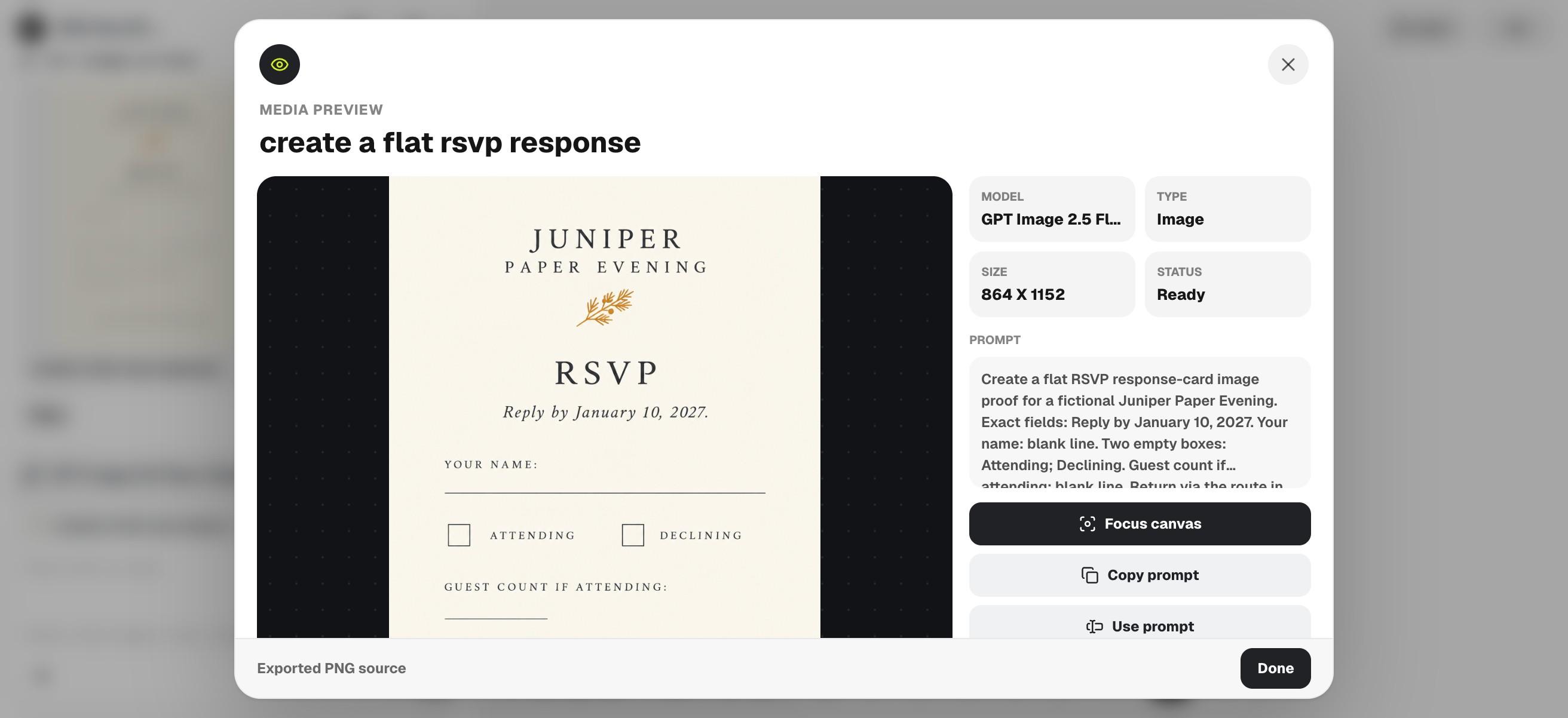
Create a flat RSVP response-card image proof for a fictional Juniper Paper Evening. Exact fields: Reply by January 10, 2027. Your name: blank line. Two empty boxes: Attending; Declining. Guest count if attending: blank line. Return via the route in your invitation. Ivory, charcoal, small amber accent, generous space. No extra dates, addresses, QR codes, checked boxes or guest data. No connected form or editable PDF claim.4. Read it from a guest's point of view
Can someone immediately find the reply date, indicate that they are declining and understand where to return the response? Count the attendance choices and inspect the blank fields. Reject added contact details, a changed deadline or decorative marks that look like preselected answers.
The actual PNG keeps the supplied reply deadline, Attending and Declining boxes, conditional guest-count label and return-via-invitation instruction. It contains no added address, QR code or preselected response. The generic return instruction is still a placeholder: the host must supply and check a real route before distributing their own card.

5. Prepare the source and test your response route
The English HTML companion preserves the fields as editable text. The CSV records each field and its review condition. The PDF is a separately assembled proof. Replace the fictional event and deadline, then add accurate return instructions appropriate to the channel you will use.
Print one sample and try completing it by hand, or inspect the final digital file at the intended size. If using a separate online form, verify that destination and its confirmation independently. No form setup, guest-data collection or invitation delivery is part of this demonstration.
Choose the workflow and review the final file
Choose an event form when you need structured digital responses, and verify it separately from the card design. Choose a printable card when a physical response suits the invitation. In either case, keep the deadline, attendance choices and return route more prominent than the ornament.
Download the English working files
These English companions are separately assembled editorial files. They preserve the source information or blank fields described above; they are not exports from Ciyo's image-generation step. Review and adapt them before use.
Practical questions
Is the sample connected to an RSVP form?
No. It is a design source and proof. No online collection endpoint is included.
Is January 10 the event date?
It is the fictional response deadline. Replace it and the event details with your actual information.
Can a guest decline?
Yes. The sample explicitly separates Attending and Declining rather than requiring a guest count for every response.
Make the reply easy to complete
Approve the response fields and deadline, then explore a clear RSVP proof in Ciyo before checking the final source and return route.