Practical design guides
Save the Date Design: Announce Only the Details You Have Confirmed

A save the date gives guests early notice. Adding an unconfirmed ceremony time or a guessed venue can make a handsome card less useful than a plain message with the correct date and city.
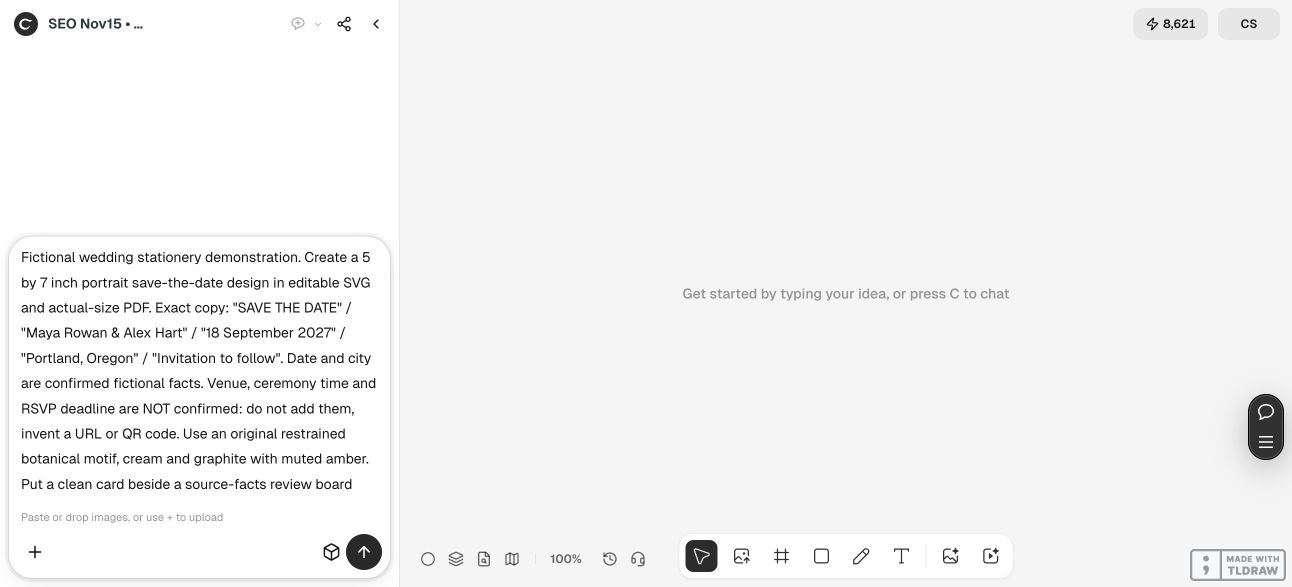
This tutorial combines stationery guidance with a fictional Maya Rowan and Alex Hart card made in Ciyo. We inspected the returned card and its source-facts board. No wedding was booked, no notices were sent and no physical print was produced.
Quick answer
Confirm the names, wedding date and location before designing the card. Include an approved wedding website only if it is ready to use, and make clear that an invitation will follow. Keep uncertain venue, time and reply instructions out of the artwork. Proof the exact exported file with another person before sending or printing.
1. Separate an early notice from the formal invitation
A save the date answers a small set of questions: who, when and roughly where. It does not need to carry the entire ceremony schedule. Minted’s guidance distinguishes the early notice from the later invitation, which provides the detailed event information and reply instructions.
Decide who will receive the notice using your confirmed invite list. Then create one short source-of-truth list for the words. Avoid collecting uncertain information just to fill space in a template. A quiet area of the card is preferable to a precise-looking fact that may change.
2. Approve the facts in a separate review sheet
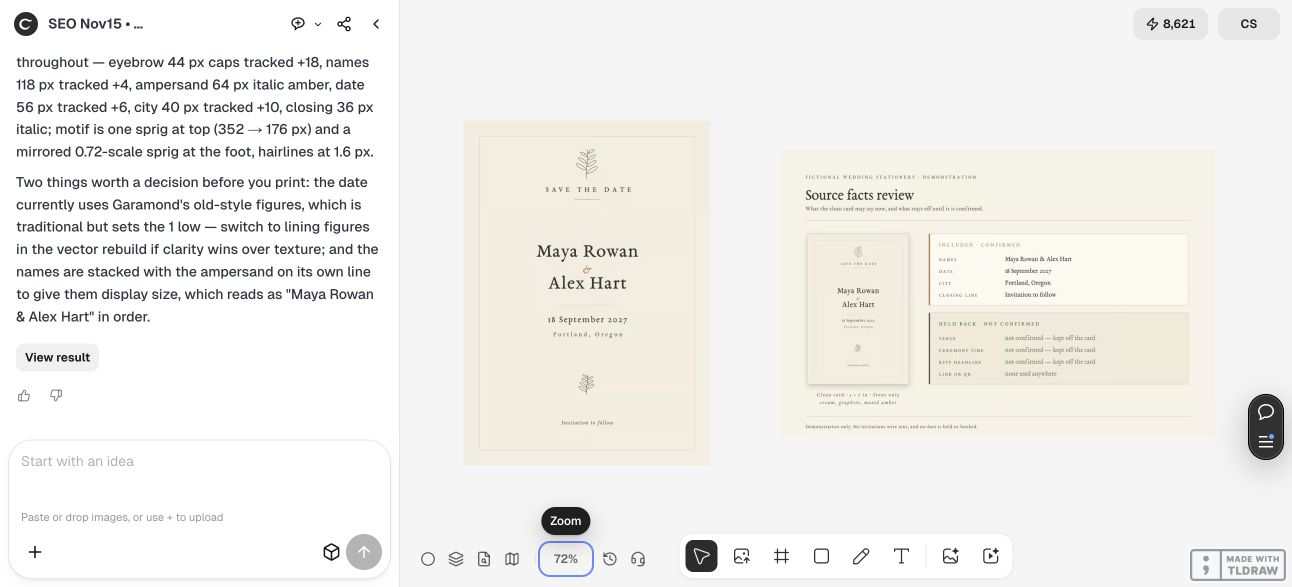
For the fictional example, Maya and Alex have agreed on 18 September 2027 in Portland, Oregon. Their venue, ceremony time and RSVP deadline are deliberately undecided. Those fields remain on a review sheet as items to resolve, not on the card.
Write the date in a way your guests will understand without guessing a regional numeric order. Spell out the month if that helps your audience. Check names and accents character by character, and decide whether full names are needed for relatives or friends who may not recognize both first names.
| Field | Approved content | On the early notice? |
|---|---|---|
| Names | Maya Rowan & Alex Hart | Yes |
| Date | 18 September 2027 | Yes |
| Location | Portland, Oregon | Yes |
| Closing line | Invitation to follow | Yes |
| Venue and time | Not confirmed | No |
| RSVP deadline, website or QR | Not supplied or approved | No |
3. Make the card and review board together in Ciyo
Start a clean project with the exact approved copy. Specify your intended format, the overall visual direction and the facts that must not be invented. Ask for a clean card beside a separate facts review. This gives the reviewer something concrete to compare with the source list.
In our November 15 production Ciyo run, the agent created a botanical card and a source-facts board. The downloaded clean card was 1500 × 2100 pixels; the review board was 2400 × 1500. We inspected the card’s names, spelled-out date, city and closing line, and confirmed that it did not add a venue, time, RSVP deadline, URL or QR code.
The demonstrated handoff was raster artwork. Ciyo said it could not deliver the SVG and PDF through that chat. We did not treat its description of inaccessible workspace files as a delivered print file. If you need live text for revisions, confirm that you can actually obtain the source or rebuild the layout in your chosen editor.
Create a [FINISHED SIZE AND FORMAT] save-the-date design. Exact approved copy: [NAMES], [SPELLED-OUT DATE], [CITY/REGION], [CLOSING LINE]. These details are not confirmed: [VENUE, TIME, RSVP OR OTHER FIELDS]. Do not add them or invent a URL or QR code. Put a clean card beside a separate facts-review board showing included and held-back fields. Return only files you can actually deliver and state any editability or print-file limitation. Do not send notices.4. Check the file at its final size
A decorative typeface can make a date harder to read. Inspect the smallest line at the finished card size and ask another person to read it without first telling them the words. In our example, the date uses traditional old-style numerals; that is a style choice to evaluate, not a reason to skip a legibility check.
A 1500 × 2100 image contains 300 pixels per inch when placed at exactly 5 × 7 inches. That calculation does not supply bleed, confirm the paper, or prove a printer will accept the file. Use the supplier’s current template and requirements; extending the background must not move the date or names into a trim risk.
For a digital notice, preview it in the channel you plan to use and check that it is still readable after that channel processes the image. For print, inspect a physical proof with the intended stock and finish. Neither step was performed in this fictional demonstration.
5. Control revisions before distribution
Keep the approved facts, artwork version and recipient list together. If the date or city changes before distribution, replace the exported file and check every occurrence, including the review sheet. If a change happens after sending, use a deliberate guest update process rather than quietly changing a design file.
A couple preparing a small notice can use one card and a short checklist. A stationery designer working with several clients should keep each approval and guest list separate. The useful control is a person who confirms the facts, not a more elaborate template.
Move the ceremony schedule, venue and reply process into the later invitation when those details are approved. Our ceremony-program guide covers a different deliverable: the order guests will follow on the day.
Questions about save-the-date designs
Do I need the venue before designing a save the date?
You need confirmed information that helps guests plan. This example uses the city and state while leaving the undecided venue off the card. Confirm the right level of detail for your event before sending.
Should I add an RSVP deadline?
Only include reply instructions that are actually approved and appropriate to this notice. Do not let a template invent a deadline or a reply destination.
Is the Ciyo example an editable SVG or PDF?
The demonstrated delivered assets are raster images. The chat did not provide the SVG or PDF as downloadable files, so the article does not claim a native editable or print-PDF handoff.
Does the pixel size make the card print-ready?
No. Pixel dimensions tell you the available image detail at a chosen placement size. You still need the printer’s template, bleed and file checks, plus a physical proof.
Design from confirmed facts
Bring the approved names, date and city into Ciyo. Review the clean card beside its facts sheet before choosing a distribution or print handoff.