Practical design workflow
Sign-In Sheet Template: Record Attendance with Fewer Fields

A workshop host needs to know who arrived. That does not automatically mean the shared clipboard needs a phone number, email address and signature from every participant.
This fictional adult paper-folding workshop uses a twelve-row sign-in sheet. The workflow starts with the attendance question, explores a readable layout in Ciyo and finishes with an independently authored editable sheet.
Quick answer: design for the decision at the door
For this example, the host needs a display name, arrival time and a simple attendance mark. The event date and session belong at the top. The row number helps the host reference an entry; it is not an identity check or a reliable capacity count by itself.
Use the four steps below to define the fields, make a visual proof, prepare a writable sheet and review how it will be handled. If a different event requires additional information, decide why it is needed before adding another column.
| Field | Purpose | What this example leaves out |
|---|---|---|
| Display name | Recognize an arrival | Full identity verification |
| Arrival time | Note when the person arrived | A complete access log |
| Attendance mark | Host records attendance | A signature or agreement |
1. Decide what attendance means
Write the session name and date before you design the sheet. An attendee who arrives for the morning session should not be recorded ambiguously on the afternoon list. Choose whether the host or the participant writes the attendance mark, and explain that convention to the person using the sheet.
Keep registration and attendance separate. Someone may have registered but not arrived, or arrived under a different display name. Reconcile those cases with your own registration source instead of treating blank rows as no-shows. Do not publish an actual completed attendance sheet as a design example.
2. Explore a spacious layout in Ciyo
Use a clean fictional project. Ask for a plain portrait sheet with a readable event header and twelve generous writing rows. Inspect the current generation settings and quote before you run the brief. The visual task is legibility at the door, including enough width for a long display name.
Compare the result with the field list. Reject added contact columns or agreement language even if they make the image look more official. A generated checkbox or handwriting line is a visual element, not a functioning attendance database.
On November 27, 2026, we used Ciyo’s production Image Generator with GPT Image 2.5 Flare, aspect ratio 3:4, 1K and one image. The displayed quote for this run was 2 credits. Check the quote in your own session.
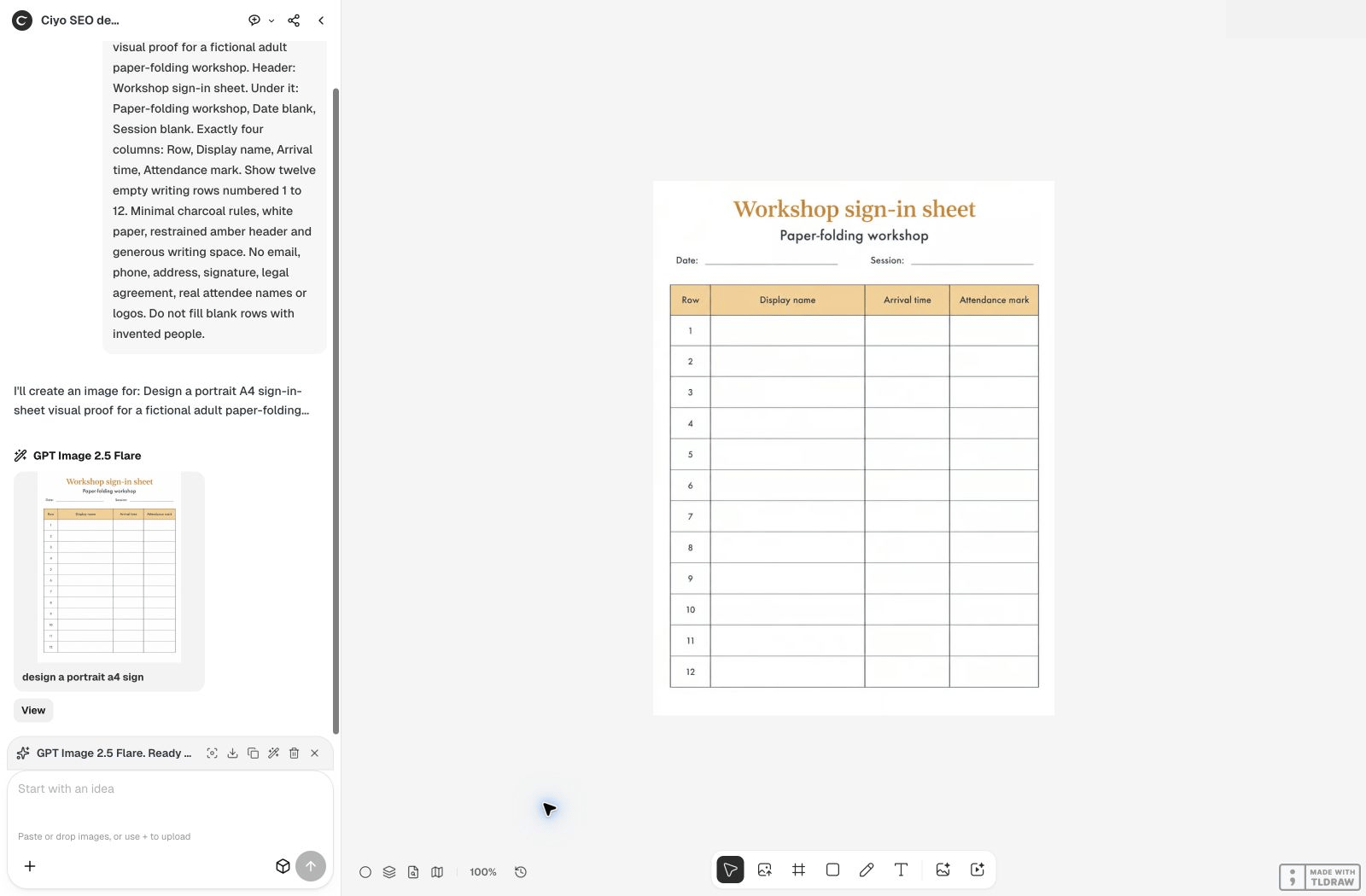
Design a portrait A4 sign-in-sheet visual proof for a fictional adult paper-folding workshop. Header: Workshop sign-in sheet. Under it: Paper-folding workshop, Date blank, Session blank. Exactly four columns: Row, Display name, Arrival time, Attendance mark. Show twelve empty writing rows numbered 1 to 12. Minimal charcoal rules, white paper, restrained amber header and generous writing space. No email, phone, address, signature, legal agreement, real attendee names or logos. Do not fill blank rows with invented people.3. Prepare a sheet people can write on
The image retained the four requested columns and twelve numbered rows. The date, session and attendee cells stayed blank.
Open the HTML download, edit the event details and save a copy before printing. The sheet includes twelve blank rows and no actual attendee information. Use the CSV headings if you need to maintain your own structured record later; there is no automatic import or attendance synchronization.
Print one A4 page at 100% and try writing a long name and a time in the same row. Check that your pen remains readable over the rules and that the last row has useful space. Increase the row height or use another page when the real event needs more room. A squeezed sheet can slow down the entrance even when it looks tidy on screen.
4. Check the host's handling plan
Decide where the clipboard sits, who can see prior entries and who collects the completed sheet. If people should not see each other's names, use an individual or host-managed method instead of leaving an open shared list. These are operational choices to make before the door opens.
At the end, distinguish a blank row, an illegible entry and an attendee confirmed by the host. Correct the record against the event source when necessary. Store the completed sheet according to your actual needs; the downloadable example does not decide retention or access rules for you.
Choose the right attendance format
Vertex42 publishes several sign-in and visitor formats, illustrating why the fields depend on the task. Its templates have their own license and are not included here. Our download is a separate original example with fewer fields for this particular fictional workshop.
A potluck planning sheet answers who is bringing what, rather than who has arrived. Keep that planning record separate. For repeated sessions, online check-in, identity verification or attendance reporting, evaluate a tool built for those requirements instead of expanding a decorative image.
Sign-in sheet questions
Does a sign-in sheet need a signature?
This fictional attendance example does not. Add a field only when your real process requires it and its purpose is clear; a signature line alone does not establish a verified identity or agreement.
Does editing the HTML update the CSV?
No. They are separate source files. Save the edited HTML and update any structured record separately.
Can Ciyo track who attended?
This workflow uses Ciyo for visual design. The image is not an attendance system; the host maintains and checks the actual record.
Make the arrival step easy to read
Start with the event and minimum fields, explore a layout in Ciyo, then print and test one editable sheet before the session.