File preparation
Compress a TNPSC application photo while keeping the name strip legible
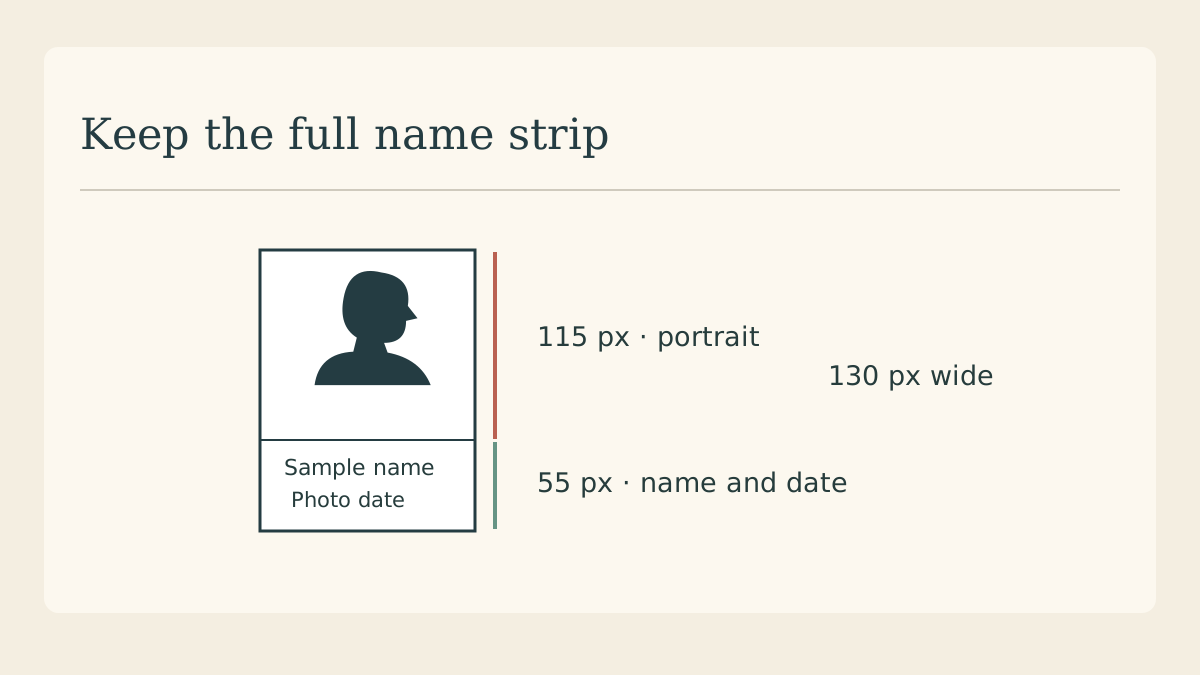
Start with the studio photograph required by the relevant TNPSC notice. Compression is the last file-preparation step. If you shrink the portrait first and then squeeze a name into the remaining pixels, a small enough JPEG can still have an unreadable date.
Check the notice for this application
Open the photograph section of your recruitment notice and the commission’s instructions. The June 2026 example gives a width of 130 pixels and a height of 170. Confirm the current notice and portal ask for the same file before using these numbers.
Build the two parts together
The commission’s example assigns 115 pixels of height to the photograph and 55 to the name and date strip. Prepare the complete rectangle from a clear source. Avoid stretching the face to fill the image area or cropping the lower strip when resizing.
Read the date from the source
Compare the typed name and date against the information required for the particular application. The notice specifies when the photograph must have been taken. Use the actual date of photography and keep a separate original from the studio.
Export a fresh JPEG
The cited instructions describe a 20–50 KB photograph file. Save one JPEG from the clean master, then check its pixel dimensions and size on disk. If it is too large, return to the master and reduce export quality gradually.
Inspect at actual pixels
Open the newly saved file at 100 percent zoom. Read the letters and the smallest date digit, then inspect the boundary between the face and white background. If the face has become blocky, improve the original capture before another export.
Confirm the portal preview
Keep the photograph and signature as separate files. After choosing the photograph, inspect the portal preview for the correct person and full strip before submission. An illustration of the layout can guide preparation; only the commission can accept an application.
Continue with file formats
When preparing other images for sharing, learn what the PNG suffix means and how to say it.