Guest-network card design
WiFi QR Code Guest Card: Check the Payload Before Styling

A guest-network card should communicate the correct network details and remain easy to scan after its artwork is added. The code, its clear surrounding area and the human-readable credentials all need to agree. Start with verified data and an independently decoded symbol.
We generated abstract border artwork in Ciyo on November 21, 2026, then separately built a deterministic QR and a fictional guest card. An independent decoder recovered the exact sample payload from both the raw symbol and the assembled card's actual browser screenshot. We did not scan it with a phone, connect to a network or change router settings.
Quick answer: encode, decode, assemble, then test the intended device
Use approved guest-network details, generate the code from those exact fields, decode it independently and preserve its clear quiet zone when styling the card. Keep the network and password readable as text. Then test your intended devices and printed size with your own authorized network.
Our downloadable example uses invented credentials only: network Juniper-Guest-Example, sample password PaperDemo2026 and authentication field WPA. It does not provide access to a real workshop network. Follow the five steps below to understand what the digital checks establish and what remains to test.
| Step | Action | Keep |
|---|---|---|
| 1 | Approve the network data | Exact fields and their intended use |
| 2 | Encode and independently decode | A payload that matches the approved values |
| 3 | Create decorative artwork | A separate image with no fake code |
| 4 | Assemble and decode again | An unobscured code and readable credentials |
| 5 | Test the intended use | Your own phone, network and print checks |
1. Prepare approved guest-network details
For a real card, obtain the exact guest-network name, authentication choice and any required password from the network owner or administrator. Keep case and punctuation intact. This example does not discover credentials, configure a router or establish that a particular network is suitable for guests.
Our sample values are invented and visibly labeled as fictional. The readable network name and password on the card match the encoded sample. A WiFi configuration payload serves a different purpose from a QR that opens a workshop signup URL; do not substitute one kind of content for the other.
The QR contains the credential data rather than encrypting the sample password. Treat the intended audience for a real guest card as part of the sharing decision, and use only information approved for that use.
2. Generate the symbol from an exact payload
The ZXing project documents a WiFi configuration syntax with fields for authentication, network name and password. Our payload is WIFI:T:WPA;S:Juniper-Guest-Example;P:PaperDemo2026;;. Its sample values do not need special-character escaping; other values may, so follow the format's escaping rules rather than removing punctuation.
We generated a regular QR symbol deterministically with error correction M. It is version 4, with 33 symbol modules per side and a four-module quiet zone, making 41 modules per side including the margin. An independent OpenCV decoder recovered the exact sample string.
That decode checks the data in this symbol. It does not establish that every phone supports the configuration, that a real password is correct or that a network connection will succeed.
WIFI:T:WPA;S:Juniper-Guest-Example;P:PaperDemo2026;;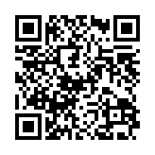
3. Use Ciyo for separate abstract border artwork
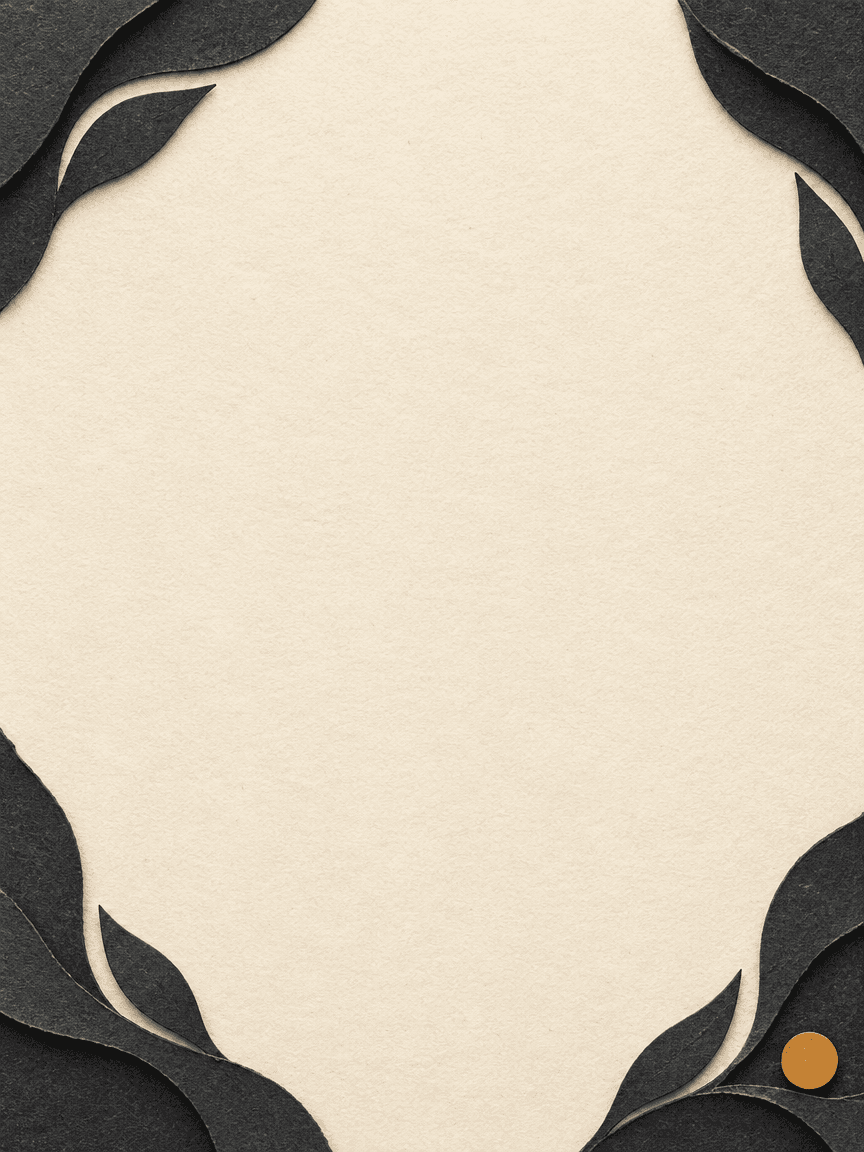
We asked Ciyo for an ivory, charcoal and amber border with a quiet center and no text, grid or code-like pattern. It returned an 864 × 1152 PNG using GPT Image 2.5 Flare. The downloaded artwork has paper-like corner forms and a small amber accent.
The image does not encode network data. Keeping it separate lets us position a verified vector code without asking an image model to reproduce its modules. The reusable prompt below requests only the artwork, so real credentials are unnecessary for that image brief.
We inspected the actual image before placing the code. Its irregular open center still needed a bounded, clear area in the final layout; a general request for empty space was not enough to define the code's margin.
Generate one original abstract border artwork for [approved or fictional guest card]. Use warm ivory, matte charcoal paper forms and a restrained amber accent. Leave a large quiet center for a separately generated code and readable text. No lettering, logo, grid, dots or QR-like pattern. Save the artwork and report actual dimensions. This is decoration only; do not claim it encodes credentials, changes a router or tests a connection.4. Assemble the card and decode the actual rendered result
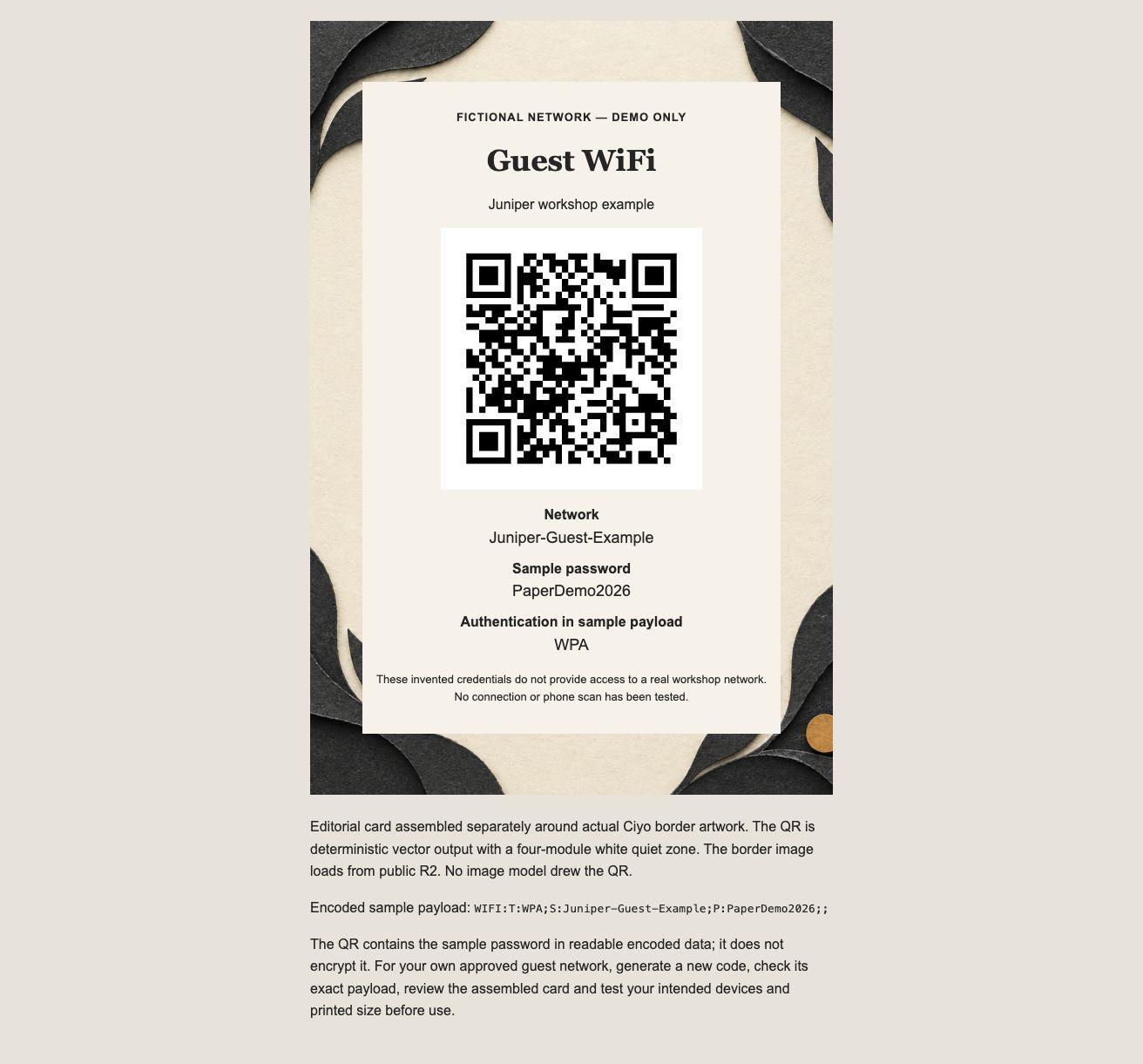
The English HTML card was assembled separately around the actual Ciyo image. It places the deterministic SVG on a white background, with the network, sample password and authentication field beneath it. The fictional-network disclosure is visible above the code.
DENSO WAVE's guidance calls for a four-module clear margin around a regular QR symbol. Our source includes that white quiet zone and keeps artwork outside it. We checked the source matrix's outer four rows and columns, then inspected the assembled browser card.
We also decoded the actual full-page browser screenshot with OpenCV and recovered the same exact payload. That second check matters because a correct source symbol can still be obscured or distorted during assembly. It remains a desktop digital decode, not a phone-camera or physical-print test.
5. Test the intended phone, network and printed size
For your own approved network, scan a correctly assembled card with the devices guests will use and confirm that the displayed details match the intended network. A successful data decode and a successful connection are separate outcomes. Do not report one as proof of the other.
If you print the card, test the actual size, paper, lighting and placement. Avoid stretching the symbol or placing art inside its quiet zone. Recheck after a layout or credential change, because the previous receipt describes the previous version.
Our example has not undergone those phone, connection or print checks. Its invented credentials are included so the digital workflow can be inspected without publishing real network information. The source card also depends on the public border image unless you save and relink that asset for offline use.
Keep the artwork and credential update paths separate
A workshop host can preserve the border artwork while replacing a code when approved guest credentials change. A designer handing off the card should include the source values, verified symbol and final card version so the operator can tell what was checked.
Do not redraw a verified QR as decoration or assume that copying an old card preserves current credentials. Keep a short record of the exact payload and checks with the source, then repeat the relevant checks when something changes.
WiFi QR guest-card questions
Does the supplied card connect to a real network?
No. It uses an invented network name and password and is labeled as a fictional example. No network connection was attempted.
Did an image model draw the QR?
No. Ciyo generated the border artwork. The QR was built deterministically outside Ciyo and independently decoded before and after card assembly.
What does the four-module quiet zone mean?
It is a clear margin around this regular QR symbol, measured in the symbol's module width. Our vector source includes it on all sides and keeps the border art outside it.
Does the browser-screenshot decode replace a phone test?
No. It confirms that the rendered desktop card decoded to the exact fictional payload. Phone compatibility, a real network connection and a printed card still need their own checks.
Verify the data before adding the border
Use Ciyo to explore abstract card artwork, then assemble it around a separately verified code. Keep approved readable credentials and test the final card in its intended setting.