Practical design guides
Window Cling Design: Choose the Viewing Side Before Mirroring

A window cling can look correct in a design file and read backwards from the pavement. The important distinction is where it is installed, where people read it, and how the chosen supplier prepares that specific material.
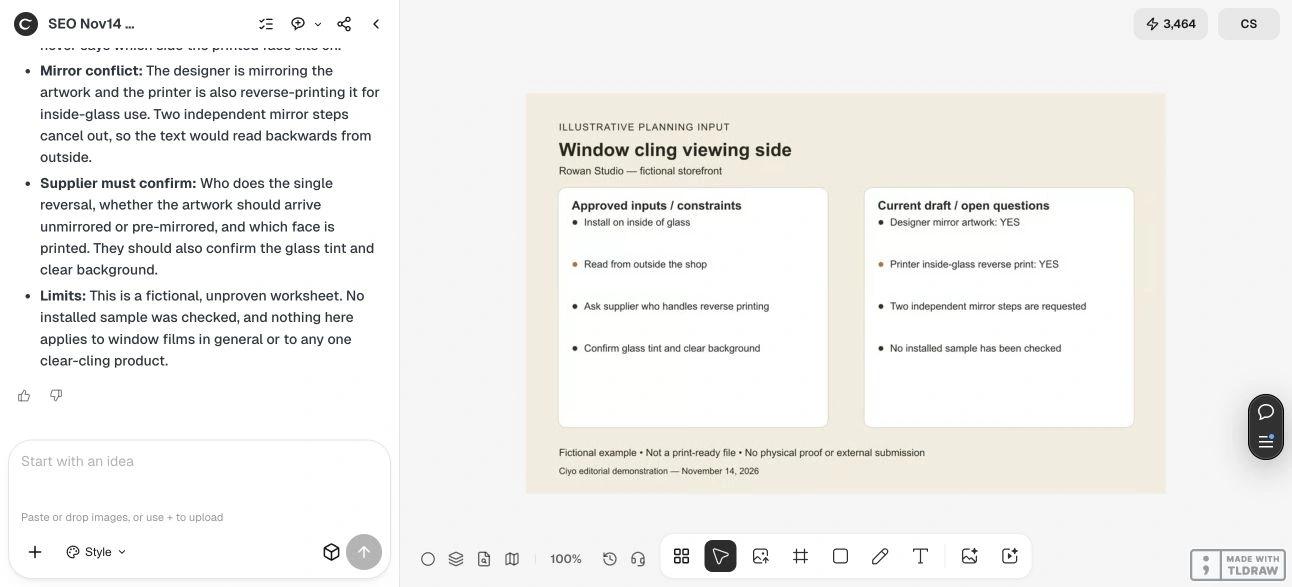
This tutorial uses Signs.com’s clear-cling guidance and a fictional Rowan Studio worksheet reviewed live in Ciyo. The review exposed conflicting mirror instructions. No installed cling, tinted window or production file was tested.
Quick answer
Write two separate instructions: “installed on [SIDE]” and “read from [SIDE].” Give them to the supplier and ask whether artwork should arrive normal or mirrored. Assign the reversal to one confirmed workflow step, then approve a proof from the intended viewer’s perspective.
1. Specify the installed side and the viewing side
For fictional Rowan Studio, the cling will be installed inside the shop and read by people outside. “Inside window sign” alone is ambiguous: it can describe installation, audience or a product option. Put both sides in plain language on the brief and label the street-facing view on your reference.
Signs.com describes an inside-glass option for its clear window clings that is placed inside and read outside, with reverse printing handled for that option. This is product-specific guidance. An opaque, adhesive or perforated product can have different requirements; confirm the exact material rather than extending one rule to every window film.
2. Decide who is responsible for reversing
Our deliberately inconsistent worksheet requested both designer mirroring and printer reverse printing. That is a reason to stop and clarify, not a reason to flip the file again until the preview looks familiar. Ask what the printer expects to receive and how its proof represents the installed result.
Request a proof showing the words as the intended reader will see them, plus a clear description of the printed face. Keep the supplier’s response with the approved file so a later designer does not repeat the reversal.
| Decision | Fictional brief | Confirmation needed |
|---|---|---|
| Install location | Inside of glass | Exact product option |
| Reader location | Outside the shop | Street-facing proof |
| Artwork delivery | Normal or mirrored: unresolved | Supplier’s written instruction |
| Reversal responsibility | One agreed step | No independent second flip |
3. Check what clear actually means
A clear substrate does not turn every colored area of your artwork into a transparent window. Identify which areas should remain clear and ask the supplier how backgrounds, white ink and colors are handled for the chosen product. Confirm whether the supplied proof represents transparency or merely uses a checkerboard preview.
Glass tint, reflections and what sits behind the sign can affect visibility. Check a material sample in the real window and lighting when possible. A high-contrast screen mockup does not prove legibility through tinted glass, and a reversed preview does not establish the ink construction.
Live Ciyo review: two mirror requests
On November 14 at dev.ciyo.ai, we uploaded the fictional planning worksheet and requested a concise conflict review without image generation or an order. Ciyo identified the inside-install/outside-read condition and the two independent mirror steps. It asked who would perform the reversal, which face would be printed, and how tint and the clear background would be confirmed.
The useful output was a supplier question list. It did not establish that a specific production file was reversed correctly. We retained the original worksheet as a planning reference; no physical sample or installation was part of the run.
Copyable supplier-brief review
Replace the bracketed fields and include the supplier’s exact product name and instructions when available.
Review my window cling brief for [BUSINESS]. Installed side: [INSIDE OR OUTSIDE]. Read from: [SIDE]. Exact supplier product: [PRODUCT OR UNKNOWN]. Supplier says artwork should arrive [NORMAL, MIRRORED OR UNCONFIRMED]. Intended clear areas: [AREAS]. Glass tint: [KNOWN DETAIL OR UNKNOWN]. Flag conflicting reversal instructions and missing approvals. Do not generate a print file or claim an installed test.4. Approve the orientation before ordering
Compare the proof with the approved words, check transparency and color expectations, and confirm dimensions, trim and installation instructions with the supplier. If the material or installed side changes, request a fresh orientation check. Save one approved revision with the supplier’s written instruction.
Source
Signs.com clear-window-cling guidance checked November 14, 2026. The Rowan Studio case is fictional and was used only for a live planning review.
Frequently asked questions
Should I mirror every window cling design?
No universal rule applies. Confirm the exact product, installed side, intended viewer and supplier file requirements before mirroring.
Does a clear cling make my background transparent?
The substrate and printed artwork are separate. Ask the supplier how colored backgrounds and any white ink affect the areas you want to remain clear.
Can Ciyo confirm the installed result?
This example demonstrates a review of conflicting planning instructions. A supplier proof and real material sample are needed to check the finished result.
Resolve the viewing side first
Bring the installation brief and draft into Ciyo. Use its correction list to ask your supplier precise orientation questions before printing.