Ciyo practical guide
AI Jewelry Photography: A Detail-Accuracy Checklist for Edits
A jewelry image can look cleaner while becoming less accurate. A fine chain gap closes, a setting gains a prong, or a silver surface takes on a gold cast. At listing size those changes can be subtle; for the buyer, they describe a different object.
This workflow combines source-photo inspection with Ciyo's image-editing and background tools. It is an accuracy review method, not a promise that generation preserves jewelry geometry. Keep the original photograph as the authority and use edits only when the result still represents what you sell.
Quick workflow: protect the product before improving the scene
Save the original, identify the small details that define the piece, request one bounded change, compare the result at matched magnification, and approve only a faithful export. If the product itself keeps changing, preserve its original pixels and change the surrounding presentation instead.
| Area | What to compare | Why it matters |
|---|---|---|
| Chain | Link count where visible, gaps and overlap | A fused gap can change the apparent construction |
| Setting | Prong number and contact with the stone | An invented setting misrepresents the piece |
| Stone | Outline, facet pattern and edge clarity | A prettier stone may be a different stone |
| Metal | Tone, finish and highlight direction | Warm lighting can imply a different material |
| Reflection | Consistency with shape and surroundings | A reflection can hide an altered edge |
1. Start with a photograph that resolves the important detail
Use the sharpest authorized source available, with the whole piece visible and enough separation from the background to inspect fine edges. Keep an untouched copy. A blurry chain is not reliable evidence of individual links, and AI upscaling cannot prove the construction that the original failed to capture.
Before editing, write a short inventory from the actual object and photograph: metal description, visible setting, chain style and any feature that must remain recognizable. Do not infer material grade, gemstone identity or dimensions from a generated image.
For a small shop, one well-lit source and a careful inspection are a better starting point than a large batch of inconsistent inputs. For a catalog team, keep the same source naming and approval record across variants.
2. Choose the least invasive edit that solves the problem
If the goal is a cleaner background, begin with background removal or a composition that retains the original product. If the goal is a new lighting mood, recognize that changing reflections may also change how the material appears.
Keep removal and generative reinterpretation separate in your review. A cutout can damage thin edges or leave halos; a generated scene can redraw the jewelry. Both need inspection, but their failure modes differ. Never assume that the phrase 'keep unchanged' creates a protected layer.
Use this authorized jewelry photograph as the product reference. Change only the surrounding background to a quiet warm-gray studio setting. Keep the visible chain structure, setting, stone outline and metal appearance consistent with the source. Do not invent engraving, extra stones or additional jewelry. Return a separate result so I can compare it with the original.3. Compare structure at the same scale
Place the original and candidate next to each other on the canvas. Match the visible product size before judging detail. A larger candidate can appear sharper simply because it occupies more screen space.
Inspect the chain one segment at a time, especially overlaps, clasps and areas close to the edge. Follow the prongs around the stone rather than checking only the most obvious front pair. Compare the stone outline and the negative space between the setting and band.
If you find a changed structural detail, reject the candidate for a factual product listing even when it looks attractive. Keep the exact reason in the review note: 'rear prong missing' is more actionable than 'does not feel right.'
4. Review metal tone and reflections separately
Look at the product against a neutral surrounding field as well as the intended background. An amber backdrop can reflect into silver; that may be visually plausible but still make the listed item read as a different metal.
Check that a bright reflection follows the surface instead of erasing an edge. A highlight crossing a stone does not by itself show that the stone has changed, so compare shape and highlight separately. When the source does not resolve the answer, inspect the physical item or retake the photo.
For advertising concepts, a stylized scene may be acceptable if it does not misstate the product. For a product-detail listing, prioritize the real object's material and construction over dramatic reflections.
5. Export one approved image before making the full set
Open the exported file in the context where shoppers will see it. Review both a large view and the small product-card size. A thin chain may survive the edit but disappear after resizing; a background edge may become more obvious after compression.
Keep the source, candidate, accepted export and rejection notes together. Once one image passes, apply the same review criteria to the next piece. Approval of one ring does not validate a batch of chains or earrings with different edge complexity.
| Field | Record |
|---|---|
| Source | Filename, product identifier and permission |
| Allowed change | Background, crop or another bounded task |
| Protected details | Specific visible structures and material appearance |
| Review | Structural result, reflection result and export result |
| Decision | Accept, revise or retain the original |
Worked example: compare the original with a cutout
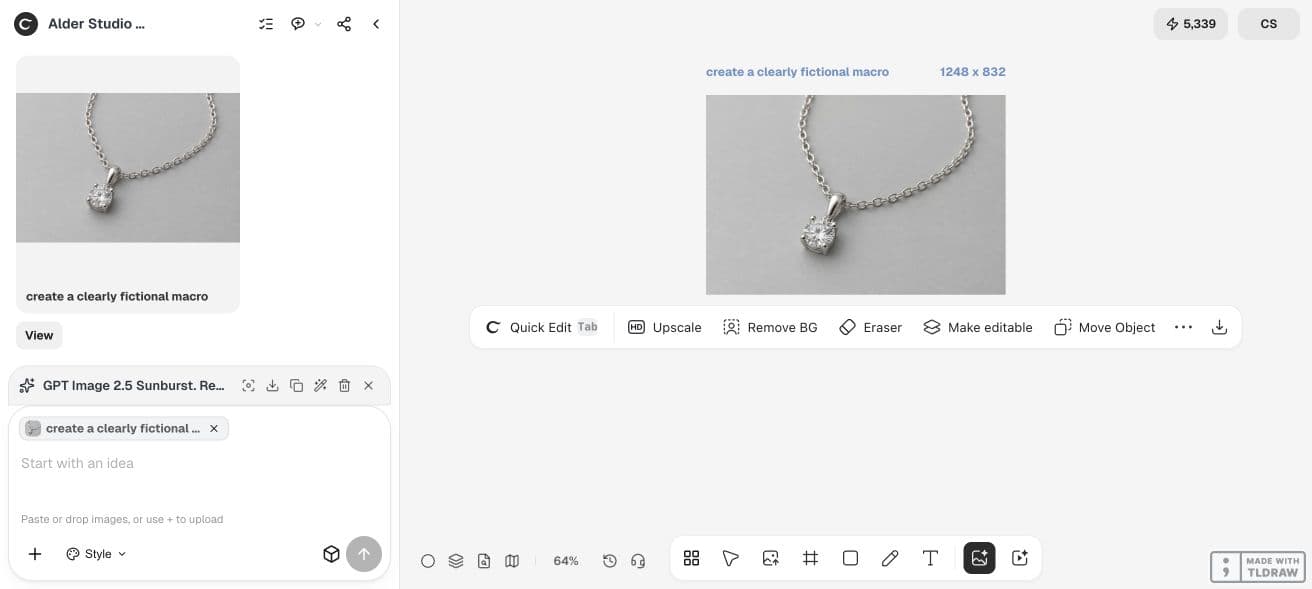
We generated a clearly fictional pendant-and-chain source in Ciyo with GPT Image 2.5 Sunburst, High quality, a 3:2 request and a displayed five-credit quote. The returned source was 1248 × 832. It is an instructional sample, not a photograph of a real item for sale.
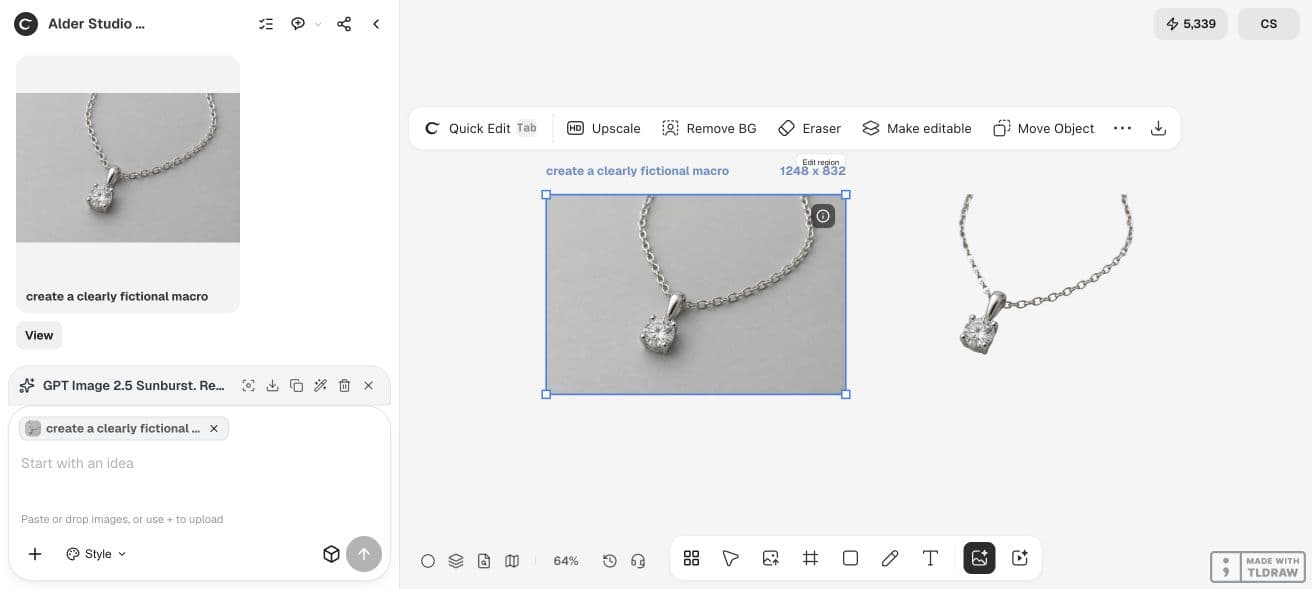
Selecting Remove BG produced a separate cutout beside the source. That makes the thin chain and pendant edges available for direct inspection. The screenshot is a workflow demonstration; it cannot certify a real stone, metal grade or prong construction.
Before using this route for a listing, download the cutout and inspect it against your actual source at full resolution. A successful removal status alone does not prove that every narrow gap survived.
When to stop generating and return to the source
If two candidates fail on the same fine structure, changing the workflow can be more useful than adding adjectives. Try a less invasive background treatment, retain the original product layer, or take a clearer source photo.
Check the current quote before a paid operation and count rejected attempts in the task cost. The cheapest usable workflow is the one that produces an accurate approved asset within your constraints, not necessarily the model with the lowest single-request quote.
Practical questions
Can AI guarantee accurate jewelry details?
No. Treat the physical item and authorized source photograph as the authority. Inspect settings, links, edges and material appearance before using an edited image.
Should I remove the background or regenerate the scene?
Use the least invasive method that solves the problem. Background removal still needs an edge check; regeneration also needs a product-identity check.
Is upscaling enough to recover a blurry chain?
It can make an image appear clearer, but generated detail is not proof of the real construction. Retake the photo when a small feature cannot be verified.
How long should a jewelry edit take?
The time depends on source quality, tool processing and review. Reserve time to inspect a full-resolution export; there is no reliable universal one-click completion time.
Review one piece before editing a catalog
Bring a sharp authorized photo, name the details that must stay accurate, and compare one bounded edit with the original.