Ciyo practical guide
How to Compare AI Image Models in Ciyo Using One Product Photo

The best-looking sample on a model's showcase may have little to do with your actual job. A merchant editing a ceramic mug needs the handle, rim and finish to survive; a spectacular new scene is not useful if the product changes.
This guide gives you a controlled comparison method using Ciyo's fixed image-model selection. It does not declare a universal winner. Use the same authorized photo and editing request, then judge the outputs against the details your own product requires.
Quick method: fix the input, vary the model, inspect the task
Choose one concrete edit and two or three models available in your account. Turn Image Auto off for a controlled comparison, keep all supported common settings constant, and save every output. Score factual product preservation before judging style.
| Element | Rule |
|---|---|
| Source photo | Use the same original file for every model |
| Editing request | Use the same text and allowed changes |
| Output | Match aspect ratio, size and count where supported |
| Model | Change only the selected generation model |
| Review | Apply the same acceptance checks to every output |
| Cost | Record the actual quote and settled spend separately |
1. Define the edit and the details that must survive
Use a task small enough to evaluate: put a product on a warmer studio background while preserving its visible construction. Write down the protected details before looking at any result. For our fictional mug, they are the charcoal handle, oval opening, ivory body and narrow amber band near the base.
Separate a style preference from a product requirement. A warmer shadow can be a preference; a missing handle is a failure. This prevents a visually appealing result from winning because you unconsciously relaxed the original brief.
If the source is blurry or partly hidden, the comparison is partly a test of invention. Use a clearer photo when the goal is accurate product editing, and record any uncertainty you cannot resolve.
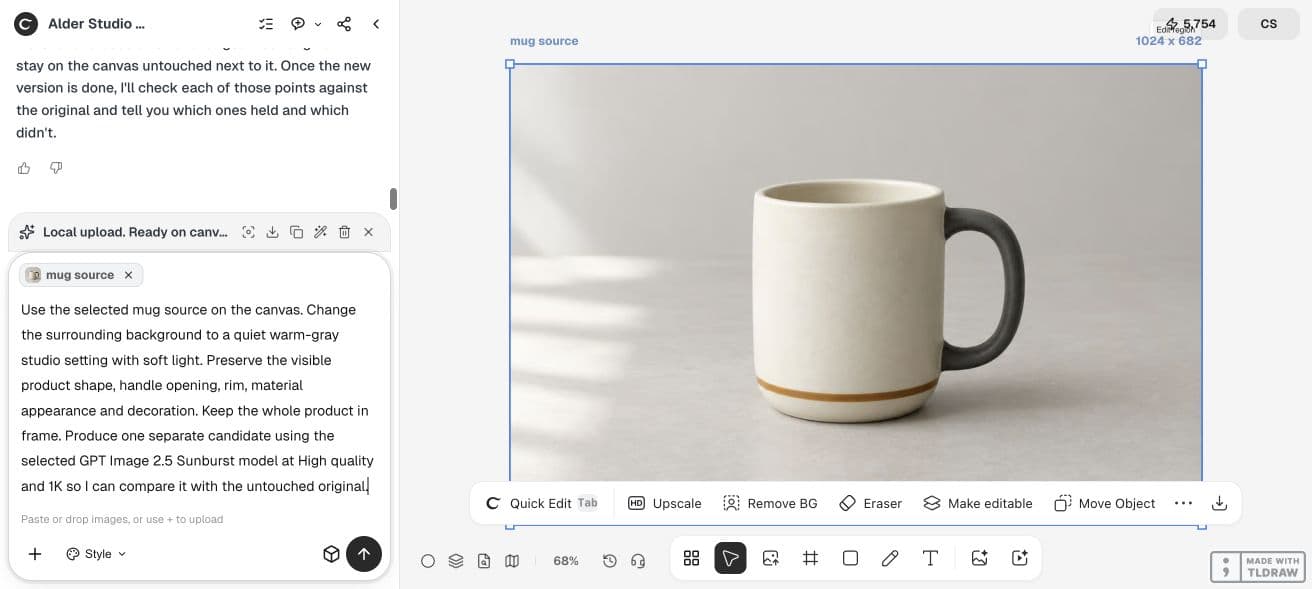
2. Fix the image model instead of leaving Auto enabled
Ciyo's Image Auto lets the Design agent choose an image model for a request. When it is off, the agent is constrained to the selected image model. Video Auto is a separate setting and does not determine the image comparison.
Open the current model controls and choose the first supported image model. Record the displayed name rather than writing a family name from memory. Repeat with the next model only after preserving the first request and output.
A model listed in an article or integration catalog may not be selectable in your current environment. Compare the choices actually offered. If one does not support the same input or resolution, report that limitation instead of silently changing the experiment.
3. Run the same bounded request
Attach the original product photo to each request. Do not give the second model the first model's edit: that would compare two different inputs. Keep the crop, image count and common output settings aligned.
The copyable request below names the permitted change and the features to inspect. It asks for preservation, but it does not make preservation automatic. If the agent changes the request to suit a model, keep that rewritten prompt in the record.
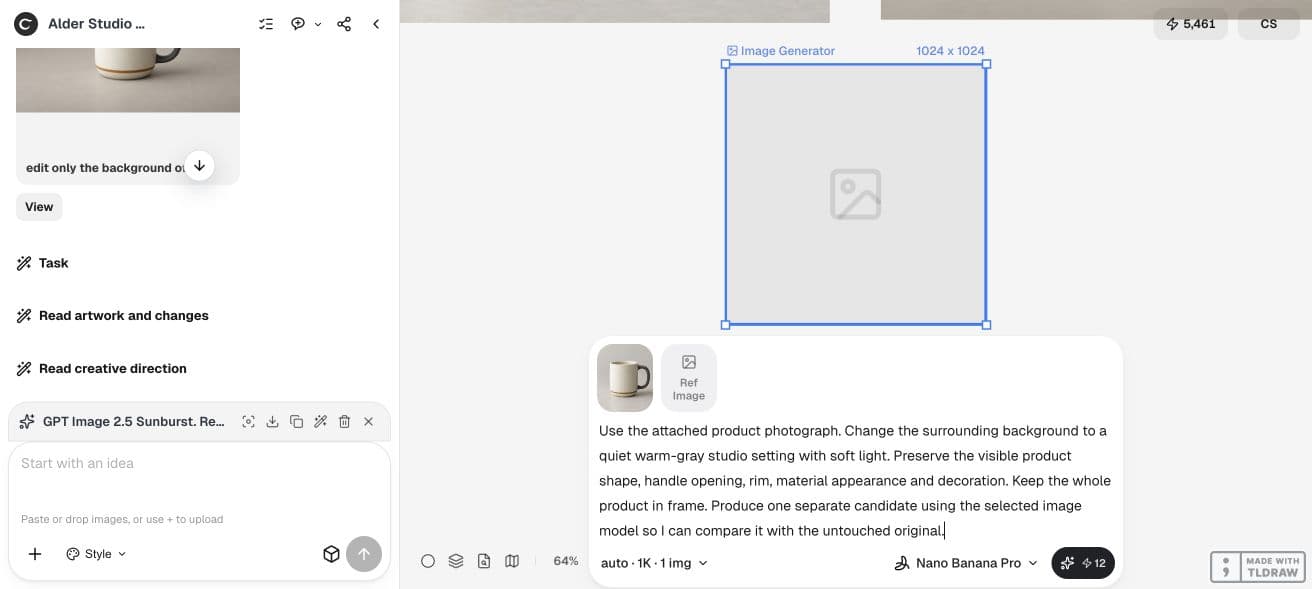
Use the attached product photograph. Change the surrounding background to a quiet warm-gray studio setting with soft light. Preserve the visible product shape, handle opening, rim, material appearance and decoration. Keep the whole product in frame. Produce one separate candidate using the selected image model so I can compare it with the untouched original.4. Review fidelity before styling
Place the original and each candidate at the same apparent size. Inspect silhouette, negative space, surface detail, any wording, background edges and contact shadow. Then judge whether the candidate actually fulfills the requested scene change.
Use descriptive decisions such as pass, revise and reject before inventing a numerical score. A single serious product error can outweigh several attractive style choices. Do not average a wrong product into an acceptable result.
| Criterion | Question | Record |
|---|---|---|
| Identity | Is this visibly the same product? | Pass / revise / reject, with the detail |
| Instruction | Did the requested background change occur? | Observed result |
| Edges | Are openings and contact areas plausible? | Crop or region to inspect |
| Text | Does any visible wording remain exact? | Character-level result or not applicable |
| Usefulness | Can this export serve the intended placement? | Placement and remaining work |
| Spend | What did the complete attempt cost? | Quote, settled spend and retries |
5. Make a task-specific choice, then retest only what matters
One output is a useful pilot, not a reliability benchmark. If both models fail a small detail, improve the source or narrow the edit before spending on a larger sample. If one passes and one fails, repeat the meaningful case within a budget to see whether the difference persists.
For an occasional merchant, the simplest acceptable workflow may be enough. For an agency, include repeatability and handoff effort. If another model needs several retries or external repair, count that work in the decision.
The comparison is complete when you can explain the chosen model for this task, with a relevant limitation. 'It preserved the handle in the accepted sample' is supportable when observed. 'It is the best image model' would require much broader evidence.
Our two-candidate pilot: what the files establish
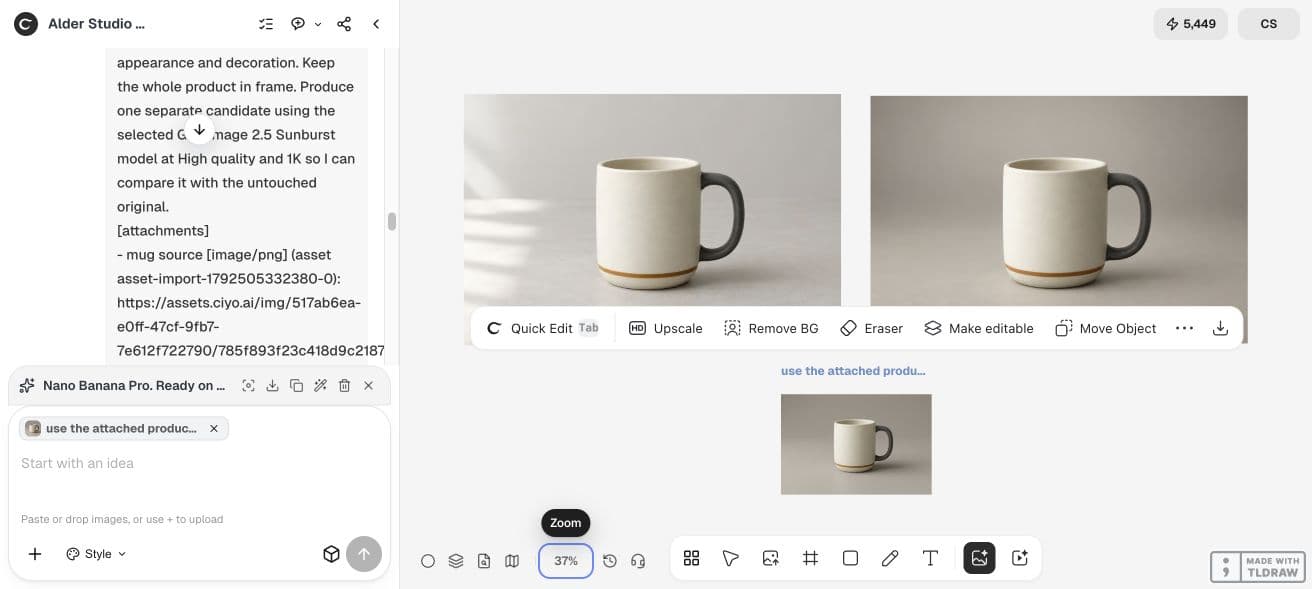
We used the same untouched, fictional mug source for a Sunburst edit and a Nano Banana Pro edit. Both candidates changed the background and kept a recognizable ivory mug, charcoal handle and amber band. The source was 1024 × 682; Sunburst returned 1024 × 672, while Nano Banana Pro returned 1264 × 842.
There is an important limitation: the Sunburst request went through the Design agent with High quality and 1K selected; the Nano Banana Pro request used the direct Image Generator with Auto aspect and 1K. The agent can rewrite a brief, so these are workflow examples, not an isolated model benchmark. For a controlled decision, repeat both through the same entry point and record the final provider prompts.
Nano Banana Pro displayed a 12-credit generation quote. The Design agent reported nine generation credits for the Sunburst edit, but agent reasoning was separate. Those are different observations, not a verified comparison of total settled task costs.
The overview below shows where the source and candidates are kept. It does not put every image at equal apparent size. Open the files at matched magnification for the acceptance checks; do not prefer the largest-looking canvas object.
Compare spend using equivalent accepted outputs
Ciyo credits are the customer's billing unit; another provider's credits are different. Check each Generation quote and distinguish it from settled spend. Design agent reasoning and revisions can add Billable LLM usage to the task.
For a small trial, write down all requests and which outputs passed. Divide the total task spend by accepted outputs only if at least one passed. If none did, report that outcome rather than producing a misleading low cost per image.
Auto remains useful when you want the agent to select a model for ordinary work. Switch it back according to your preference after the comparison; a controlled test and a convenient day-to-day workflow serve different needs.
Practical questions
Which image model should I choose?
Choose the model that meets your task's acceptance criteria within your budget, based on actual samples. This guide supplies a comparison method and does not rank untested models.
Why turn Image Auto off?
Auto can select different models across requests. Fixing the selected image model makes the comparison easier to interpret.
Are identical prompts a perfectly fair comparison?
They control one variable, but model-specific input handling and settings can differ. Record those differences and avoid a universal quality claim.
How many examples do I need?
One is a pilot. Use additional relevant inputs and repetitions when a broader production decision depends on reliability; choose the sample and budget before seeing only the best outputs.
Does a higher quote guarantee better fidelity?
No. A quote describes the charge for that request, not a promise that its output will preserve your particular product.
Compare one job you actually need to finish
Use one original photo, one editing brief and the same acceptance checks. Choose the model after inspecting the outputs.