Ciyo practical guide
AI Image Editing Quality Loss: How to Recognize Drift and Restart
You ask for a warmer background, then a softer shadow, then a little more room around the product. By the third revision, the handle or lettering has changed even though none of those requests mentioned it. That is a useful moment to stop comparing only with the previous edit.
This guide explains a controlled way to inspect cumulative changes and choose a recovery method. An October 20 community post prompted the question, but its reported benchmark is not our evidence of model quality. The original image remains the reference for deciding whether your own edit is acceptable.
Quick diagnosis: compare with the original, not just the last version
Keep the original and every accepted revision. Identify which details changed, then decide whether to retain the current candidate, restart from the original with the accumulated brief, or switch to a more localized editing method.
| Situation | Practical next step | Main limitation |
|---|---|---|
| The last edit is wrong; the prior version is sound | Return to the prior accepted version | It may already contain subtle earlier changes |
| Several unintended changes have accumulated | Restart from the original with a consolidated brief | The new output can still introduce differences |
| Only one small region should change | Use a localized edit or conventional editor | The chosen tool still needs an edge and export check |
| The source does not show the required detail | Obtain a better source | Generation cannot verify an unseen product feature |
Why a small request can change an unrelated area
An instruction to change one thing does not necessarily make every other pixel immutable. Depending on the model and editing operation, the result can reconstruct more of the image than you intended. Reusing that result as the next input carries its changes forward.
That is distinct from ordinary export degradation. Resizing or repeated lossy compression can soften edges, while generative drift can alter structure, text or identity. Compare file dimensions and visible geometry separately so you do not diagnose every problem as the same kind of quality loss.
A sharper output is not necessarily a more faithful output. An invented handle can be crisp. Judge the details against the original source rather than rewarding sharpness alone.
The community question, and what it does not prove
An October 20 r/GoogleGeminiAI post described repeatedly editing one photo with several models and comparing the changes. It also mentioned the poster's vendor pipeline. We use it as a problem signal, not as an endorsement, an independently reproduced benchmark or evidence that the poster used Ciyo.
Our workflow below is an original adaptation: keep a visible baseline, preserve intermediate files and compare unchanged regions. Do not import the post's claimed scores into your own model choice.
Published October 20, 2026. The post includes a vendor-pipeline mention. Its reported model scores were not independently reproduced here; it motivates an original inspection workflow, not a Ciyo performance claim.
1. Define a small edit sequence and protected details
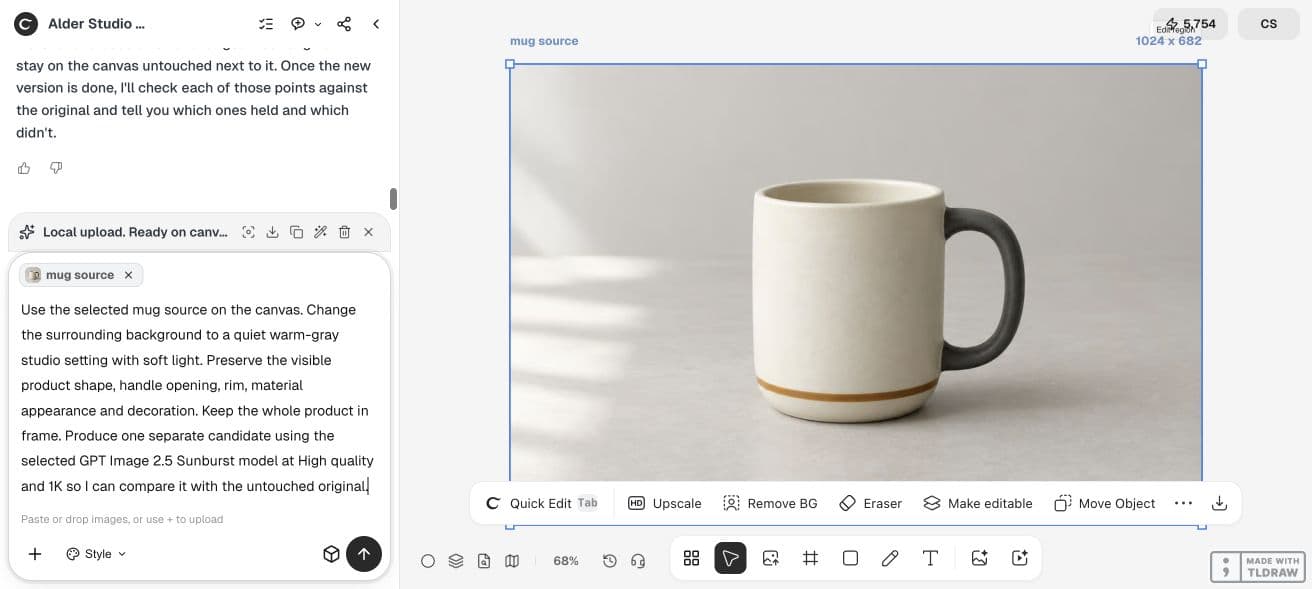
Start with a source that you have permission to use and that clearly shows the details you need. For a fictional mug trial, preserve the handle opening, rim, amber band and overall proportions. Write three limited changes, such as a warmer background, a softer shadow and more surrounding space.
Save the original as its own asset and keep it visible. Record the chosen model and settings. If you are comparing edit strategies, keep the model fixed so an automatic model change does not become another variable.
Original file:
Model and settings:
Protected details:
Change 1:
Change 2:
Change 3:
Candidate after each change:
Unintended differences from the original:
Accepted version and reason:2. Compare a sequential route with an original-reference route
For the sequential route, apply the first change, use that candidate for the second, then use the next candidate for the third. Preserve the intermediate images. This represents the common revision chain.
For the original-reference route, attach the untouched original again and give the model one consolidated description of the intended final state. Include the changes you still want and remove abandoned instructions. Compare this result with both the original and the sequential result.
This comparison tests two workflows on one input. It does not establish that restarting always wins, and the second route can still alter protected details. Choose the candidate that passes the task's checks, even if that means retaining an earlier version.
Start again from the attached original image, not from a previous generated edit. The final requested changes are: [CONSOLIDATED CHANGES]. Keep these visible details consistent with the original: [PROTECTED DETAILS]. Return a separate candidate. Do not add changes that are absent from this final brief.3. Inspect the regions you did not ask to change
Match the images' apparent scale and compare the same regions. Look at the product silhouette, openings, small decoration, visible text and contact with the surface. Then inspect the requested changes to confirm that the candidate still accomplishes the job.
A simple side-by-side view is often enough to spot a structural mismatch. If you use a pixel-difference tool, remember that alignment, resizing and lighting changes affect the result. A numerical difference is not automatically a meaningful product error, and a single score can hide a small but important changed label.
Record the actual finding in plain language. 'The handle opening narrows in version three' tells you more about the next step than a vague statement that the image has degraded.
Worked example: return to the original before editing
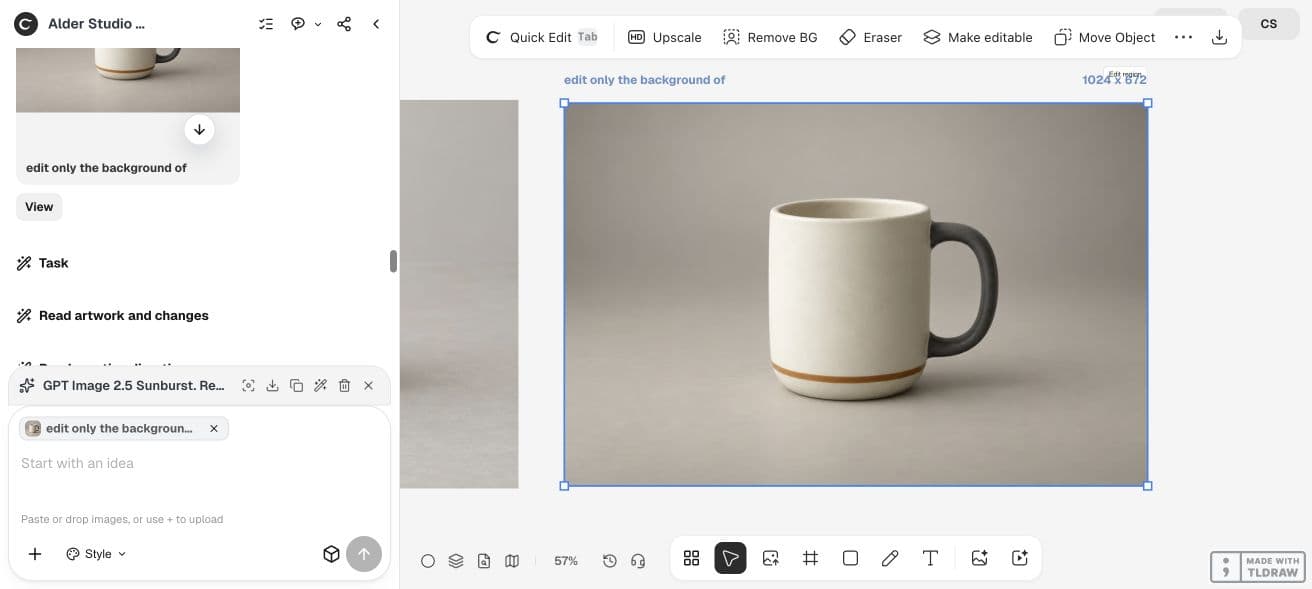
For this demonstration, we uploaded the untouched fictional mug onto the Ciyo canvas and requested one background edit with GPT Image 2.5 Sunburst. The source was 1024 × 682; the returned candidate was 1024 × 672. Even a narrow request can change export geometry.
The first composer-attachment attempt was not recognized by the Design agent. Uploading the image onto the canvas and selecting it allowed the edit to proceed. Keep the original visible and confirm that the request actually references that asset.
This demonstrates the original-reference route, not a ten-edit drift benchmark. We did not measure a serial chain of edits or establish a failure rate. The new candidate still requires inspection against the original.
4. Choose a recovery method with a clear stopping rule
Return to an accepted earlier version when only the last change failed. Restart from the original when the chain has accumulated several unwanted changes. For a tiny isolated correction, consider a localized or conventional edit that gives you more direct control over the affected area.
Set a trial budget before retrying. A restart can save work, but it is still a new request with its own charge and review effort. If repeated attempts change an essential detail, retain the faithful source or use another production method.
For a solo creator, keep a small version set and a short log. For client work, preserve the approved baseline and distinguish requested changes from incidental differences. Do not overwrite the only approved file while exploring a revision.
Practical questions
Does restarting guarantee that the original stays unchanged?
No. It gives the model the original reference again, but the new output still needs inspection. Choose the result that meets the task rather than assuming one route must win.
Is drift the same as JPEG quality loss?
No. Compression and resizing can reduce visible detail; generative edits can also change content or geometry. Check both the file properties and the depicted object.
Should I use a longer prompt?
Use a clear consolidated brief. Remove conflicting or abandoned instructions. More words do not automatically protect unchanged regions.
Can I use a fidelity score?
Yes, as one diagnostic if its method is appropriate and disclosed. Alignment and intended changes can distort a score, so also inspect the details that matter to the task.
What is the fastest recovery?
If a previous version already meets the requirements, return to it. Otherwise compare a bounded restart with a localized edit; actual timing depends on the tool and review work.
Keep an original-reference checkpoint
Bring the original and the latest candidate onto one canvas. Name the unintended changes before requesting another revision.