Ensemble poster layout
Proof the trim edges of a cast poster before printing
A cast sheet may look balanced until the printer trims a few millimetres from an edge. Start with the print provider’s requested trim, bleed and safe-area values. A paper overlay makes their effect easier to judge.
Draw the trimmed size
Create a rectangle at the requested finished dimensions. Mark it as a nonprinting guide. Place the outer background extension beyond it using the bleed requested for this particular job.
Identify vulnerable details
Look for Ada’s projecting cap and Noor’s outer chart point. Decide which decorative shapes may cross the trim and which must remain intact for the character to read.
Move text inside
Read the smallest credit from a proof of the finished area. Keep critical letters clear of the provider’s safe boundary, including punctuation and the ends of long role descriptions.
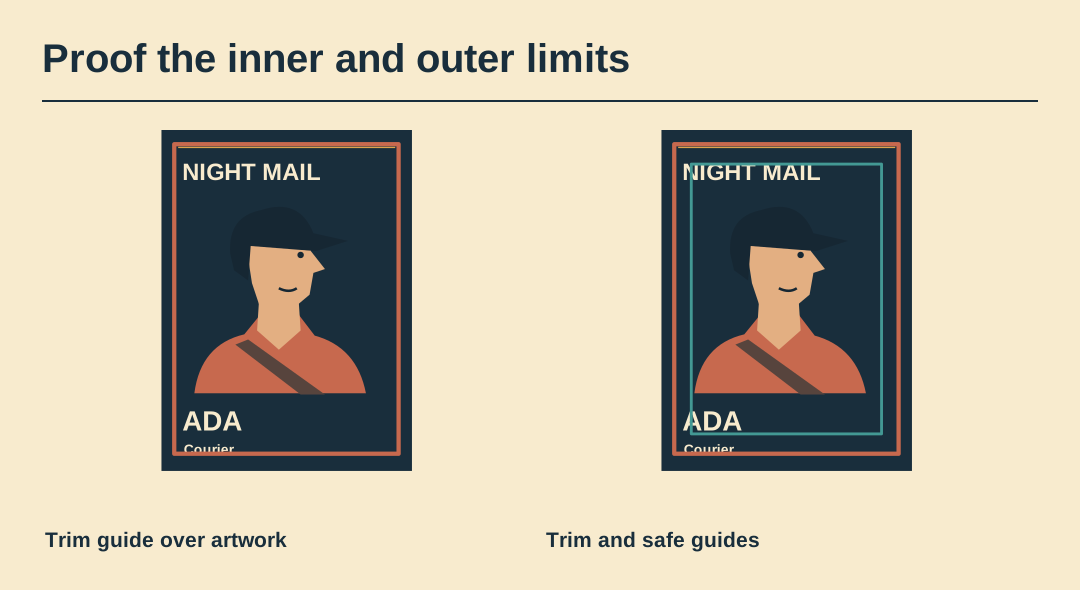
Try an offset overlay
Slide a paper window slightly over a printout in several directions. This is a visual stress test, not a prediction of the printer’s exact tolerance. Record what disappears first.
Inspect the print file
Open the file being sent to the printer. Check the page size and the requested marks or their absence. Artwork guides that were useful in the working document should never appear as accidental coloured lines.
Keep the approved proof
Write the provider, finished size and approval date on a separate job note. Keep a digital preview of the trimmed result so the person collecting the print can recognise a misplaced edge.
Inspect the ensemble master
The SVG retains the original lettering and portrait shapes. Use a copy to try a different size or arrangement.