Infinite Canvas
An infinite canvas for ideas, images and video.
Keep the source photo beside the alternatives. Ciyo gives your creative work room to grow, with a visual workspace for reviewing images, video and the decisions behind the next version.
Bring an idea or a reference image. Start with one asset.
See the work in context
Bring reference images into a project and keep generated results on the same canvas. Pan and zoom to move between the whole project and the detail you need to inspect.
Compare before you replace
Place alternatives side by side and keep useful earlier versions nearby. Check the same brief criteria across each image instead of relying on a thumbnail or a model's preference alone.
Organize your next step
Move and group canvas elements, use frames to organize a board, and select the images you want to discuss with the design agent. Image and video tools work inside the existing workspace.
A useful first task
Make the first version easy to review.
- 01
Bring in a reference
Start a project with your goal and any useful image. Keep the original visible as a reference for later comparisons.
- 02
Build a reviewable board
Create a first asset, then place alternatives nearby. Use canvas arrangement and selection to keep the comparison clear.
- 03
Refine the selected direction
Select the relevant images and ask the design agent about a specific change. Inspect the delivered file's dimensions and content before using it elsewhere.
See it in use
Two options, one visible decision.
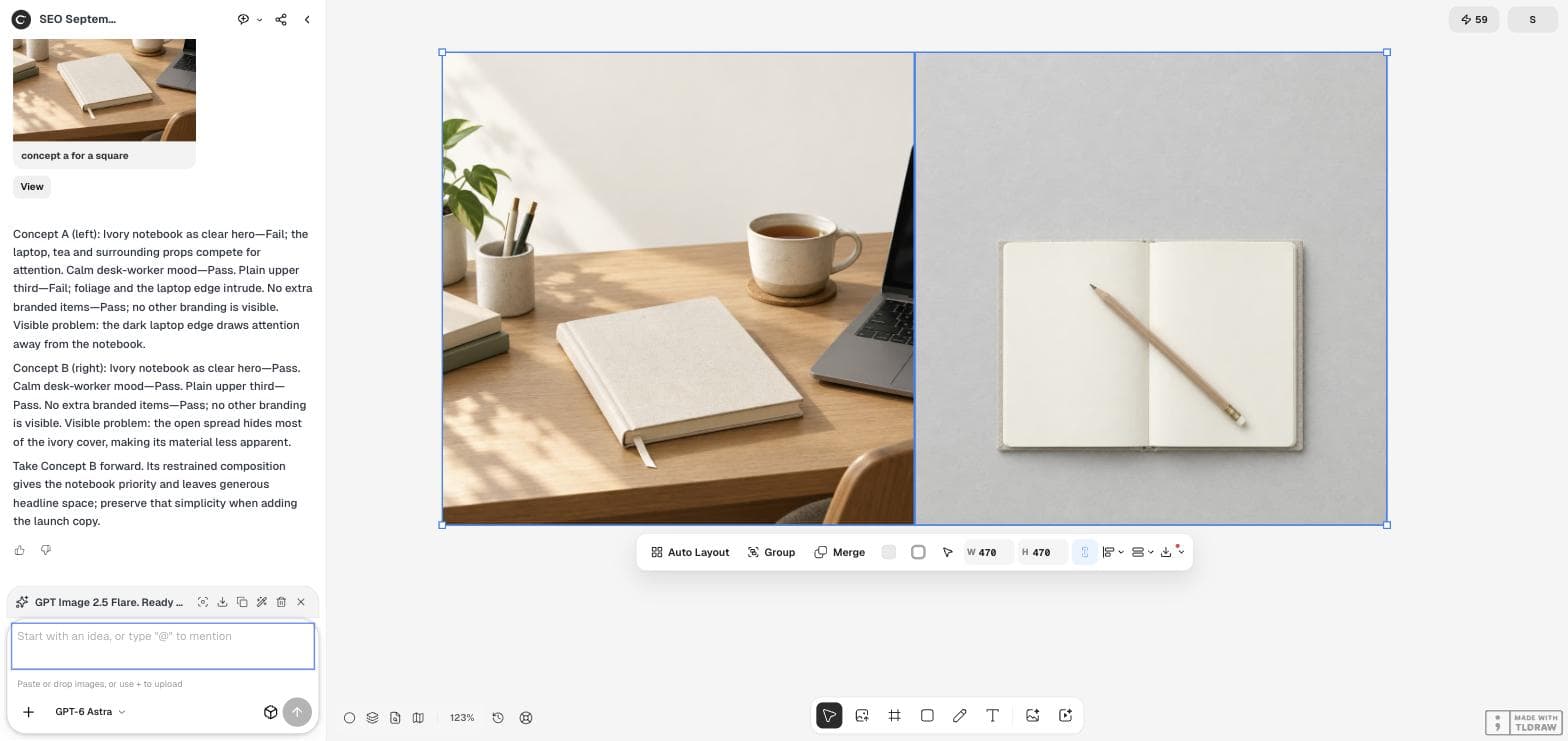
This actual notebook concept board keeps a desk scene and an overhead flat lay beside the agent's verdict. The reviewer can inspect the pictures while reading why one better matches the brief. The accepted direction still has a named weakness to address.
Read the complete walkthroughKeep the final review in your hands.
A canvas image is still an image: its photographed or generated words are pixels, not native editable text. Keep references and versions clearly identified, and inspect the final exported file. Arranging existing elements does not validate image quality or campaign performance.
Guides and examples
Choose an approach. See the steps.
Continue your workflow
Connect the next step.
Questions about Infinite Canvas
What is an infinite canvas?
It is a pannable, zoomable visual workspace where you can place and organize creative assets instead of working inside one fixed page. In Ciyo, images and videos can remain together while you review and revise.
Can I use my own images?
Yes. Add reference images through the existing upload flow. In a canvas project, uploaded images can appear in the conversation and on the canvas; uploading by itself does not start a paid generation.
Can I edit every word in a generated image?
Generated text inside a picture is raster content. Image edits re-render pixels; the canvas does not automatically turn every word into a native text element. Inspect the wording after a revision.
Your next creative task
Bring the idea. Work through the details.
Start with one request and refine the direction in the workspace.