Product image workflow
How to check an upscaled product photo before publishing

An upscale is only useful if the delivered file meets the placement’s needs and preserves the product. A larger option in a menu is the request; the downloaded file is the result you need to inspect.
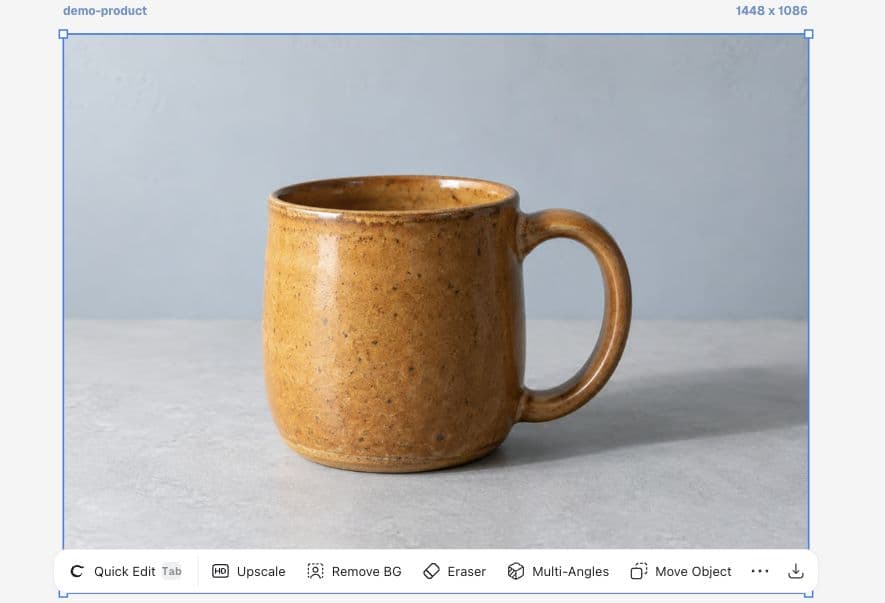
This walkthrough follows a fictional Juniper Pottery mug through Ciyo’s Upscale control. Our test exposed a mismatch: the 2K option displayed 2048 × 1536, but the downloaded result remained 1448 × 1086. That is why verification belongs in the workflow.
1. Record the input and required output
Start with the original file and write down its pixel dimensions. Our input is 1448 × 1086. Decide what the website or designer actually needs before choosing a larger option.
An image shown in a small card may already have enough pixels. A larger banner may need a larger source, but the required dimensions depend on its real display size and crop. Avoid treating “4K” or “8K” as a quality grade.
2. Read the requested dimensions
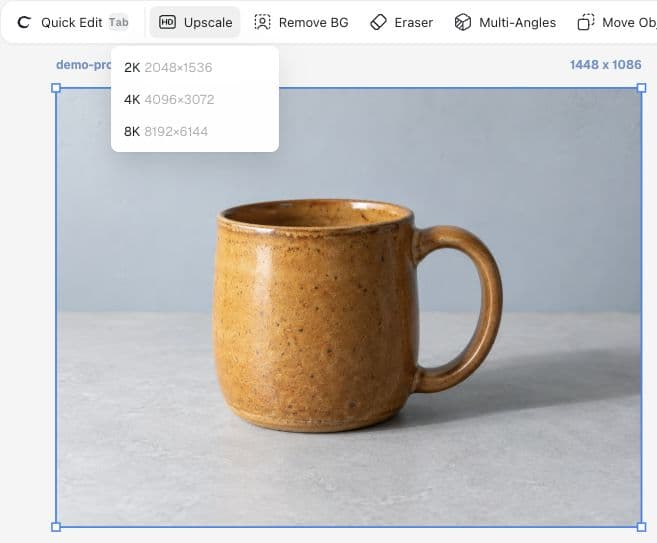
Select the image and choose Upscale. The menu in this run offered 2K at 2048 × 1536, 4K at 4096 × 3072, and 8K at 8192 × 6144. We chose 2K. Read the current credit estimate in your own session before running an operation.
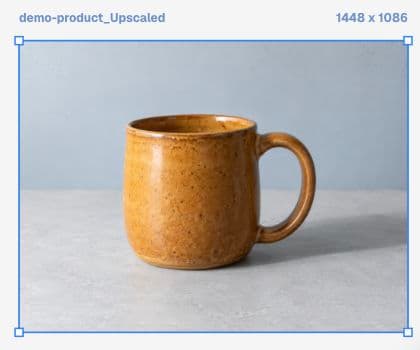
Ciyo added a new result beside the source. Keep those versions separate until you have checked them. A completed thumbnail shows that an asset returned; it does not by itself verify resolution or improved detail.
3. Check the file you actually download
Select the returned image and download it. Inspect pixel width and height in your file viewer or image properties. In this test, both the canvas metadata and the downloaded PNG reported 1448 × 1086. The operation did not meet the requested 2048 × 1536 dimensions.
We therefore do not present this run as a successful 2K upscale. Keep the original and report the mismatch with the requested size, actual size, and operation date. Do not spend repeated credits trying larger options without first understanding the result.
4. Inspect detail and the destination separately
If a later result meets the size requirement, compare the rim, glaze speckles, handle edge, and any real product label at the same viewing scale. Added texture is not automatically accurate texture.
Finally, test the image in its actual destination. Resizing, recompression, and display size can change the appearance after export. Judge the page people will see, not only the editor preview.
| Check | What to do | Decision |
|---|---|---|
| Dimensions | Read the downloaded file properties | Reject a size mismatch |
| Product detail | Compare at the same viewing scale | Reject changed labels, edges, or finish |
| Destination | Open the final page or preview | Check the delivered image, not only the source |
Upscale acceptance record: original 1448 × 1086; requested 2048 × 1536; downloaded dimensions: ___. Check rim, handle, glaze, and final website placement. Mark accepted only after each check passes.Why the editor preview is not the last check
A recent creator reported upscaled images looking good in Canva and local files but worse at lower YouTube playback resolutions. That report concerns another workflow and has no confirmed diagnosis. It is a useful reason to inspect the final delivery surface separately.
Published September 12, 2026. The author discusses Canva, AI character images, and YouTube. We adapt the destination-check principle to product photos; this is not a Ciyo comparison or benchmark.
Practical questions
Did the demonstrated 2K request succeed?
It returned an image, but the downloaded file remained 1448 × 1086 rather than the requested 2048 × 1536. The size acceptance check failed.
Does a bigger image contain more truthful detail?
Not necessarily. Check the source against the output, especially labels, texture, edges, and recognizable product features.
Should I upscale every product image?
Choose based on the final placement. First verify whether the existing source already meets the required dimensions and quality.
Bring your next product image into Ciyo
Open a canvas, upload the image you want to review, and make one clear decision before preparing the final asset.