Practical product imagery
Clipping Path vs AI Background Removal: Choose the Deliverable

A merchant asks for a clipping path and receives a transparent PNG. The product may look isolated, but the requested editable path has not been delivered. That mismatch starts with the output contract, before anyone judges the edge quality.
This guide compares method and deliverable choices using Ciyo’s raster background-removal workflow and a specialist retouching handoff. Path’s current guidance describes limits of automated cutouts; it does not supply a matched Ciyo benchmark or a universal cost comparison.
The useful question is whether you need an acceptable isolated picture, an editable path, a detailed mask or a finished composite. Choose the workflow after that requirement is clear.
Quick answer: name the required file before choosing the method
Use an AI background-removal pass when an inspected raster cutout is a suitable deliverable. Ask a retoucher for the required path or mask when editability, complex boundaries or production specifications demand it.
A clipping path and an image mask solve related isolation problems, but they are not interchangeable files. In particular, fine soft detail or transparency can require a mask or composite rather than only a hard path.
| Need | Evaluate | Verify |
|---|---|---|
| An isolated raster picture | Ciyo Remove Background | Edges on the destination and actual export |
| An editable clipping path | A path-capable editor or retoucher | That the delivered file contains the requested path |
| Hair, fur or soft transitions | A masking workflow | Detail and partial transparency |
| Transparent product in a new scene | Specialist compositing when needed | Transmission, reflection and destination match |
1. Write a small delivery specification
Identify the product, destination, required dimensions, background or transparency, file format and editability needs. If a print or commerce partner requested a path, ask for its actual file requirements rather than inferring them from the word cutout.
For a fictional Juniper mug banner, a raster image on the final pale background may be sufficient. For a downstream designer who must alter a product boundary repeatedly, an editable path or mask may be part of the deliverable.
Keep the source and any approved reference available. This prevents a later revision from relying on a flattened export as its only evidence.
2. Try AI background removal on a suitable source
Import an authorized photo into Ciyo, keep an untouched original and use Remove Background on the selected picture. Check any quoted generation cost before starting. This produces an image-editing result; it does not establish native clipping-path export.
An opaque product with a clear outline is a useful first sample. Fine structures, reflections and background-colored edges deserve additional review. The fact that one box works well says little about a chain, fabric fringe or glass bottle.
Compare the candidate on the destination background, not only on the canvas where it was generated.
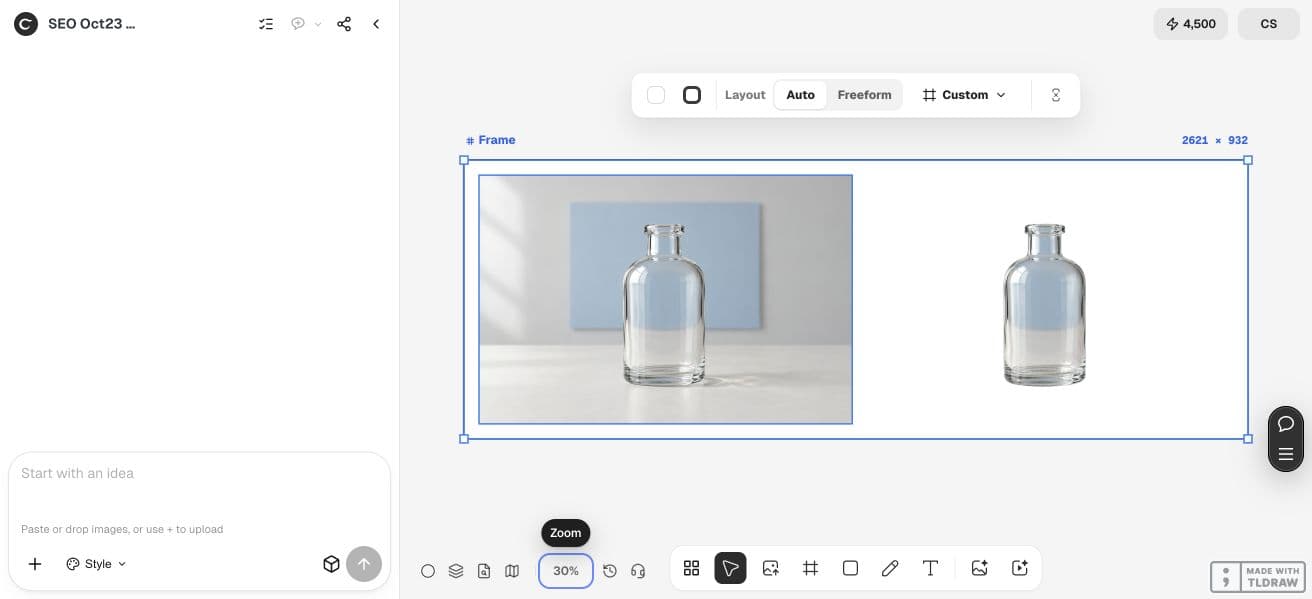
Our October 23 glass example returned a 1248 × 832 PNG with four channels and a non-opaque alpha channel. Those file properties establish a raster transparency deliverable; they do not establish editable vector nodes. The retained blue interior also failed the glass-background check, independently of the required file type.
3. Inspect the edge at detail and display scales
Look for clipped corners, jagged curves, halos and unwanted remnants. Then zoom back to the intended display size: a result can look tidy close up yet have an unnatural silhouette in the final layout.
Keep shadow decisions explicit. Removing the background can also remove the contact shadow that seated the product in the source. Decide whether the destination needs a new shadow; do not mistake that compositing choice for edge accuracy.
Use the actual exported file for the final check. A checkerboard preview or filename extension alone does not prove the downstream deliverable has the needed transparency or editability.
4. Decide whether to accept, revise or hand off
Accept a raster cutout when it meets the stated output need and looks credible on the checked destination. Revise a specific local defect when the source supports a clear correction. Hand off when the task needs a path, a detailed mask or compositing that this workflow has not supplied.
Path’s article is a service provider’s explanation of its own process, so treat its claims in that commercial context. This guide makes no claim that a manual service always wins on speed, price or quality.
| Observation | Decision to consider | Handoff note |
|---|---|---|
| Clean opaque boundary and raster output is sufficient | Accept after export review | Record the approved destination |
| One obvious local edge defect | Try a scoped revision | Identify the exact boundary |
| Repeated loss of fine product detail | Use a specialist | Supply the original and marked problem areas |
| Required editable path is absent | Request the specified deliverable | Name the required file and editability |
| Background visible inside glass | Evaluate a composite or reshoot | Supply the intended scene and transparency issue |
5. Give a retoucher the original and the destination requirements
Send the original file, an approved reference if available, exact deliverable requirements and a list of boundary concerns. Include the final background or layout when it affects the work. A screenshot of a failed cutout is useful context but a poor replacement for the original image.
For a small seller, one clear handoff can avoid repeated ambiguous revisions. For an agency, agree on who checks factual product accuracy and who checks technical file delivery.
Product/source file: [filename]. Destination: [placement and background]. Required deliverable: [raster cutout / editable clipping path / mask / finished composite, with file requirements]. Preserve: [outline, fine details, label and finish]. Known problem areas: [specific boundaries]. Shadow treatment: [retain, remove or separately specify]. Please return the requested editable elements and an exported preview for review.6. Compare complete task costs, including the handoff
An AI quote and a retoucher’s price may cover different outputs. Compare the accepted deliverable, revisions and internal review effort rather than treating one image-operation price as the total job.
Ciyo credits and an external service’s fees are different units. Keep actual generation charges and external quotes separate until the scope is equivalent. Do not invent an hourly saving or a success rate from one sample.
Preserve the editable master and original source after approval. A future new background or larger print placement can require a new review even when the earlier export was acceptable.
Practical questions
Is a transparent PNG a clipping path?
No. It can contain raster transparency without containing the editable vector path a downstream partner requested.
Does every product need a manual clipping path?
No. The required deliverable and inspected result decide. A simple raster cutout may be sufficient for some placements.
Does a hard clipping path solve hair or glass?
Not by itself in every case. Soft detail and transmitted light can need masking or compositing, depending on the source and destination.
Which method is cheaper?
Compare quotes for equivalent deliverables and include revisions and review. This guide does not establish a universal price winner.
Define the cutout you actually need
Start with one permitted source image and a clear acceptance check. Keep the original beside the result and approve the complete export before using it.