Practical design guides
Firefly Graph and Repeatable Creative Workflows: Plan the Review Stops

A repeatable creative workflow needs more than a saved prompt. It needs to say which inputs can change, which facts stay fixed and when a person must inspect the output.
Adobe announced Firefly Graph in beta on November 10, 2026. That is a current product announcement, not proof that a particular team has improved its results. This guide uses that news as context for an original workflow-planning exercise you can trial manually in Ciyo; no Firefly Graph integration or live benchmark is claimed.
Quick answer
Map the work as approved brief → verified references → one concept → review → final layout → export inspection. Trial the sequence manually before automating it. Put an explicit stop wherever a wrong price, changed product or unreadable label could pass into the next stage.
What the announcement establishes
Adobe’s November 10 release describes Firefly Graph beta as a way to create custom repeatable workflows. Beta availability and access still need to be checked in the actual Adobe account. The announcement does not establish that Ciyo can run those graphs or that either product will produce an approved campaign without review.
Treat the practical question as workflow readiness: do you know the accepted input and output at every stage? If not, connecting more steps can repeat a mistake faster. A diagram is useful when it exposes those dependencies, even before any automation is chosen.
1. Define the variable inputs and fixed facts
Our fictional Juniper Market creates a weekly produce promotion. The photograph and approved offer can change; the shop name, logo reference and ordering destination are fixed. The owner supplies the offer wording and its applicable dates. A missing price blocks the brief instead of inviting the model to invent one.
Keep this brief outside the generated image as well as in the working request. A second person should be able to check a draft against it without reconstructing an entire chat. Date the brief so next week’s inputs cannot silently replace the record for this week’s design.
2. Map a small input-to-output sequence
Use this accessible text diagram: approved brief → original product photo → one visual concept → owner review → exact-copy layout → exported-file check. The review stages are deliberate boundaries. Reject a changed product or incorrect offer before creating more sizes.
In Ciyo, create a dedicated project containing the source reference, concept and approved version with clear labels. Work through the stages manually. This is a reusable working process, not a claim that Ciyo schedules or runs this sequence unattended.
Live Ciyo check: review the plan before running a campaign
We uploaded our own fictional Juniper Market workflow sheet for a text-only planning review. Ciyo identified missing offer terms, dates, original photo, destination and approval criteria, then described human review stops. It stated that its image inspector did not accept SVG. This was a review of a plan: no real campaign cycle, export, benchmark, scheduling or Firefly Graph integration was performed.
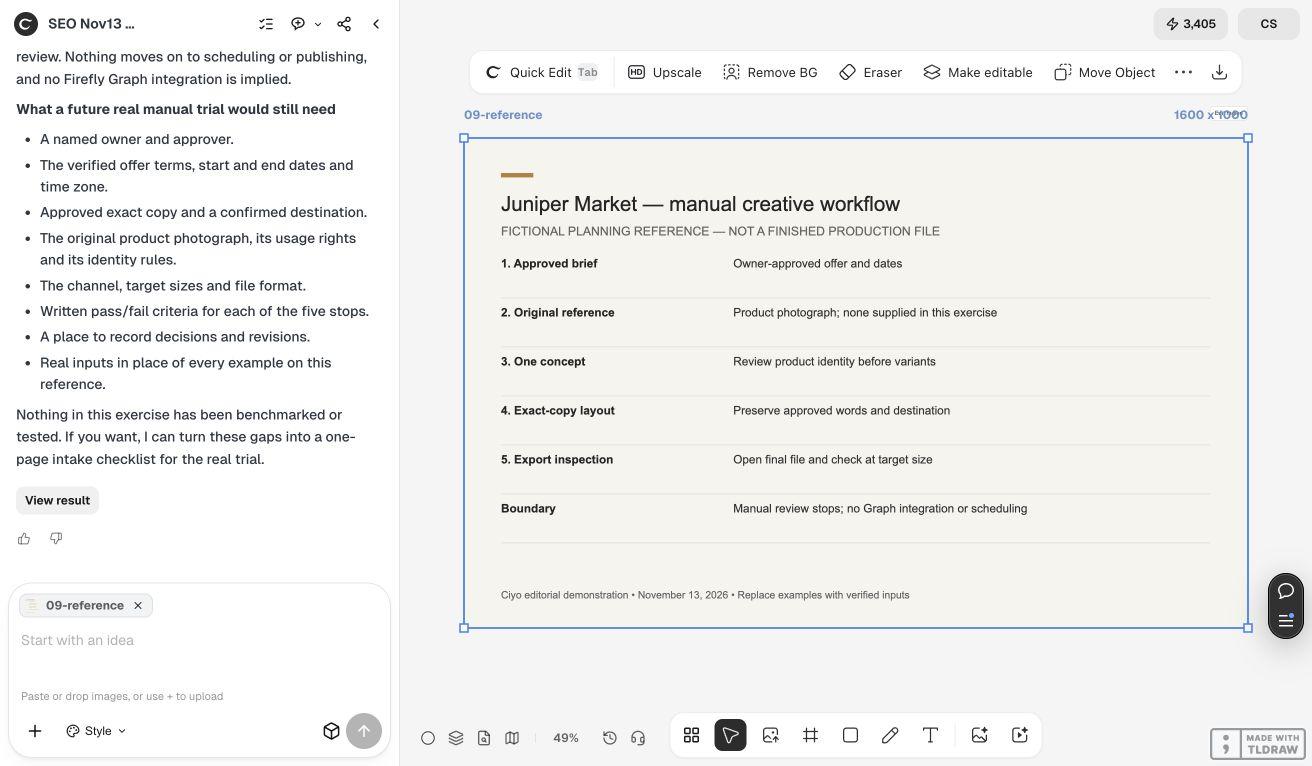
A review contract for each stage
The following is an original illustrative recipe, not an exported Firefly Graph file.
| Stage | Required input | Output and stop condition |
|---|---|---|
| Brief | Owner-approved offer and dates | Stop on missing or conflicting facts |
| Reference | Original product photo | Stop if the product cannot be identified |
| Concept | Brief plus reference | Review composition and product fidelity |
| Layout | Accepted concept and exact copy | Check every word and date |
| Export | Approved layout | Open the file and inspect target-size readability |
3. Record failures before adding automation
Run one cycle and record where a person had to intervene. Did the concept change the product? Did the headline need a manual correction? Did a small export make the qualification unreadable? Those observations tell you where the workflow needs a better input or a review stop.
Repeat with a second fictional offer only after fixing the first cycle’s weak handoff. If you later use a workflow tool, carry those acceptance conditions into it. Do not infer retry safety or approval behavior from a line connecting two boxes.
Copyable manual trial recipe
Replace the fields, keep the approval boundary, and inspect the actual outputs at each step.
Help me run one manual creative cycle for [CAMPAIGN]. Fixed facts: [BRAND, DESTINATION, RESTRICTIONS]. Variable inputs: [APPROVED OFFER, DATES, ORIGINAL PHOTO]. Start with one concept and stop for my review before making variants. Preserve the real product and exact offer wording. If an input is missing or contradictory, ask rather than inventing it. After approval, help with the layout and provide an exported-file checklist. Do not schedule, publish or claim an integration.Choose automation after the process is stable
A solo marketer with an occasional campaign may get more value from a clear manual recipe than a complex graph. A team repeating the same validated steps may have a stronger reason to evaluate automation, provided it can inspect access, costs, recovery and approval controls in the actual tool.
Measure the complete cycle under comparable conditions if you want to claim time savings. Count review and corrections as work. A launch announcement or an attractive first output is not a measurement of your team’s production process.
Source
Adobe’s original announcement was checked November 13, 2026. The Juniper Market recipe is an original fictional exercise and was not supplied or endorsed by Adobe.
Frequently asked questions
Is Firefly Graph generally available?
Adobe’s November 10 announcement labels it beta. Check the current access and conditions in your Adobe account.
Does this recipe run automatically inside Ciyo?
No. It describes a manual sequence with explicit review stops. No Firefly Graph integration or recurring execution inside Ciyo is established here.
What should I automate first?
Start with a step whose inputs, expected output and failure recovery you have already validated. Keep human review where a mistake would materially change the offer or product.
Trial one creative cycle with clear review stops
Bring your approved copy and reference files, make one draft, and compare the result with your checklist before creating more versions.