Ciyo practical guide
Ad-to-Landing-Page Message Match: Check Product, Offer and Visuals

A shopper taps an ad for one product bundle and lands on a page whose first screen shows a single item. Even if both assets look polished, the reader has to work out whether the destination is the offer they expected.
This guide turns message match into a bounded visual review: compare the ad's final frame with the destination's first screen, identify specific mismatches and correct one documented issue. Recent advertiser discussions motivated the workflow; they do not prove that message mismatch caused those advertisers' results or that this check will improve conversion.
Quick workflow: capture → compare → correct → verify
Use the actual creative and the actual destination state for the same audience, device and offer. Put them beside each other, compare product, offer, action and visual expectation, then decide which asset needs the correction.
Ciyo can help arrange the review and create a revised visual. Website editing, campaign changes and publishing remain separate handoffs. Record which side changed and check the final destination again after the change.
| Dimension | Question | Example mismatch |
|---|---|---|
| Product | Is this the same item or bundle? | Ad shows two mugs; destination opens on one |
| Offer | Does the stated offer mean the same thing? | Ad highlights a bundle; page emphasizes an unrelated promotion |
| Action | Can the reader take the promised next step? | Ad says view colors; destination opens a generic homepage |
| Visual expectation | Do the variant and key details agree? | Ad shows an ivory mug; first screen shows a charcoal version |
Why review the creative and destination together?
In an October 16 r/FacebookAds discussion, an apparel advertiser described uneven creative delivery and confusing early results. A separate October 19 discussion described changing several test variables at once. These are practitioner accounts, not controlled experiments.
The useful adaptation is to make the customer-facing sequence inspectable before changing more variables. We are applying that idea to message match; neither poster is presented as a Ciyo user or as proof of a conversion outcome.
Published October 19, 2026. This discussion motivates a bounded review process; the message-match checklist is Ciyo's editorial adaptation, not a diagnosis or measured result from the poster.
1. Collect the exact customer-facing pair
Capture the ad variation that is actually being reviewed, including its final frame and visible copy. Open the linked destination in the intended state. Record the date, device, language, product variant and any offer conditions that affect what appears.
For a fictional mug campaign, the review pair might show an ad for an ivory two-mug set and a landing first screen for a single charcoal mug. Label the example fictional. For real work, use authorized campaign assets and avoid capturing unrelated account information.
Do not compare a current ad with an outdated design mockup and call it a live message-match audit. If the destination cannot be reached, record that as an unresolved input rather than guessing what the shopper sees.
2. Compare the four dimensions on one canvas
Place the ad and destination capture beside each other at readable scale. First state what each one promises in plain language, then compare the two statements. This keeps the review focused on the buyer's interpretation rather than only color and typography.
Check product identity before visual style. A consistent amber palette does not compensate for a different bundle quantity or variant. Then check offer wording, conditions, the next action and whether the destination makes that action reasonably findable.
In our fictional example, Ciyo's Design agent inspected the attached pair and identified the same three visible mismatches: quantity, color and the offer in the CTA. It also noted that matching button styling did not resolve those differences. It proposed aligning the landing panel to the approved two-mug set without generating another image or changing a website.
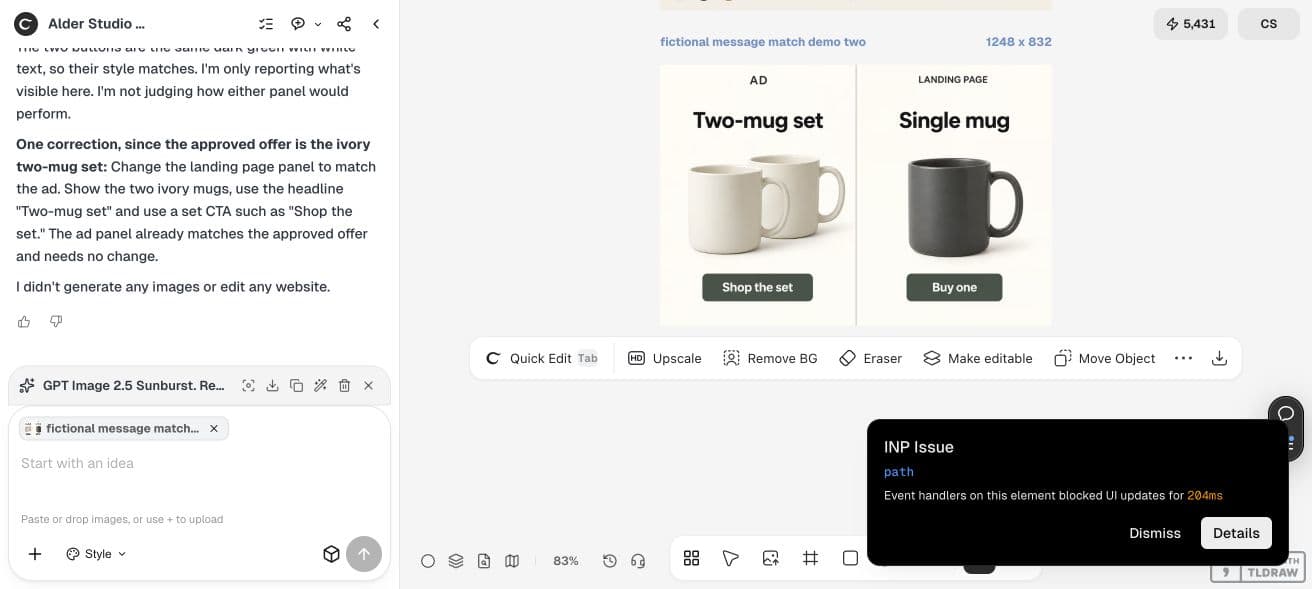
Review these authorized ad and landing-page captures together. For each, state the visible product or bundle, offer, requested action and key visual expectation. Identify only differences supported by the captures. Separate confirmed mismatches from questions that require more context. Do not infer campaign performance or edit the website. Propose one bounded creative correction and explain which expectation it aligns.3. Decide which side should change
Return to the approved product and offer brief. If the ad is outdated, revise the ad. If the destination is wrong, send a precise correction to its owner. Do not force a valid ad to match an erroneous page merely because the ad is easier to edit.
For the fictional two-mug example, a correction could align both assets to the approved set: the same quantity, ivory variant and action. The actual choice depends on the campaign brief. Keep the factual decision separate from the design request.
Change one documented mismatch at a time when the purpose is a controlled review. If an urgent factual correction requires several simultaneous changes, record them honestly; do not later describe the result as a clean test of one visual element.
4. Produce a bounded revision and inspect the handoff
Create a revised candidate in Ciyo using the approved product photo and exact offer wording. Preserve the accepted parts of the creative. Compare the candidate with the original ad and destination before choosing it.
Keep factual lettering in editable text or an inspected source where possible. A generated picture can alter a product or render an offer incorrectly. Reopen the export and check quantity, variant, words and crop at the intended size.
Website and campaign owners then apply any approved changes through their normal process. Revisit the actual destination afterward. A corrected design file does not prove that the deployed page or active ad changed.
Worked example: inspect an intentionally mismatched pair
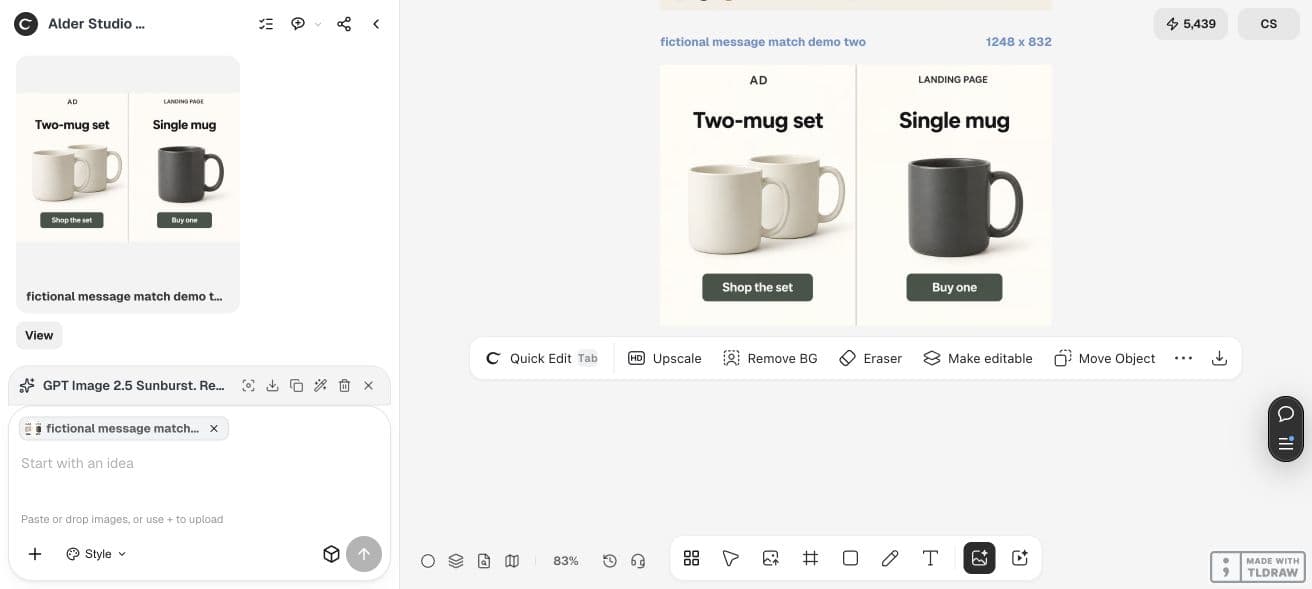
We generated a fictional two-panel mockup in Ciyo with GPT Image 2.5 Sunburst, High quality and a 3:2 request. It displayed a five-credit quote and returned 1248 × 832. This is a teaching mockup, not a screenshot of a live ad account or landing page.
The left panel shows two ivory mugs, the headline Two-mug set and the action Shop the set. The right panel shows one charcoal mug, the headline Single mug and the action Buy one. Quantity, variant and requested action visibly disagree.
If the approved offer is the ivory two-mug set, the bounded correction is to align the destination's product, headline and action with that set. That is a design-review decision, not a claim that changing the image will increase conversions. No campaign or website was changed during this demonstration.
5. Record the decision without inventing a performance result
Keep a short log of the observed mismatch, approved correction, exported asset and final check. If the campaign is later tested, record what else changed and evaluate the appropriate outcome with enough context. A visual review alone cannot explain low sales or prove a conversion lift.
For a solo merchant, this can be a simple pair of captures and a checklist. For an agency, add who owns the product facts, landing page and campaign. For a team working across languages, check the actual localized offer and destination rather than assuming the English pair covers every version.
Ad variation and date:
Destination URL and captured state:
Audience / device / language:
Approved product and offer:
Confirmed mismatch:
Unresolved question:
Chosen correction and owner:
Accepted asset:
Final live-state check:
Other changes during any later experiment:Practical questions
Does message match mean identical design?
No. The ad and page can use different layouts while agreeing about the product, offer and next action. Focus on expectations that affect the buyer's understanding.
Will this fix a low conversion rate?
The checklist can reveal a specific mismatch. It does not establish why a campaign underperforms; traffic, product fit, pricing and other factors may matter.
Can Ciyo update my landing page?
This workflow uses Ciyo for review and creative assets. Website changes and deployment are separate tasks handled through your site's normal process.
Which screenshot should I compare with a video ad?
Start with the final frame and the visible offer, and also review earlier frames that establish a product or promise. Compare those with the actual destination state.
Can I scale the review across variants?
Reuse the checklist, but capture the correct ad and destination for each relevant product, audience and language. One checked pair does not validate every campaign variation.
Review one customer-facing pair
Bring the actual ad and destination capture, identify one supported mismatch and make a precise correction before changing more variables.