GPT-6 Astra · Creative workflows
GPT-6 Astra + Blender: Write a Reusable Render Task Brief

A good first render does not make the next request repeatable. When you ask for another material, an assistant may also change the camera, rebuild the object or choose a different lighting setup. A reusable brief makes those boundaries explicit before work begins.
We used GPT-6 Astra in Ciyo to draft a specification for an external Blender operator. The example is a fictional pottery vase in an existing scene. This demonstration produced a written brief; it did not run Blender, install an agent skill or produce a new render.
Start with an existing scene and a narrow change
Choose the source scene that already has the composition you want. State the requested material change in observable terms: for example, change the vase from glossy ivory to matte terracotta while preserving its shape, camera and lighting. A request to make the whole scene more premium gives the operator much more freedom.
Our earlier Astra and Blender guide covers the broader workflow. Here the deliverable is a reusable instruction document for later runs. Keep project-specific values as placeholders until the person operating Blender can confirm them.
Separate required inputs from creative preferences
Give every run a source file, Blender version, named camera, target object and material slot, output folder and final pixel dimensions. These identify what the operator should open and change. A description such as the front camera is less dependable than a name checked in the actual scene.
Then describe the visual change and any authorized exceptions. If the target material is shared by other objects, the operator needs to know whether to create a separate material for the vase. Otherwise a seemingly local edit can alter the rest of the scene.
| Input | Why it matters |
|---|---|
| Source .blend and Blender version | Identify the scene and execution environment |
| Camera, object and material slot | Remove ambiguity about the target |
| Material change and fixed properties | Bound the permitted edit |
| Output folder, run name and dimensions | Make results easy to find and compare |
| Explicit exceptions | Record any approved camera, geometry or lighting change |
Ask Astra to draft the reusable specification
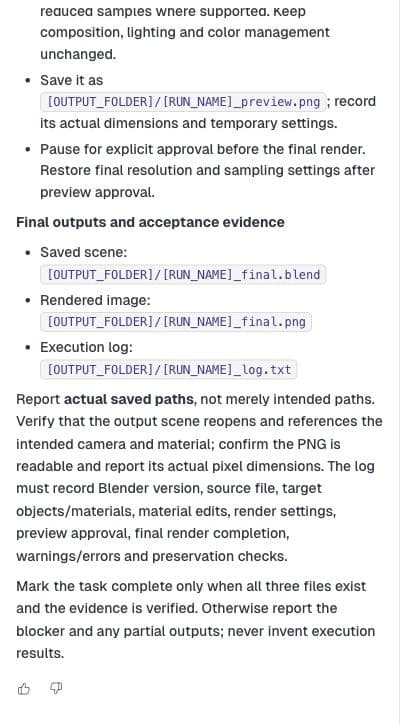
In the live Ciyo session, Astra returned required inputs, preservation rules, missing-input questions, a preview checkpoint and final acceptance evidence. It included placeholders for unresolved values instead of inventing a local path or an installed Blender version.
Review that document before giving it to an operator. In our example, preserving the mesh, transforms, camera, lights and world illumination suited a material comparison. Those restrictions would be inappropriate for a later task whose purpose was to change the silhouette.
Write a reusable brief for an external Blender operator. Starting scene: [SOURCE_BLEND]. Target: [OBJECT_AND_MATERIAL_SLOT]. Requested material change: [DESCRIPTION]. Keep mesh, transforms, camera and lighting fixed. Include required inputs, unresolved questions, one reduced-resolution preview, and acceptance evidence for the saved scene, PNG and log. Leave unknown values as placeholders. This is a written specification; do not claim execution.Put a preview checkpoint before the expensive render
The demonstrated brief suggested a reduced-resolution preview with a maximum long edge of 512 pixels and lower sampling where supported. That is a proposed checkpoint, not a benchmark or a guarantee of render time. The operator should choose settings appropriate to the scene and available renderer.
Use the preview to answer a specific question: did the material change while the composition stayed fixed? Compare the rim, silhouette, shadows and framing with the approved scene. Record the temporary preview settings, then restore the intended final settings before producing the deliverable.
Resolve missing resources before changing the scene
Make the first operator response an input check. If the supplied file uses missing textures, an unnamed camera or an ambiguous material slot, the brief should ask for those details before rendering. Silently substituting a camera or rebuilding a shader can make a repeat run impossible to compare with the first.
The live template explicitly requested unresolved inputs and told the operator not to silently substitute when resources were missing or the file was incompatible. Carry that rule into your final brief, but replace its placeholders with values checked in the actual Blender environment.
Require evidence that survives the chat
A completion message should identify actual saved files. Ask for the output .blend, a readable PNG with checked dimensions and a log of the environment, edits, settings and warnings. Reopening the saved scene is a useful acceptance step because an image alone cannot establish that the editable project was saved correctly.
Keep a fresh run name for each variation and preserve the source scene. When a missing resource or ambiguous material blocks the task, resolve that question before treating a partial output as complete. Reuse the template after updating its inputs; reuse does not mean every project should inherit the previous project's assumptions.
Practical questions
Is this an installable Astra Blender skill?
No. It is a reusable written task brief. Installing or configuring an agent integration is a separate workflow.
Does Ciyo run the Blender render in this example?
No. Ciyo helped draft the specification. An external Blender operator must execute and verify it.
Can I reuse it for camera or lighting changes?
Yes, after changing the allowed edits and acceptance checks. The material-only preservation rules should not silently carry into a different task.
Make the next step clear
Use Ciyo to organize the brief and visual references before moving into production.