Ciyo · GPT-6
GPT-6 Astra and Blender: How the 3D Demos Work

Search interest in “gpt astra blender” follows a set of demonstrations: OpenAI showed GPT-6 Astra modelling a house in Blender and turning it into a walkable Unreal Engine 5 scene, and early users posted clips of Astra building objects, interfaces, and playable prototypes in the same software. The results look like a 3D model, so people ask whether Astra makes 3D models.
It does not, in the direct sense. Astra’s model page lists text and images as input and text as output. What the demos show is a model writing Blender’s Python, running Blender without its interface, looking at the render, and revising. This guide explains that mechanism from Blender’s own documentation and one publicly documented run, as checked on September 7, 2026.
What OpenAI actually showed
The launch post describes Astra modelling a house in Blender and turning it into a walkable scene in Unreal Engine 5, so that designers and clients can explore a layout before it is built. It also shows a kart racer and a spaceship game, credited to Pietro Schirano, and says Astra brings stronger visual judgment to the websites, games, applications, and renderings it builds.
The nearest benchmark is BenchCAD, which asks a model to reconstruct 3D objects from multi-view renders by generating CAD code. OpenAI reports 95.9% for Astra with tools, against 83.3% for GPT-5.6 Sol. The word that matters in that description is code. The 3D output is produced by a program the model writes, inside software the model operates.
The mechanism: Blender’s embedded Python
Blender ships with an embedded Python interpreter that stays active while Blender runs. Its bpy module gives scripts access to Blender’s data, classes, and functions, so a script can create a cube, move a vertex, assign a material, place a camera, and render. Blender’s manual shows the plain form: run blender with the --python argument and a script path.
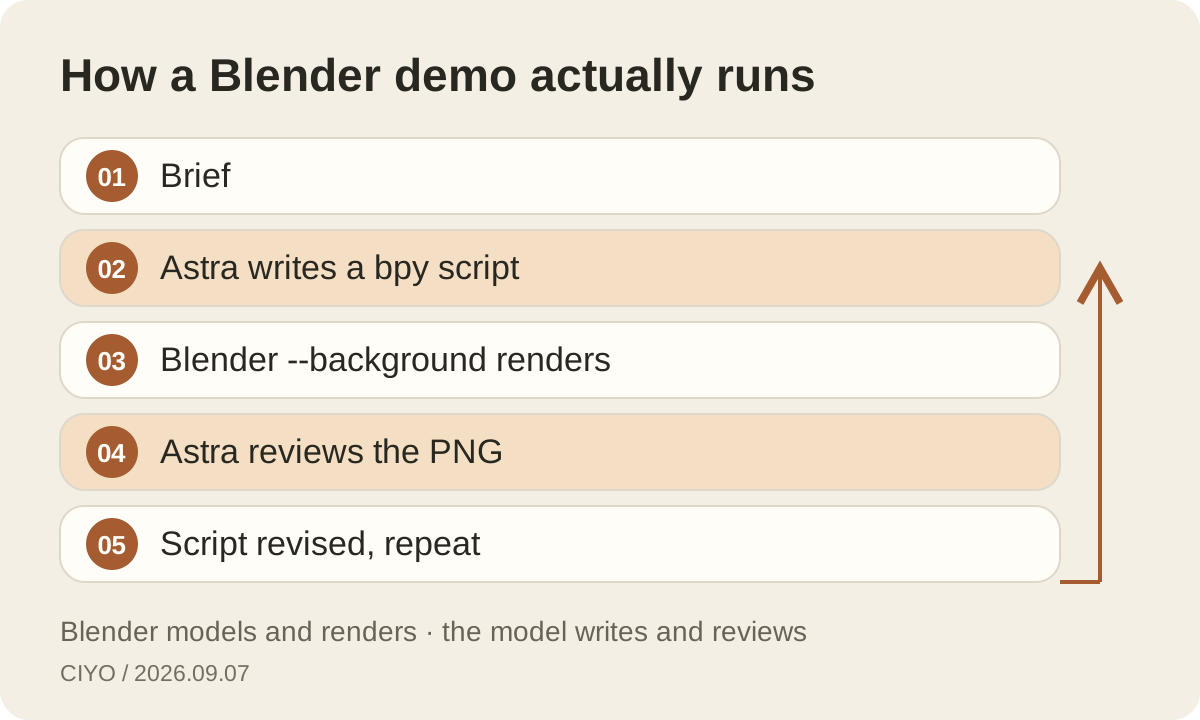
The command line also has -b or --background, documented as running Blender in background mode, often used for rendering without the interface. Combine the two and a model can execute a scene script on a machine with no window open, write an image with a render call, and read that image back as its next input. That loop is the whole trick.
A documented public run
Simon Willison published a run in ChatGPT’s macOS app in Codex mode with GPT-6 Astra at medium effort. The transcript shows the agent writing a scene script, running /Applications/Blender.app/Contents/MacOS/Blender --background --python with that script, viewing the rendered image, and iterating. Three prompts took 2 minutes 39 seconds, 3 minutes 51 seconds, and 5 minutes 59 seconds.
The repository contains the Python scripts, the .blend files, and the PNG renders, so the output is an editable Blender scene rather than a flat picture. Codex also wrote a reusable skill file documenting how to invoke the local Blender, which shortens later requests. This is one run by one person at one effort level, not a benchmark, but it shows the pieces plainly.
What you need on your machine
You need Blender installed; it is free software available for macOS, Windows, and Linux. You need an Astra surface that can run local commands: Codex, either the CLI at version 0.153.0 or newer or the ChatGPT desktop app in Codex mode. Plus plans include Astra in ChatGPT Work and Codex as the rollout continues, and Pro, Business, and Enterprise plans include it too.
You need to grant the agent permission to run commands in a working folder, and you should review what it runs. The ordinary ChatGPT chat window cannot execute Blender on your computer, so a Blender request there produces a script you would run yourself, or a description, not a render.
| Step | Done by | Where |
|---|---|---|
| Interpret the brief and plan the scene | GPT-6 Astra | Codex session |
| Write the bpy script | GPT-6 Astra | Your working folder |
| Build geometry, materials, and lights | Blender running the script | Your machine, no window |
| Render a frame | Blender | Your CPU or GPU |
| Review the render and revise | GPT-6 Astra, then you | Codex session |
Skills make the second scene faster
Codex reads skills, which are directories containing a SKILL.md file with a name and description plus optional scripts, from locations such as .agents/skills in a repository or $HOME/.agents/skills. A Blender skill can record the executable path, the background flags, the output folder, and a checklist such as always setting a camera before rendering.
Once the skill exists, a request like “render the product on a plinth with soft studio light” can invoke it in one line. That is what makes the demos look effortless: the setup work was done once, and later prompts reuse it. Keep the skill in version control with the scene scripts so a colleague can reproduce the pipeline.
What the model can and cannot do here
Through bpy the model can create primitives, edit meshes, assign materials, set up lights and cameras, animate, and render with the engines Blender ships. Blender’s documentation is explicit that more advanced features, such as new mesh modifiers or object types, require C or C++; a script works within what Blender already exposes.
Quality depends on the script the model writes and on the render it inspects. A model can only see what it renders, so a wrong camera angle hides a broken mesh. Astra’s launch material and a public run both show it iterating from renders, which is the right habit; it is also why the process takes minutes per revision rather than seconds.
What it costs
Blender is free and rendering runs on your hardware, so the only metered cost is the model. In Codex on a ChatGPT plan, usage draws on the plan’s allowance; OpenAI’s documentation lists Astra in Work and Codex at 250 credits per million input tokens, 25 per million cached, and 1,250 per million output tokens, with Fast mode at a 2.5 times multiplier and separate per-plan allowances.
Through the API the same work is billed at $10 input and $50 output per million tokens at standard rates, with each rendered image the model looks at counted as input tokens. A scene that needs five renders and five revisions is a long conversation. Log the token usage of a typical scene before you promise turnaround times to a client.
From a 3D scene to a 2D deliverable
Most creative teams do not ship a Blender file. They ship a still, a product shot, or a short clip. A scripted scene is useful because it produces consistent renders from consistent angles, which make strong references for an image model. Render the object plainly, then use the render as a reference in an image-to-image workflow to add material richness, a set, or lighting that would take hours to model.
This is where a canvas fits. In Ciyo, drop the render on the board, generate variations with GPT Image 2 using it as a reference, and turn an approved still into motion with an image-to-video model. The 3D step gives you geometry you control; the image step gives you the finish.
Questions to settle before you invest
Decide whether you need editable geometry or only pictures. If you need pictures, an image model with good references may be faster and cheaper than a scripted scene. If you need geometry that a client will walk through, or the same object rendered from many angles, the Blender route earns its setup time.
Then run one bounded scene end to end: a single product, one camera, three revisions. Record the elapsed time, the tokens, and what you had to fix by hand. That record, not a launch clip, tells you whether Astra and Blender belong in your pipeline.
Continue reading
Questions about Astra and Blender
Do I need Blender installed to reproduce the demos?
Yes. The documented workflow runs Blender on your machine in background mode with a Python script. Astra writes and revises the script; Blender builds and renders the scene.
Does GPT-6 Astra output 3D files directly?
No. Its model page lists text output only. The .blend files and renders in the demos are produced by Blender running code the model wrote.
Can I do this in the ChatGPT web chat?
Not as a render. The web chat cannot execute Blender on your computer. Use Codex, either the CLI at version 0.153.0 or newer or the desktop app in Codex mode, with local command permission.
Finish the render on the canvas
Bring a Blender still to Ciyo, generate finished variations with GPT Image 2 using it as a reference, and animate the approved frame with image to video.