GPT-6 Astra · Creative workflows
GPT-6 Astra PowerPoint: Write Speaker Notes from Approved Facts

A slide can look finished while the speaker still has no clear sentence to say. Asking for a polished pitch too early creates another problem: the notes may turn a visual idea into an unsupported promise. Start with what each slide needs the audience to understand and the facts you can actually support.
We used GPT-6 Astra in Ciyo to draft notes for a three-slide fictional Still ceramics workshop pitch. The output was text for an external PowerPoint deck. No PPTX file was created in this demonstration.
Give each slide one audience takeaway
List the slide title, the approved evidence and the decision it should support. Our opening slide used the ivory-mug concept to explain the visual direction. The second covered possible workshop inclusions, which were still unconfirmed. The third asked for the decisions needed before launch.
This separation keeps a concept image from becoming a promise about what participants will make. If a date, price or service detail is missing, mark it as unknown in the input. Do not rely on the model to infer which gaps are safe to fill.
| Slide | Approved material | Still unknown |
|---|---|---|
| Make your first mug | Ivory-mug visual concept | Participant outcome and workshop format |
| What the session includes | Topic for discussion | Duration, materials, instruction and firing |
| Decisions before launch | List of required decisions | Date, venue, price and booking URL |
Request spoken notes and transitions together
We asked for one audience takeaway, 35–50 words of natural spoken notes and one transition per slide. The range was a drafting constraint, not a timing estimate. Speaking pace, pauses and discussion can change how long the same paragraph takes.
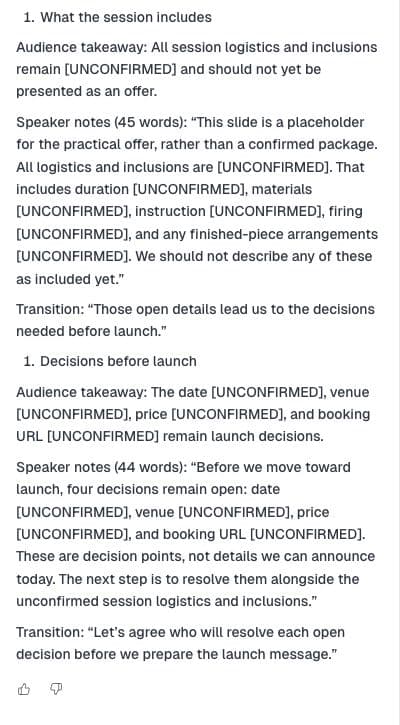
Astra returned three structured sections. It treated the first image as a visual starting point, left the session inclusions unresolved and ended with the launch decisions. Asking for transitions helped connect the slides without repeating the same introduction each time.
Draft speaker notes for these slides: [TITLES_AND_APPROVED_FACTS]. Give each slide one audience takeaway, 35–50 words of natural spoken notes and one transition. Mark every unknown explicitly. Do not invent attendance, revenue, duration, inclusions or promises. These notes will be placed into an external PowerPoint deck; do not claim to export a presentation.Review claims before polishing the voice
Read every sentence as a potential commitment. In a workshop pitch, a phrase about taking home a finished mug may imply materials, firing, collection and timing that nobody has approved. Replace unsupported promises with a question for the owner or leave the section out of a public presentation until it is confirmed.
Our draft named unconfirmed duration, materials, instruction and firing. That was useful for an internal planning discussion. It would be awkward to read a series of unknown markers to prospective customers, so the same notes are not automatically suitable for every audience.
Move reviewed notes into the deck and rehearse
After checking the facts, place each paragraph with its matching slide in your presentation editor. Keep the slide title attached while transferring the text so that a transition does not end up beneath the wrong image. This is a manual assembly step outside the demonstrated Ciyo conversation.
Read the notes aloud with the slide visible. Shorten sentences you stumble over and remove descriptions that merely narrate what everyone can see. Time the actual rehearsal if the presentation has a limit; do not convert a model's word count into a claimed speaking duration.
Keep a short fallback version for live discussion
After the full notes are fact-checked, ask for a one-sentence version of each takeaway using only those approved facts. This gives the presenter a way to move forward if discussion consumes the available time. Treat it as another draft to review, not a replacement for rehearsal.
Keep operational reminders separate from words meant for the audience. A note to confirm the booking URL is useful to the author; it should not accidentally become part of the public pitch. Label those reminders clearly when moving the text into the deck.
Make the final slide ask for a decision
For our internal draft, the useful ending was a request to assign the date, venue, price and booking decisions. It did not need a fabricated launch date or a claim about likely sales. A clear owner and next step are enough to make a planning presentation productive.
Keep the reviewed notes with the approved visual assets and record which facts remain open. If the offer changes, revise the affected slide and its notes together. The strongest draft is the one a presenter can say naturally and defend when someone asks a follow-up question.
Practical questions
Did Astra create a PowerPoint file here?
No. The demonstrated output was speaker-note text in Ciyo. Deck assembly and export happen separately.
Should I read every generated sentence aloud?
Use the draft as rehearsal material. Check the facts, adapt the language to your voice and remove wording that does not help the audience.
How should I handle missing facts?
Mark them explicitly while drafting. Resolve them with the owner before making a public promise, or omit the unsupported claim.
Make the next step clear
Use Ciyo to organize the brief and visual references before moving into production.