GPT-6 Astra · Long creative sessions
GPT-6 Astra Slow? Save a Handoff Before You Restart

When a creative conversation gets long, starting again can feel like the quickest way forward. Then you spend the next exchange describing the same image, explaining which version won and correcting details that were already settled. Before you restart, save the decisions that make the work usable.
This guide demonstrates a handoff between two Ciyo conversations for a fictional ceramics workshop. It addresses continuity, not model latency: we did not measure response speed or establish why a particular request was slow. For model time, tool delays and Fast mode, start with our separate Astra speed guide.
Choose a stopping point with a usable result
A useful checkpoint is an approved brief, a chosen image or a reviewed edit. In our Still ceramics board, the warm mug concept and the slate-background version already existed. The headline was a separate text object. Repeating those generation steps would not answer the remaining question: what should the workshop offer actually say?
Inspect the task's current state before starting another request. If generation is still active, check its status and decide whether to wait or use the available Stop control. A handoff does not cancel a running task, refund a generation or establish that an apparently quiet job has failed.
Ask for decisions, assets and unknowns
Ask Astra for a compact note with the approved direction, the relevant assets, any export limitation and one next action. Request separate confirmed and unknown facts. This makes the note easier to check than a retelling of every message.
The live response identified the warm and slate assets, the separate headline and missing workshop details. It also distinguished the images' displayed canvas size from verified export dimensions. That distinction matters: a number visible in a layout is not automatically the size of the downloaded source.
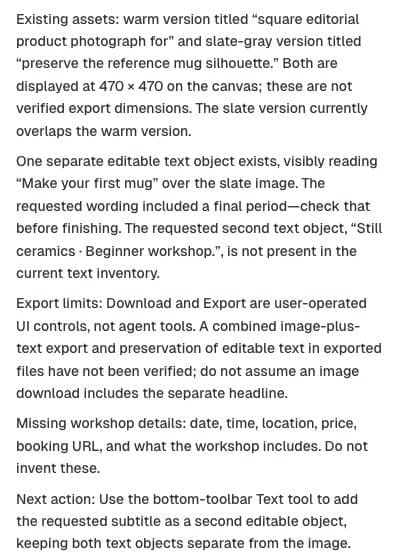
Write a compact handoff note for this project so I can resume in a fresh chat. Include approved visual choices, existing asset names, separate editable text, known export limits and one next action. Separate confirmed facts from missing details. Do not generate or change anything.Correct the handoff before reusing it
Treat the summary as a draft. Compare asset names with the board, read the actual headline and check whether a suggested next action still matches your intention. In our result, Astra mentioned a possible final period and a missing subtitle. Those observations did not make either change an approved requirement.
We kept the facts we had checked: two mug concepts, one separate headline and the image-source export boundary. We left date, time, venue, price and booking URL unknown. We then chose offer planning as the next task instead of automatically accepting the suggested subtitle change.
| Field | Useful content |
|---|---|
| Approved | Chosen direction and decisions already made |
| Assets | Specific names and the version to keep |
| Verified limits | What an export or prior operation actually produced |
| Unknown | Facts requiring the owner’s answer |
| Next task | One deliverable that moves the work forward |
Resume with one bounded request
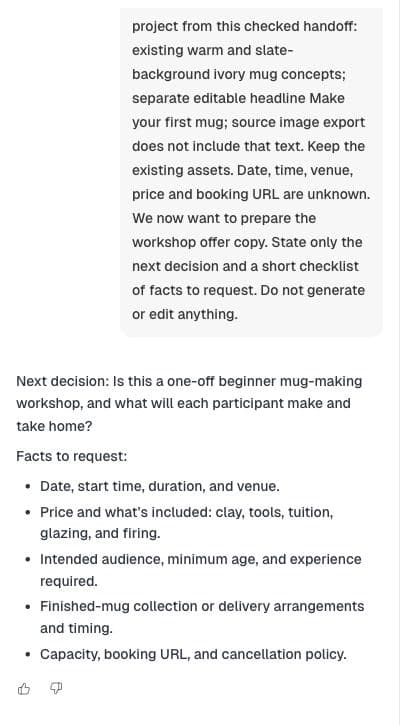
Use New chat in the same project, then paste the checked note and state the next job. Our canvas objects remained available. We asked only for the next decision and a short checklist of facts required for workshop copy; we explicitly asked for no generation or edits.
Astra responded by asking what participants would make and take home. Its checklist covered logistics, inclusions, audience, collection arrangements and booking details. That gave us a concrete information request without inventing an offer or recreating the existing images.
Name the version another person should open
Warm and slate are useful visual descriptions, but a larger project may contain several of each. Add the chosen asset name or project location to the note, and identify any rejected version that could be mistaken for the approved one. If you hand the work to another person, confirm they can access the project.
For a text-only handoff outside Ciyo, include a preview or an accessible source reference through your normal sharing workflow. Prose alone cannot establish that the next operator is looking at the same image. Our demonstration stayed in one project, so the board itself remained the asset reference.
Keep the handoff small enough to use
Include a detail because it affects the next decision. A rejected color experiment may be worth one sentence if it prevents repetition; an entire abandoned prompt history usually is not. Keep source files and approved assets in the project rather than trying to encode them all as prose.
After the next milestone, update the note with what changed and what is still uncertain. A handoff is useful when another person—or your next conversation—can identify the current deliverable and continue without guessing. It is not a promise that a fresh session will run faster.
Restarting and handoff questions
Does New chat make Astra faster?
This demonstration did not measure speed. It shows how to carry checked decisions into a fresh conversation without repeating completed creative work.
Can I paste the summary without reviewing it?
Check it first. Confirm the asset version, actual text and remaining decisions; a model's suggested next step is not automatically an approved requirement.
Does a handoff replace my project files?
No. Keep the actual assets and source records. The note explains their purpose and current approval state.
Continue from the work you already have
Open your Ciyo project, check the selected assets and give Astra one clear next task.