GPT Image 2.5 Sunburst · Reference editing
Sunburst Reference Edits: Check What Stayed the Same
A background edit succeeds only if the important parts of the subject survive. A mug can look convincing while its handle becomes wider or its glaze loses a distinctive mark. ‘Looks similar’ is a first impression, not a complete approval check.
This walkthrough uses Sunburst in Ciyo to change a fictional mug image from warm surroundings to slate gray. Select the reference, write a bounded edit and compare the result against specific details that must remain fixed.
Treat the model claim as a reason to test
OpenAI's September 8 announcement positions Sunburst for precise creative work with longer generation times than Flare. That makes a constrained reference edit a useful task to try. It does not remove the need to inspect your result.
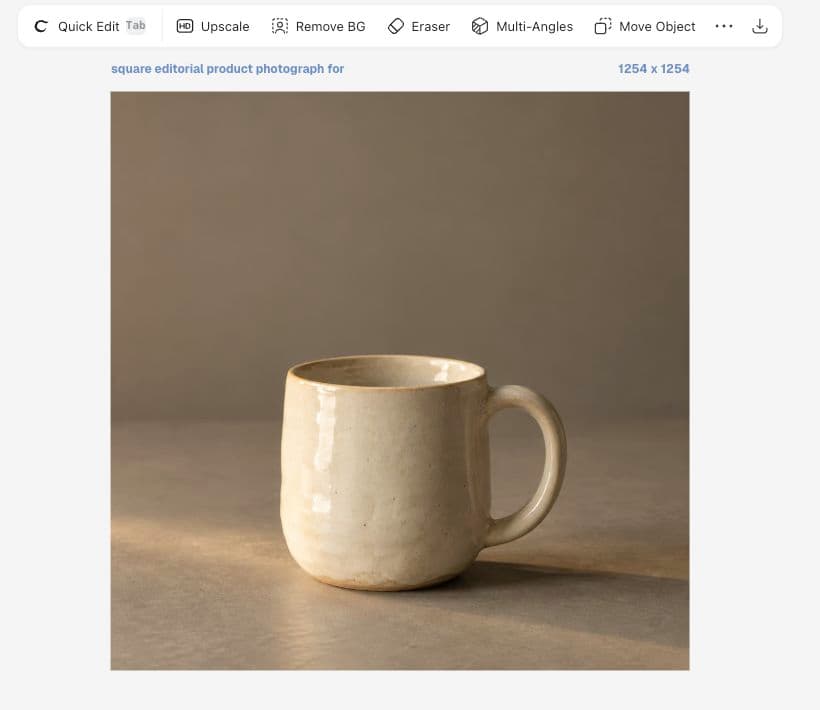
Our live Ciyo Image Generator offered Sunburst. This is one completed edit, not a controlled comparison: Flare created the source and Sunburst performed a different task. Both images are fictional generated artwork.
Choose a reference you can inspect
Use an image with visible edges and material details. Our source includes the entire handle and rim. A blurry or heavily cropped reference makes later preservation harder to judge.
Keep the source on the canvas. Open Image Generator, select Sunburst, choose Reference image → Select from Canvas and click the intended image. Use Zoom to Fit if it is off-screen. Confirm that the reference appears in the generator before submitting.
Separate the change from the fixed details
Request one change: cool slate surroundings. Then list the details that must remain recognizable. Asking for a new camera, lighting, props and material at once makes an unwanted change harder to diagnose.
For a real product, ‘preserve’ still requires comparison with an authorized reference and review by someone who knows the item. This fictional mug cannot validate a real catalog product's accuracy.
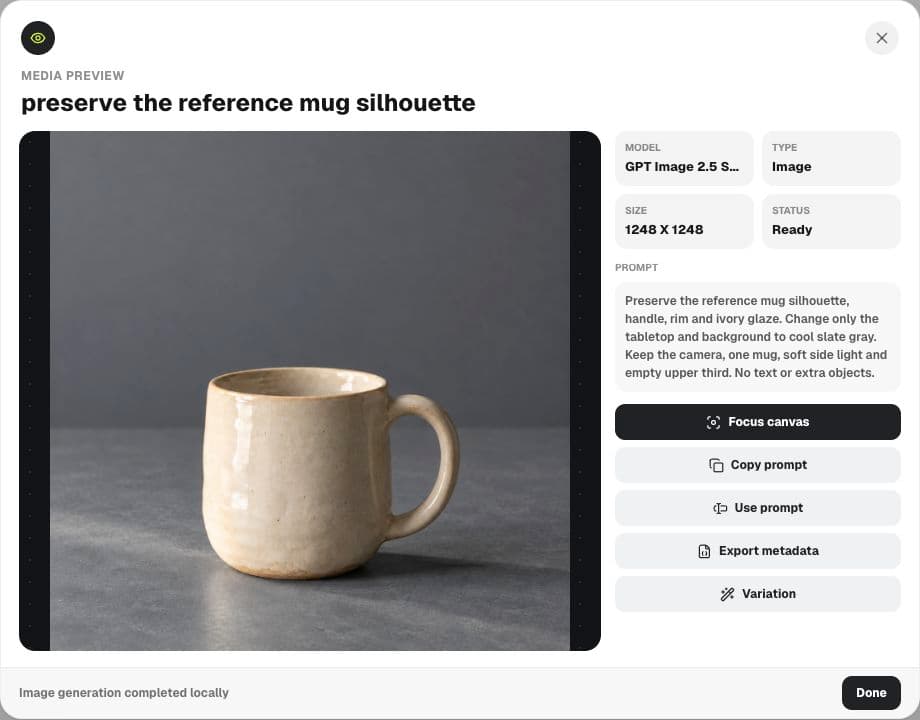
Preserve the reference mug silhouette, handle, rim and ivory glaze. Change only the tabletop and background to cool slate gray. Keep the camera, one mug, soft side light and empty upper third. No text or extra objects.Inspect before calling the subject preserved
The output changed the surroundings to slate gray and retained a recognizably similar ivory mug. Its rim and handle remain visible, and the upper area still has room for copy. That supports using it as a fictional concept.
It does not prove pixel-identical preservation. The source preview reported 1254 × 1254 and the result 1248 × 1248. Compare at matched display sizes, inspect the outline and surface, and check the downloaded file when dimensions matter.
Check identity before atmosphere
A pleasing background can distract from a changed handle. Review the fixed details first. Revise or reject an output when a critical feature differs, even if the new setting is attractive.
For actual merchandise, compare against the real item and keep the reference with the approval note. The model cannot establish commercial accuracy from a vague description of a glaze or dimension.
| Detail | Compare | Reason to stop |
|---|---|---|
| Silhouette | Body width, height and base | The product changes shape |
| Handle | Opening and attachment points | Construction changes |
| Rim | Thickness and contour | The edge is distorted |
| Surface | Glaze and distinctive marks | Identity cues drift |
| Delivery | Dimensions and crop | The intended placement no longer works |
Hand off the chosen version with its limits
Export the selected source and save the prompt or metadata. Label the slate-background version and state whether it is a concept or an approved product representation. That gives the next person a clear starting point.
If only the headline changes next, edit a separate text object instead of regenerating the image. Keep the accepted subject while changing the part of the deliverable that needs work.
Reference-edit questions
Does Sunburst guarantee unchanged geometry?
No. Compare with the reference. This similar-looking fictional mug is not proof of exact geometry or pixel preservation.
Why did the dimensions change?
The observed outputs had different dimensions; this walkthrough does not establish the provider's reason. Prepare the required delivery size explicitly.
Is this a model comparison?
No. Creating a source and editing it are different tasks, so this sequence does not establish a Flare-versus-Sunburst ranking.
Make one controlled reference edit
Choose an authorized image, specify one change and review the details that must remain fixed.