Practical design guides
Kittl vs Ciyo for Print Design: Compare the Handoff, Not Just the Preview

When choosing between Kittl and Ciyo for a printed piece, a polished preview is only part of the decision. You also need the right editable source, permitted use and a file the printer can accept.
This is a documentation-based comparison checked November 13, 2026, with an original test brief you can run in both products. It is not a timed head-to-head test or a ranking of generated-image quality. Exact Kittl plan prices were not available in the captured pricing text, so no price winner is claimed.
Quick verdict
Shortlist Kittl when its documented templates, text effects and vector tools match the printed piece you need. Shortlist Ciyo when a conversational design process and a canvas holding references, concepts and revisions suit your working method. Both describe canvas and AI capabilities; the useful distinction is whether your actual task and handoff work in the account you will use.
Compare the requirements before the products
Our fictional shop needs an earring display card with an approved logo, exact wording and supplier-confirmed attachment points. Its acceptance criteria are modest: the pair fits, the copy stays readable, the source can be revised and the supplier accepts the production file.
Run that same brief in each product. Keep inputs and target dimensions constant, save the exported files and record any manual corrections. Do not compare a first draft from one tool with a polished, repeatedly revised result from the other.
Kittl: inspect the template and export path
Kittl’s public pages describe templates, text effects, vector tools, an infinite canvas and AI creative tools. Its pricing FAQ distinguishes the free starting tier from paid access that includes higher-resolution and vector exports and commercial licensing. Check the exact plan and asset license for your intended use.
Its fit depends on the real file, not the presence of a template thumbnail. For the earring card, open a suitable design and verify whether the words, paths and dimensions remain editable in the export you need. Confirm any fonts, graphics and client-delivery permissions before treating the design as ready.
Ciyo: inspect the visual process and the output
Ciyo is an AI design workspace with a Design agent and a canvas. It can help you develop the card concept while keeping original references nearby. For exact shop copy, retain a separate approved text source and check the exported result rather than relying only on the conversation.
Ciyo’s public pricing page lists a $10 pack of 1,000 credits with no subscription. Media operations and Design agent work can consume credits separately. Record the quote shown for your actual request and any billed revisions; a credit-pack price alone does not predict a completed card’s cost.
Ciyo observation
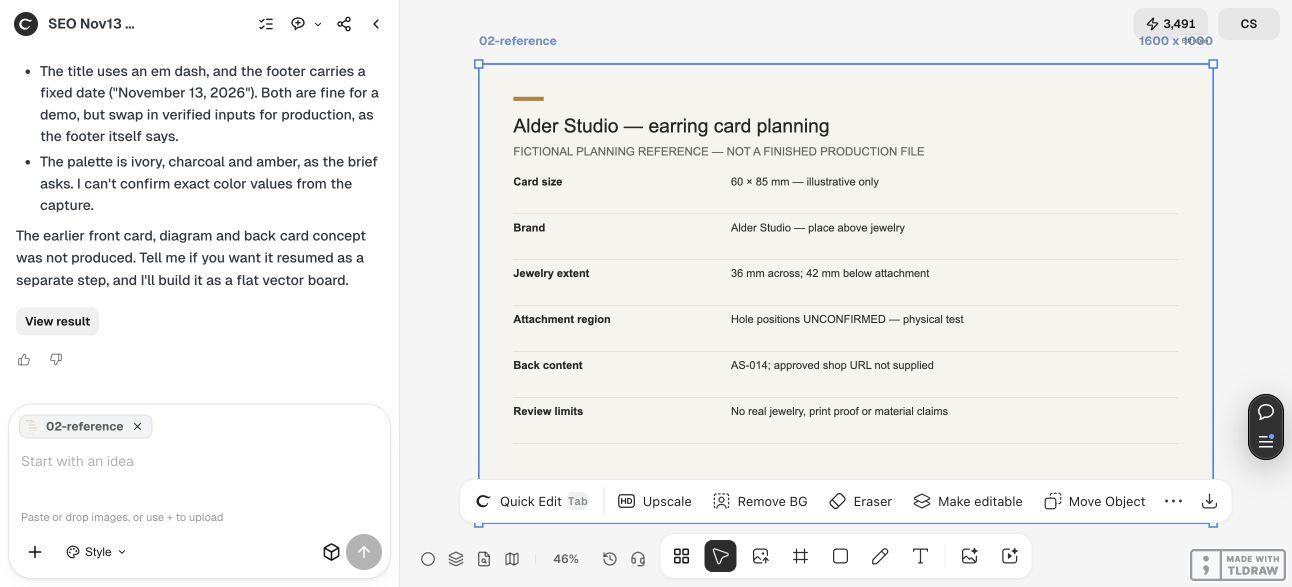
Our first fictional card-concept request stalled and was stopped without a finished asset. We then uploaded our own Alder Studio planning sheet for a separate text review. Ciyo checked the brand, jewelry extent, unconfirmed attachment region and AS-014 back content, and flagged missing real jewelry, supplier hole geometry and a physical proof. The review used a viewport capture because its image inspector did not accept SVG. This is a Ciyo-only planning observation. We did not run an equivalent Kittl task or measure comparative output, speed or cost.
A decision table for this print job
Unverified dimensions remain unverified. A feature listed by a vendor is not an observed output-quality result.
| Criterion | Kittl | Ciyo | Check before choosing |
|---|---|---|---|
| Working approach | Templates, editor and AI tools described | Design agent with canvas references | Run the same card brief |
| Pricing model | Free and paid plans; exact prices not captured | $10 / 1,000-credit pack; usage varies | Compare actual task cost and license needs |
| Editable production output | Vector exports described for paid plans | Verify the actual requested output | Open files in the recipient’s editor |
| AI image quality | Not benchmarked here | Not benchmarked here | Inspect equivalent outputs |
| Integration and support | Check required feature and plan directly | No Kittl migration integration established here | Test the real handoff |
| Physical fit | Not established by a screen preview | Not established by a screen preview | Print and assemble a sample |
Run one comparable brief
Use the same source files and acceptance criteria in each tool. Track the work yourself rather than treating the following as measured performance.
Create a visual concept for a [CARD TYPE] at [DIMENSIONS] using [ORIGINAL LOGO], [APPROVED COPY] and [SUPPLIER GEOMETRY]. Preserve exact words and keep [FUNCTIONAL AREAS] clear. Explain which output is editable and which is a flat preview. Identify manual prepress steps and license checks still needed. Do not claim print readiness until the supplier has checked the file.Choose by the costly correction
For a solo maker, test the step most likely to need repeated changes, such as replacing a product name or moving an attachment guide. For an agency, also test whether the client can open and revise the file and whether the asset license covers the handoff.
If you need both a visual exploration tool and a production editor, budget for the manual transfer and check which elements survive it. Exporting a picture does not preserve editable text or layers by itself. Keep one approved master instead of assuming two tools will stay synchronized.
Sources and comparison limits
Primary pages checked November 13, 2026. No live Kittl output, speed benchmark, support response or automatic migration was measured for this comparison.
Frequently asked questions
Which product is cheaper for one print job?
That depends on the required plan, asset license, generation settings, usage and revisions. This article does not have equivalent completed-job costs for both products.
Is Kittl free for the work I want to sell?
Check the current plan and applicable asset license for that work. The presence of a free account does not by itself establish the commercial rights or export access you need.
Can I move a layered project directly between them?
No direct project-migration workflow was verified here. Test the available export and import with a small representative file before committing the whole job.
Test your print brief in a small Ciyo project
Bring your approved copy and reference files, make one draft, and compare the result with your checklist before creating more versions.