Opus 5.5 motion production
Opus 5.5 Motion Easing: Fix Overshoot Without Flattening the Video
A workshop promo has a headline that lands with a satisfying bounce, then briefly crosses the right edge. The fix is a bounded movement with a clear hold, not a request to make the whole video less exciting.
Easing changes how progress moves between two states. Specify the endpoints, duration and permitted range before choosing the curve.
Ciyo’s Opus 5.5 agent built the fictional worked example below with code. The linked MP4 is the actual product export, drawn with Pillow and encoded with FFmpeg; it is not a generated camera-footage clip.
1. Describe the movement in measurable terms
For one entrance, write start position, final position, start frame and settled frame. Separate the entrance from the hold. A headline that keeps oscillating never reaches a stable reading phase.
Use a decorative circle to compare curves before applying them to essential copy. It is easier to judge acceleration and landing when content does not distract from the movement.
2. Compare two versions of the same path
Keep the endpoints and duration identical. One circle moves with linear progress; a second uses a smooth bounded ease. If you change position, size and color at the same time, you cannot identify what improved.
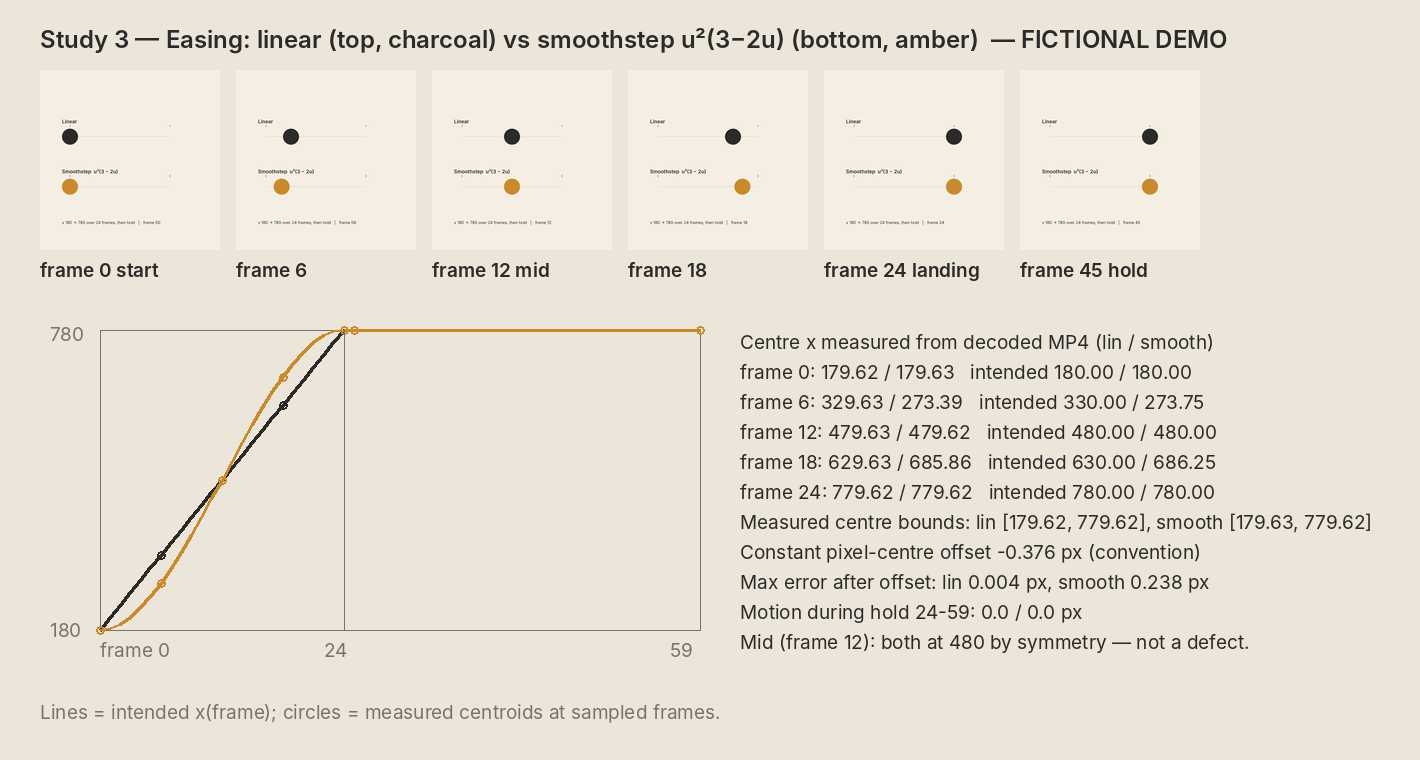
For a 24-frame entrance, define local progress u=clamp((i-start)/24,0,1). A simple bounded smoothstep is u²(3−2u). This is an illustrative curve, not a claim that every animation should use it.
| Rule | Linear | Bounded smoothstep |
|---|---|---|
| Progress | u | u²(3−2u) |
| Range | 0…1 | 0…1 |
| End position | Same target | Same target |
| Review | Constant pace | Slower start and finish |
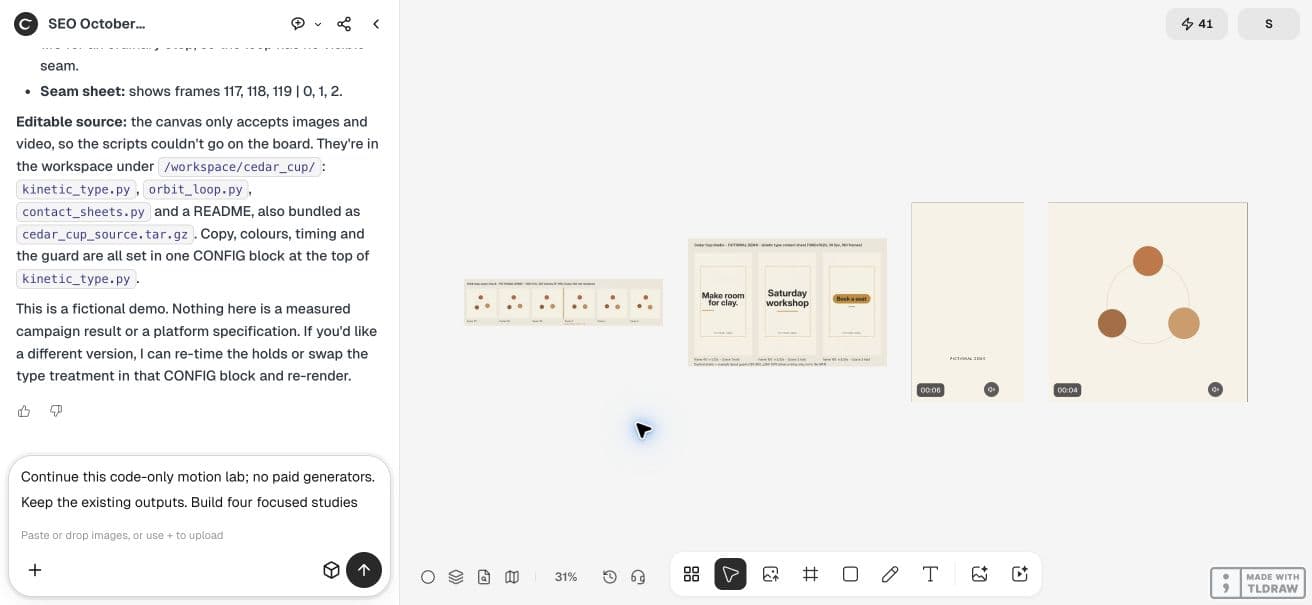
Use code only. Make a two-second 1080x1080 silent easing study at 30fps: two circles move from x=180 to x=780 over 24 frames, then hold. Upper circle linear; lower circle bounded smoothstep u*u*(3-2*u), with u clamped to 0..1. Label the comparison clearly. Export MP4 and source, sample start, midpoint and landing frames, and report minimum/maximum center positions. Keep shapes inside the frame.3. Check overshoot on the actual object
A bounded progress rule protects the position path only if the rest of the drawing is bounded too. A scale animation or shadow can still extend past the guard. Inspect the combined transformed bounds.
If a spring is intentional, reserve room for its maximum extent and ensure it settles before the hold. Do not use an arbitrary clipping mask to hide a headline that is traveling too far.
4. Make the hold an explicit state
Clamp the entrance after its end frame and render the final position directly. A small residual motion can make type feel unstable. Keep the call to action especially calm.
Remotion explains that interpolation extrapolates unless constrained. A custom implementation needs the same attention: after the entrance ends, stop applying an unbounded progress formula.
5. Ask Ciyo for a paired motion study
Have the agent render two circles on equal paths with the same frame duration. Save the source and sampled frames around the start, midpoint and landing. Watch the complete study to assess the movement between those samples.
Then apply the chosen curve to one workshop headline. Recheck its font bounds at the worst position and retain the prior export so the change can be compared.
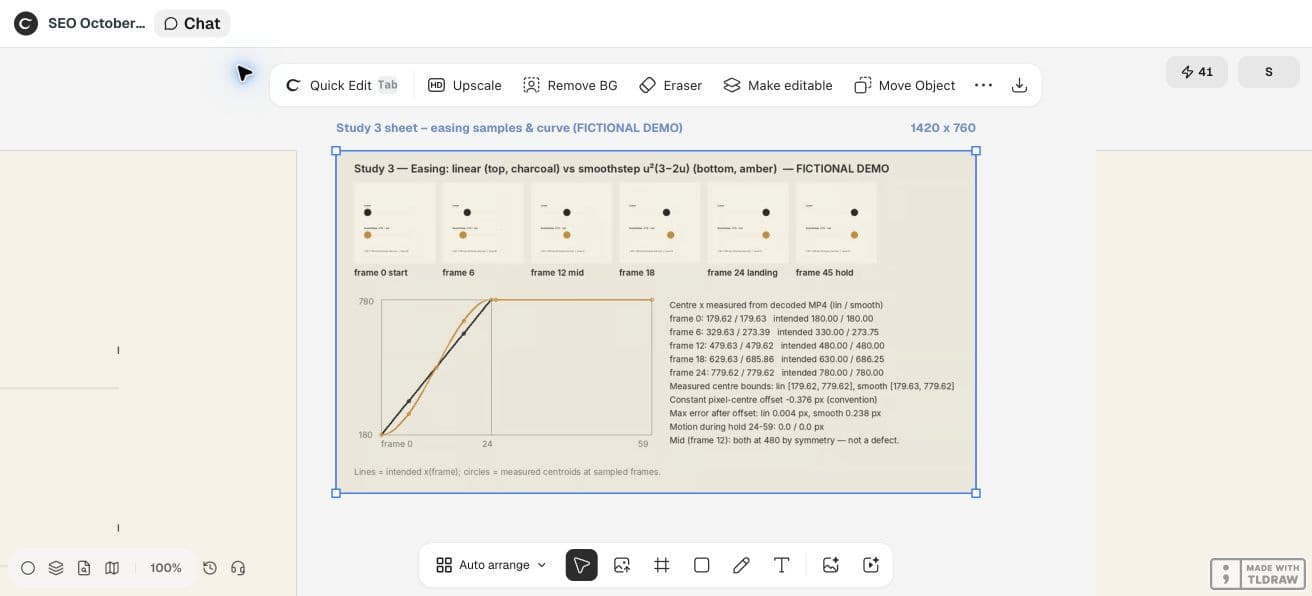
The live easing study has 60 counted frames at 30fps and lasts two seconds. The agent reported that both circles stop moving after frame 24. The decoded center measurements run about 0.376px below the intended coordinates because of its pixel-center measurement convention.
Both curves meet at the midpoint by construction. Start, midpoint and landing samples alone cannot show the acceleration difference; watch the movement between those samples before choosing a curve.
In this demo, Ciyo saved the Python sources in the project workspace but could not attach a source archive to the canvas. Ask the agent to paste the source in chat when you need a copy outside that workspace; the video download is a separate deliverable.
CFNStudio compares model outputs in Motion. This concerns another tool; our bounded-easing study is an original Ciyo exercise, not the poster’s advice or evidence of model superiority.
6. Explain what the change achieved
A useful revision note says “The headline reaches its final position by frame 24 and stays inside the layout guard.” It does not say the video is scientifically more engaging.
Keep easing settings in the source, close to the scene they affect. Review with the actual text and output size before copying the curve into another composition.
Practical questions
Does easing require a bounce?
No. Many curves change acceleration without overshooting the endpoints.
Why does interpolation keep moving after the entrance?
An unconstrained mapping may extrapolate beyond its range. Clamp progress and define the hold explicitly.
Can checking the center prove a circle fits?
No. Include its radius, transforms and any visible effects in the bounds.
Make a small motion study you can check
Open an isolated Ciyo project, bring your approved copy, and ask the agent for source, a rendered draft and the specific checks your deliverable needs. Review the actual export before using it.