Practical design workflow
Project Timeline Template: Check Dependencies Before Drawing the Bars

A timeline can show three neat bars while hiding a task that starts before its prerequisite is finished. Dates and dependency rules need to agree before the chart is decorated.
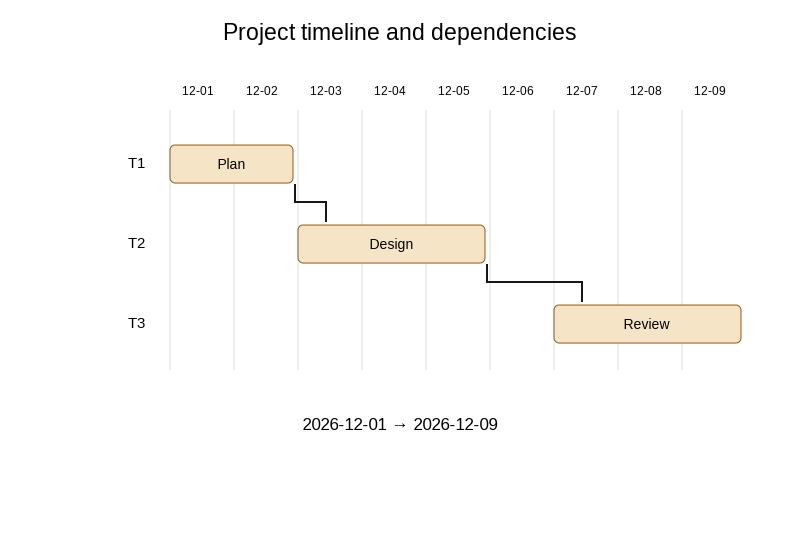
This fictional three-task launch uses inclusive calendar dates in December 2026. The original downloads include a task table, CSV and SVG. Ciyo helps explore presentation, while the source makes the predecessor checks explicit.
Quick answer: approve the task list before the picture
Give every task an ID, start date, finish date and predecessor. For this simple example, the rule is finish-to-start: a successor begins on a later calendar date than its predecessor finishes. The example has no working-day calendar, resource constraints or automatic rescheduling.
The four steps below prepare the dependency list, explore its visual treatment, check dates and keep the shared versions consistent. A gap is allowed when it is intentional; an attractive continuous ribbon is not a reason to remove it.
| Task | Start | Finish | Predecessor |
|---|---|---|---|
| T1 · Plan | 2026-12-01 | 2026-12-02 | None |
| T2 · Design | 2026-12-03 | 2026-12-05 | T1 |
| T3 · Review | 2026-12-07 | 2026-12-09 | T2 |
1. Write the dependency rule in plain language
In this source, Design follows Plan and Review follows Design. Keep those relationships in the predecessor column instead of inferring them from where the bars happen to sit. If a real task has several predecessors, preserve each one and decide what must be complete before the task begins.
The example dates are calendar dates, including both endpoints. Plan spans two dates, Design spans three and Review spans three. These spans do not establish effort or staffing: a three-day bar is not proof of three person-days of work. Add those concepts separately only when the real plan requires them.
2. Explore a visual timeline in Ciyo
Create a fictional project and request a straight-on timeline with task IDs and dates. Inspect the current settings and quote before generating. Use the visual proof to judge whether the date axis, labels and handoff gaps are readable.
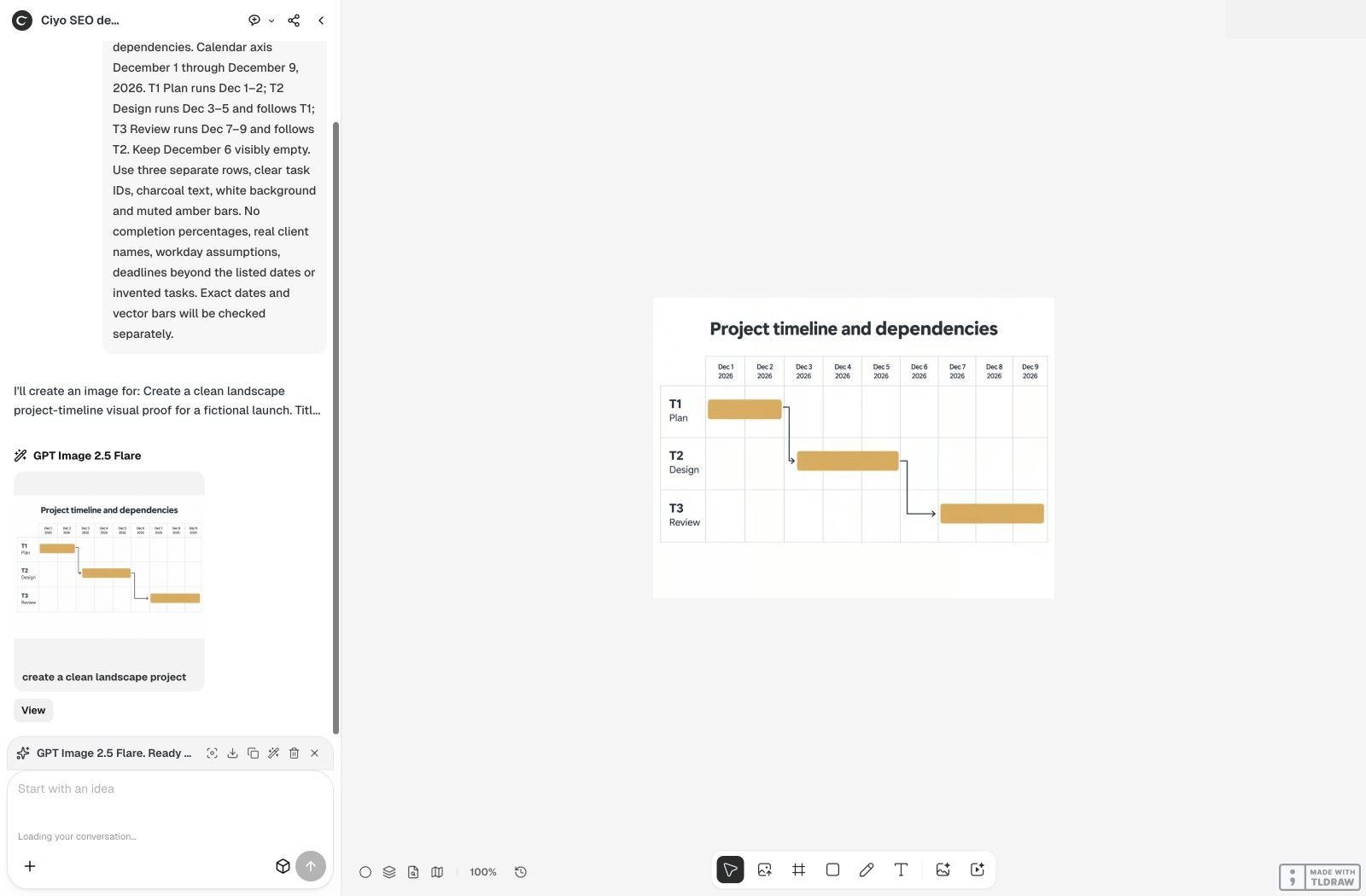
Compare each bar with the source table. A generated timeline can shift a finish date or close an intentional gap. Keep the source beside it, and do not treat the image as a project-management system. The exact schedule in the supplied SVG is constructed separately from the approved date list.
On November 27, 2026, we used Ciyo’s production Image Generator with GPT Image 2.5 Flare, aspect ratio 4:3, 1K and one image. The displayed quote for this run was 2 credits. Check the quote in your own session.
Create a clean landscape project-timeline visual proof for a fictional launch. Title: Project timeline and dependencies. Calendar axis December 1 through December 9, 2026. T1 Plan runs Dec 1–2; T2 Design runs Dec 3–5 and follows T1; T3 Review runs Dec 7–9 and follows T2. Keep December 6 visibly empty. Use three separate rows, clear task IDs, charcoal text, white background and muted amber bars. No completion percentages, real client names, workday assumptions, deadlines beyond the listed dates or invented tasks. Exact dates and vector bars will be checked separately.3. Check dates, predecessors and the gap
The three bars follow the stated date ranges. December 6 has no task bar, and the arrows show the two dependencies.
First confirm that every start is on or before its finish. Then verify that each predecessor exists. For T2, December 3 is later than T1's December 2 finish. For T3, December 7 is later than T2's December 5 finish. The unused December 6 is therefore visible and intentional.
Check for a cycle if you extend the example: a task cannot require its own completion through a chain of predecessors. Also check the real calendar, dependencies and owners before treating any proposed date as a commitment. This fictional plan is an illustration, not a delivery forecast.
4. Keep the table and SVG in agreement
Open the HTML example to review the table and original SVG together. Save edited HTML after changing text. The CSV and standalone SVG are separate sources: editing the table does not redraw the bars. Update the date table and vector coordinates deliberately, then compare them again.
Before sharing a revision, inspect the first and last dates of each bar and read its predecessor against the table. Keep a version or approval reference in your actual workflow so readers know which schedule is current. The downloads do not send notifications, update tasks or synchronize a team calendar.
Choose a project tool for a changing schedule
Smartsheet's timeline templates offer presentation formats for project plans. A scheduling product is more appropriate when dates change often or dependencies need to recalculate. Verify the current product's capabilities rather than assuming a static chart provides them.
A meeting agenda allocates time within a session; a multi-day project timeline describes a different sequence. Link the two when a review meeting is part of the plan, while keeping the agenda's decisions and the project's dependencies in their own sources.
Timeline questions
Does changing a date move the SVG bars?
No. The table, CSV and SVG are separate static sources. Edit and compare each representation, or use a scheduling tool when you need automatic dependency updates.
Are these working days?
No. The example uses inclusive calendar dates. It does not model weekends, holidays, capacity or effort.
Can the successor start on the predecessor's finish date?
Not under this example's stated rule, which requires a later calendar date. A real plan may use another rule, but it must be explicit and consistently applied.
Start with the dependency list
Approve the dates and predecessors, explore their presentation in Ciyo and compare every visual bar with the editable source before sharing.