Small business · Print
An Invitation You Can Actually Print
The card looks perfect on screen. You send the file to a print shop, and it comes back soft, with slightly furry type and an edge that does not sit where you expected.
That is almost never a design failure. It is a resolution failure, and it is invisible until paper is involved. We designed an A5 invitation for a fictional coffee bar's launch night on September 21, 2026, and then checked the three things a printer will check.
Write the words out, exactly
An invitation is mostly information, and information is the thing a renderer is most likely to improvise. So do not describe the text. Dictate it, line by line, and forbid anything else.
The instruction below does three jobs at once: it fixes the wording, it fixes the order, and it closes the door on invented extras such as RSVP lines, dress codes and decorative Latin.
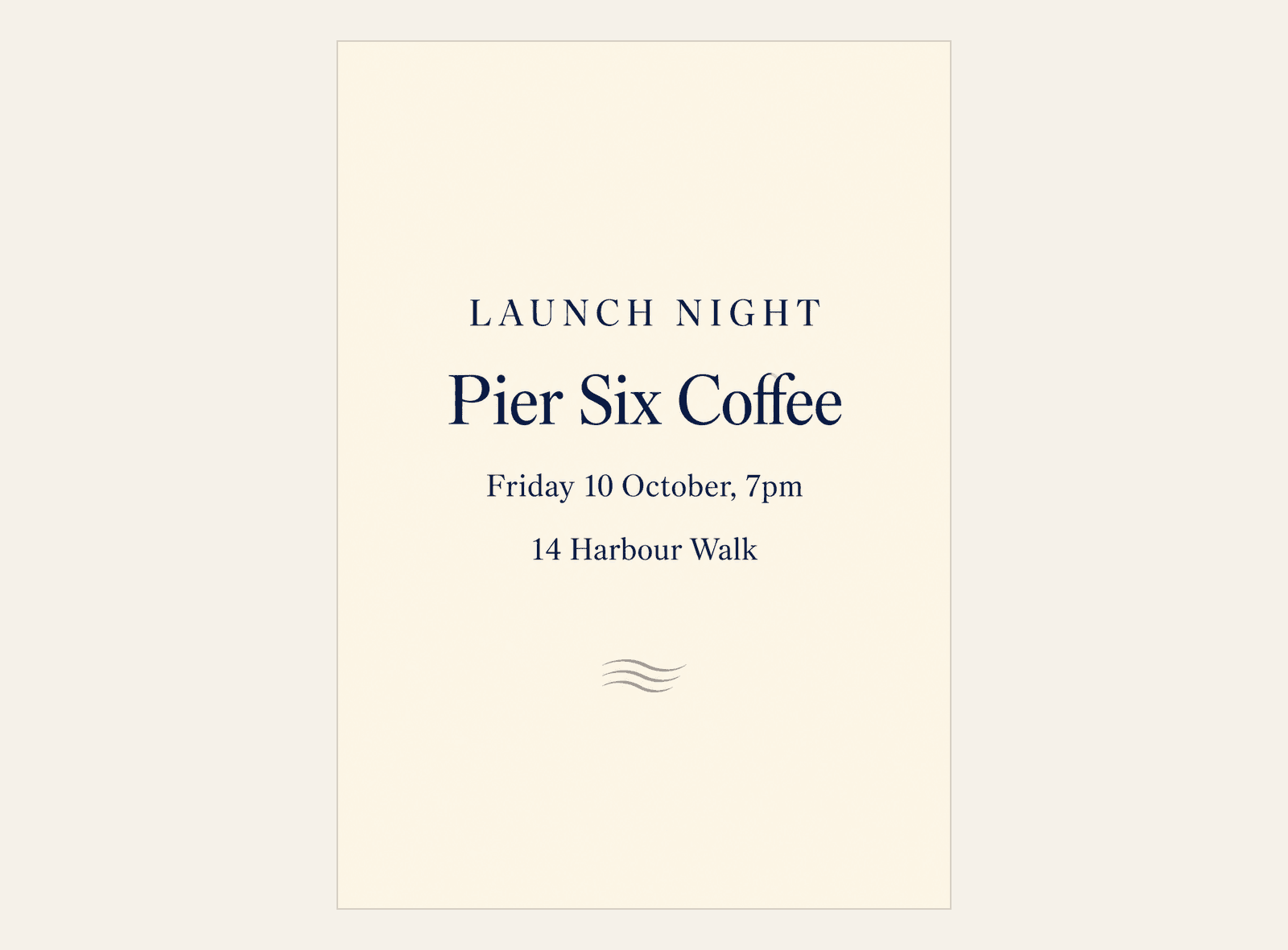
Design an A5 portrait invitation card for Pier Six Coffee's launch night. Print these details exactly and add no other words: LAUNCH NIGHT on the first line, Pier Six Coffee on the second, Friday 10 October, 7pm on the third, 14 Harbour Walk on the fourth. Warm and inviting, plenty of quiet space, and leave a clear margin all round for the printer.What came back
All four lines, exactly as written, in the order given, with nothing added. A restrained cream card, a small wave device at the foot, generous margins, and type that sits comfortably inside them.
For a first attempt from a 68-word brief, it is genuinely usable. The wording is right, the hierarchy is right, and the quiet space it was asked for is there.
The number that stops it reaching a printer
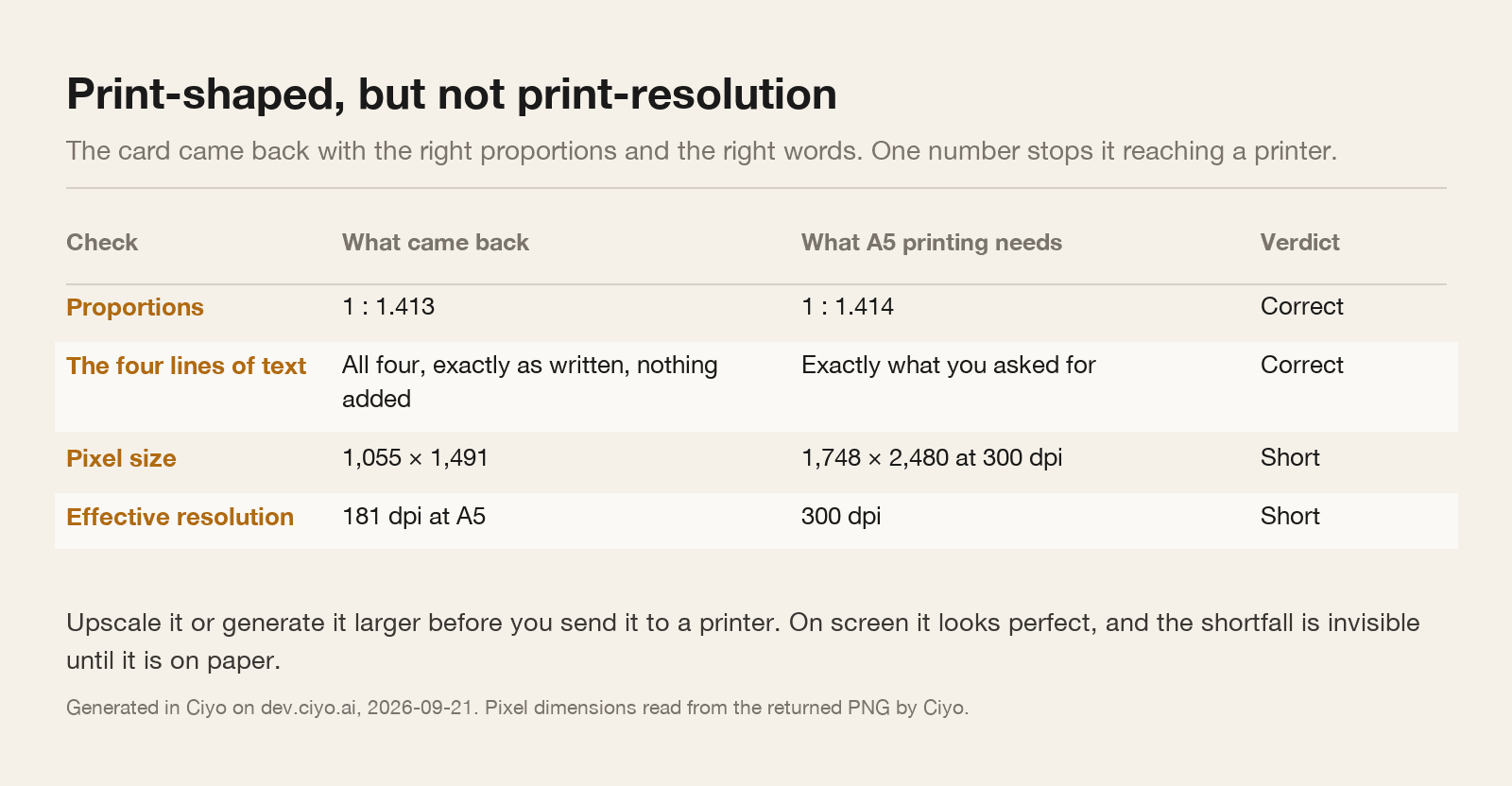
The proportions are almost exactly right: the file is 1 to 1.413, and A5 is 1 to 1.414. That is closer than most hand-made files manage.
The pixel size is the problem. The card came back at 1,055 × 1,491 pixels. Spread across an A5 sheet that works out at about 181 dots per inch, and commercial printing wants 300. To hit 300 dpi at A5 you need 1,748 × 2,480 pixels.
Nothing about the file looks wrong on a screen, because a screen is happy at 100 dpi. The shortfall only exists once the image is asked to cover 148 by 210 millimetres of paper.
Fixing it before you order
Ask for a larger render, or upscale the one you have. Either is a minute's work, and both are far cheaper than a box of soft cards.
Then check the margin against the printer's requirements rather than your own eye. Most printers want between 3 and 5 millimetres of bleed beyond the trim line and want nothing important within about 5 millimetres inside it. A generated card has no bleed at all, so either extend the background yourself or place the card on a slightly larger canvas before export.
Finally, send a PDF or a PNG at the size you actually want printed, and say the size in the order. A file that is technically 300 dpi at A6 is 150 dpi at A5, and print shops will happily print exactly what you gave them.
| Check | How | If it fails |
|---|---|---|
| Every word | Read the card out loud against your own notes | Regenerate with the lines dictated, or set the type yourself |
| Pixel size | Open the file and read its dimensions | Generate larger or upscale before anything else |
| Proportions | Divide height by width: A5 is 1.414, A6 is 1.414, US Letter is 1.294 | Regenerate at the right ratio rather than stretching |
| Margins and bleed | Compare with the printer's own template | Place the card on a larger canvas and extend the background |
What a generator is good at here, and what it is not
It is good at the look: the mood, the spacing, the sense of an occasion, and half a dozen different directions in the time it takes to open a template library.
It is not good at being a typesetter. Rendered type cannot be nudged, its kerning is whatever it is, and correcting a single character means regenerating the whole card and losing everything else.
So the workflow that survives contact with a real order is a hybrid: generate the card to find the design, then rebuild the text layer yourself over the generated background. You keep the look and you gain a file where a date change is a five-second edit rather than a new picture.
If you only remember one thing
Read the pixel dimensions before you fall in love with the design. A5 at 300 dpi is 1,748 × 2,480, A6 is 1,240 × 1,748, and a square 150 millimetre card is 1,772 × 1,772.
Everything else on this page is recoverable. Resolution is the one thing you cannot fix after the order goes in.
Invitation printing questions
What resolution does an A5 invitation need?
1,748 × 2,480 pixels for 300 dpi. Our generated card was 1,055 × 1,491, which is about 181 dpi at A5 — fine on screen, short for print.
Did it print the text correctly?
Yes. All four dictated lines appeared exactly as written, in order, with nothing added. Dictating the lines rather than describing them is what makes that reliable.
What about bleed?
A generated card has none. Place it on a slightly larger canvas and extend the background, or ask your printer for their template and match it.
How do I change the date later?
Rebuild the text layer yourself over the generated background. Rendered type cannot be edited, so a date change otherwise means regenerating the whole card.
Design it, then check the numbers
Dictate the four lines, generate the card, and read its pixel dimensions before you send anything to a printer.