Product photos · New angles
Make Another Product Angle from One Photo with AI

Marketplaces and product pages work better with more than one view, but a small shop often has one good photo. An AI angle tool can suggest a second viewpoint from that photo. It is guessing the parts of the product the camera never saw, so the result needs a careful comparison before a buyer relies on it.
This guide creates a rotated view of a fictional Fold notebook with Multi-Angles in Ciyo. We ran it on September 18, 2026 with the default settings. At the time, the panel showed a cost of 9 credits. The screenshots show the actual controls and result.
Pick the view your listing is missing
Decide what the new angle should show before you open the tool. A lower, rotated view can show thickness and the spine. A top view can show the cover shape. If the missing information is a detail the photo never captured, such as the inside pages, an angle tool cannot reveal it; it can only invent it.
Our source was a square photo of a closed ivory notebook on an oak desk, shot from above at an angle.
Open Multi-Angles on the selected photo
Select the photo on the Ciyo canvas and choose Multi-Angles in the image toolbar. The panel has Subject and Camera tabs, a small 3D preview and three sliders: Rotate, Tilt and Scale. The defaults were Rotate 45, Tilt -30 and Scale Medium.
Change one slider at a time on later runs, so you can tell which setting caused which change.
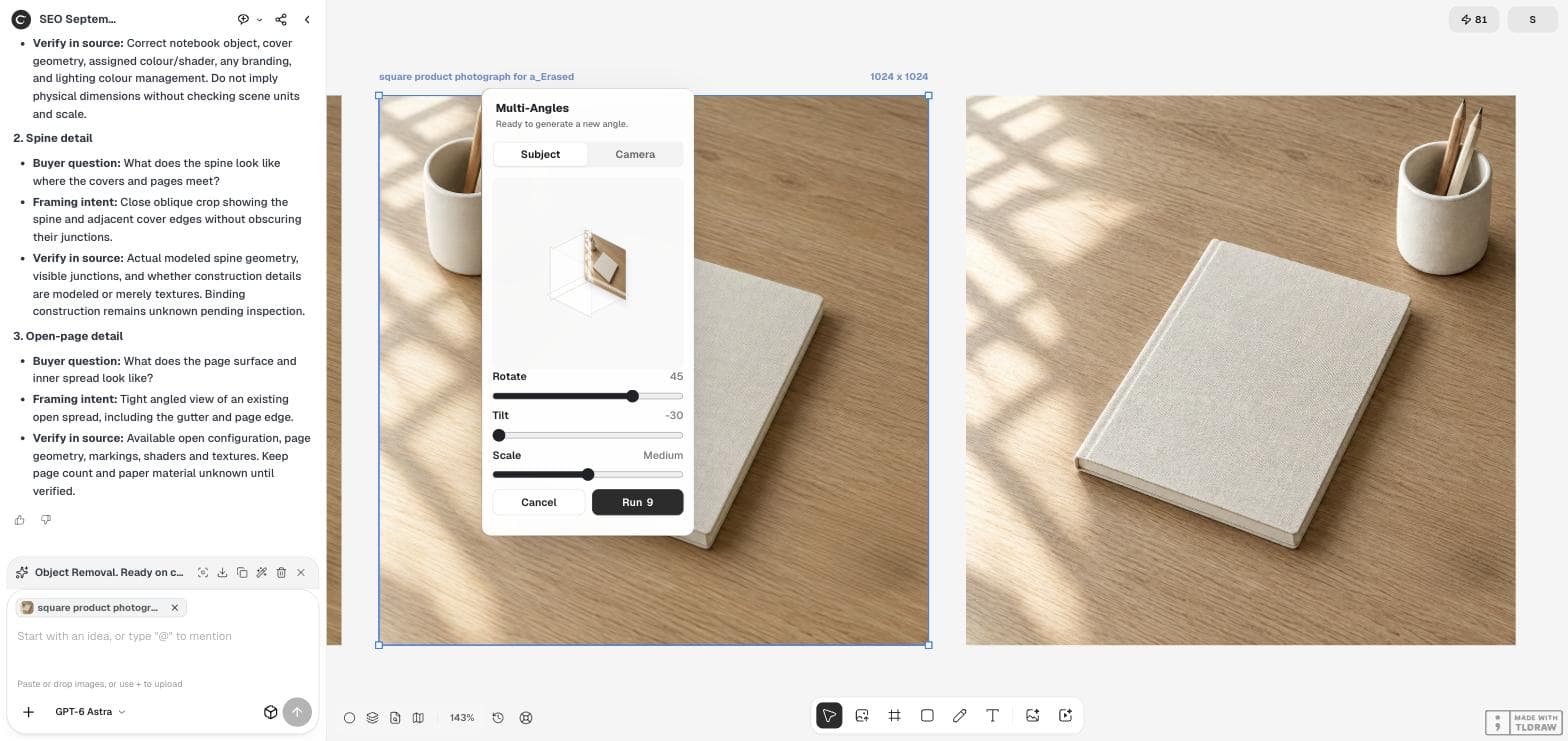
Run it and place the views side by side
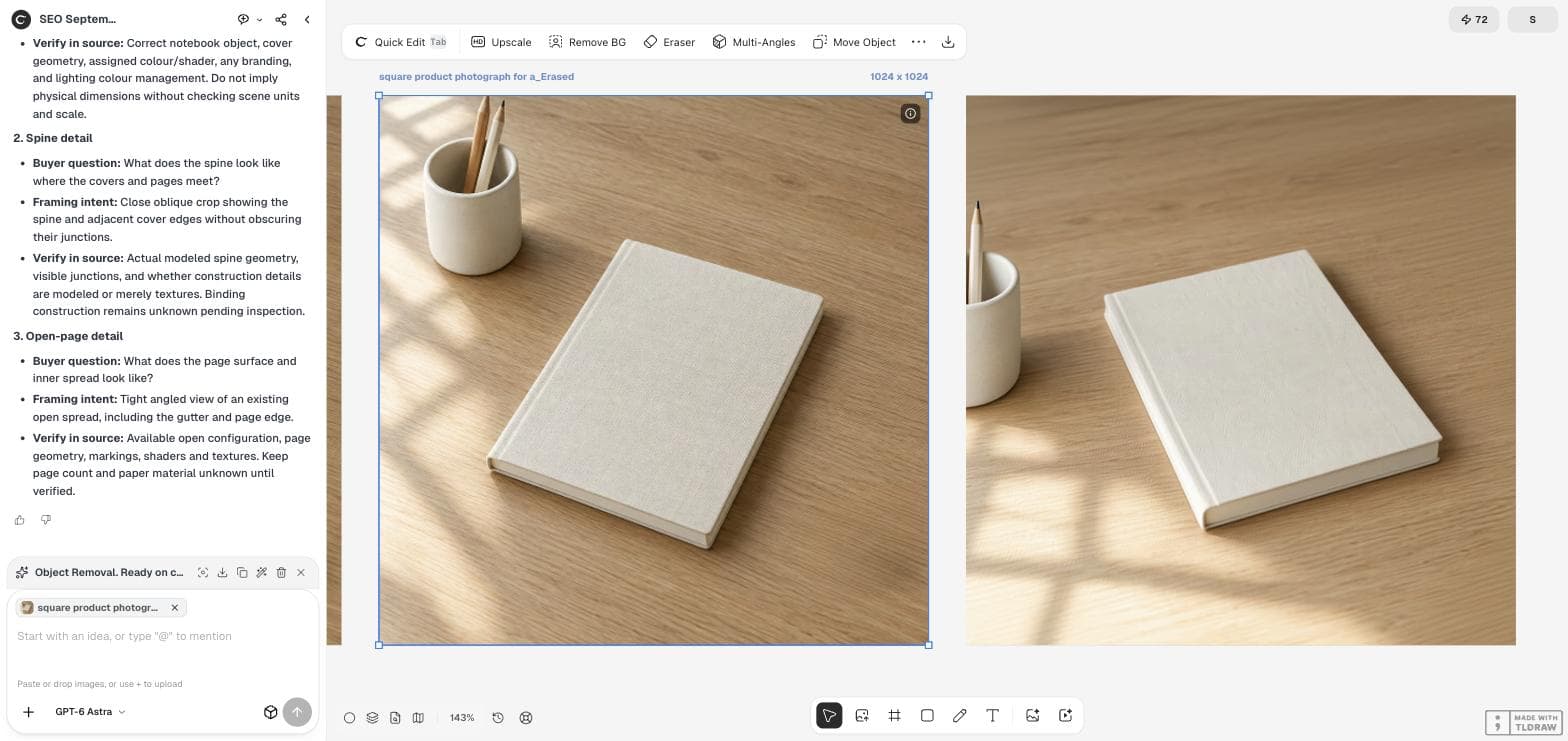
The result appeared as a new image next to the source, with "_Multi-Angles" added to its name. The notebook was turned, seen from lower down, with its long edge and page block more visible.
Keep the source and the new view next to each other while you review. Differences are much easier to see side by side than from memory.
Compare every detail a buyer would check
Our new view kept the notebook's colour, linen texture and cover edges. The props changed: the pencil cup was cut off at the left edge and showed one visible pencil instead of two. The window-light pattern on the desk also moved. For a product page, prop changes may be acceptable; product changes are not.
Use the table below. If the product itself changed shape, colour, size or construction, do not publish the view as a photo of that product.
Marketers use the same checklist. On September 16, 2026, a post in r/AI_UGC_Marketing listed what makes or breaks generated product visuals: the device keeps a consistent shape, and its buttons and ports stay in the right place. Those checks apply to a still angle as much as to video.
| Check | Our result |
|---|---|
| Product colour and material | Kept: ivory linen texture |
| Proportions and corners | Looked consistent; confirm with the real item |
| Invented details | Page block became visible; not verified against a real notebook |
| Props and background | Changed: cup cropped, one pencil visible, light moved |
| Cropping | Product fully in frame |
A marketer's test of HeyGen, Tagshop AI and Luma AI for product video. It concerns those tools, not Ciyo's Multi-Angles.
Label generated views honestly
A generated angle is an illustration of the product, not a photograph of it. If buyers will make decisions from it, such as thickness or how the spine looks, verify those details against the real item or take a real photo of that side.
Marketplaces can have their own rules about generated or edited listing images. Check the current rules for the platform you sell on before uploading.
Finish the set
When a view passes the review, crop it to the same ratio as the rest of the listing and check the set together. Consistent light and background make several views read as one product.
If you have a 3D model, planned renders give you exact views without guessing. Use the angle tool when a model does not exist and the view is a draft or a supporting image.
Product angle questions
Can Multi-Angles show the back of a product it never saw?
It can generate one, but those parts are invented. Verify them against the real product before a buyer relies on them.
Does the tool change my original photo?
No. In our run the new view appeared as a separate image named with "_Multi-Angles".
How much did the run cost?
The Run button showed 9 credits with the default settings on September 18, 2026. Check the button for the current cost.
Add a second view to your listing
Open your product photo in Ciyo, run Multi-Angles and compare the new view with the original.