Pixel art · Tested
Can an AI Video Model Animate Pixel Art Without Breaking the Grid?
A short idle loop — lamps flickering, leaves moving — makes a pixel-art scene feel alive on a profile, a stream overlay or a menu screen. A video model can make that loop from one still frame. The question is whether the pixels stay pixels.
On September 27, 2026 we gave Seedance 2.5 in Ciyo a square pixel-art picture of Rook & Rabbit, a fictional board-game café, and measured every frame of the five-second clip.
The setup
The start frame was a 1,024 × 1,024 pixel-art shop front made in Ciyo from a photo. In the Video Generator we chose Seedance 2.5, the Frames mode with that picture as the start frame, 5 seconds, 720p and audio off. The price shown was 197 credits; it was the same with audio on.
Frames mode matters. It starts the clip from your exact picture, where the Reference mode only uses the picture as a guide.
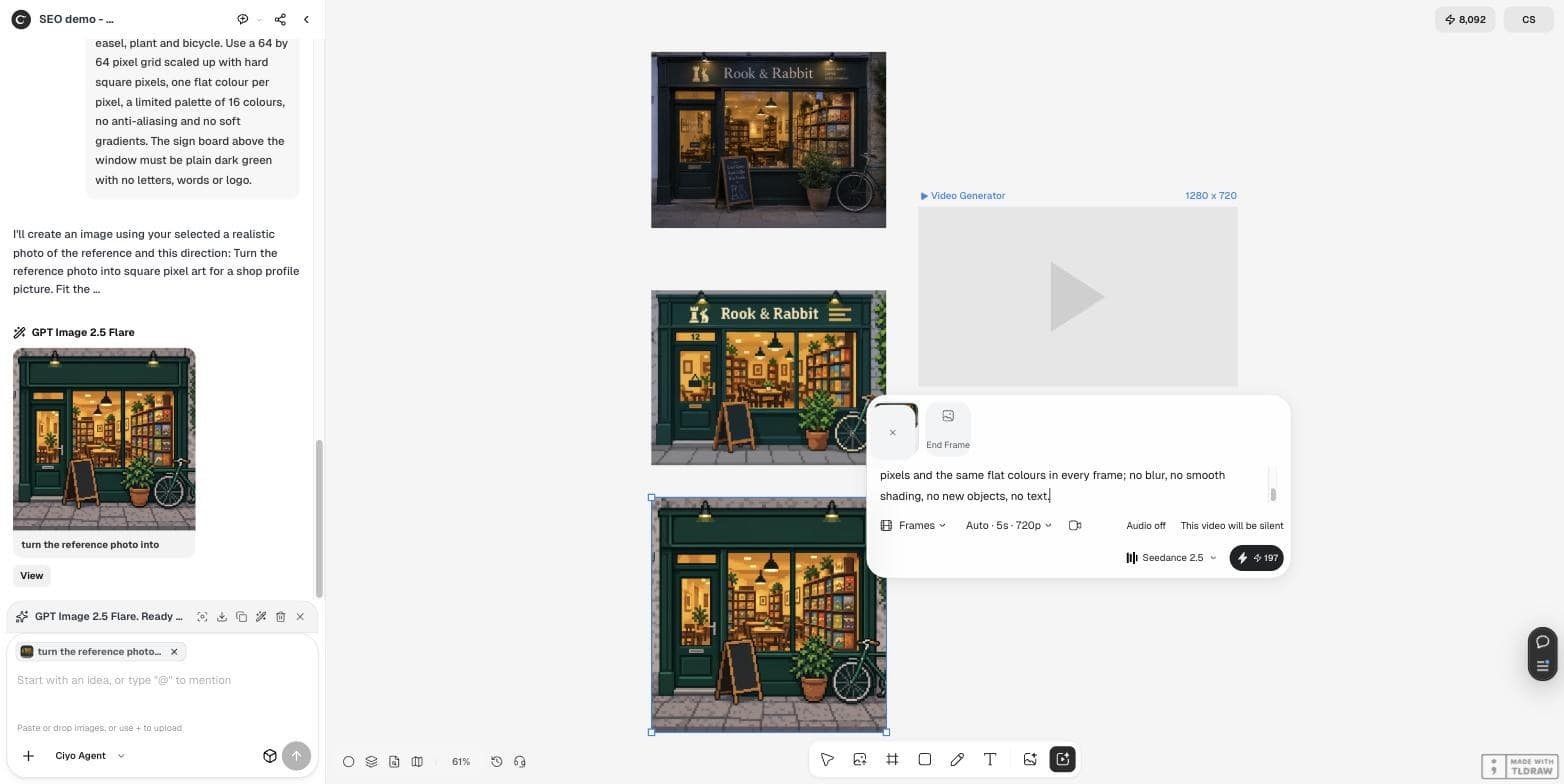
Keep this exact pixel-art style and the camera completely still. Loop-friendly idle animation: the ceiling lamps flicker softly, the plant leaves sway a little, and the bicycle wheel does not move. Keep hard square pixels and the same flat colours in every frame; no blur, no smooth shading, no new objects, no text.What came back
The clip was 960 × 960 at 24 frames per second: 121 frames over 5.04 seconds. The camera stayed still and the bicycle did not move, as asked. At normal size it looks like a gentle pixel-art loop.
Up close, it is not the same pixel art. The share of sharp colour steps — the hard edges between pixels — fell from 2.7% in the start image to about 1.5% after the first second. The blocks soften and shift slightly, and each frame holds 69,000 to 84,000 colours.
We measured the grid, frame by frame
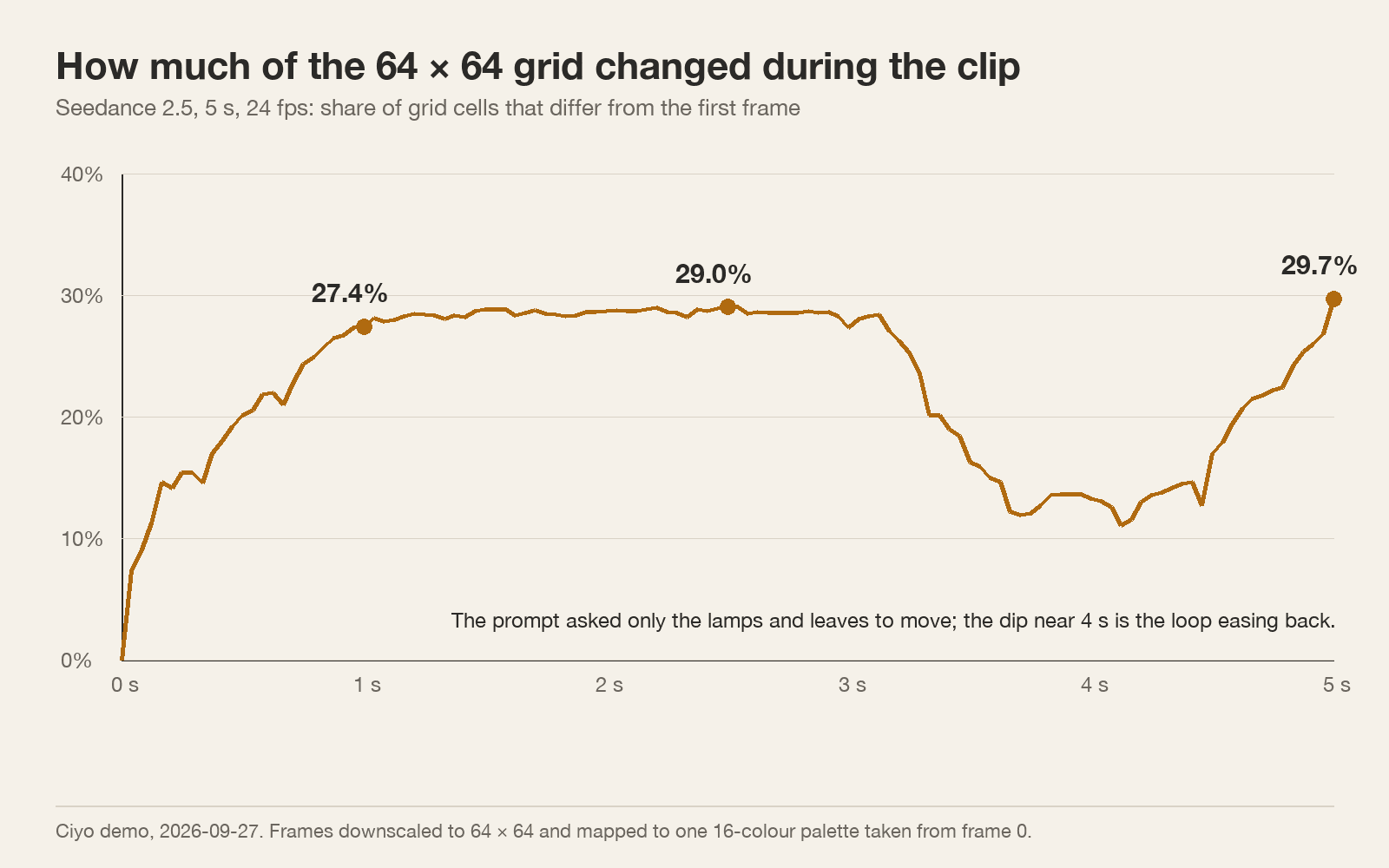
We shrank every frame to 64 × 64 and mapped it to one 16-colour palette taken from the first frame. Then we counted the grid cells that differ from the first frame.
By one second, 27.4% of the cells had changed; by the end, 29.7%. Frame to frame the change is small — 3% of cells on average — which is why it looks calm when it plays. But the prompt asked only the lamps and leaves to move. We drew generous boxes around the lamps and the plant — 28% of the picture — and 76% of the changed cells at one second were outside them. That is the model repainting areas that should be still.
When the video model is good enough
Use the clip as it is when the pixel look is the point and nobody will inspect single pixels: a background loop on a stream, a looping post, a menu screen in a café window.
Do not use it where the grid is the product: a game sprite, a bead or cross-stitch pattern, or an animation that must match other frames exactly. There, a repainted grid is a defect.
| Use | Video model clip | Frame-by-frame or code |
|---|---|---|
| Looping social post | Good | More work than needed |
| Stream or shop-window screen | Good | More work than needed |
| Game sprite | Grid drifts | Needed |
| Bead or stitch pattern | Grid drifts | Needed |
Two ways to keep the grid
First, snap the clip. Export the frames, shrink each to 64 × 64, map them all to one fixed palette and scale them up with nearest-neighbour resizing. We did this and got a 16-colour GIF of 221 KB. The grid is exact again, but the repainting shows as cells that flicker between colours.
Second, draw the motion instead of generating it. Keep the still as the base frame and change only the pixels that should move — a lamp that swaps between two colours, three leaves that shift by one pixel. Ciyo's sprite-sheet guide covers frame layout.
Posted 2026-09-27. Simon Willison had Claude Opus 5.5 make a short pixel-art animation for a talk's closing slide; in a follow-up post he shares the prompt and the HTML page Claude built before he recorded it as video. Because the animation is drawn in code, every pixel sits on the grid — the opposite trade-off from a video model. Ciyo does not run Opus 5.5.
A test to run on your own clip
Play the clip at 400% zoom for five seconds and watch one area that should be still, such as a wall or the pavement. If the pixels there crawl or change colour, the grid has drifted. Decide from the table above whether that matters for where the clip will go.
Animating pixel art with AI
Can Seedance 2.5 animate pixel art?
Yes, from a start frame in Frames mode. Our 5-second clip looked right at normal size, but 27% of the 64 × 64 grid had changed by one second.
How much did the clip cost?
197 credits for 5 seconds at 720p with Seedance 2.5 in Ciyo on September 27, 2026, with or without audio.
Can I fix the drift afterwards?
Snapping every frame to 64 × 64 and one palette restores the grid, but the repainted areas then flicker between colours.
What is better for game sprites?
Frame-by-frame pixel edits or animation drawn in code, where each pixel is placed on purpose.
Try a pixel-art loop
Make the still in Ciyo, animate it with Seedance 2.5, and check the grid before you use it.