Video · Image to video
Turn a Photo into a Short Video with AI for Your Shop

A short moving clip gets more attention than a still photo in a feed, and a small business often already has the photo. Image-to-video models can animate it: a slow camera move, a moving awning, light across the pavement.
This guide turns a fictional café's storefront photo into a 5-second clip with Seedance 2.0 Mini in Ciyo, on September 19, 2026, and checks the frames. The clip cost 26 credits in our run.
Choose a photo that can move
Pick a photo with a clear subject and a few things that could move naturally: fabric, leaves, light, steam. Avoid people's faces unless they agreed to be filmed. Our start frame was a generated photo of a fictional sage-green café front with a striped awning, two bistro tables and lavender pots.
Set the photo as the start frame
Open the Video Generator. Its mode menu offers Reference, Edit and Frames. Choose Frames, click Start Frame, choose Select from Canvas and click your photo. The start frame fixes the first picture of the clip, so the building stays your building.
We kept the defaults shown: Seedance 2.0 Mini, 5 seconds, 720p, audio on. The button showed 26 credits.
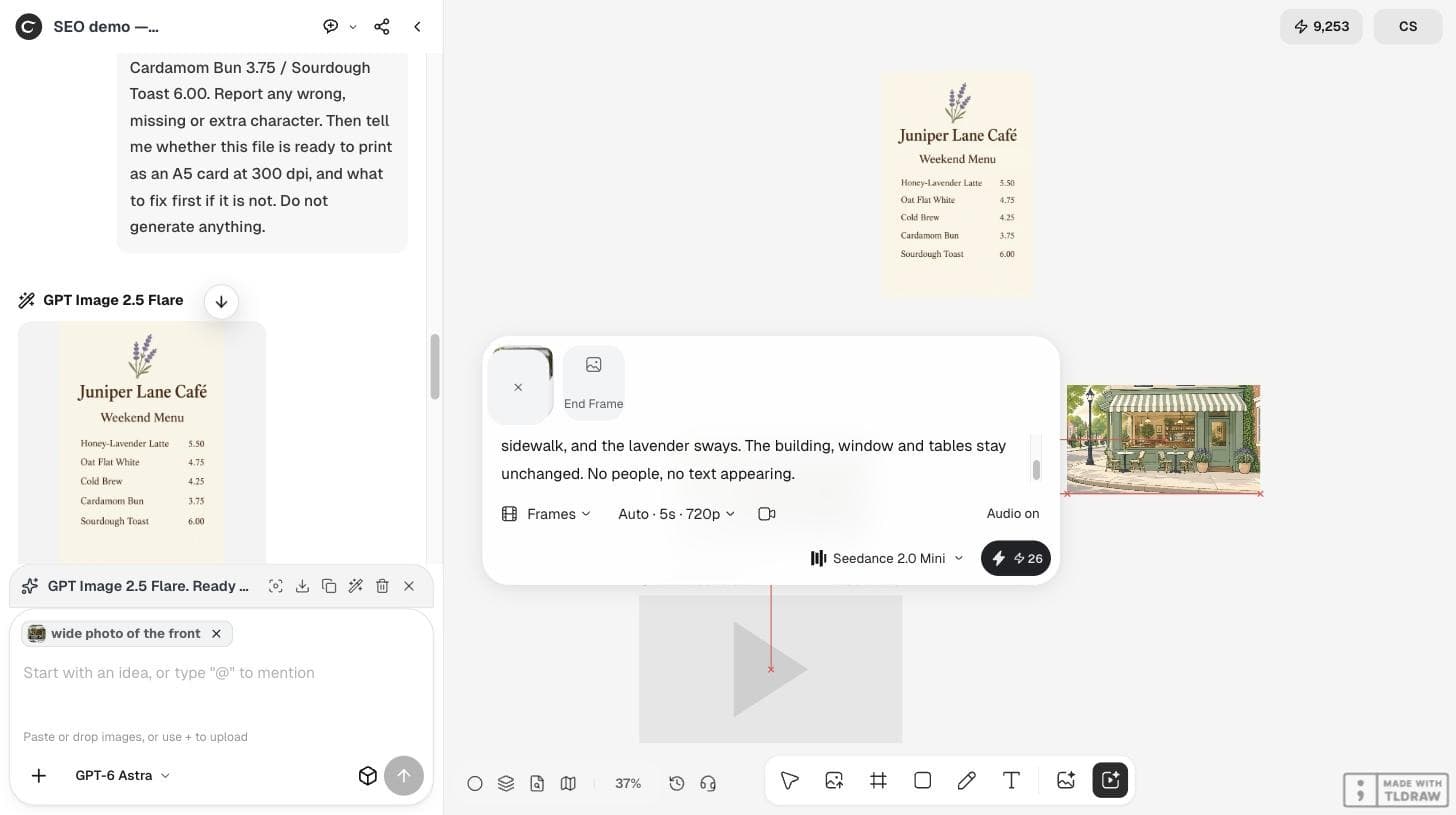
Describe the motion, not the scene again
The photo already describes the scene. The prompt should say what moves, how the camera moves, and what must stay unchanged.
Slow, steady camera push-in toward the café's front door. The striped awning ripples slightly in a light breeze, leaf shadows move gently on the sidewalk, and the lavender sways. The building, window and tables stay unchanged. No people, no text appearing.Check the frames, not only the first second
The clip came back as a 1280×720, 5-second video with an audio track. We extracted frames at the start, middle and end. The camera pushed in steadily toward the door, and the facade, window, door, tables and lavender pots stayed consistent across the frames.
Watch for the usual failures: objects that change shape, text that appears on signs, extra people, and a jump at the end. In our clip we saw none of these in the sampled frames.

Budget video separately from images
One 5-second clip cost 26 credits, compared with 1 or 2 credits for a Flare image in the same session. Approve the still photo first, then animate only the final version. Longer clips, higher resolution and other Seedance models cost more; check the button before each run.
| Setting | Value |
|---|---|
| Model | Seedance 2.0 Mini |
| Mode | Frames, start frame from canvas |
| Length and size | 5 s, 1280×720 |
| Audio | On (default) |
| Cost | 26 credits quoted and charged |
Post it where motion helps
A slow push-in toward the door works as an opening or a 'we are open this weekend' story. Add your text in the editing app, not in the prompt, so it stays sharp and correct.
Others are building longer ad clips from stills. On September 14, 2026, @Grow_withAI posted a commercial made from two GPT Image 2.5 product images and Seedance 2.5, edited in CapCut. The post promotes CapCut with hashtags; the single-clip method here is simpler and our own.
A creator's post about turning product images into an ad with Seedance 2.5 and CapCut. It promotes CapCut and does not involve Ciyo.
Photo to video questions
What did a 5-second clip cost?
26 credits for Seedance 2.0 Mini at 720p in our run. Check the button for current prices and other models.
Why use Frames instead of Reference?
A start frame fixes the first picture of the clip, so the building or product stays the one in your photo.
Did the clip include sound?
Yes. Audio was on by default and the file had an audio track. Check it before posting or mute it.
Animate your best photo
Set your photo as the start frame in Ciyo, describe only the motion and check the frames.