Practical product imagery
Black Friday Ad Design: Make the Offer Read First

A Black Friday graphic can announce a sale without explaining the deal. Decorative type fills the frame while the product, qualifying spend or end date becomes too small to read.
Canva’s template category and Predis’s seasonal-ad workflows show a familiar range of promotional layouts. This guide uses three illustrative offer structures in Ciyo and evaluates readability rather than claiming that a particular template produces more sales.
The task is one approved offer expressed clearly: a percentage discount, a fixed price or a bundle. Keep its commercial wording separate from generated artwork so a change to the offer does not require redrawing the product.
Quick answer: choose the offer structure before the visual style
Write the actual offer and its conditions first. Pick the layout that communicates that offer, place the product and add editable copy. Review at mobile size before trying decorative variations.
The sample wording below is fictional and supplies no market price, real promotion or legal assessment.
| Offer | Primary message | Supporting copy |
|---|---|---|
| Percentage discount | 20% off selected mugs | Eligible range and approved dates |
| Fixed price | Juniper mug — $18 | What that price includes |
| Bundle | Mug + coaster + gift box | Exact quantities and bundle price |
1. Collect the approved offer, not a list of design adjectives
Before opening an image generator, settle the product, audience, placement, price or discount, conditions, deadline and next action. Confirm the facts with whoever owns the promotion.
For a fictional Juniper Pottery campaign, use a single mug photo across all three layout exercises. These are alternatives for teaching hierarchy; they are not three offers the business is actually running.
If the promotion is not approved, keep the graphic clearly labeled as a concept in the review package. Do not let a generated price become the offer simply because it fits the composition.
2. Reserve a clear area for editable offer text
Place the approved product image on the Ciyo canvas. Compose a quiet background or use a restrained image edit if it helps the product read clearly. Leave usable copy space rather than asking an image model to draw the entire sale announcement.
Add the offer with actual text controls where supported. Keep the product name, qualifying phrase and deadline editable. Generated lettering inside an image is a different kind of asset and can require regeneration to change.
A solo merchant benefits from a layout that remains easy to revise. An agency should keep a copy checklist beside the canvas so approval is tied to exact wording rather than a visual impression.
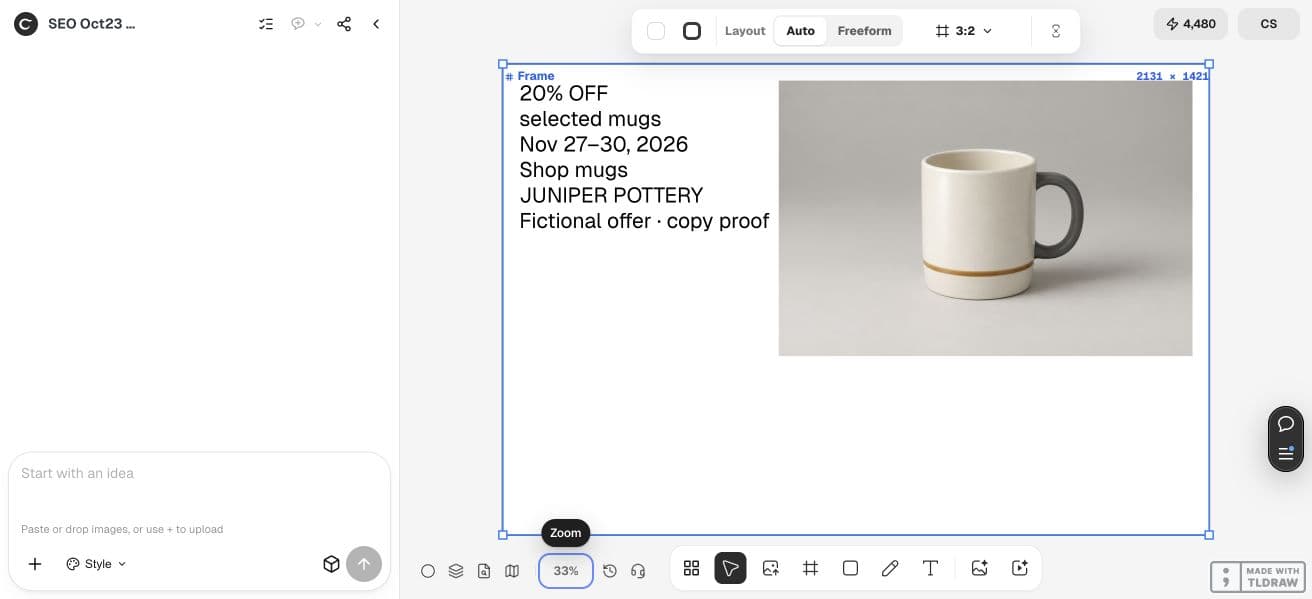
For the walkthrough, we entered “20% off selected mugs”, “Nov 27–30, 2026” and “Shop mugs” as native Text content and grouped it beside the original synthetic mug with Auto Layout. This manual proof checks wording and reading order. Changing the frame preset left extra empty space, so a finished placement still needs deliberate recomposition and an export check. The separate automated three-layout attempt did not deliver a verified result and is not shown as successful.
3. Build a percentage-discount layout with the qualifying phrase visible
Let the percentage and the eligible product range form one readable idea. If the offer covers selected items, keep that condition close enough to be read with the headline. Do not hide the condition in decorative text.
Use hierarchy to separate the main saving from the date and CTA without making either disappear. Check that a quick glance does not imply a storewide discount when the offer is narrower.
Create a square concept layout for the fictional Juniper Pottery campaign using the approved mug image. Reserve space for editable headline text “20% off selected mugs”, a separate approved date line and “Shop the collection”. Keep the full qualifying phrase readable. Preserve the product photo and do not add prices, scarcity claims or new accessories. Return a layout for review, not a published promotion.4. Use fixed-price and bundle layouts for different buying questions
A fixed-price layout should make the item and price easy to connect. Put the amount near the product name and keep any important inclusion or limitation legible. Avoid a crossed-out reference price unless the business has supplied and approved it.
A bundle layout must identify the contents and quantities. Use actual component photos where possible and keep styling props distinct. The existing bundle-image guide covers that inventory problem; this article focuses on the offer’s visual hierarchy.
Keep enough common structure across the three concepts to compare them fairly. Changing product photo, palette, headline and layout all at once makes it harder to see which hierarchy is clearer.
5. Review the small version and the exact wording together
Inspect each concept at its likely mobile display size. Ask what a reader can identify first, what they must zoom to read and whether the product is still recognizable. A large canvas preview can conceal tiny qualifiers.
Proofread prices, percentages, product names and dates as text. Then compare that text with the rendered and exported graphic; a correct text layer can still be clipped or crowded in the final file.
| Check | Question | Action if unclear |
|---|---|---|
| Main offer | What deal does one glance communicate? | Simplify the headline hierarchy |
| Qualifier | Is the scope clear beside the claim? | Move or enlarge the phrase |
| Product | Can readers identify what is being sold? | Reduce competing decoration |
| Timing | Are approved dates readable? | Give the line a stable position |
| Export | Does the file preserve the layout? | Recheck crop, clipping and text size |
6. Choose a concept and preserve an editable master
Select the layout that communicates the actual offer most clearly. Keep the editable version, the approved copy and the final export together. A later change to the deadline should be a deliberate copy update, followed by another export check.
For a team, record an approval owner for the offer and another for the final visual if those responsibilities differ. A design review does not automatically authorize publication or advertising spend.
Compare actual campaign performance only after the promotion is approved and run with a suitable measurement plan. Readability is a useful production criterion; it is not measured revenue lift.
Practical questions
Should every Black Friday ad use black and red?
No. Choose a treatment that makes the product and approved offer clear while fitting the brand. The palette alone does not communicate the deal.
Can I ask AI to invent a sale price?
It can propose a fictional concept, but the business must supply and approve any actual commercial offer. Do not publish an invented price.
Are these Ciyo presets or downloadable templates?
They are worked layout briefs built with the existing canvas and text tools. This article does not claim that three dedicated presets are installed.
How should I choose the winning layout?
First check factual accuracy and small-screen readability. Actual sales performance requires campaign measurement; this guide does not establish a conversion winner.
Design one approved offer clearly
Start with one permitted source image and a clear acceptance check. Keep the original beside the result and approve the complete export before using it.